
Home › Forums › Calendar Products › Community Events › Community Events page has disappeared
- This topic has 12 replies, 5 voices, and was last updated 11 years ago by
Support Droid.
-
AuthorPosts
-
September 11, 2015 at 10:44 am #1004371
William Gadson
ParticipantHi,
After updating the Community Events plugin (and Events Cal pro/Events cal), my submission page for community events has disappeared. The plugin worked very well prior to the new release and update. But, I am not sure of what has happened to the page at this point.
I poured over the forum last night, but to no avail. I have checked to verify permalinks were correct and verified that I had the correct URL Slugs set. Still, When I try viewing the Community Events submission form, I get a 404 page error.
http://emergenconline.com/events/submit-your-event/add
http://emergenconline.com/events/submit-your-event/listI have not changed anything, but am not sure where else to look for a solution.
I am happy share with you the settings for assistance with getting this back up.
September 12, 2015 at 9:55 pm #1004628Mad Dog
ParticipantThis reply is private.
September 13, 2015 at 3:13 pm #1004698Oliver
ParticipantHi Gadswil,
the problem is that with one of the lastet update the last part of the URL (/add, /list) is translated. This means when you are using a non-english translation this last part is translated to your language. I had the same with German.
@Modern Tribe Team:
I see two options to fix this:a) don’t include these two parts of the URL in the .po/.mo-files, so that the URL stays untouched
b) Add the capability in the settings screen to let the admin configure this part of the URL, like with the community slug:
https://www.dropbox.com/sh/od6qvnkeozekh04/AAA7I4pvZG3zWyJiopYPHqY_a?dl=0Otherwise this is very confusing because the URL changes with the update but this is nowhere to see!
Best regards,
OliverPS: I would prefer option b)
September 13, 2015 at 4:20 pm #1004705ParticipantPS: at least the correct URL to the add/list-page has to displayed in the settings page within non-english systems. IMHO this is currently a bug 😉
September 14, 2015 at 5:25 am #1004769George
ParticipantHey @Gadswil,
The things @Oliver mentioned above don’t seem to apply to your site, as it does not seem that you are using a non-English translation of things on your site…is that correct?
With that in mind, then, I’m curious about three things:
First, head to Events > Settings > Community in your wp-admin. Scroll down until you find the “Community rewrite slug” option there.
1. What is the current value of this option?
2. If you reset this option to its default “community”, as in the screenshot below, and then Save Changes, does anything improve?
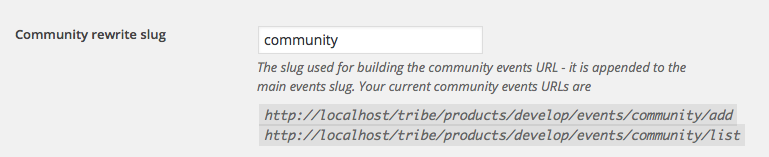
3. If steps 1 and 2 don’t help, then even though it’s early on in the troubleshooting process I’d recommend doing the plugin-based steps in our official troubleshooting guide here → https://theeventscalendar.com/knowledgebase/testing-for-conflicts/. I recommend this because in the system information that you included – which we greatly appreciate by the way! – there is a significant number of plugins on your site. This is totally fine, but just increases the chances of code conflicts and I think it’s smartest to check this item off the list before we dive deep into any other troubleshooting.
Let me know what you think, @Gadswil, and also what you find if you do those troubleshooting steps!
Cheers,
GeorgeSeptember 14, 2015 at 12:25 pm #1004967ParticipantThis reply is private.
September 15, 2015 at 7:16 am #1005264ParticipantI then tried to recreate this issue, but was unsuccessful – The page appeared
I then followed the instructions of re-activating my current theme ( WP-Prosperity v. 2.6) Premium theme.
I reactivated all other plugins with no other changes.
Hey @gadswil,
Thank you for running through all of those steps! The things you noted which I quoted above all indicate that this is indeed a conflict between Events Calendar Pro and your theme.
The fact that rolling back just one version resolves this conflict is odd, and I’m sorry that our updates for 3.12 which were meant to improve the plugin have, on your site at least, made things worse!
The next steps from here that I can think of would be to first contact support for the theme and report this issue – they may have some insight here and might be able to take a quick look at things.
In the meantime, you can share a .zip of the theme with us here too. We don’t officially support third-party software so I unfortunately cannot guarantee that I’ll be able to find the specific error, but I’d be happy to take a look at the theme on my local test site and see if I can find something in our code that is causing things to break.
You can share a .zip by uploading it to something like http://ge.tt, and then sharing the download link here in a “Private Reply”. I’ll take a look and see what I can find, if anything! 🙂
Thanks for your patience and persistence with this issue, @gadswil. I look forward to trying to figure out the “puzzle” of this bug, and genuinely hope I can fix it for you.
Cheers,
GeorgeSeptember 15, 2015 at 9:25 am #1005317ParticipantThis reply is private.
September 16, 2015 at 11:53 am #1005716ParticipantHey @gadswil,
Thank you for sharing the theme! I’ve activated it on my local testing site which is running PHP 5.2.17 and tested this out quite a bit.
For me, no matter what I tried the community events page still continued to show up. Here’s a screenshot for example/proof → https://cloudup.com/clkYdaSKzbh
As you can see in that screenshot, I even tried the custom URL slug to match your site configuration…
I’m sorry that my testing has not helped further here 🙁 I urge you to contact your theme developer for support and see if they have any insight on why this might be happening. I will keep looking but have so far still been unable to reproduce your problems.
Sorry for the bad news @gadswil!
Sincerely,
GeorgeSeptember 16, 2015 at 12:42 pm #1005742ParticipantHey @gadswil,
Another member of our support team, Brook, was looking at your site and noticed you have a page with the slug /submit-your-events on your site.
But you also have /submit-your-events as the Community URL slug, too.
I tested this on my local site and did not produce a problem, but I’m curious if you’d be able to try temporarily deleting your /submit-your-events Page and then refreshing Permalinks on your site to see if that helps with Community Events at all? To do this, you’d run through the following steps:
- Copy and paste the content of your “Submit your events” page to a Word document or Gist at http://gist.github.com or something, so that you can re-create the page later on without losing your original writing for it.
- Once that back up is made, delete the “Submit your events” page. Then, go to the “Trash” for your pages in your site’s wp-admin – click “empty trash” so that the page is permanently deleted.
- Go to Settings > Permalinks in your admin area, and just click “Save Changes” without actually making any changes. This may seem like an odd thing to do but is a little “trick” within WordPress to get the permalinks across your site to refresh.
- Check out your issues with the Community Events pages and see if they persist
Let us know what you find! 🙂
Thanks,
GeorgeSeptember 21, 2015 at 11:10 am #1007155ParticipantHi George,
Yes, I have tried this also but to no avail. I am writing the theme developer and awaiting their response. This baffles me to no end, since it worked rather perfectly with the previous version.
I will let you know the results from there.
September 21, 2015 at 1:42 pm #1007228ParticipantThanks for the update @gadswil, and for trying out all of these troubleshooting steps. Your patience and persistence are supremely appreciated!
Definitely keep us posted on any input from your theme developer – and one thing that also might help is our forthcoming Maintenance Release, which, if all goes to plan, should come out before the end of this week. It includes many bug fixes and may make a positive impact here.
Keep us posted @gadswil, and please let me know if there’s anything else I can help with here.
Sincerely,
GeorgeOctober 6, 2015 at 7:05 am #1011870KeymasterThis topic has not been active for quite some time and will now be closed.
If you still need assistance please simply open a new topic (linking to this one if necessary)
and one of the team will be only too happy to help. -
AuthorPosts
- The topic ‘Community Events page has disappeared’ is closed to new replies.