

Forum Replies Created
-
AuthorPosts
-
George
ParticipantThank you so much for your patience Caroline, I’m sorry that your issues persist even to this day.
To help us further investigate, I’m curious: can you share some Facebook Pages that you are importing from, and also some singular events on facebook.com that are duplicating for you when you import?
Also, do you happen to notice that this problem only with scheduled imports, for example? Or do you have problems with manually-imported events duplicating, too?
Thank you!
GeorgeParticipantI’m glad to hear it Gretel, thank you for the update!
I’ll close up this thread for now, but if there’s ever anything else we can help with, don’t hesitate to open a new one! 🙂
Best of luck with your site,
GeorgeParticipantThanks Karen, let us know how it goes! 🙂
ParticipantHey @Sönke,
I’m sorry that issues persist here!
Just curious – are you creating these translated URLs with “woche” via the WPML plugin? If not, how are you making the URL display as /woche instead of /week?
September 15, 2015 at 6:55 am in reply to: "No ical found at this url" Homepage Calendar Import #1005220ParticipantHey Sönke,
Thanks for contacting your host, let us know how it goes!
As for getting the bug fixed itself, you’re absolutely right that it should be fixed regardless. We’re working on a fix now that we’ve reported the bug, and it should hopefully be fixed in the next release.
I hope the PHP Version increase helps you until that release comes out – let us know if your host is able to increase the version and if it helps! 🙂
Cheers,
GeorgeParticipantThanks for posting that coupon-related issue in another thread @oniregoc, it’s indeed a separate issue so if it’s in another thread we can keep things organized and solve both problems for efficiently.
Now, @smalldogcreative – thanks for confirming the fields to use and such! If you’re always going to have the tickets displaying in the same order, so that for example you have three tickets on display always, and the first ticket is always going to start with quantity of “1” (and all tickets after / below the first one starting with quantity of “0”), then JavaScript will indeed work well here. This is especially true because of jQuery being loaded on most WordPress-generated pages, so you can use its methods like $.first() or $.last() to get elements based on their display order very, very easily.
An example of doing this would be as follows, which if you drop into your theme’s functions.php will demonstrate the example I gave above: the first ticket in list always starts with “1” selected for the quantity, while all other tickets listed start with “0”
if ( function_exists( 'tribe_get_events' ) ) :

	/**

	 *	Force first-ticket quantity to "1"

	 * @link http://theeventscalendar.com/support/forums/topic/variable-quantity-and-zero-quantity/

	 */

	function tribe_support_1004556() {

		if ( ! is_singular( 'tribe_events' ) ) return;

		if ( ! wp_script_is( 'jquery', 'enqueued' ) ) wp_enqueue_script( 'jquery' );

	?>

		<script>

			jQuery(document).ready(function($) {

				$( '.tribe-events-tickets tr' ).first().find( '.input-text.qty.text' ).val( '1' );

			});

		</script>

	<?php

	}
add_action( 'wp_footer', 'tribe_support_1004556' );
endif;Here’s how this code makes things look once its applied:
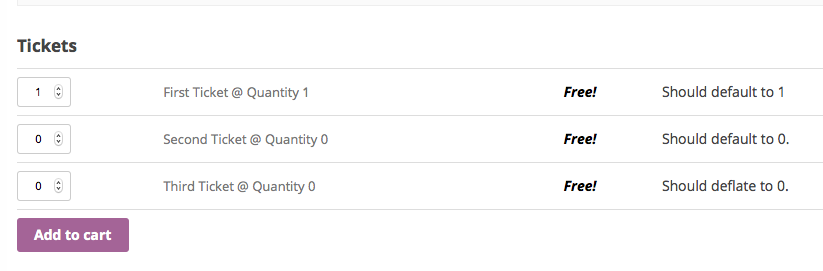
I hope this helps! If anything, hopefully it at least gives you a good place to start that you can then take and tweak to your site’s specific needs.
Cheers,
GeorgeParticipantHey Allan,
That error is an interesting one, and would normally trip if we were using (as the error implies) incorrect operators on that line of code, but we’re using string-related operators and only dealing with strings…weird!
Can you share your system information with us? Here’s how to do so → https://theeventscalendar.com/knowledgebase/sharing-sys-info/
That might contain some relevant information here, as this is an odd issue to arise on your site…
Thank you so much for your patience Allan, I’m sorry about how this thread is still going but am hopeful we’ll get things working soon!
Sincerely,
GeorgeParticipantHa! Likewise John 😀
I hope your reply means that my suggestions were useful here – I’ll assume that’s the case, and go ahead and close up this thread.
Thanks for the kind words and the fun reply John. Best of luck with your site – and if any other issues arise, we’ll be here to help any time you open a new thread.
Cheers,
GeorgeParticipantHey David,
I’m sorry about the extra headaches with having to work around your customizations here – we can definitely improve this functionality with filters or actions, for example, so stay tuned to plugin updates in the event that such improvements are included in an upcoming release.
Thanks for your feedback here, and for the kind words despite the limitations of our plugin!
Best of luck with your client project,
GeorgeSeptember 14, 2015 at 5:44 pm in reply to: Version 3.12 recurring event description – lasts 0 day(s) and 0 hour(s) #1005100ParticipantHey @chantell,
Thanks for being cool despite our admittedly-not-awesome display of recurring event information 😉 I didn’t get the sense you were “bitching” at all, just providing some good feedback, which we genuinely appreciate!
We caught these issues late in our release cycle for the last release so stay tuned to the next release – hopefully improvements here make it into that update, and if not, then presumably they’ll arrive in the one right after.
Stay tuned!
Cheers,
GeorgeParticipantHey Ulrich,
Thanks for sharing this code! The problem is likely the browser support in the browsers like IE and Safari that may not fully support the CSS attribute selectors that you are using.
Using some different CSS selectors should fix things here – can you clarify what specific Category or Categories on your events page you want hidden? I’ll show you a different Selector that should work better 🙂
Thanks!
GeorgeSeptember 14, 2015 at 5:36 pm in reply to: The page "Events Calendar" uses the "/events" slug: #1005096ParticipantThanks for chiming in @pompanotoday! I’m glad that your issues are resolved with that error.
@clangille – it sounds like there might be some deeper issues on your site, since your calendar itself is not even showing…to be clear, when you mention doing “everything to troubleshoot”, did you also try theme- and plugin-related troubleshooting steps as outlined here? → https://theeventscalendar.com/knowledgebase/testing-for-conflicts/If not, you should do those steps and see if at least the calendar comes back at all – we should start with that, and then as you noted yourself, getting the admin notice to hide is rather simple after that.
However, folks, I’m sorry to report it, but: it appears that there is indeed a bug here on our end!
This is what you noted, @Jason – that, for some reason, the code here is tripping the error even though there isn’t a pre-existing /events/ slug.
For now, @jason, I’m curious: are you able to successfully hide the issue if you add code like the following to your theme’s functions.php file?
if ( class_exists( 'Tribe__Events__Admin__Notice__Archive_Slug_Conflict' ) ) {

    remove_action( 'admin_init', array( Tribe__Events__Admin__Notice__Archive_Slug_Conflict::instance(), 'maybe_add_admin_notice' ) );

}
That should help! (And P.S. @Jason – thank you for offering a login! But please do not share one here, since we cannot log into customer sites and it’s a security risk 😉 )
Thank you all for your patience here, seriously – I have been unable to produce this problem, and our function works well seemingly the vast majority of the time. However, obviously it is turning up a false positive on your folks’ sites, and I’m sorry about that. I will make a bug ticket for this and we’ll hopefully get a fix for this included in our upcoming maintenance release!
Sincerely,
GeorgeSeptember 14, 2015 at 5:22 pm in reply to: Venue name and City are required after update….when they're in the Saved Venue #1005090ParticipantHey @Mad Dog,
Thanks for both your patience here and for elaborating on how these things are all related on your site. Community submissions are still working okay for me on my test site, so while we’re getting closer to a solution or at least an understanding of the problem here, can I trouble you for one more clarification of something?
It’s the last one, I promise! 🙂
What I’m curious about is how you mention this:
If I DON’T have this code included in the function, everything works perfectly and as it should.
And then you also mention this:
– However…with this code added I DON’T have a similar problem with the Organizer fields when using a Saved Organizer. It works fine.
To clarify: you say the “everything works perfectly” without your custom code, but then seem to imply that, even without the custom code, there is in fact an issue with using a saved organizer. So, in other words, that even with that custom code removed, things don’t actually “work perfectly”…
I’m really sorry if this seems like just mincing words, but it’s actually a big deal, because so far I have been unable to recreate your problems – problems with the Venue or with Organizer. So if you have problems with one of these on your site even without any custom code, then that indicates a genuine bug at play and I can reach out to other team members for some help investigating this.
However, if your first quote is accurate and even your “Saved Organizer” issue does not persist when your custom code is removed, then the custom code itself is the source of these problems and we can narrow our search there.
I’m really sorry about the back-and-forth over these details, @Mad Dog! Thank you for being patient with me. I just want to make sure that I address the problem here at its core.
Thank you!
GeorgeSeptember 14, 2015 at 4:17 pm in reply to: Generate a custom notice when a Wooticket ticket product is purchasable #1005050ParticipantHey @bottegadelpossibile,
We unfortunately don’t offer support for customizations here, so you’ll mostly have to take the reins here on your own, but with that being said, I’m happy to at least try and offer some insight here to help you on your way.
It sounds like the displaying of your notice should depend on the date of your event correct? I.e. that by “not purchasable” you mean that the event for the ticket has passed, is that right?
If not, let me know what exactly makes a ticket “purchasable” or “not purchasable” on your site – I can help from there and hopefully share a way for you to detect this status on a given ticket, so you can display the message or not 🙂
Cheers,
GeorgeParticipantHey Darren,
Sorry you’re having some trouble here! We’ve included many fixes for Eventbrite syncing issues in recent releases so things should be working fine here…
I’m curious, can you share your full system information with us? Here’s how to do that → https://theeventscalendar.com/knowledgebase/sharing-sys-info/
In the meantime, can you clarify if this happens for you regardless of the specific event, or if it only happens intermittently? In other words, does this happen every time for you or only for some events?
Thank you!
George -
AuthorPosts