

Forum Replies Created
-
AuthorPosts
-
George
ParticipantHey Peter!
I’m sorry that things didn’t work out with The Events Calendar and Events Calendar Pro for you 🙁
But yes, absolutely, we can refund your purchase immediately and would be happy to do so. To do this, can you just forward a copy of your order receipt to [email protected]? I highlighted “order receipt” there because what I mean specifically is the actual receipt from http://theeventscalendar.com that was sent to you after purchase; NOT a paypal receipt or similar.
The order receipt should have your Order Number at the top of it – we’ll match this to our records and initiate a refund immediately if, indeed, your purchase was within the last 30 days.
I’ll keep an eye out for your email!
Cheers 🙂
GeorgeParticipantHey @wsansewjs,
To modify the HTML for the Organizer URL, you’d use basically the same approach as the tutorial you linked to, but you’d use the filter tribe_get_organizer_website_link instead. To see this filter and learn how it works, and what you can customize with it via code, head to src/functions/template-tags/organizer.php in your plugin files for The Events Calendar. This function is in the file there.
Similarly, the venue URL is filterable with tribe_get_venue_website_link – head to src/functions/template-tags/venue.php to find this function and learn more about its inner workings.
Here’s a quick example that would add the class name “example-class” to the organizer link so that you could style it to look like a button or something:
add_filter( 'tribe_get_organizer_website_link', 'tribe_19028_example' );function tribe_19028_example( $html ) {
$post_id = tribe_get_organizer_id( get_the_ID() );
$url = tribe_get_event_meta( $post_id, '_OrganizerWebsite', true );if ( empty( $url ) ) return $html;
return sprintf( 'Custom organizer Link – style it to your liking! :)', $url );
}
Best of luck with your customizations!
— George
ParticipantHey Valerie,
Sorry you’re having some trouble here!
To be clear, it sounds like you essentially want to change the display of the text that reads like: “An event every week on the same day that lasts 0 day(s) and 0 hour(s), the last of which will begin on 3 November 2015”
Is that correct?
If so, the only way to do this at this time is to modify code 🙁 I’m sorry about that!
Are you interested in writing custom code? Or would you rather wait for an upcoming product release? We’re going to add the “custom description” back in a future release 🙂
— George
ParticipantHey Caroline,
Sorry your original thread there was closed, our Support Droid auto-closes threads after 15 days of inactivity. Thanks for following up here!
I’m also really sorry to hear that your problems are persisting.
I’m curious: in your original thread with me, you reported that the duplication problem did NOT happen on your test site with no other non-Tribe plugins active, and with the Twenty Fifteen theme active…
…However, it seems that on your current site at http://carolineelisa.com/facebookeventtest/, your site is in this state but the problem does persist.
Is this is an accurate description of things?
Also you mentioned in your original thread(s) that your local version of your site did NOT have these duplication issues – is that still the case?
Just curious about where things currently stand – let me know and we can continue troubleshooting from there.
Also: thank you so, so much for your patience with this issue over all of these months. I, for one, am still unable to recreate duplication like this and so the troubleshooting is still challenging. I really appreciate your persistence, and we’re eager to help you get things working smoothly so you don’t have manually log in and delete duplicates all the time! 🙂
Sincerely,
GeorgeParticipantHey @Cristina,
Thanks for reaching out!
As you noticed already with your imports of 20-25 pages, imports of this size can take several minutes or longer. However, there isn’t really an upper limit, and so, in theory, as long as you leave the importer alone when an import is running and just let it run (i.e. you don’t exit the page and such), it should work.
One potential limitation is a response timeout from Facebook’s API itself, which we unfortunately cannot get around and don’t have control over 🙁 If this happens, your import should stop at some point, but all the events up to that point should’ve been imported fine and you should be able to take the rest of your pages and resume the import. We’ve got some code in place to try and prevent event duplicates from importing, so duplicates shouldn’t be a problem.
Does this information help at all? Let me know! 🙂 And let me know if you have any further questions or thoughts on all this.
Thank you!
GeorgeSeptember 14, 2015 at 8:17 am in reply to: Line break error on import, no automatic Google maps, category reset #1004858ParticipantHey Thomas,
Thanks for the kind words about the plugins there at the end of your post – I’m glad that the plugins are useful and really sorry that some of these bugs are keeping them from being as awesome as they could be on your site! Hopefully I can address your concerns about these things as follows:
First of all, you’re right about the line-break bug already being on our radar. The .ics file format is very, very strict, so it’s a bit tricky to work with sometimes – we’re working hard on numerous fixes though and better support for line-breaks is one of them!
As for your other question, there is unfortunately both an outright limitation with the iCal Importer plugin itself, and a bit of a bug going on! 🙁
I’m really sorry about that fact – let me explain it a bit:
The limitation is that there is currently not a way to set up imported events to default to having their map checkbox checked upon import. The bug is that, indeed, our overwriting of previously-saved options on events is too aggressive, and upon import you have have the problem that you noted here where your changes are overwritten.
We agree with you completely that more control over things here would improve iCal importer greatly, and we’re working hard to introduce improvements in this area of things. I don’t have an ETA for such improvements at this time, but your feedback is important and only adds to our urgency to get these improvements out the door.
Does any of this information help? Let me know, and let me know if you have any other thoughts or questions here that I can help address. In the meantime, I want you to know that there might be a code solution to try and force the “Show Map” checkbox to remain checked. I will try to get this to work and will post if I’m able to get something working.
Thank you,
GeorgeParticipantHello,
Sorry to hear about this odd issue on your site! Hm…how exactly are you translating things into French? Are you using a multilingual or translation plugin of some kind, for example? Or have you simply set your site’s language setting to “French” in the Settings > General page of your site?
Also, where did you get your French translation file from? Did you get it from translations.theeventscalendar.com? If so, how recently?
Thank you!
GeorgeSeptember 14, 2015 at 7:46 am in reply to: "No ical found at this url" Homepage Calendar Import #1004838ParticipantHey @Sönke,
I tested your .ics file in PHP 5.2 and got errors too, but as soon as I switched to PHP 5.6, things imported fine:
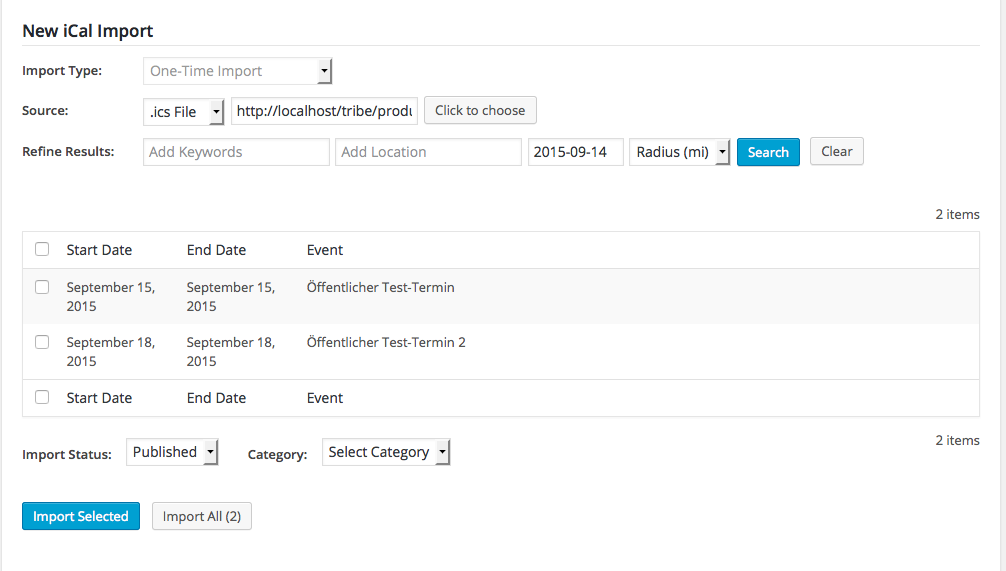
I’m really sorry about this! This seems to be a bug in our code. I will log this is as a bug so that our developers can fix it as soon as possible.
In the meantime, can you contact your web host and see if they can increase your site’s PHP version to 5.6? Or anything higher than 5.2? It might help.
Really sorry about this @Sönke!
— George
ParticipantHey Niko,
I’m sorry that The Events Calendar and Events Calendar Pro cause problems with the Avada Theme Fusion Page Builder! Page Builders are notoriously problematic pieces of software so I’m sure it’s the complexity of the builder code itself that isn’t playing nicely with The Events Calendar and Events Calendar Pro…
As for your question, no, deleting The Events Calendar or Events Calendar Pro will not delete events data from your site. As soon as you re-install these plugins and activate them again, the events data should all still be exactly where it was.
With that being said, you should make a back up of your site before deleting these plugins just to be 100% safe! If you don’t know how to back up a site, you can Google for some simple methods and there are many easy ways to do it. You can also use the WordPress “Export” tool to export all of the data for the following post types from The Events Calendar:
• Events
• Venues
• OrganizersThen, if you lose any data later on, you can just use the WordPress importer tool to import those XML files.
I hope all this information helps! You have a few different options and regardless of all of them, in general you should not lose any data here.
Cheers!
GeorgeParticipantHey Alice,
I’m sorry you’re having trouble here – what are your site’s settings in “Settings > Permalinks” in your wp-admin? Are they “Default”? If you set them to, for example, “Postname”, then save your changes, and see if anything improves.
If you’re trying to show these events in “list view”, then this URL should work: /events/category/concert/list/, where “Concert” is the example category being shown here. Adding ?tribe_event_display=past there works fine for me, i.e:
/events/category/concert/list/?tribe_event_display=past
Let us know what you find!
— George
ParticipantHey John,
Sorry you’re having trouble here! I think I can help by first addressing your questions about whether anything was changed in our recent update that could affect this.
The answer is yes, because WordPress.org itself required all plugins recently to update their text domains to match the plugin. Ours previously was ‘tribe-events-calendar’, but our recent update set this to the now-correct ‘the-events-calendar’. Small difference, but it will affect the code you posted here. Try updating your code to this instead:
function tribe_custom_theme_text ( $translations, $text, $domain ) {$custom_text = array(
'Photo' => 'Grid',
'Month' => 'Calendar'
);if ( ( 'the-events-calendar' == $domain || 'tribe-events-calendar-pro' == $domain ) && array_key_exists( $text, $custom_text ) ) {
$text = $custom_text[ $text ];
}return $text;
}add_filter( 'gettext', 'tribe_custom_theme_text', 20, 3 );
You’ll notice that Events and “find Courses” are removed from that, which is intentional, because we have a new filter for doing that specifically that you should use in addition to the code above. Here’s an article about this new snippet → https://theeventscalendar.com/knowledgebase/changing-the-word-events-to-something-else/
Try out both things here and let me know if they help! 🙂
— George
ParticipantHey @mumbaimeetups,
I’m really sorry to hear about these issues! While I’m glad that the first set of 404-related problems is resolved, your remaining problems with ERR_EMPTY_RESPONSE seem to indicate that your server or webhost may be blocking the request(s) to Facebook.
Can you contact your web hosting provider and ask them to make sure that your site can make requests to Facebook’s API? Also, do you know if your site is behind a firewall or anything else like that?
Thank you!
GeorgeSeptember 14, 2015 at 7:07 am in reply to: Version 3.12 recurring event description – lasts 0 day(s) and 0 hour(s) #1004809ParticipantHey @chantell,
I’m sorry about how things looked on your site and that you’ve had to resort to custom CSS just to hide this! 🙁
We actually agree with you – and Robert – about the custom recurrence description. We also found a bug which leads to the 0 day(s) and 0 hour(s) display even on events that are more than an hour long, so we’re working hard on fixing that and on restoring a better solution here.
The rewriting of our recurrence-related code was actually quite a massive undertaking. A few of our best developers worked very, very hard on it. I helped with testing it and can tell you that these smaller issues arose just from how many things changed and how much new code was written – not making excuses here! 🙂 Just trying to provide some context for how we missed this UI feature.
We’re working hard to correct our mistake(s) and our next update should address these problems, so stay tuned for that. And thank you immensely for your patience in the meantime.
I hope this information helps – your feedback is much appreciated and if you have any further thoughts on this matter or anything else, let me know!
Sincerely,
GeorgeParticipantHey @karen,
Happy to help here! I’m just curious, though, can you clarify exactly what you mean by your words here:
I read, Chenge Monday to MON, but it no longer appears on line 29
What does this mean? I’m sorry for my misunderstanding, I just don’t understand it 100% but want to so that I can best help you out 🙂
As for forcing the “three-letter” day style to display on your site, you should be able to do so by adding the following code to your theme’s functions.php file:
add_filter( 'tribe_events_get_days_of_week', 'tribe_force_shortened_week_day_names' );
function tribe_force_shortened_week_day_names( $days_of_week ) {
$days_of_week = Tribe__Events__Main::instance()->daysOfWeekShort;
return $days_of_week;
}
I hope that helps!
— George
September 14, 2015 at 6:49 am in reply to: New version of Event Calendar conflicts with Mappress Google maps plugin. #1004801ParticipantHey @karen,
I’m really sorry to hear about this conflict on your site! There are indeed JS and AJAX updates in our last few plugin updates but there isn’t anything in theory that would so sharply conflict with other code on a site…I’m curious, did things work fine in previous versions of The Events Calendar/Events Calendar Pro? If so, what was the last version you remember things working well in?
If you’re curious about learning more about the specifics of the conflict, I’d recommend seeing if any errors pop up on your site if you head to your site’s wp-config.php file and change this line of code:
define('WP_DEBUG', false);to this:
define('WP_DEBUG', true);That will display PHP errors if any exist, which might be quite useful here.
Thank you, and sorry again for this trouble on your site.
— George
-
AuthorPosts