

Forum Replies Created
-
AuthorPosts
-
February 8, 2017 at 4:29 pm in reply to: Is the only way to import evenbrite events with the Eventbrite Tickets license? #1231754
George
ParticipantHey Brianna,
Thanks for reaching out.
The title “Eventbrite Tickets” may be a bit confusing here, because yes, importing Eventbrite.com events in any capacity requires the Eventbrite Tickets add-on.
You do NOT need Events Calendar Pro to use Eventbrite Tickets; you just need The Events Calendar.
But if you want both the features of Events Calendar Pro and the separate features of Eventbrite Tickets, you would need to buy both add-ons.
Please let me know if this helps and if there are any other issues or questions I can try to help with!
— George
ParticipantHey Riccardo,
Do you mean that the ticket is not generated until you set the Order Status of the order to “Complete”?
And you only do that once you ship the product?
Also, please share your site’s complete, un-edited system information using the “Sharing information manually” steps outlined in this article: https://theeventscalendar.com/knowledgebase/sharing-sys-info/
Thanks,
GeorgeParticipantHi Joe,
Writing that code is already above and beyond the standards of what we can do in this support forum, per the guidelines elaborated upon here: https://theeventscalendar.com/knowledgebase/what-support-is-provided-for-license-holders/
It’s definitely not perfect but works very well for me and should work well for you. That PHP notice should be just that: a notice, not a “warning” or “error”. The code should not fail to work, in other words.
I would recommend tinkering with it and/or just replacing the bit in the snippet that calls Tribe__Events__Main::getLink() with a hard-coded URL to your site’s events page.
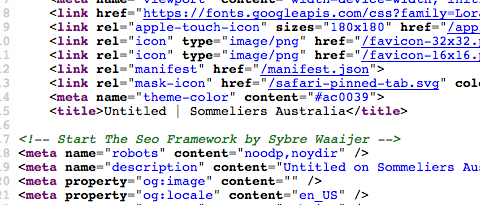
As for the empty HTML page title, I cannot recreate this. Here’s the title in the source code of your month view page, showing “Untitled” (click for a larger-sized image):
Here’s the title in the source code of my month view page, showing the month name and site title (click for a larger-sized image):
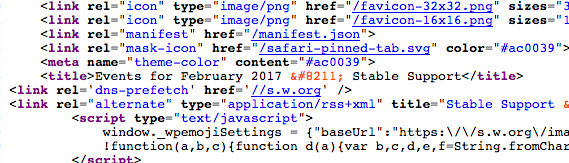
☝️ I am using your theme and the BreadcrumbNavXT plugins just like your site, so not sure what is happening here. You may find it useful to try the complete set of troubleshooting steps on this page → https://theeventscalendar.com/knowledgebase/testing-for-conflicts/ After EACH STEP in that process, check back on your month view and see if the document title changes at all.
— George
ParticipantHi Richard,
Thanks for reaching out.
We unfortunately do not make GoodBarber nor do we make any specific integrations with it or for it, and so there’s not much information we have about integration with it.
We are also generally not able to help at all with customizations or custom implementations of our plugins as elaborated upon here: https://theeventscalendar.com/knowledgebase/what-support-is-provided-for-license-holders/
There are two things I can think of that may be helpful:
1. The RSS Feed of events: Let’s say your site’s calendar exists at example.com/events. Well, if you go to example.com/events/feed, it will be an RSS feed of your site’s upcoming events.
2. The Events Calendar API Class: You mention being non-technical, but building an app is inherently a technical process and so one thing I wanted to mention in case it is helpful is the API within The Events Calendar. It may be helpful in terms of basic CRUD functions for your app. You can see the whole API by going to this file within The Events Calendar: the-events-calendar/src/Tribe/API.php
☝️ I hope these two resources help. For further assistance with the GoodBarber system, please contact the support folks at GoodBarber.
Please let me know if there are any other issues or questions I can try to help with.
— George
ParticipantReally sorry to hear this, @customer!
First, I noticed that you’re running version 4.6.3 of WordPress.
This is a bit outdated, and so the first step here is to upgrade your site’s version of WordPress.
Upgrade to the latest version, which is currently 4.7.2.
1. Once you update to WordPress 4.7.2, do issues persist?
2. If issues do persist, can you please post a screenshot of the specific part in your wp-admin when it says to “try again”? You can do this by uploading the screenshots to this thread. If you have issues with that, you can upload to Imgur.com, Flickr.com, CloudUp.com, or any similar image-hosting site; then just share the links to those images here and I’ll take a look.
3. If issues do persist, can you please post your site’s complete, un-edited system information using the “Sharing information manually” steps outlined in this article: https://theeventscalendar.com/knowledgebase/sharing-sys-info/
Thanks!
GeorgeParticipantThis is a great idea, Jamie. Thank you for sharing it.
I can pass this along to our developers but would also encourage you to post this idea to our UserVoice page here: tribe.uservoice.com
☝️ This page is our “feature requests” page, where other users can vote ideas up and down. We pay close attention to this page and often consider it when making product decisions.
So definitely post there!
In the meantime, please let me know if there are any other issues or questions I can try to help with.
— George
February 8, 2017 at 2:11 pm in reply to: Selling a "punch card" of event credits to the same type of event #1231693ParticipantThis is a cool idea, Scott. Our plugins unfortunately do not have any support for this exact type of feature out-of-the-box, nor do we have plans to build something specifically like this at this time. 🙁
Sorry to disappoint!
The features you are trying to implement are technically possible, though, so if you are really keen to implement the features you describe, you would can write that custom code yourself or hire a professional developer to do it for you. We have a list of great developers here → http://m.tri.be/18k1 (and have no affiliation with any of these folks—they’re simply some well-respected names in the community that we’ve compiled to share in situations like this one).
Please let me know if this information helps and if there are any other issues or questions I can try to help with.
— George
ParticipantThis reply is private.
February 8, 2017 at 1:54 pm in reply to: Partial refund on multiple tickets in order – best practice? #1231666ParticipantHi @danfeeley,
Thanks for reaching out.
Unfortunately refunds in WooCommerce are applied to orders, not to products within them.
And so we do not have a way to make partial refunds affect tickets within orders at this time: The refunds apply to the order total itself, not to individual tickets and there is not a way to alter this behavior at this time.
I’m sorry to disappoint! Please let me know if there are any other issues or questions I can try to help with.
— George
February 8, 2017 at 1:47 pm in reply to: Shortcodes/Custom Widgets to Resemble Default Events Page #1231663ParticipantHey Todd,
You say this:
I assumed they would allow me to put what is automatically created on the default events page on a different page but I can’t get anything to remotely resemble that.
Have you tried the [tribe_events] shortcode specifically? Here is a guide to using it → https://theeventscalendar.com/knowledgebase/embedding-calendar-views-tribe_events-shortcode/
Thanks,
GeorgeParticipantHi @Willem,
Thanks for reaching out.
We may indeed be able to help you here, but only over email. Please send us an email at support at theeventscalendar.com with a link back to this support thread for reference.
We will continue the conversation from there! 😀
— George
ParticipantHi Barb,
I would recommend that you open another thread. As you can see from my response to Russell, this issue will require some investigation and dialogue.
Please open a new thread of your own to facilitate this investigation into your own site and its issues as they may be different in terms of their cause and thus different in terms of the steps needed to resolve the issue.
Thanks,
GeorgeParticipantHi Russell,
I am sorry to hear about issues with global stock.
To help me help you, can you please do each of the following three things?
1. Post your site’s complete, un-edited system information using the “Sharing information manually” steps outlined in this article: https://theeventscalendar.com/knowledgebase/sharing-sys-info/
2. You say, “It says 254 global stock (122 sold)” — Can you please share a screenshot of where this shows up for you on your site? You can do so by uploading the screenshots to this thread. If you have issues with that, you can upload to Imgur.com, Flickr.com, CloudUp.com, or any similar image-hosting site; then just share the links to those images here and I’ll take a look.
3. For the event you share a screenshot of, can you also share a link to it on your website directly so that I can check it out?
Thanks,
GeorgeParticipantHey Brian,
Thanks for reaching out.
This sort of message is not something that our plugins would show themselves; this may be arising because of limitations imposed by your server.
I would recommend contacting your web hosting provider’s support and mentioning this — they may be able to identify why this would be happening.
Please let us know how this goes!
— George
ParticipantHey Mark,
You say this:
deleted the attendees but the count is still showing.
Can you share a screenshot of the specific count that is not accurate in your wp-admin? You can do so by uploading the screenshots to this thread. If you have issues with that, you can upload to Imgur.com, Flickr.com, CloudUp.com, or any similar image-hosting site; then just share the links to those images here and I’ll take a look.
Thanks!
George -
AuthorPosts