

Forum Replies Created
-
AuthorPosts
-
George
ParticipantHello!
I wanted to share the news that we released a Maintenance Release today that should include a fix that restores the functionality of the Show Google Maps setting.
You should be able to see this update in your wp-admin Updates page. You can learn more about the release here: https://theeventscalendar.com/maintenance-release-events-calendar-4-4-2-event-tickets-4-4-2-premium-add-ons/
Cheers!
GeorgeParticipantHey Sara,
Thanks for reaching out.
Can you please clarify what you mean about us stealing money? Did you get charged on your card for something you did not pay for, for example?
Please let me know what went wrong and I will work promptly to help.
Thanks,
GeorgeParticipantHey Will,
Thanks for reaching out! I’m sorry to hear about these problems.
I cannot recreate this problem with recurring events on my own testing site, so we will need to do some investigating here.
One thing I noticed about your recurring event is that, where a day name or number should be in the recurrence description of your event, there’s just some empty text saying “[day]”, as shown in this screenshot ? https://cloudup.com/c1Dk2rh03gS
That is odd and not something I can reproduce on my site.
To help me investigate this, I’m wondering if you can clarify a few things for me:
1. The URL of the event you shared has “copy-copy-copy” in it. Why? What is the origin of this text in the URL?
2. Can you share a screenshot of the “Time and Date” section of the edit screen for an event on which these problems occur? To clarify, this “Time and Date” section is where the recurrence rules are configured. So if you can find a recurring event that has these issues, share a screenshot of the complete “Time and Date” section to show its complete configuration. Here is an example of what a “Time and Date” screenshot might look like → https://cldup.com/JLJmZjrBFx-3000×3000.png
You can do so by uploading the screenshots to this thread. If you have issues with that, you can upload to Imgur.com, Flickr.com, CloudUp.com, or any similar image-hosting site; then just share the links to those images here and I’ll take a look.
Thank you!
GeorgeParticipantHey Daniel,
Thanks for your patience here. We’re still tinkering with a code snippet here for you but will have one coming soon! Stay tuned 😀
— George
February 9, 2017 at 8:59 am in reply to: On SUBMIT EVENT page, when I click "Add New User", it just scrolls to the top #1232180ParticipantThis reply is private.
ParticipantHey Moe,
– Is there a feature to have featured events, that would appear on top regardless of their date?
Featured events are indeed a feature of our plugins. You can learn about those here: https://theeventscalendar.com/knowledgebase/featured-events
– Can I change the links of the category pages to be /{categoryname} instead of /category/{categoryname}
You cannot do this with our plugins “out of the box”. It would unfortunately only be possible by way of some extensive custom coding. 🙁
– Can I add content and customize the category pages of the events, so they would be just the events listed?
If you’re asking if you can add content like text and images above and below the [tribe_events] shortcode, then yes, you can do that.
Next, when you say, “so they would be just the events listed”, I am not 100% sure what this means — are you asking if events in the [tribe_events] shortcode would display in the same format as the List View on the main /events/ page? If so, then yes; you’d just make the shortcode look like this: [tribe_events category=”example” view=”list”]
I hope this information helps!
GeorgeParticipantHey Jennifer,
Head to Settings → General in your WordPress admin and ensure this option is checked (click for a larger-sized image):
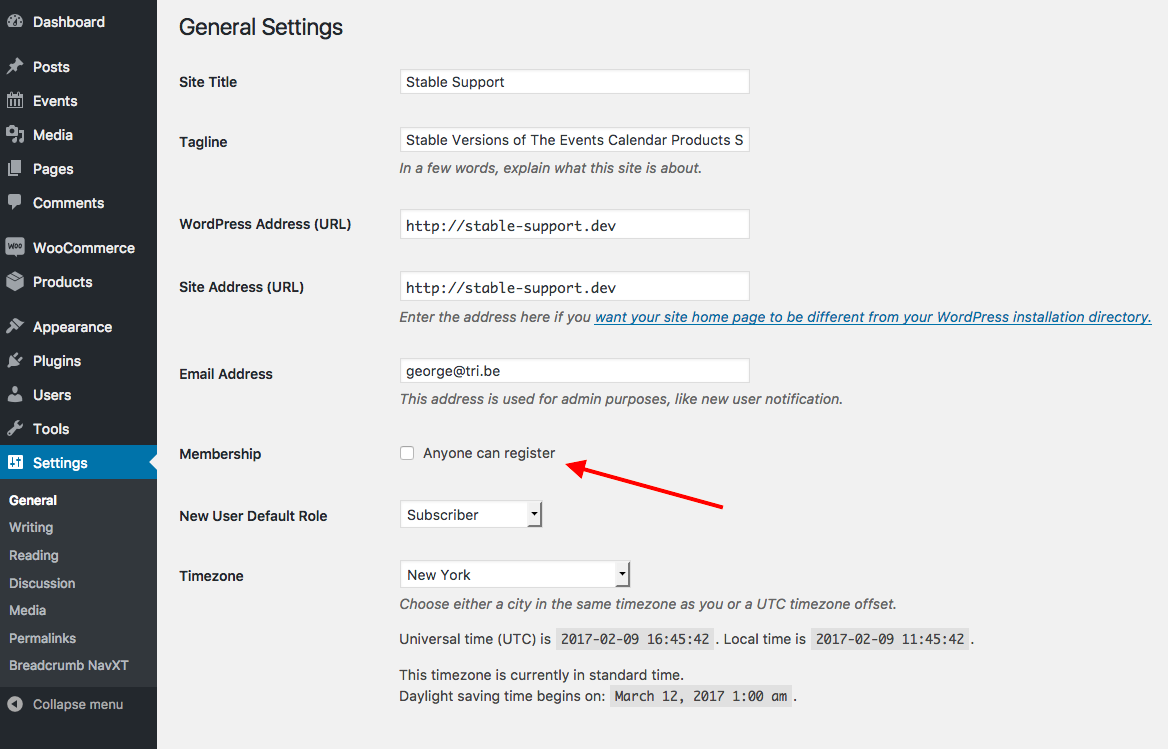
If it’s not checked, check it and then check out the log-in form on your community events form again — a “register” link should show up there!
If that link doesn’t appear, let me know.
As for the link itself, once you check the “Allow anyone to register” option folks should be able to register by going to yoursite.com/wp-login.php?action=register
— George
ParticipantHey Robert,
Thanks for reaching out, and for doing that testing with WP_DEBUG!
I have good news and bad news here.
The bad news is that our developers have actually been able to identify a bug here, and so I can confirm that in some cases these fatal errors with the Customizer are arising. It is not just an issue with your site.
I’m very sorry to bear news about this bug!
The good news, in a way, is the fact that, now that we’ve confirmed the existence of a bug, our developers are actively working on a fix. Fixes like this usually arrive within 1 to 2 weeks’ time from their initial discovery, if everything goes to plan.
Stay tuned to this thread—I will mark it “pending fix” and will update it with news about the arrival of the bug fix.
Please let me know if there are any other issues or questions I can try to help with in the meantime!
Sincerely,
GeorgeParticipantThis reply is private.
February 8, 2017 at 5:06 pm in reply to: Displayed ticket price to include eventbrite fee ? #1231787ParticipantHey Scott,
Thanks for reaching out.
There’s unfortunately no way to pull off what you describe — it may be possible with some custom coding outside the scope of our support forums, but not with anything “out-of-the-box” with the plugin. 🙁
I’m sorry to bear that news!
I would encourage you post this idea in our UserVoice page, though → tribe.uservoice.com. Other customers can vote ideas up and down on that page, and we pay close attention to this page and often use the data there to help inform our product decisions, so it’s a great way to submit ideas like this.
Please let me know if there are any other issues or questions I can try to help with!
— George
ParticipantHey Moe,
Thanks for reaching out and for your interest in our products.
– Can I create different pages that show events within a certain category and have the filter bar so people can filter through these events (other inputted fields, dates and price)
SORT OF — You can show events in only certain categories on different pages like you describe. You can do this by using Events Calendar Pro’s [tribe_events] shortcode feature, which you can read about here: https://theeventscalendar.com/knowledgebase/embedding-calendar-views-tribe_events-shortcode/
This short code does not have support for the Filter Bar though. 🙁 At this time you can only have the Filter Bar filters on the main events page of your site, nowhere else; there is no current workaround for this limitation.
– Can I customize the way the events pages look using the fusion builder provided in the avada theme, so I would have different templates for each category? (multiple columns layout, etc.)
We do not make the Fusion Builder or Avada theme and so your best course of action to learn about this specifically is to contact the support teams of those products.
In regards to our products, there is not a different template per category.
Extensive custom coding may be required to pull off the sort of thing you’re describing, where each category has its own layouts. We cannot help with or provide any support for custom coding or custom designs—please read here to learn more: https://theeventscalendar.com/knowledgebase/what-support-is-provided-for-license-holders/
– Testing out the add event element in the builder only adds the events images, can I make it add a snippet of the text provided in the event description?
Can you please clarify what you mean by “The builder”?
We do not make anything called “the builder” and so when it comes to adding a snippet of text or other things in this “builder”, it may not be something possible with our plugins and may only be possible by contacting the creators of the builder for more insight into making it do more things.
Thanks,
GeorgeParticipantHey @Breanna,
Thanks for reaching out!
It seems that “Attendee Information” does not have the ability to add field items with prices.
↑ This is correct.
Is there a work around for this? or Can I add a custom filed that supports fields with prices? That way when the select that filed it adds to the total price of that ticket?
↑ There is unfortunately not any such workaround for this at this time. 🙁 I’m sorry to disappoint!
Please let me know if there are any other issues or questions I can try to help with.
Sincerely,
GeorgeFebruary 8, 2017 at 4:40 pm in reply to: Purchased Aggregator and is not showing up in downloads #1231769ParticipantThanks for the update Stanley!
I will close this issue for now, but feel free to a new thread any time if other issues or questions arise.
You might also find our Knowledgebase helpful; here’s a link to a list of all articles related to Event Aggregator ? https://theeventscalendar.com/knowledgebase/plugin/event-aggregator/
Cheers! 😀
GeorgeParticipantHey Amy,
Thanks for reaching out. There’s unfortunately not really any way to set a default location here for community events.
The single geography mode is definitely supposed to help in a way, by limiting the allowed area/locations, but because of your post here and your claim that this option did not help, I took a look and was able to recreate the behavior you describe: The option does not work.
This is a bug in our code and I have just logged a bug ticket for our development team to work on. Hopefully a fix for this will come in the next couple of weeks if the development and testing processes go according to plan.
I’m sorry to disappoint here—first about the lack of “default venue” options with Community Events, but also about the bug with that “single geography mode” option.
I will post an update on this thread when a fix for that bug is released—even if the fix doesn’t come for several weeks from now and this thread is closed!
In the meantime, please let me know if there are any other issues or questions I can try to help with.
Sincerely,
GeorgeParticipantHey CC,
Thanks for reaching out and for your interest in our products.
Our product Event Aggregator should work well here; with it you can import from as many Facebook pages as you’d like.
Learn more about Event Aggregator here! → https://theeventscalendar.com/product/event-aggregator/
— George
-
AuthorPosts
