
Home › Forums › Calendar Products › Community Events › WordPress Failure
- This topic has 20 replies, 4 voices, and was last updated 9 years, 7 months ago by
Jennifer.
-
AuthorPosts
-
January 25, 2017 at 5:01 am #1223509
Jennifer
ParticipantHi George,
Thanks for the information. Yes, everyone that can not use the community event feature are people from the general public that are coming to my site to add events. None have admin rights or anything like that. I don’t think they are registering as users either. I don’t think the form requires them too. Could that be causing the problem? Here’s a link to the form again so you can see what is required of someone submitting an event:
https://fun4kidsinbuffalo.com/events/community/add
I can add events through the community events page when I am both logged in AND logged out so I can’t say if say if once you log in the problems stop. Should I change a setting or something that requires them to sign up as a user and try that?
January 25, 2017 at 11:19 am #1223859George
ParticipantShould I change a setting or something that requires them to sign up as a user and try that?
This may indeed be a useful test — you can find the option for this by heading to Events → Settings → Community in your wp-admin.
Let me know what you find by doing this!
Thanks for your patience and persistence.
Sincerely,
GeorgeFebruary 8, 2017 at 2:59 pm #1231722ParticipantHi George,
I’m making one last ditch effort to use the community calendar by enabling the setting you mentioned above that requires people to login before posting an event. That said, I just did it and tried to test it. It gives you the option to login, but it doesn’t give you an option to create an account. How do users sign up initially?
A screen shot is attached.
February 9, 2017 at 8:52 am #1232164ParticipantHey Jennifer,
Head to Settings → General in your WordPress admin and ensure this option is checked (click for a larger-sized image):
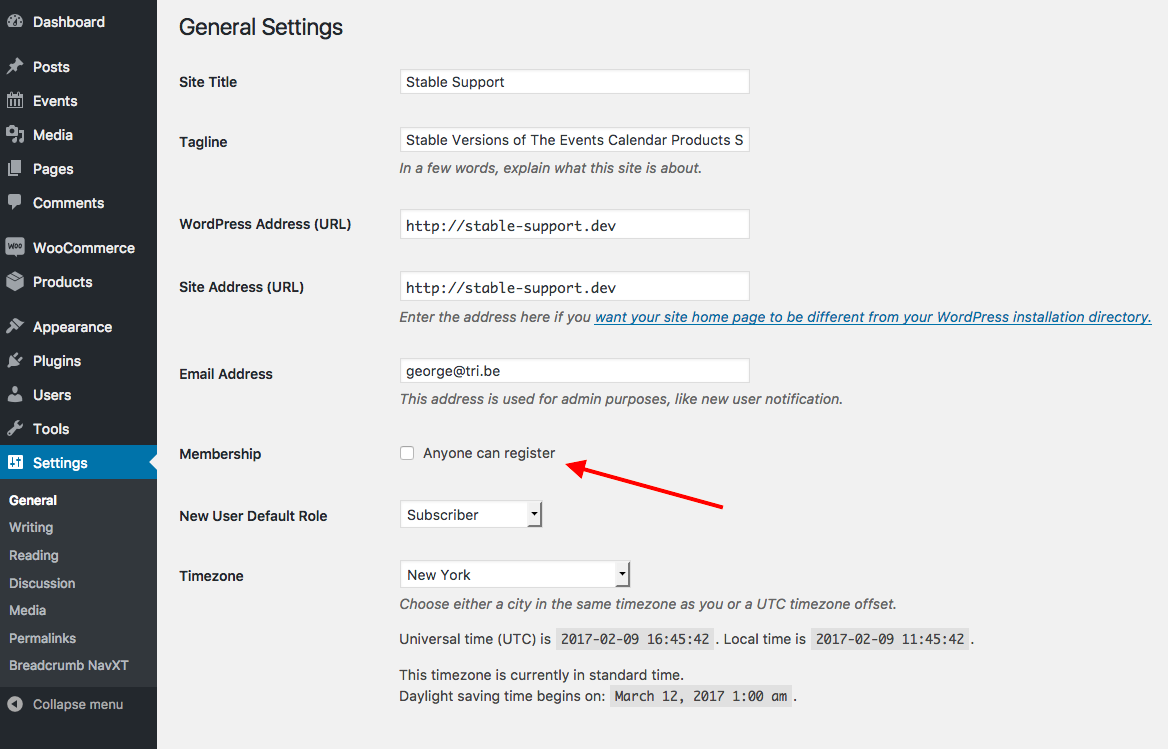
If it’s not checked, check it and then check out the log-in form on your community events form again — a “register” link should show up there!
If that link doesn’t appear, let me know.
As for the link itself, once you check the “Allow anyone to register” option folks should be able to register by going to yoursite.com/wp-login.php?action=register
— George
March 3, 2017 at 8:35 am #1249021Support Droid
KeymasterHey there! This thread has been pretty quiet for the last three weeks, so we’re going to go ahead and close it to avoid confusion with other topics. If you’re still looking for help with this, please do open a new thread, reference this one and we’d be more than happy to continue the conversation over there.
Thanks so much!
The Events Calendar Support Team -
AuthorPosts
- The topic ‘WordPress Failure’ is closed to new replies.