

Forum Replies Created
-
AuthorPosts
-
February 8, 2017 at 1:31 pm in reply to: Paid Orders not returning as ‘Processing’ staying in ‘Pending’ #1231638
George
ParticipantStay tuned!
GeorgeFebruary 8, 2017 at 1:26 pm in reply to: Events RSVP facility creating customer complaints – please help \O/ #1231632Participant
Advanced Post Manager
Our FAQ on wordpress.org for Advanced Post Manager (APM) is confusing, and I am sorry about this. I have just logged a ticket for our developers to make this more clear and helpful.
What it should clarify is that coding is only required for it to work on post types other than “events”. So, no code is needed for it to work with The Events Calendar.
As for your issues, though, what I have found here is another bug where APM only shows its filters on the Events page when Events Calendar Pro is activated. This is not how it’s supposed to work, and is a frustrating bug that must be very recent because it previously worked fine until very recently. I am sorry about this, and have logged a bug for our developers to fix this and am imploring them to do so promptly.
The reason why it’s not showing up on your site, then, is because Events Calendar Pro is failing to register as “activated”. We will get to this specific problem later, as you’ll see.
It stands to reason that once we get Events Calendar Pro showing up as “activated” on your site, the APM filters will show up as expected on the Events page.
Events Calendar Pro
You mention some Pro-specific views not being accessible in your wp-admin. This would only normally happen if Events Calendar Pro was not active on your site.
You mentioned Events Calendar Pro was installed and activated on your site, but your system information does not list Events Calendar Pro in the “Plugins” list, which means it is not installed or activated on your site
1. Please ensure that you have installed Events Calendar Pro on your website. Download a fresh copy of it here any time: http://theeventscalendar.com/my-account/downloads
2. If you are certain that it is installed and activated, please go to the “Plugins” page in your site’s wp-admin and take a full-page screenshot there. There are many ways to take such a screenshot—just google “How to take a full-page screenshot” and then the type of browser and computer you’re using, and many results should come up.
Then upload the screenshot to this thread. If you have issues with that, you can upload to Imgur.com, Flickr.com, CloudUp.com, or any similar image-hosting site; then just share the links to those images here and I’ll take a look.
Please be aware of the fact that if Events Calendar Pro is installed and activated on your site but is not showing up in your System Information, this is an odd problem we cannot reproduce and nobody else is reporting, and so would indicate a unique and specific issue with your specific website.
3. If you get Events Calendar Pro installed and activated on your website, does anything improve with both the “photo and map view” issues? What about the “Show map link” issues?
Thank you,
GeorgeFebruary 8, 2017 at 1:13 pm in reply to: Events RSVP facility creating customer complaints – please help \O/ #1231627ParticipantFor the time now please stay in this thread and do not open new threads. I have been working on a reply to your issues for a while to address every single thing you mention, which is why it is taking some time. Please sit tight, a reply is coming in a bit.
February 8, 2017 at 12:03 pm in reply to: Events RSVP facility creating customer complaints – please help \O/ #1231579ParticipantThis reply is private.
ParticipantI am very sorry Art, I was actually wrong about our Meetup.com integration here.
Unfortunately Meetup.com events don’t have featured images — only groups themselves have a featured image.
And so importing events from Meetup.com does not import any images for use as the event featured image.
Sorry for my mistake here!
George
ParticipantHey Art,
I’m sorry to hear this! Can you share links to some of the specific Meetup events you’re trying to import?
I am investigating this and will have another reply to post here shortly, but wanted to request those Meetup event links in the meantime—it may be helpful for my investigation.
Thanks,
GeorgeFebruary 8, 2017 at 10:51 am in reply to: Presale Question to see if plugin has all that we need #1231527ParticipantHi Nathan,
1. Event Calendar / or will I have to get PRO if I want to run Event Tickets Plus?
You do not need Events Calendar Pro to use Event Tickets Plus.
2. Event Tickets Plus<
3. Woocommerce
4. Some free CSV Exporter
5. An Authorize.net API
6. WooCommerce Constant Contact extension https://woocommerce.com/products/woocommerce-constant-contact/
/blockquote>Yes to all of these things if you want the features they provide.
In regards to your questions about the mock-ups you shared, our plugins are just plugins. They provide functionality. The appearance of your site, your checkout pages, your event pages, and so on is all mostly dictated by your theme. We do not make any themes and so this aspect of your project is one that you’ll mostly have to take the reins on.
One thing to note is that by default our plugins don’t have all of the choices displayed on one single page. What I mean is, in your “registration process” mockup the ticket quantities, cardholder information, and additional ticket choices are all one one single page. This is not how our plugins work by default — you select the tickets on the event page for the event you want to attend. Then you click “add to cart” and are taken to a cart (powered by WooCommerce) that takes you through a checkout process.
Altering this behavior is only possible with extensive custom coding.
We are not able to help with custom coding.
Please also keep in mind that we have a thirty-day no-questions-asked refund policy that you can learn about here: https://theeventscalendar.com/knowledgebase/refund-policy/
WooCommerce.com does too, in regards to its Extensions and such.
And so to really get a sense of how these things all work, you may find it best to just try all the plugins firsthand. If they don’t work to your needs, you can request a refund any time within that first thirty days from purchase using the form here: https://theeventscalendar.com/knowledgebase/refund-policy/
Cheers,
GeorgeParticipantHey Ryan,
Thanks for your follow-up. Just to be clear, if you head to Events → Settings in your wp-admin, is the “Show comments” option checked? Here’s a screenshot of that option for reference (click for a larger-sized image):
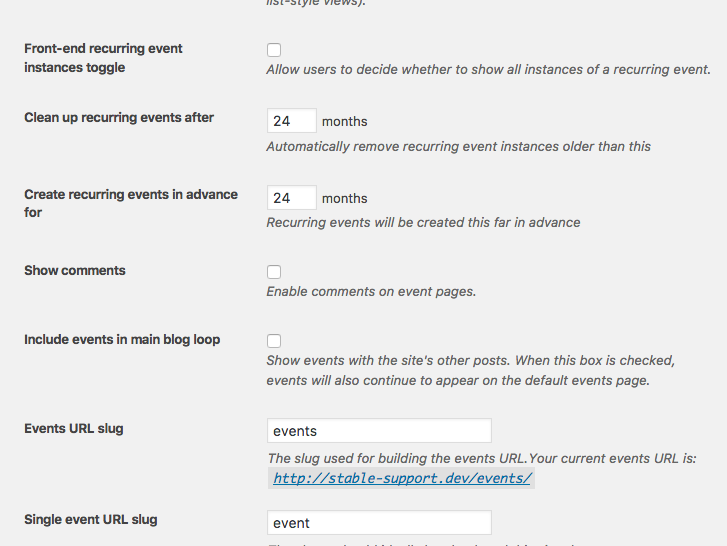
Your issues may not be the same as some of the ones other folks are reporting, but it will take some further investigation here to determine that.
Thank you!
GeorgeFebruary 8, 2017 at 10:28 am in reply to: Paid Orders not returning as ‘Processing’ staying in ‘Pending’ #1231506ParticipantThanks for this information, @Johanne.
I am reaching out to a developer on our team to see if they can help me provide some insight on this. I am looking into your reports and trying to figure out exactly where things could be going wrong.
Thank you so much for your patience here! Stay tuned.
— George
ParticipantHey Joe,
Thanks for your patience here.
It took me some significant amount of time to come up with something that would get breadcrumbs working on the Month View, but I’ve finally done it. 😀
Well, “working” isn’t quite right. I set up your theme and the breadcrumbs plugin on my local testing site and was able to verify that the breadcrumbs worked on all sorts of events pages…but for some reason, not ever on the Month View specifically.
I could not identify a specific reason for this no matter what I tried or what code I read through. Furthermore, the breadcrumbs plugin also doesn’t have many hooks like actions and filters, which would make modifying the breadcrumb output much easier.
So I put together a bit of code that basically just generates its own breadcrumbs from scratch.
Does that sound weird? It is a bit weird. But I’ve got it working well on my local site and it should work well for you, too!
Here’s how it works:
1. Breadcrumbs on every page other than the Month View are left totally alone. The List View breadcrumbs, for example, are not touched by this snippet at all. They just work as is. Same for breadcrumbs everywhere else on your site. This code only touches the Month View specifically.
2. On the Month View, this code generates its own Breadcrumb links in the same exact style as the ones provided by default by your theme and the plugin. Here’s a screenshot of the breadcrumbs on Month View when this snippet is activated, for example (click for a larger-sized image):

☝️ (My local site’s title is “Stable Support”, for context. Whatever the site title is will be used here.)
3. The snippet adds some CSS that makes the custom “fake” breadcrumbs look just like the “real” ones.
? You can find the custom code snippet I wrote for you in a Gist here → https://git.io/vDRto
Simply copy this code in full and paste it into your theme’s functions.php file. It should work well from there.
We are not able to provide any support for this snippet, nor are we able to resist with further refinement of the appearance or behavior of this custom code. You will have to take the reins from here; but hopefully this helps you get started and works well! 😀
Please let me know if it does and if there are any other issues or questions I can try to help with.
Cheers,
GeorgeParticipantHey Meleah,
Thanks for your followup.
We’re unfortunately not able to help with any custom coding or design-related issues here, so the best thing I can recommend for specific page design issues is to write custom CSS on your site to fix any issues that arise.
Definitely check out a [free!] tool like Firebug if you use FireFox, or the Developer Tools for either Safari or Chrome. They have “Inspector” tools that let you zoom right over the element whose styles you want to change/fix.
As a quick example, while it’s true that we cannot help with custom coding or design tweaks, I took the liberty of checking out your /events/ page nonetheless to see if I could recommend some custom CSS to get you started here 😉
You should be able to make some progress by adding CSS like the following to the bottom of your theme’s style.css file:
body.post-type-archive-tribe_events #secondary {

    display: none !important;

}
body.post-type-archive-tribe_events #primary {
width: 100% !important;
}
☝️ This may require further elaboration or refinement to get things like just right. You will have to take the reins on any such elaboration or refinement—but I hope this helps you get started!
Cheers,
GeorgeParticipantThanks for sharing that, Alexander. I’ve noted this conflict for future reference and we will keep an eye on this if other folks report similar conflicts.
For now, best of luck with your project! Open a new thread any time if other issues or questions arise.
Cheers,
GeorgeParticipantHey Art, meetup images should be importing fine.
As for setting default images, apologies for not addressing this earlier; there is no feature within Event Aggregator that lets you specify a default featured image.
Please let me know if this helps and if there are any other issues or questions I can try to help with.
Thanks!
GeorgeFebruary 7, 2017 at 4:08 pm in reply to: Event Order and Attendees numbers not matching. Big issue #1230983ParticipantHey Jo,
You mention IPN not triggering:
1. How did you determine this was the problem?
2. Event Tickets Plus has no role in the IPN process. This is something WooCommerce and PayPal handle. Have you opened support tickets with either entity about this? If not, I would encourage you to do so.
Thanks!
GeorgeParticipantHey Sara,
Yes! This is possible. You can use any Event Aggregator license on up to 10 different domain names.
There is currently a bug with our license keys page where only one domain name will show up, but this is just a UI issue! The license will actually work on multiple different domain names without issue. We’re hoping to fix this UI issue in the next few weeks if all goes to plan.
Please let me know if this helps and if there are any other issues or questions I can try to help with!
— George
-
AuthorPosts