
Home › Forums › Calendar Products › Events Calendar PRO › Display User's Comment(s)
- This topic has 5 replies, 4 voices, and was last updated 9 years, 7 months ago by
Ryan Glover.
-
AuthorPosts
-
February 4, 2017 at 9:51 am #1229526
Ryan Glover
ParticipantHello,
Is it possible to display a user’s comment, along with my reply, after they’ve made a comment via the ‘Leave A Comment’ section on the event’s page. I’m receiving comments and replying to their questions. I’m just wondering if this dialogue can be seen by other user’s when they visit my site. If it’s possible to do so, how can it be done?
Thank you.
Ryan
February 6, 2017 at 7:16 pm #1230298George
ParticipantHey Ryan,
If the comments are not showing up on the front-end of your site, then they will only be visible in your admin.
And so the only folks they’ll be visible to are folks with user accounts on your site of the user level “Author” or higher.
Does this help at all?
— George
February 7, 2017 at 11:03 pm #1231106ParticipantHello George,
this does help. Thank you. My next question is: how can I allow for comments to be displayed on the front-end of my site – more specifically the front-end of my single events via Events Calendar PRO page – so that any comment made is visible to the public despite their user level.
I’ve included a screenshot of the page I’m referring to which shows that comments can be made but none of the comments which have been written are hidden and not displayed.
I’ve read a few comments on this support forum that other Events Calendar users are experiencing technical difficulties in regards to displaying comments on the Event’s page and I’m wondering if I fall into this category?
Kind regards.
RyanFebruary 8, 2017 at 10:43 am #1231518ParticipantHey Ryan,
Thanks for your follow-up. Just to be clear, if you head to Events → Settings in your wp-admin, is the “Show comments” option checked? Here’s a screenshot of that option for reference (click for a larger-sized image):
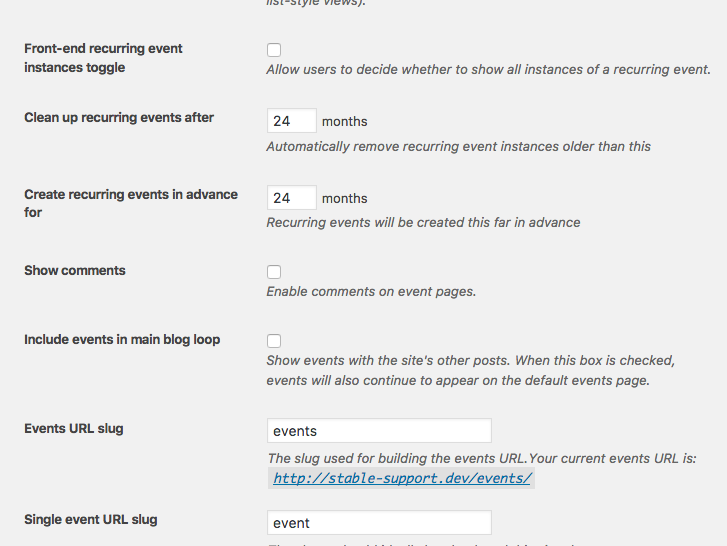
Your issues may not be the same as some of the ones other folks are reporting, but it will take some further investigation here to determine that.
Thank you!
GeorgeMarch 2, 2017 at 8:35 am #1248365Support Droid
KeymasterHey there! This thread has been pretty quiet for the last three weeks, so we’re going to go ahead and close it to avoid confusion with other topics. If you’re still looking for help with this, please do open a new thread, reference this one and we’d be more than happy to continue the conversation over there.
Thanks so much!
The Events Calendar Support Team -
AuthorPosts
- The topic ‘Display User's Comment(s)’ is closed to new replies.