

Forum Replies Created
-
AuthorPosts
-
George
ParticipantHey Erin,
Thanks so much for your explanation here – I’m sorry about my original misunderstanding of the purpose of your post, but appreciate you sharing your solution so that others can learn from it.
Thanks for posting Erin!
— George
September 25, 2015 at 9:58 am in reply to: Recurring Events won't display beyond the original event date #1008747ParticipantThanks for this, Dustin! I recreated an event with your exact same recurrence settings and did not reproduce this issue…just to be 100% certain, if you go to Events > Settings in your wp-admin, is this setting currently checked?:

If so, un-check it and see if things improve once you save your changes.
Thanks for your patience with me here Dustin – I’m able to produce this recurring event without issue, so we’ll have to do some more troubleshooting to figure out why it’s behaving differently on your site. The above question is a good place to start, but if you find that this option is unchecked already, I’d recommend you go one step further and try running through our troubleshooting steps here → https://theeventscalendar.com/knowledgebase/testing-for-conflicts/
After each step in the process, make another test event with similar rules as your original. These are just test events; you can delete them after testing 🙂
But check each event once it’s created. Does this problem persist?
If it suddenly works as expected on one event in that debugging process, then whatever you deactivated last before it started working is likely causing a code conflict with the plugin.
Let us know what you find!
GeorgeParticipantHi @sammioneill,
Thank you for your update, it sounds like your issues here are actually not related to The Events Calendar or its add-ons at all, and are just related to how you are using Google Analytics. You mention this, for example, as more or less the crux of your issue:
When I am approached by potential advertisers and sponsors regarding my viewing figures (unique and returning) I cannot see where the stats are recorded (if they are)
We don’t offer support for third-party software or general WordPress questions, but to share some general advice to hopefully help you find your statistics, there are two things I would recommend:
1. First, you can just read up on Google Analytics in general and learn more about how to use it technically. For example, there is a “Google Analytics Dashboard” in your Google Analytics account that shows an awesome, detailed breakdown of your page views and other statistics.
2. Alternatively, you can just use a Google Analytics plugin. There are many out there. One that I personally recommend is Google Analyticator – we use it right here on http://theeventscalendar.com! There are also other great plugins, but if choose any of the top-5 most popular, they’ll solve two problems for you: they’ll add the Analytics Tracking code appropriately on your site, and most will also have a Dashboard Widget right in your wp-admin Dashboard where you can see a snapshot of statistics, like in this screenshot:
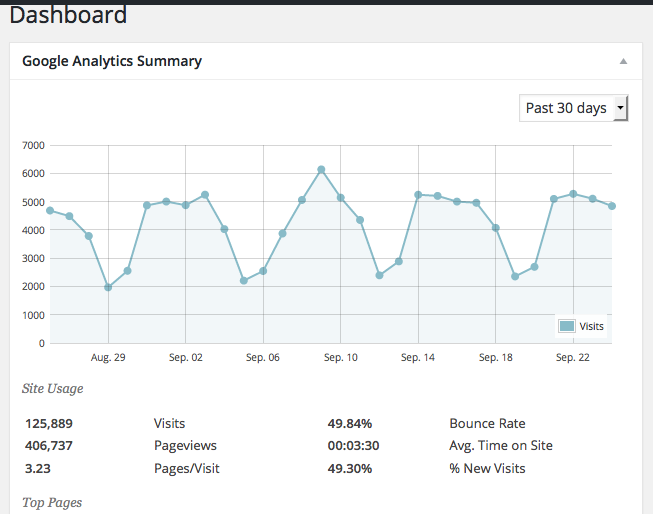
I hope all this information helps!
Cheers,
GeorgeParticipantHey @holmfirthevents,
Thank you for all of this information! The second chunk of information that you posted is the “System Information” I was referring to, and greatly appreciate it.
Using UK addresses should not be a problem at all. There are three things I’d recommend doing and then see if they help this issue at all:
1. Make sure you are indeed using valid addresses for your venues. If your venues are not using a valid address, try correcting their addresses and then “Update” the venue.
2. Update your version of WordPress to the latest version, currently 4.3.1 – your System Information shows you are using version 4.2.5
3. Update your versions of The Events Calendar, Events Calendar Pro, and Events Filter Bar to their latest versions. Your System Information shows these are at version 3.10.x, you should update them to the most recent versions which as of this week are 3.12.2.
Try each of these steps and then have another look at things – do problems persist?
Thank you!
GeorgeParticipantI’m sorry @Nicholas, I don’t have a specific ETA on a fix for this but we are making great progress towards our next release so the wait shouldn’t be too long here – hopefully by the end of October-ish at most, though again I can’t promise a specific ETA.
I’m sorry about this issue – stay tuned to plugin updates in your wp-admin Dashboard for a fix! And if any other issues or questions arise, open a new thread here any time 🙂
Cheers,
GeorgeSeptember 25, 2015 at 7:19 am in reply to: Functions aren't changing labels or words in the List Widget #1008688ParticipantThank you for reporting this one, too, @MIKE!
Much appreciated – I’m sorry that these things aren’t fixed, but I will indeed add this second one to the development ticket and we’ll have them patched up quick! 🙂
Cheers,
GeorgeP.S.
If you would like to manually fix this second bug for now, you can do so by replacing it with code like this:
/**

 * Renders the "Add Another Organizer" button

 *

 * @return void

 */

protected function render_add_organizer_button() {

    echo '
' . sprintf( __( 'Add another %s', 'the-events-calendar' ), tribe_get_organizer_label_singular() ) . ' ';
}
ParticipantHey Rene,
Thanks for your feedback here. I would tend to agree that it would be odd to make the order by start date an odd setting, but we’re not really making it a “setting” here – in your case, you want to write a custom query for events on your homepage:
On the homepage of the site we want to display the last entered event in a category.
For where we have our default event queries, showing events by start date makes some more sense because these are the default “out-of-the-box” calendar views, and just like any physical calendar out there or calendar app like iCal or Google Calendar, we show the events in the calendar by start date.
I’ll close up this ticket for now – I wish you the best of luck with your customizations!
Cheers,
GeorgeParticipantNo problem! I’m sorry for our limited ability to help on this issue, but if any other issues arise and/or if these problems do end up being specifically related to The Events Calendar and WooCommerce Tickets, open a new thread on the forums here any time 🙂
Cheers,
GeorgeParticipantHey Shannon,
Thanks for sharing all this!
That error is coming from your theme, so unfortunately editing theme code is required here.
First, however, I’d recommend updating all your Tribe plugins to version 3.12.2 across the board – this is the most recent version for all plugins, your System Info shows you are running versions in the 3.11.x range.
As for the Fatal Error, to fix this you will have to head to the /tribe-events/single-event.php file in your theme. Then, where you see the function tribe_events_single_event_meta() being used, replace it with this:
<!-- Event meta -->

<?php do_action( 'tribe_events_single_event_before_the_meta' ) ?>

<?php tribe_get_template_part( 'modules/meta' ); ?>

<?php do_action( 'tribe_events_single_event_after_the_meta' ) ?>
That should help – let us know if it does! 🙂
Cheers,
GeorgeParticipantI think debug is currently off.
Thanks for letting us know! If you turn debug on as per the instructions above, do any errors then start popping up?
Thanks!
GeorgeParticipantWoot, thanks for the update Geoff – give the update a try, folks, I hope it helps! 🙂
September 24, 2015 at 1:50 pm in reply to: With each feed refresh my posts are moved back to pending #1008501ParticipantWoot, thanks for the update Geoff – give the update a try, Allison, I hope it helps! 🙂
September 24, 2015 at 1:49 pm in reply to: Recurring event all occurrences link issue for Events Calendar Pro 3.11.1 #1008500ParticipantWoot, thanks for the update Geoff – give the update a try, @Sitecrafting, I hope it helps! 🙂
ParticipantI’m sorry to hear this Matthew!
It’s odd because I do not have this issue – can you share any specific facebook.com event URLs for events that have this problem? I will try to recreate the issue behavior directly.
Thanks!
GeorgeSeptember 24, 2015 at 1:47 pm in reply to: Importer not importing for the set recurrence + imports duplicates #1008497ParticipantHey @jadecreative,
Thanks for your reply – for now, I’d like you to know that we just released a Maintenance Release yesterday for all of our plugins. There isn’t a specific fix for the duplication issue, but I’d recommend updating anyway as performance in general should be slightly improved.
As for your comment here:
I literally just set it up and did the first import and then didn’t check it until the other day when I noticed that the latest update was Sep 6.
This may be the extent of your problem with that import not running, because unfortunately WordPress’ Cron system is not a true cron system. A true cron system runs in the background on a server no matter what, but WordPress’ cron system only runs if there is a visitor on the site. This visitor can be a public or admin user, but if there are no visitors in the interval set up for a WP cron job, then the cron will not run. In terms of the Importer, then, the import will not run.
I’m sorry about this limitation. It’s frustrating to us, too, as WordPress developers, but trying to build a cron separate from WordPress’ own build-in Cron is a bad idea and so we’re sort of limited there for now.
I hope this information helps! Thank you for your patience with us as we improve our plugins and fix bugs, it can be a frustrating process of course but feedback like yours helps us quite a bit.
Sincerely,
George -
AuthorPosts