

Forum Replies Created
-
AuthorPosts
-
George
ParticipantThanks for reaching out Mark!
I’m sorry to admit this, but I unfortunately don’t fully understand your issue – can you help clarify what you mean when you say this:
I’ve entered a “Please contact us” link in the the message editor of the “Venues” dashboard, but this link doesn’t show up when I associate this venue with an event.
It sounds like what you mean is that you add a “Please contact us link” in your “venue description” field, as shown in this screenshot:
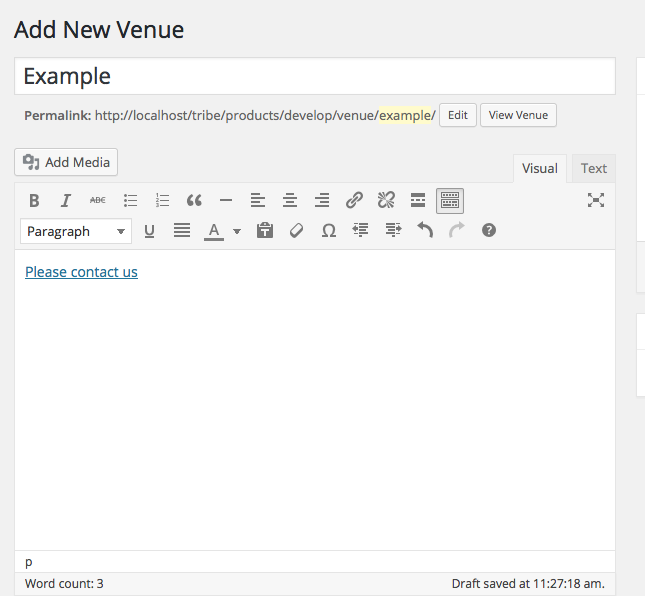
And then, when you create an event and select this above venue as the venue for that event, you want that “Please contact us” link to appear in the venue information but it does not, as shown in this screenshot:
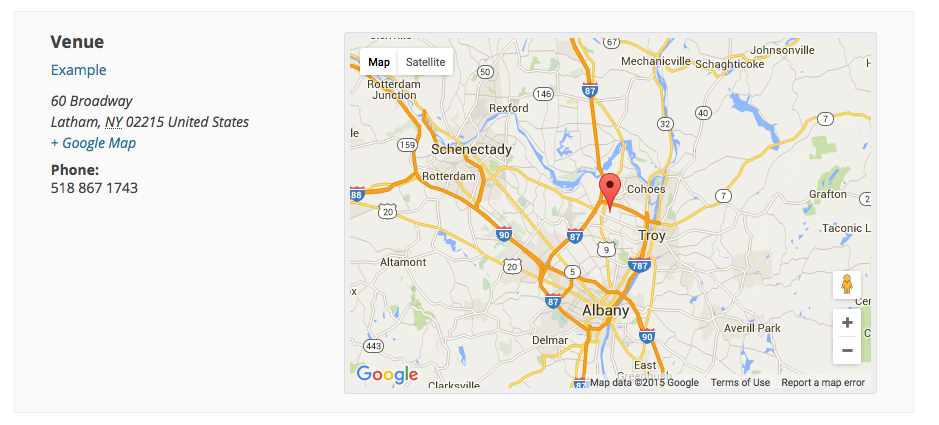
Is this an accurate summation of your issues? If not, what things are different about your actual issues? Let me know in detail and share screenshots of your own if possible (you can just upload them to Imgur.com and share links to them).
I apologize for responding to your questions with questions of my own, but just want to be 100% certain of what your issues are so I can best help you resolve them 🙂
Thank you!
GeorgeParticipantwhen a user chooses say 4 tickets to purchase that the user has the option to assign the names of the three other people including themselves on the ticket purchase
I’m sorry to bear this news James, but unfortunately the functionality you describe is not easily possible without some extensive code customization 🙁
We are working actively on an all-new add-on called “Tickets User Meta” that would better allow for functionality like this, however. It’s not quite ready, but we will be launching a Public Beta test of it that you can sign up for here if interested → https://theeventscalendar.com/knowledgebase/how-to-signup-for-beta-access/
When the beta does finally kick-off (there’s no official start date as of this time), folks who sign up at that link will get a free copy of the add-on and the ability to try it out before anyone else.
Sorry for the mixed news here James, let me know if this is helpful at all and/or if there’s anything else I can help with!
Sincerely,
GeorgeParticipantHey Rob!
We can definitely help out here – can you share a link specifically to a page on your site where we can see this dishwater-gray sidebar widget in person? We’ll be able to recommend a specific solution from there.
And two other quick notes – first, in regards to the Canvas theme, The Events Calendar and its add-ons do actually work quite well with the theme. There are, however, occasionally some specific bugs with specific features, or with combinations of the theme and custom code, etc. In other words, the Canvas theme and The Events Calendar plugin are both well-made WordPress software, so the number of conflicts about it on the forums are related more to the widespread use of both products than to some inherent lack of compatibility…
Apologies for verbosity there, but just wanted to shed some light on that note about Canvas Theme and assure you that it is a solid theme that is very compatible with The Events Calendar.
Finally, in terms of not having to edit files and do all sorts of stuff to fix this, I totally get not wanting to have to jump through hoops to fix this; fortunately, it’s fairly simple, I promise! Once we see your widget in person, I’ll recommend some CSS code to fix it. All you have to do is then Copy it, and then go to Appearance > Editor in your wp-admin, choose the style.css file and scroll all the way to the bottom of the file, and then Paste in the CSS I shared with you. Then you click “save”, and that’s it! 🙂
I hope this information helps – let me know if it does. And let us know a specific page on your site where we can see the gray widget – I’ll recommend a fix promptly thereafter.
Sincerely,
GeorgeParticipantie: there’s just one calendar, right? … and community just allows for the end user to add their events.
Thanks for reaching out and for your interest in our plugins, @Denon! To answer your question: yes, all of our add-ons for The Events Calendar use that same main calendar.
Community Events, Events Calendar Pro, and every other add-on all just “extend” the functionality of that one main calendar, with all your same and original events and settings for the main calendar with just some added features.
So Community Events does exactly what you described looking for – it lets users submit events from the front-end, and when submitted, if those events are published they’ll be published on the one main calendar 🙂
I hope this all helps! Let me know if so, and if there’s anything else I can help with.
Cheers,
GeorgeSeptember 25, 2015 at 11:29 am in reply to: Next/Prev event navigation links doesn't lead to correct events #1008771ParticipantHey @twkmedia,
Thanks for your patience here! I’m curious about how updating WordPress might affect this on your site, so do keep us posted on how that goes when you do it.
Finally, in regards to this thread: https://theeventscalendar.com/support/forums/topic/single-event-view-previous-event-link-incorrectly-points-to-the-oldest-event/
I finally was able to produce a bug there, so I’m wondering if that is affecting your site here in a different way than it was for those folks…
Anyways, are custom templates currently active on your site? If so, please remove them. You should back up your theme’s whole /tribe-events folder, and then remove this whole folder. If you do this, just to be clear, does anything change at all?
Sorry for the lack of solid answers at the moment – I’m having trouble recreating your exact issue in a way that is different than the issue reported in the thread linked above.
Sincerely,
GeorgeParticipantHey @sammioneill,
Thanks for clarifying your issue, I’m sorry for misunderstanding it a bit. I’m curious about why this would be happening…if there’s a tracking code, it would be added to content on your site via the wp_footer(); function, which is called in templates with the get_footer() template include function.
The plugin views for The Events Calendar have this get_footer(), so things should theoretically be working fine. Have you contacted support for any of the providers of analytics on your site? If not, I would recommend doing so to see if they have any further insight on this matter.
Finally, did you happen to try the Analyticator plugin I recommend? If not, I’d recommend trying this or another plugin. These plugins tend to be more robust in how they add their tracking codes to site content, and so might help ensure the events views are tracked within Google Analytics. Definitely install one of these plugins if you continue to have issues here, and then give the plugin and your Analytics account at least 12 hours to start letting the data propagate.
Thank you!
George-
This reply was modified 11 years ago by
September 25, 2015 at 11:18 am in reply to: Languages not working with customized template files #1008768ParticipantWow, I didn’t know that WooCommerce was able to do that, that is awesome! The fact that it is possible does give me hope that, yes, at some point we could add functionality for this to ensure translation files were up-to-date with custom templates.
For now there is still no way, unfortunately 🙁
I’m sorry to disappoint Eugene!
Sincerely,
GeorgeParticipantHey @Cliff,
Thanks for sharing this…I’m not quite sure about the extent of this problem, and will investigate, but one thing I’m curious about is: why do you call global $post in your code? That is not necessary and itself could be causing some problems with your query results displaying on the page.
Try removing that and see if anything is improved with your query. It looks fine to me otherwise and I don’t have problems using tribe_get_events() like you describe so am interested what you find.
Let me know!
GeorgeParticipantHey Hans-Gerd,
You should be able to get 3.12.2 at http://wordpress.org/plugins/the-events-calendar – let me know if that helps!
— George
September 25, 2015 at 11:05 am in reply to: Does The Events Calendar Pro use Structured Data Markup #1008762ParticipantHey Somer,
I’m sorry you’re having problems here! I don’t have this issue so am wondering if perhaps there’s a code conflict, or if your server’s timezone settings are conflict here or something.
To get started on that, would you mind opening a new thread on these forums with a link back to this one for reference, and the description of your problem that you posted here along with a copy of your system information? Here’s how to share system information → https://theeventscalendar.com/knowledgebase/sharing-sys-info/
This will allow us to tend to your unique issue more efficiently, and save @Somer from some unnecessary email notifications 🙂
Thank you!
GeorgeSeptember 25, 2015 at 11:00 am in reply to: Single event view previous event link incorrectly points to the oldest event #1008760ParticipantYou folks are truly awesome! Thank you so much for your detailed testing here, I was in fact able to reproduce this issue with the additional details and I just submitted a nice, detailed bug report ticket to our developers.
I’m sorry that this problem exists at all for you folks, but at least we now know there is a bug here. We have a release coming soon and if this a small bug we can hopefully get it fixed by then.
What your thoughts on this? Is there anything I can help further with here?
Thank you so much for your troubleshooting skills and for your patience with us as we try and find, then fix this bug.
Sincerely,
GeorgeSeptember 25, 2015 at 10:34 am in reply to: Filter: "wootickets_email_message" not changing the message #1008757ParticipantThanks for the update Sean! Glad to have helped 🙂
ParticipantWe unfortunately do not 🙁 This most recent release was a “maintenance release” aimed at fixing some smaller (but numerous) bugs, but we have another proper “main release” coming soon for most plugins.
Stay tuned!
September 25, 2015 at 10:25 am in reply to: adding event info to venues using tribe_include_view_list array #1008753ParticipantHey @dpeschio,
I’m sorry to hear that you’re pissed about this, making you feel that way was far from my intention and I did not realize that your question was so simple.
In your second reply, you said your question was this:
all I’m asking is for some documentation on the arguments I can use with tribe_include_view_list so I can filter and style the content
But in your first reply, I read your questions as this:
My problem is three fold:
1 – there is way more info than I want returned by this code. All I want is the date displayed like it is on the widget, the featured image and the name of the event. Can give me some guidance on how I would filter that down? I do not want link to previous and next events.2- events are displayed as list layout, not in photo grid
3- the code also returns “Upcoming Events: There were no results found” then display the events. Need to get rid of that.
I read this as two separate CSS-style questions (1 and 3), and then a question about how to make a duplicate version of the photo grid (2). All three things combined are some substantial customizations, or at least enough to be beyond the scope of customization support we can provide.
I’m sorry about the misunderstanding, @dpeschio, and it honestly was just a misunderstanding – I had the impression you were asking for far more than some help with the documentation about one function.
Speaking of which, let’s turn to that function: tribe_include_view_list()
If you’re curious about all the available function arguments for this function, basically there is one parameter called $args, an array. This is what you’re already using in the code snippet in your first post in this thread.
This $args array itself gets passed to the method Tribe__Events__Query::getEvents(), which is also the method that is called by the function tribe_get_events().
So, even though it seems a bit odd, you can actually learn all of the arguments for tribe_include_view_list() by learning the arguments for tribe_get_events() and for WordPress’ built-in class WP_Query.
You can learn more about tribe_get_events() here:
And you can learn more about WP_Query here:
I hope this all helps – let me know!
Sincerely,
GeorgeParticipantI’m sorry about your experiences thus far, @Lourene. I want to be clear that by saying that this might be happening at the server level, I don’t mean to say that’s “not our fault” as a way to avoid helping you at all – I will try to be helpful as I can be!
But there are limits to that, unfortunately, and by “not our fault” all I mean is that if this problem is arising from the level of the server – which it seems to be – then there’s not much we can do because we do not have access to your server.
Your hosting provider manages your server, so if you haven’t already, I would recommend contacting Go Daddy support about this directly.
The only other debugging step I could recommend would be to do each step in our troubleshooting process here → https://theeventscalendar.com/knowledgebase/testing-for-conflicts/
After each step, see if this issue persists in your admin.
If it suddenly starts working after a plugin deactivation, for example, then that most-recently-deactivated plugin is the cause of the problem; from where you can post about it both here in this forum thread so we can further investigate, and also in the forums of that plugin’s support site.
I do not think a plugin conflict is at play here; but it is a possibility, and something I’d recommend testing for if you have the time.
I’m sorry about the nature of your problem and your support experiences related to it, but hope that this reply is at least somewhat useful.
Sincerely,
George -
This reply was modified 11 years ago by
-
AuthorPosts