
Home › Forums › Calendar Products › Events Calendar PRO › Analytics
- This topic has 7 replies, 3 voices, and was last updated 11 years ago by
Support Droid.
-
AuthorPosts
-
September 22, 2015 at 11:02 am #1007577
sammioneill
ParticipantFirstly I have no computer knowledge so answers need to be pretty simple.
I have been have 1000 events loaded onto my website perfectly which I tweet out and people respond to.
These do not show up in my analytics wordpress/googel or statcounter.I need to prove how many unique visitors I have to my site, how do I know?
Also.
Previously I have uploaded CSVs with no problems now I cannot – is this a glitch?Please help
Sammioneill
-
This topic was modified 11 years, 1 month ago by
September 22, 2015 at 11:51 am #1007596George
ParticipantHello,
Thanks for reaching out – I’m happy to help here and will tackle each issue one at a time.
Before we get to the CSV problems, can you clarify your analytics problems a bit?
For example, this is your summation of the problem:
These do not show up in my analytics wordpress/googel or statcounter. I need to prove how many unique visitors I have to my site, how do I know?
1. Do you have a Google Analytics account already created?
2. Do you have a Google Analytics WordPress plugin on your site?
3. When you say “statcounter”, what statcounter are you using for your site?Being more certain of these specifics will help us help you – thank you in advance for your response!
In closing, in preparation for investigating your CSV importer issue, can you share your “System information” with us? This article clarifies how to do that → https://theeventscalendar.com/knowledgebase/sharing-sys-info/
Thank you!
GeorgeSeptember 23, 2015 at 6:04 am #1007789ParticipantThis reply is private.
September 24, 2015 at 4:54 am #1008201ParticipantHelloooooooo 😀
Did my private reply with my details come through?
S
September 25, 2015 at 7:43 am #1008703ParticipantHi @sammioneill,
Thank you for your update, it sounds like your issues here are actually not related to The Events Calendar or its add-ons at all, and are just related to how you are using Google Analytics. You mention this, for example, as more or less the crux of your issue:
When I am approached by potential advertisers and sponsors regarding my viewing figures (unique and returning) I cannot see where the stats are recorded (if they are)
We don’t offer support for third-party software or general WordPress questions, but to share some general advice to hopefully help you find your statistics, there are two things I would recommend:
1. First, you can just read up on Google Analytics in general and learn more about how to use it technically. For example, there is a “Google Analytics Dashboard” in your Google Analytics account that shows an awesome, detailed breakdown of your page views and other statistics.
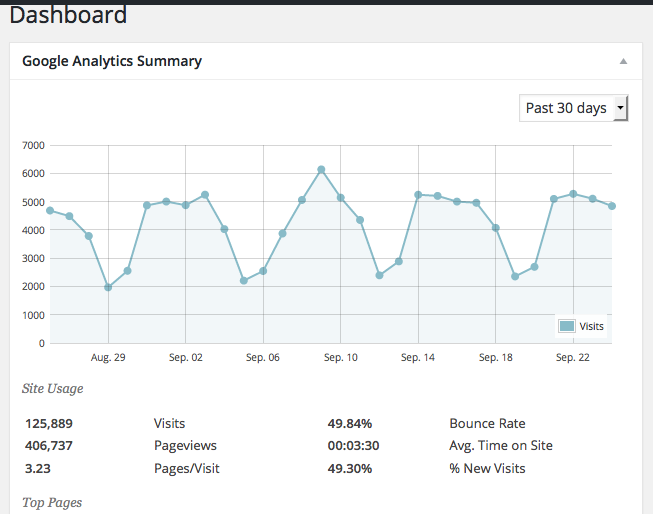
2. Alternatively, you can just use a Google Analytics plugin. There are many out there. One that I personally recommend is Google Analyticator – we use it right here on http://theeventscalendar.com! There are also other great plugins, but if choose any of the top-5 most popular, they’ll solve two problems for you: they’ll add the Analytics Tracking code appropriately on your site, and most will also have a Dashboard Widget right in your wp-admin Dashboard where you can see a snapshot of statistics, like in this screenshot:
I hope all this information helps!
Cheers,
GeorgeSeptember 25, 2015 at 7:59 am #1008714ParticipantThanks – although I still don’t think I am explaining myself properly.
When I look at mt stats on ‘wordpress’ or google or statcounter the views of ANY events are not registered.
I can see stats of my posts and pages but not events.
I have also tried to upload the CSV again with no result.
September 25, 2015 at 11:24 am #1008770ParticipantHey @sammioneill,
Thanks for clarifying your issue, I’m sorry for misunderstanding it a bit. I’m curious about why this would be happening…if there’s a tracking code, it would be added to content on your site via the wp_footer(); function, which is called in templates with the get_footer() template include function.
The plugin views for The Events Calendar have this get_footer(), so things should theoretically be working fine. Have you contacted support for any of the providers of analytics on your site? If not, I would recommend doing so to see if they have any further insight on this matter.
Finally, did you happen to try the Analyticator plugin I recommend? If not, I’d recommend trying this or another plugin. These plugins tend to be more robust in how they add their tracking codes to site content, and so might help ensure the events views are tracked within Google Analytics. Definitely install one of these plugins if you continue to have issues here, and then give the plugin and your Analytics account at least 12 hours to start letting the data propagate.
Thank you!
George-
This reply was modified 11 years, 1 month ago by
October 10, 2015 at 7:05 am #1013432KeymasterThis topic has not been active for quite some time and will now be closed.
If you still need assistance please simply open a new topic (linking to this one if necessary)
and one of the team will be only too happy to help. -
This topic was modified 11 years, 1 month ago by
-
AuthorPosts
- The topic ‘Analytics’ is closed to new replies.