
Home › Forums › Calendar Products › Events Calendar PRO › "Events" not showing on a Google Town Search
- This topic has 7 replies, 3 voices, and was last updated 10 years, 12 months ago by
Support Droid.
-
AuthorPosts
-
September 12, 2015 at 9:17 am #1004559
Kerry Sykes
ParticipantThe events are not appearing on the Google “Whats on” events when searching for a town on Facebook (this is a wordwide feature).
https://developers.google.com/structured-data/testing-tool/
When using this tool, it is not picking up the venue as a “location” therefore does not add the events.
location: missing and required
I am using the standard event calendar with Pro, so hoped these would automatically appear on a Google Search for a town.
Can you let me know what I need to do to get these showing on a general google search
On my case this is “Holmfirth”, none of my events are showing, and really should be (this will help with my Google Stats too!)
September 14, 2015 at 6:39 am #1004795George
ParticipantHey @holmfirthevents,
Sorry you’re having trouble here!
We do pass location data for the Event, hEvent, and hCalendar formats, so things should be working in theory here. For example, if you use the Google Structured Data tool that you linked to with an event from our official demo site at http://wpshindig.com, the location data shows up fine – here’s a screenshot for example/proof:
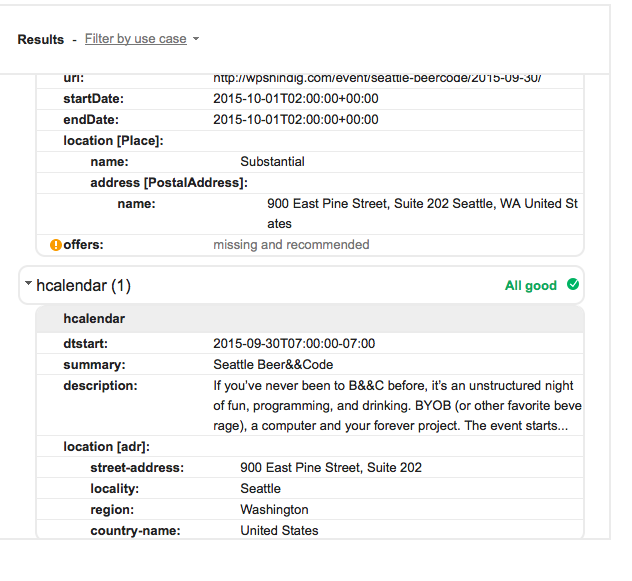
That’s the data for this event specifically, which I encourage you to try with that Structured Data testing tool yourself just to ensure that it works for you, too → http://wpshindig.com/event/seattle-beercode/2015-09-30/
So with that in mind, then, there may be a theme or plugin issue that is preventing your data from being properly displayed. To get started on investigating this, can you send over a copy of your System Information as described here? → https://theeventscalendar.com/knowledgebase/sharing-sys-info/
One thing to note as well, which I’m sure you already know but I just want to note it, is that Google can take some time for its results to update and propagate – i.e. if you make a change on your site, it’s not going to immediately start showing in Google Search results. It could take weeks for your site to be re-indexed and have its events feeds parsed accordingly. And there is unfortunately nothing we can do to speed up that process 🙁
Just wanted to note this disclaimer – let us know your “System Information” and hopefully that reveals some information we can take for further troubleshooting here.
Thank you!
GeorgeSeptember 24, 2015 at 6:11 am #1008211ParticipantThis reply is private.
September 24, 2015 at 7:01 am #1008237ParticipantThis reply is private.
September 25, 2015 at 7:36 am #1008699ParticipantHey @holmfirthevents,
Thank you for all of this information! The second chunk of information that you posted is the “System Information” I was referring to, and greatly appreciate it.
Using UK addresses should not be a problem at all. There are three things I’d recommend doing and then see if they help this issue at all:
1. Make sure you are indeed using valid addresses for your venues. If your venues are not using a valid address, try correcting their addresses and then “Update” the venue.
2. Update your version of WordPress to the latest version, currently 4.3.1 – your System Information shows you are using version 4.2.5
3. Update your versions of The Events Calendar, Events Calendar Pro, and Events Filter Bar to their latest versions. Your System Information shows these are at version 3.10.x, you should update them to the most recent versions which as of this week are 3.12.2.
Try each of these steps and then have another look at things – do problems persist?
Thank you!
GeorgeSeptember 28, 2015 at 3:53 am #1009118ParticipantThis something that should have been working on the previous version of the Event Calendar and WordPress (only recently updated). The addresses all have a valid address, I have many venue locations on the event calendar, not just one location, and none are showing at all, so this is a coding issue with the plug-in, not my system, or data entry.
It is best for me to add you as an admin on wordpress so you can look into this, I have been using the premium plug-in for 3 years now, and have never seen it showing on Google Search Events on the town, and therefore have probably lost thousands of hits to the website with this issue.
Is this an issue with the plug in being american locations and not suitable for english postcodes?
September 29, 2015 at 7:23 am #1009648ParticipantIt is best for me to add you as an admin on wordpress so you can look into this,
Hey @holmfirthevents,
I genuinely appreciate your offer to have us log into your site directly, and that you’re willing to trust us with that! However, we cannot log into user sites for any reason, so please do not post any login information for the sake of security.
As I noted earlier in the thread, there may be a theme or plugin conflict that is messing up the markup for the Structured Data format of events on your site. Have you been able to test activating a default theme like Twenty Fifteen? If not, then what I’d recommend is to activate a default theme like that, and then run a single Event on your site through Google’s “Structured Data Testing Tool” here → https://developers.google.com/structured-data/testing-tool/
Note the results, and then re-activate your original theme and repeat the process. Note the results again and then compare with the first results – is anything different?
Thank you for your patience here!
— George
October 14, 2015 at 7:05 am #1014498KeymasterThis topic has not been active for quite some time and will now be closed.
If you still need assistance please simply open a new topic (linking to this one if necessary)
and one of the team will be only too happy to help. -
AuthorPosts
- The topic ‘"Events" not showing on a Google Town Search’ is closed to new replies.