

Forum Replies Created
-
AuthorPosts
-
September 24, 2015 at 1:43 pm in reply to: Filter Bar is locking up after selecting category #1008495
George
ParticipantHey Charles,
Thank you for sharing that login information, however we cannot log into customer sites for any reason and so I have removed that login information for security purposes.
As for your issues, if updating to the most recent versions across the board has not helped, then unfortunately for now the next best step for troubleshooting is for you to run through the troubleshooting steps outlined here → https://theeventscalendar.com/knowledgebase/testing-for-conflicts/
Check on your issues after each step in that process – does anything improve?
These steps may seem tedious but are actually much quicker to go through than they seem.
Thank you for your patience with this, it’s an odd issue and these steps will help us get to the bottom of it!
Sincerely,
GeorgeParticipantJust to second Leah’s comment here, can you both, in fact, share your System Information? Like Leah linked to, you can find out how to do this here → https://theeventscalendar.com/knowledgebase/sharing-sys-info/
Thanks!
GeorgeParticipantHey Brendan,
We unfortunately do not offer any support for custom code, so there’s not much specific advice I can share here.
In general, however, it sounds like the things needed for your customization are very general WordPress questions related to custom taxonomies and such; in other words, there’s not really anything specific to The Events Calendar or Filter Bar that would come into play with your list.
To see how Filter Bar does it, I’d recommend just diving right into the Filter Bar code – check out the code in the /src/ folder, specifically, and read through the class Tribe__Events__Filterbar__Filters__Category.
In that class, for example, is a line of code like this which gets all the categories:
// Load all available event categories

$source = get_terms( Tribe__Events__Main::TAXONOMY, array( 'orderby' => 'name', 'order' => 'ASC' ) );
That uses the general WordPress function get_terms(), which sounds like it’d be quite useful for your own customizations and can be read about here → https://codex.wordpress.org/Function_Reference/get_terms
I hope all of this information helps!
— George
September 24, 2015 at 1:32 pm in reply to: How do I get user's current position with Location field? #1008486ParticipantHey @fifteen15studios,
Thanks for reaching out!
However, I’d like the ability to geolocate (or at least get close) the user’s position. I think I can make a button which can feed the GPS coordinates or IP location to the search field, but I was wondering if this feature was built in? If so, how do I activate it?
This is unfortunately not a default feature that is built-in to the plugin, and therefore is not possible to have on your site without some extensive custom-coding 🙁
I’m sorry to disappoint! Let me know if this information helps and/or if there’s anything else that I can help with.
Sincerely,
GeorgeSeptember 24, 2015 at 1:30 pm in reply to: Next/Prev event navigation links doesn't lead to correct events #1008483ParticipantOh, and P.S. – I noticed your version of WordPress is 4.2.5 – that’s a pretty recent version, but the current one is 4.3.1. Any chance you can update 4.3.1 just to rule this out as a possible factor in this issue?
Thank you!
September 24, 2015 at 1:29 pm in reply to: Next/Prev event navigation links doesn't lead to correct events #1008482ParticipantHey @twkmedia,
Sorry to hear things aren’t working right on your site – I’m happy to help try and fix this. There aren’t any conflicts that I recognized off the top of my head as I looked through your System Information, and I totally relate to your concerns about going through all those conflict-related troubleshooting steps on a live site…
We can keep conflicts in mind and come back to that for troubleshooting purposes if nothing else is letting us make progress, but before we get to that sort of testing, I’m curious if you can first clarify your comments here:
This is the code used to display the links and I can’t figure out why there’d be any problem with it.
Do you mean that you’re using some custom code on your site at all, any customized The Events Calendar views perhaps?
No worries if so, but just for the sake of testing I would recommend making a backup of all of these customizations; and then temporarily removing them from your site. Once removed, see if your issues with the Prev/Next links persist or are different in any way.
Let us know about this, we can continue troubleshooting from there!
Thanks,
GeorgeSeptember 24, 2015 at 8:33 am in reply to: Venue name and City are required after update….when they're in the Saved Venue #1008364ParticipantThank you for your patience, too, @Mad Dog – I’ll close up this thread but please keep an eye on plugin updates as we are now aware of some bugs here and will try to get fixes for them into the next few public releases.
Cheers!
GeorgeParticipantHey @Pagan11460,
Sorry for the confusion here, I will try to clarify a bit.
1. Go to “Pages” in your WordPress admin, by going to the link shown in this screenshot:
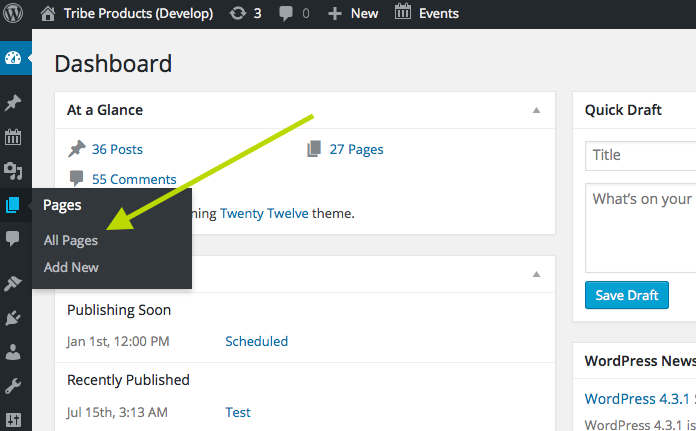
2. In the list of pages that this link brings you to, is there a Page called “events” here whose slug is /events?
If so, then make the /wpevents/ change again for your The Events Calendar “events slug” option. Then, go to Settings > Permalinks in your admin area, and just click “Save Changes” without actually making any changes. This may seem like an odd thing to do but is a little “trick” within WordPress to get the permalinks across your site to refresh, which might help here.
Leave your site in this state after making this change, and let us know when you’ve done this. Then, link to both URLs and I will take a look.
Thank you for your patience!
ParticipantHey Kim,
Any such combinatory functionality between Community Events and WooCommerce Tickets unfortunately does not exist at this time; in other words, you cannot do what you mentioned trying to do at this time.
However, we are launching an all new plugin called “Community Tickets” to address this very problem – the plugin is coming soon, and while I do not have an ETA on its public release, we just launched a public beta of the plugin yesterday to get some feedback from the community before we ship the plugin. So, it’ll be coming sooner rather than later 🙂
The beta is unfortunately “Officially” closed to new applicants, which I wish weren’t the case so that you could get your hands on the Beta code and play around with things.
But if you email me at george at tri.be with a link to this forum post, I’ll see what I can do and might be able to get you some Beta code 😉
Cheers!
GeorgeSeptember 24, 2015 at 8:15 am in reply to: Languages not working with customized template files #1008346ParticipantHey Eugene,
This problem stems from the fact that translations rely on the plugin’s .mo and .po language files, which are generated anew before each release of the plugin.
The problem is that these files point to strings in the core plugin, so if you have a customized template, then this new custom file in your theme is not a part of the .mo and .po files and so will not be translated as part of The Events Calendar.
The only solution would be to generate new .mo and .po files – you can search online for information on how to do that, there are a number of ways.
I hope this information helps!
— George
ParticipantHey Jo,
I’m glad to hear that you’ve found The Events Calendar useful for your site!
You can indeed get the personal license, and if you only have one website then that’s the license you should be getting 🙂
As for the company behind all this, we’re Modern Tribe, Inc., which you can find out more about here → http://tri.be
Let me know if this information is helpful and/or if there’s anything else I can help with!
Cheers,
GeorgeParticipantHey Adulis!
Thanks for posting here, I think you’re in luck because we now do have a list of well-reviewed customizers that we have heard good things about from users. Those customizers are listed here if you’re interested → https://theeventscalendar.com/find-a-customizer
I hope that helps! Let me know if it does 🙂
— George
September 24, 2015 at 8:07 am in reply to: Filter: "wootickets_email_message" not changing the message #1008328ParticipantHey Sean!
Sorry you’re having some trouble with this snippet – however, the snippet itself is fine and there’s no problem with putting it in a child theme functions.php file…
You could try adding the snippet to the functions.php file of your parent theme, perhaps, and also there might be a difference if you remove the “priority” argument in your add_filter call – i.e. instead of this:
add_filter( 'wootickets_email_message', 'sdn_wootickets_filter_completed_order', 10 );You just have this:
add_filter( 'wootickets_email_message', 'sdn_wootickets_filter_completed_order' );Just some ideas.
If you do a test purchase for yourself, does the email that you receive have the proper message?
— George
ParticipantHey @Lourene,
I’m really sorry that you’ve been having so many problems here!
1. How, specifically, are you hosting your website?
Also, when you say something like this:
Our server insists that they can not duplicate this error
2. By “our server”, who specifically are you contacting about this?
I ask these questions because, while I know you’ve been caught between support teams already and I hate to say “it’s not our fault” and leave you empty-handed again, this error is unfortunately something that would arise not from our plugin itself but from the configuration of your hosting and your web server.
I’m not saying we can’t help here! 🙂 Just clarifying the origin of an error notice like that.
Let me know about questions 1 & 2 here and I’ll happily help as much as I can from there.
Thank you!
GeorgeParticipantHey Tal!
Really sorry to hear about this issue on your site – I’m wondering, if you follow the steps outlined here and then try saving the Key after each step, does anything improve? → https://theeventscalendar.com/knowledgebase/testing-for-conflicts/
Let us know!
If that doesn’t help at all, then your best bet may be to just manually update the plugins; you can get updated versions of your Premium add-ons by going to http://theeventscalendar.com/my-account/downloads, and can get the most recent version of The Events Calendar by going to http://wordpress.org/plugins/the-events-calendar
– George
-
AuthorPosts