
Home › Forums › Calendar Products › Events Calendar PRO › Suddenly… an error message…
- This topic has 8 replies, 5 voices, and was last updated 10 years, 7 months ago by
Leah.
-
AuthorPosts
-
September 18, 2015 at 7:49 am #1006429
Margaret Tehan
ParticipantHello, I’ve been using The Events Calendar Pro on this site: http://www.wpbakerygroupusa.com/ for several years. Now, suddenly, I am getting an error message across the top of my dashboard that says:
The page “Events” uses the “/events” slug: the Events Calendar plugin will show its calendar in place of the page.
Edit the page slug or edit The Events Calendar settings.But the calendar is actually working just fine. Do I need to make a change? If so, can I change the events url slug to “wpevents” and keep the Events *page* slug as “events”? If people have that page bookmarked, I want to keep the page slug as is. If I make that change, I want to make sure that my calendar will still work and that it will display on the events page at: http://www.wpbakerygroupusa.com/events/
September 18, 2015 at 11:23 am #1006539George
ParticipantHey @pagan11460,
Sorry you’re having trouble here! If you have a Page that is called Events and its slug is /events/, then there will indeed be a conflict here and the error will display.
What you recommended here should work:
If so, can I change the events url slug to “wpevents” and keep the Events *page* slug as “events”?
Try that out and let us know if issues and/or that error persist!
Cheers,
GeorgeSeptember 22, 2015 at 9:44 am #1007549ParticipantWell, George… that didn’t work. I wanted to keep the page slug at http://www.wpbakerygroupusa.com/events/
When I changed the slug in the settings to wpevents, that changed the slug to http://www.wpbakerygroupusa.com/wpevents/
So… I changed it back. The calendar is still working — for now. I don’t know what will happen when I attempt to add new events to the calendar.
So my question is… why am I suddenly getting this error when I’ve been using The Events Calendar Pro on this website for years and I didn’t get this error message before?
September 23, 2015 at 8:14 am #1007876ParticipantHey @pagan11460,
Sorry for the confusion – I misread your first post and think that clarifying these details here will help us clarify the whole issue:
1. Do you have a page on your site called “Events” and whose slug is /events/? This means an actual “Page” in your WordPress admin, not just the calendar that is generated by The Events Calendar and is viewable at /events/ on your site.
2. If you have a page like this, and then also have the “events slug” in your The Events Calendar settings set to /events/, then it means that there are two things trying to exist at .wpbakerygroupusa.com/events/ – the true “page” created in your admin, and the calendar whose “Events slug” setting is set to /events/. There are only two fixes if you have this setup: either delete the “page” or rename it; or make the “Events slug” something else.
3. If you do not have an actual page called “Events”, but this error is displaying anyways, then it’s just a small bug on your site. Why is it happening now when it hasn’t before? Well, the error itself is a recent feature of the code, and if its showing erroneously like this then it is because of an odd permalinks-related bug on some sites. We are trying to fix this bug, but for now you can ensure that the error is hidden by adding the following bit of code to your theme’s functions.php file:
if ( class_exists( 'Tribe__Events__Admin__Notice__Archive_Slug_Conflict' ) ) {

    remove_action( 'admin_init', array( Tribe__Events__Admin__Notice__Archive_Slug_Conflict::instance(), 'maybe_add_admin_notice' ) );

}
I hope this helps clarify things a bit!
— George
September 23, 2015 at 10:17 am #1007931ParticipantHi George… I’m sorry but this still isn’t making any sense to me. You ask:
1. Do you have a page on your site called “Events” and whose slug is /events/?
My answer: Yes. I do have a page called “Events” and the slug is “/events/” — I have had a page called “Events” and a slug called “/events/” ever since I first started using The Events Calendar Pro.
You then say:
“2. If you have a page like this, and then also have the “events slug” in your The Events Calendar settings set to /events/, then it means that there are two things trying to exist at .wpbakerygroupusa.com/events/ – the true “page” created in your admin, and the calendar whose “Events slug” setting is set to /events/. There are only two fixes if you have this setup: either delete the “page” or rename it; or make the “Events slug” something else.”
But… a.) I can’t change that URL — http://www.wpbakerygroupusa.com/events/ — because my client uses it in printed brochures, etc. It’s already been established and I need to keep it that way. So I can’t delete the “page” or rename it. But then you say that I can make the “Events slug” something else.
As I said above, when I make the “Events slug” something else… like “/wpevents/”… then my page has the slug http://www.wpbakerygroupusa.com/wpevents/ — If I make that change and then try to view the events page at http://www.wpbakerygroupusa.com/events/ — the calendar is no longer displaying and instead, I see a shortcode.
Meantime, the events calendar *is* actually working despite the warning messages. You say that you are trying to fix this bug… so… if my calendar is working, then should I just ignore this message seeing as how your working on fixing it anyway and I’m not having any problems with my events calendar?
September 23, 2015 at 12:35 pm #1007999Cynthia Lockley
Participant@pagan11460 and @George You do not need a page called Events. The Events Calendar creates that page for you as a ghost page. You don’t need to create a slug. The ghost page will have the URL yoursite.com/events
1. If you have an Events page in your Pages directory, go to Pages and delete your Events page.
2. If you have a navigation menu item at the top, go to Appearance/Menus and delete the Events (or whatever you called it) menu item since that page is no longer there. Then, in the Custom Link box, create a new menu item with a custom link yoursite.com/events using the Events name you had before. It will point to your ghost page.
-
This reply was modified 11 years, 1 month ago by
September 24, 2015 at 8:30 am #1008361ParticipantHey @Pagan11460,
Sorry for the confusion here, I will try to clarify a bit.
1. Go to “Pages” in your WordPress admin, by going to the link shown in this screenshot:
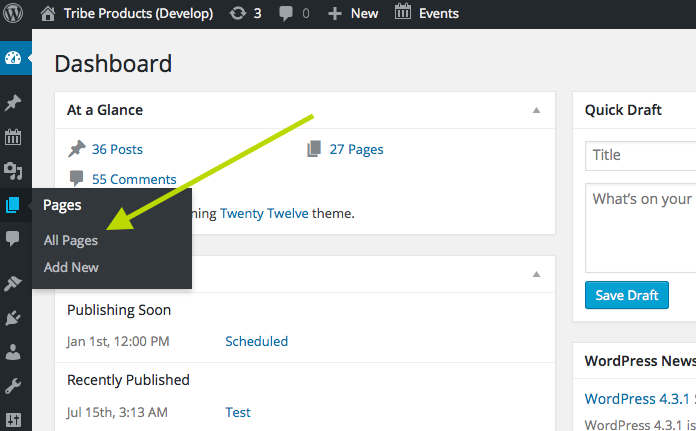
2. In the list of pages that this link brings you to, is there a Page called “events” here whose slug is /events?
If so, then make the /wpevents/ change again for your The Events Calendar “events slug” option. Then, go to Settings > Permalinks in your admin area, and just click “Save Changes” without actually making any changes. This may seem like an odd thing to do but is a little “trick” within WordPress to get the permalinks across your site to refresh, which might help here.
Leave your site in this state after making this change, and let us know when you’ve done this. Then, link to both URLs and I will take a look.
Thank you for your patience!
October 9, 2015 at 7:05 am #1013079Support Droid
KeymasterThis topic has not been active for quite some time and will now be closed.
If you still need assistance please simply open a new topic (linking to this one if necessary)
and one of the team will be only too happy to help.March 14, 2016 at 12:10 pm #1088590MemberHi there,
I wanted to drop in here and let you know that a fix for this problem is included in our upcoming release. Keep an eye on your Updates page for the new version and watch our blog for the release notes post.
If you experience any issues after updating your plugins to the new versions, please open a new thread in the forum and we’d be happy to take a look.
Thank you for your patience while we expand and improve our plugins!
Best,
Leah -
This reply was modified 11 years, 1 month ago by
-
AuthorPosts
- The topic ‘Suddenly… an error message…’ is closed to new replies.