

Forum Replies Created
-
AuthorPosts
-
George
ParticipantAwesome! Thanks for the update @Ben – best of luck with your site 🙂
Cheers,
GeorgeNovember 3, 2015 at 9:44 am in reply to: Pro plugin infinite loop in wp-cron, exhausts SQL queries and brings site down #1021358ParticipantI’m sorry about this situation @Duane – it looks like your purchase of your license is from June of this year, is that correct? Our payment processors only let us process refunds within 30 days of purchase, so we are unfortunately not able to issue a refund although if I could I would do that immediately 🙁
If you do not deem the plugin worth continuing to use, then I guess that’s the best decision if you think it’s the best decision.
If you would like to share SQL exports anyways, it’s much appreciated and we can indeed do some testing with it. You can email .zips of these exports privately to us at [email protected].
Sincerely,
GeorgeNovember 3, 2015 at 9:38 am in reply to: Can Import from Eventbright to WP, but can't upload from WP to Eventbright #1021354Participant@docfx, I’m terribly sorry and have no good explanation for what happened. I just completely messed up here and somehow blanked on one of the key features of the plugin. I’m really, really sorry!
Posting to EB from WP is indeed supposed to work, and it does for me as I just tested it, so I unfortunately think there is a code conflict on your site.
You mention already testing for conflicts with your theme, but what about your other plugins? Of particular interest is WordFence – it’s a great plugin, but it might be blocking or interfering with the communication between your site and with eventbrite.com.
I would recommend deactivating all plugins except The Events Calendar and Eventbrite Tickets, BUT you claim to have already tried this to no avail. So this is quite a perplexing issue – I will rope in another developer on our team for some extra help with figuring this one out.
Thank you for your patience while we investigate this and try to reproduce the problems, which we are currently unable to do. I see that your licenses are recent purchases – if worst comes to worst, and we’re unable to resolve this, then we are happy to refund your purchases in full (which we can do within 30 days of the date of purchase).
Once again, I’m really sorry about my confusion here.
Sincerely,
GeorgeParticipantHey Quincy,
Thanks for clarifying your question.
Just to be clear, this is the “Pre-Sales Questions” forum, so we cannot field support requests here. Further, adding featured images to event views unfortunately requires custom code, which we are not able to help with regardless of where you post it.
With that being said, we have three Knowledgebase articles that cover Featured Images and event two examples of adding them to event views:
• https://theeventscalendar.com/knowledgebase/featured-images/
• https://theeventscalendar.com/knowledgebase/adding-featured-images-to-month-view/
• https://theeventscalendar.com/knowledgebase/add-thumbnails-to-upcoming-events-list-widget/I hope this helps!
If you’re curious about how to add featured images to even more event views, then your best bet is to use the same principles in the articles above and apply them to the other views you’d like to customize.
You can learn about customizing views in general in our Themer’s Guide here:
• https://theeventscalendar.com/knowledgebase/themers-guide/Best of luck with your customizations!
George—
P.S.
Apologies if the “Showcase” is at all misleading; many of the views in the showcase are customized in line with the things I mentioned above, and the owners of those sites have customized their calendars to achieve the views you are referring to.
ParticipantHey Ryley,
If you deactivate both Jetpack and the Jetpack Extras plugin, does that error go away?
Thanks!
GeorgeParticipantHey @Cliffy,
Thanks for the thoughtful reply, lots of interesting points here. And no worries about your original post – it wasn’t harsh or anything! I sensed some frustration but that is totally fair, and hopefully we can both agree that our “Related Events” feature can be improved in general 🙂
To address a few of the additional points you raised, all I mean about an event being “more” or “less” related is like this:
• Events A and B are in the same category as each other, but have no keywords in common (in their event descriptions, event titles, etc.)
• Event C is in the same category as Event A, and also has some of the same keywords in its event description.So Events A, B, and C are all “related”. But A and C are “more” related because they have more in common. And so if you multiply factors like this across hundreds of events, etc., you end up with a gradient of “relatedness” for any set of events, not just a black-and-white “this is related” and “this is not related”.
Now, our related events system is not quite as sophisticated as this at present, but it was just an illustration of things to consider.
But a simple dialog box which represented weeks would I’m sure resolve the issue Jennifer and I have raised. If you want years, then x weeks by 52 etc.
You are partly correct here, and when it comes to converting weeks to years it is a rather simple thing to do in concept. The issue is the full implementation of this as an outright feature, and, as you noted, not just a “quick fix”.
I can (and will!) create a development feature ticket for this; it’s a great idea and your and Jennifer’s thread will both be linked to as examples of folks wanting this feature, which will raise the “priority” of the ticket and thus hopefully lead us to discuss it as a development team sooner rather than later. I appreciate your kind words about our listening to users and such – we do listen to feedback and love hashing out complex problems! 🙂
To be completely candid and frank with you, there is no way for a UX feature for this to make it into our plugins for our next planned release. This release is a major one, and we’re already more or less complete with development are in the pre-launch phases of QA, Testing, fixing our bugs, and all that fun stuff that it sounds like you might be quite familiar with based on your experience in the field 😉
But who knows? The release after, or a maintenance release in between or something, could see some UI implementation of this. Until then, I’m sorry to say that Brook’s original code snippet is the best solution at this time.
Thanks for the back-and-forth here, @cliffy, and for adding your voice to this feature request. The feedback genuinely does help, and we appreciate it.
Let me know if you have any other thoughts on all of this, or if I can help with anything else.
Cheers!
GeorgeNovember 3, 2015 at 8:42 am in reply to: Known Issue: Previous Event Link on Single Event Page #1021323ParticipantThanks for reporting this @Heath! We’re still working on a fix 🙁 I’m really sorry about this but appreciate your patience.
— George
ParticipantHey @darrdav,
No, in general VAT is not applicable. Let us know this helps or if you have further questions!
— George
ParticipantJust commenting on this thread to let you know, Mad Dog, that we’re still working on this but are approaching a release. We’re hoping to get something out the door before the end of the month at the latest, if all goes to plan. 😀
Stay tuned!
GeorgeParticipantThis reply is private.
November 3, 2015 at 8:16 am in reply to: the events calendar Pro + Weekly view + on homepage #1021303ParticipantHey @Linda,
Because of the way The Events Calendar works you can’t really pull of having the events calendar on a homepage of a site, unfortunately 🙁
It might be possible with some extensive code customization that we wouldn’t be able to help with, or with some method of just redirecting users to /events on your site so that it essentially acts like the homepage.
I’m sorry about this; we’re working on better solutions for this because many people have been requesting this, but unfortunately at this time the only way to really get events showing well on a homepage is with our Widgets 🙁
Please let me know what you think and if there’s anything else I can help with Linda – thank you!
— George
November 3, 2015 at 8:05 am in reply to: 500 Internal Server error with 3.12 Just purchased 10/13/15 #1021290ParticipantReally sorry to hear about this @Frank – this NOT normal behavior and there are no reports of similar behavior at this time, so it sounds like something is conflicting on your site.
Are you able to access your wp-admin now? I’m not sure because you said you were unable to, but then also mention having done some plugin conflict testing.
If you can access your wp-admin, please deactivate Events Calendar Pro and then share your system information with us. Here’s how to do that → https://theeventscalendar.com/knowledgebase/sharing-sys-info/
Then, see if any errors pop up on your site if you head to your site’s wp-config.php file and change this line of code:
define('WP_DEBUG', false);to this:
define('WP_DEBUG', true);That will display PHP errors if any exist, which might be quite useful here.
Once you’ve made this change, re-activate Events Calendar Pro so that your site breaks, and see if any PHP errors are there on the white screen. If so, copy and paste the entirety of these errors and share them with us here.
Thank you!
GeorgeParticipantHey AJ,
Thanks for reaching out and for your interest in Events Calendar Pro! We don’t quite know when it will be released – if everything goes to plan, we’re really working hard to try and get it out before it’s 2016, but it’s an ambitious release so to be completely candid that could be pushed back a bit.
As for the ticketing features specifically, these will be in a separate and free plugin. The features will be essentially the same as the existing WooCommerce Tickets add-on, at least for the initial release of the plugin. If by “variable prices” you mean, for example, that you can have one ticket at $20 for adults, then another option for $15 for kids, then another option for $12.50 for Seniors or something like this, then yes that should be supported well.
I hope this helps! Let me know any further questions you might have, or if I can help with anything else 🙂
Cheers,
GeorgeParticipantHey @Byung! I’ll address your questions in order:
1) how can I remove attached Calendar powered by The Events Calendar link? (Reference to below capture link)
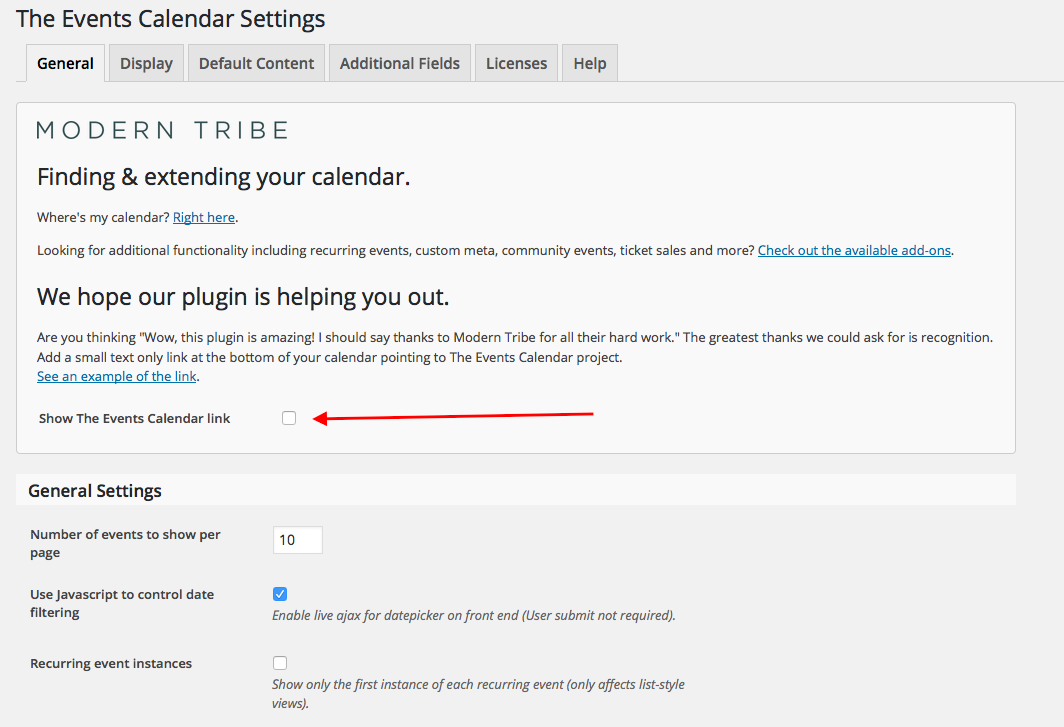
You should be able to do this by heading to Events > Settings in your wp-admin. There’s an option called “Show the The Events Calendar link” – simply un-check this option, save your changes, and it should be gone when you go back to view your page.
Here’s a screenshot of that option:
2) Do you have “Short Code” for tickets add to cart on the post page such on below?
Unfortunately, we do not have a shortcode for enabling that on non-Event posts at this time 🙁 The best option currently is just to add a link to the event itself at the bottom of your post or something, unless you were to write custom code to get around this.
3) please advise what images I can add to? (Reference to screen capture)
Those image spots are for the “Featured Image” of your event – you can learn about this feature here: http://www.wpbeginner.com/glossary/featured-image/
I hope this helps!
Cheers,
GeorgeParticipantHey Courtney,
Unfortunately doing this would require some editing of core plugin code, which is never recommended 🙁
I covered this customization over in this other forum thread which I recommend checking out and whose steps I recommend replicating → https://theeventscalendar.com/support/forums/topic/google-maps-disable-scroll/
Other than that thread, there are unfortunately not many further resources for this. I’m sorry if any of this is disappointing Courtney!
Sincerely,
George -
AuthorPosts