

Forum Replies Created
-
AuthorPosts
-
George
ParticipantHey @Christal,
I’m sorry about these issues – I noticed in your “System Information” that you’re using Events Calendar Pro is at version 3.12.2. We’re currently at 3.12.5, and this error should be fixed in 3.12.5
If you update, does the issue persist?
Thanks!
GeorgeParticipantHey @Mike,
I’m sorry that issues are persisting!
I removed your login information because we are unfortunately cannot log into customer sites for any reason; one of the main reasons for this is for security purposes.
Now, back to your issue:
You mention that you suspect a theme conflict here. What, specifically, makes you suspect this?
Also, we’re unfortunately not able to tell if there’s a conflict for sure. The only definitive way to reveal or rule out a conflict is to run through the complete set of troubleshooting steps here → https://theeventscalendar.com/knowledgebase/testing-for-conflicts/
Let us know if you can do those steps, and if so, what you find!
Thank you,
GeorgeParticipantHey @darrienw93,
We unfortunately cannot help with code customizations, which is essentially what customizing the event emails would boil down to, but I’m happy to help as much as possible.
With that in mind then, can you clarify or elaborate on exactly what you mean by your comments here:
I see that there is a foreach loop that will print this information for every ticket that is purchased in the email.php, but I only need this data to be displayed once in variables in my email template.
The variables are not available outside of the loop, although the $tickets variable is itself an array so you can just refer to the 0-index element in that array if you only ever want to show information from the first ticket in the order. And so the code would essentially just look this for example:
$tickets[0]['event_id'] instead of the current version inside the loop which is $ticket['event_id']
If you’re not familiar with PHP arrays and how to use them, I would recommend researching that more online.
Best of luck with your customizations!
— George
ParticipantThat’s excellent feedback @Courtney, and we appreciate it. The mobile usability of Maps is something we’ve been thinking about for some time now, and are indeed hoping to improve that aspect of the Map View.
I’m sorry for the inconveniences here – thanks for the thoughtful replies despite them 🙂
Best of luck with your site going forward; if other questions, comments, or concerns ever arise, open a new thread any time!
Sincerely,
GeorgeParticipantI’m sorry about the lack of 100% compatibility, @James 🙁 It’s truly something we’re not proud of and are working hard to improve.
I’m sorry for the inconveniences that arise from all of this, but wish you the best of luck with your site in the meantime.
Cheers,
GeorgeParticipantHey Chris,
If you want the calendar to live at /calendar instead of /events, then delete any “Page” in your wp-admin that has the slug /calendar OR /events.
Once that “Page” is deleted, go to Events > Settings. Right there on the “General” tab, set the “Event slug” option to calendar. Here’s a screenshot of this option:
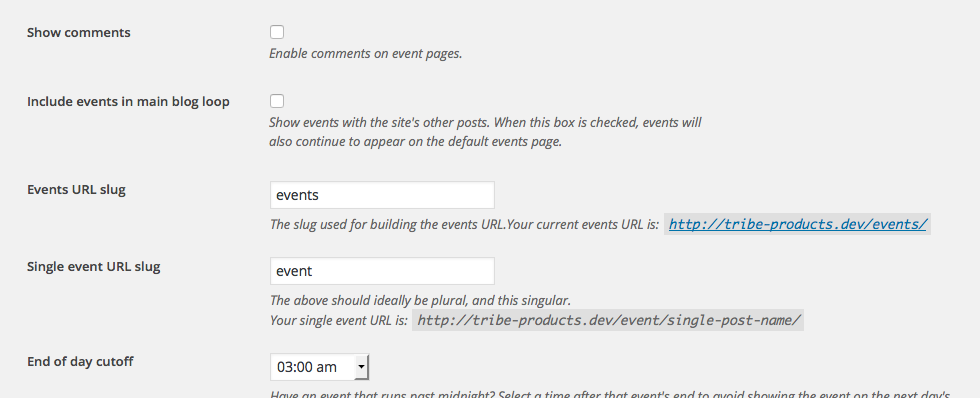
Then go to Settings > Permalinks in your admin area, and just click “Save Changes” without actually making any changes. (This may seem like an odd thing to do but is a little “trick” within WordPress to get the permalinks across your site to refresh, which might also help here).
Let me know what happens if you do these exact steps….
Thank you for your patience @Chris!
Cheers,
GeorgeParticipantCool, thanks for the update @Tarmota.
Best of luck with your site! 😀
— George
November 3, 2015 at 10:07 am in reply to: How do I put an upcoming events list on my homepage in a text or code area? #1021375ParticipantI’m sorry it didn’t help that much, @gardenclubcouncil 🙁 If you need the customizations regardless and cannot implement them yourself, your best bet is to hire some professional assistance. We have a list of highly-rated developers here that might be helpful if you’re looking for people to hire → http://m.tri.be/18k1
Best of luck with your custom site development!
— George
ParticipantThanks for the update @Nicholas! In regards to your questions about updating, I’m not sure why you didn’t get the notice – now that you’re updated, if you enter your license key in your settings then you should be getting update notices.
If not, then I’d recommend contacting your web host support because there might be a server configuration that is preventing communication between our update server and your site or something like that…
Sorry about the inconveniences from manual updating! It’s a good fallback option but you should be able to update right from within your admin with one-click updates based on the “Update available” notices.
Make sure your license key is entered, and that your web host confirms that communication between the servers is not interfered with…
I’ll close up this thread for now but wish you the best of luck with your site 🙂
Cheers!
GeorgeParticipantHey @Sean,
I’m a bit confused – you say that the display of times is problematic, but look at the times in your screenshot:

But you verified that that was the exact display you wanted:
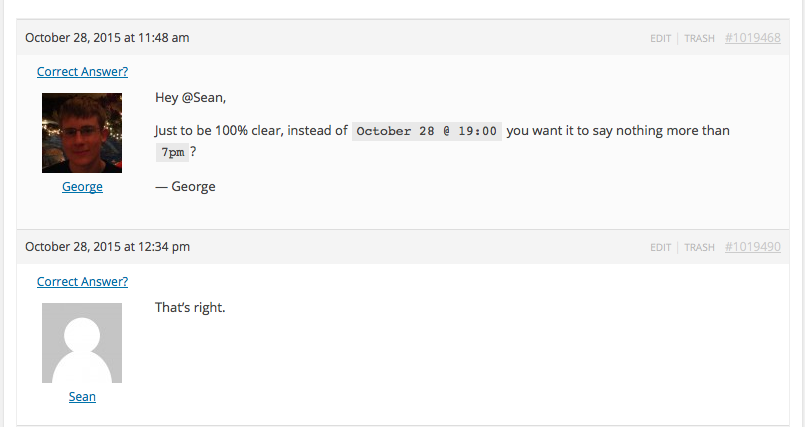
So it seems that the only problem is that it’s 4 hours ahead of where it should be – if you set your site timezone to something 4 hours behind its current setting (just for testing purposes!), is this resolved?
Thanks for your patience with this,
GeorgeParticipantThis reply is private.
ParticipantThanks for this information!
According to the information, your Events Calendar should be live at http://www.lachai-roi.nl/agenda, however this link is still just a blank white screen for me 🙁
I’m sorry, but unfortunately the only steps I can think of recommending would be to run through the complete set of troubleshooting steps here → https://theeventscalendar.com/knowledgebase/testing-for-conflicts/
Check on your issues after each step in that process, and let us know what you find!
Thanks,
GeorgeParticipantHey Greg,
Good find! The detail of import is what Brian wrote here:
There shouldn’t be any structured data showing for the widget, we are limiting that to single-event pages only. It sounds like the widget is causing this on your posts.
As it stands, we’re not sure why this structured data conflict is happening; so, apologies if I wasn’t clear about the status of this issue. I’d never heard of this until your thread, though the fact that there are other reports of now indeed make the case that this could be a code problem within our own software.
It could also be theme-related, or a combination of these factors.
Regardless of such, there is not currently a fix for this. I’d recommend staying tuned to updates since we will release a fix there if we are able to figure out the problem – check the “changelogs” of releases to see if this is mentioned there on any given update.
Thank you for your patience with this!
— George
ParticipantCheers! 😀
ParticipantNice! Stay tuned to plugin updates, we’ll be including an official fix for this as soon as possible 🙂
Cheers,
George -
AuthorPosts