

Forum Replies Created
-
AuthorPosts
-
George
ParticipantI’m sorry Ryley, I don’t have any further suggestions at this time – I cannot recreate this problem 🙁
The one thing that seems to stand about all of this is how things worked fine before your site migration. That seems to indicate that something about your new hosting environment is playing a direct role in these issues.
Just to be clear, what are your Permalinks actually set to? E.g. are they /%postname%/, for example?
Thank you so much for your patience here, Ryley. I’m really sorry about this odd issue.
Sincerely,
GeorgeNovember 4, 2015 at 10:15 am in reply to: Previously entered event name displayed in lists My Venue, My Organizer #1021786ParticipantHey @Jim,
Thanks for elaborating on what you see as the issues here, and clarifying them as this:
The appropriate correction would be to disallow the creation of an organizer or venue without the entry of a unique name for the organizer or venue.
This is unfortunately a bit tricky to do, but we have a knowledgebase article covering the basics of the customization: https://theeventscalendar.com/knowledgebase/required-fields-for-events-submission-form/
You can specify the requirement of the venue name or organizer name values by requiring specific elements on the $_POST array upon submission.
—
I apologize for the roundabout way of arriving here – I misread comments in your posts like this one:
Something in TEC is producing those names from somewhere, and without validation/testing.
I read that and thought that there was some additional, more elaborate code-conflict situation here.
— George
ParticipantNice! 😀 Best of luck with your site @darrienw93.
— George
ParticipantThanks for the update on this @Edwin – best of luck with your site 🙂
ParticipantHey @Hellowebsites,
Sorry to hear about these issues – I can’t recreate them on my testing site’s Map View page (I know you said Map View was disabled, but just noting it), so I’m curious if you can provide some additional info here:
1. What is URL to the events page you’re talking about?
2. When did this issue start happening? Has it been around since the moment you activated Events Calendar PRO, or has it been fine and then only recently started acting up? If the latter, do you remember any recent changes you made right before the issue started happening?
3. Can you share your “System Information” with us? Here’s how → https://theeventscalendar.com/knowledgebase/sharing-sys-info/
Addressing each of these three questions above will provide some fertile ground for further investigation here; thanks in advance for addressing these questions!
— George
ParticipantHey Hannah,
Thanks for reaching out – we unfortunately don’t have this feature with our ticketing plugins at the moment, and even “Free” tickets would, at this time, require going through a checkout process (i.e. “purchasing” the free tickets).
However, in our upcoming version of The Events Calendar, version 4.0, we have some simple RSVP features that pretty achieve what you described here:
It’s just to get an idea of attendee names and numbers, really.
I don’t have a definitive release date for the 4.0 update, but it should be here by Thanksgiving Day if all goes to plan.
Let me know what you think about this and if I can help anything else!
Sincerely,
GeorgeParticipantHey @Frank,
Thanks for reaching out!
These features are technically possible to implement, but are not supported by default in our plugins and so implementing these features would require writing custom code 🙁
While we cannot help much with writing custom code, I’m happy to provide as much general advice here as I can, and can hopefully get you pointed in the right direction so you can take things further and actually implement the code.
First and foremost would be figuring out what JavaScript tooltip library you would like to use. There are many, many options, though two of the most common are:
• Bootstrap tooltips → http://getbootstrap.com/javascript/#tooltips
• jQuery UI tooltips – which are included within WordPress by default! 🙂 – https://jqueryui.com/tooltip/You can “enqueue” the necessary for JavaScripts for these libraries with the wp_enqueue_script() function, which you can learn about here → https://codex.wordpress.org/Function_Reference/wp_enqueue_script
Once you have the necessary JavaScripts loaded, all the actual data for the events and their titles is already loaded on the page in the widget; so with some CSS to make things look like you want, and JavaScript to set up the tooltips, you should be able to pull this off.
I’m sorry if any of this is too vague – like I mentioned, we can’t actually help with writing custom code and so general advice is the best I can offer here. I hope it helps regardless!
Sincerely,
GeorgeParticipantHey @Justin,
I’m really sorry to bear the news that no, this unfortunately is not possible at this time 🙁
It’s an idea that has been bubbling up over the years and something we’re interested in making; it’s unfortunately quite challenging to pull off from a code side, however, and so features like this will likely not make into our plugins for a long time if ever.
Sorry to disappoint @Justin! Please let me know if you have any more thoughts on this matter or if I can help with anything else.
Cheers,
GeorgeNovember 4, 2015 at 8:58 am in reply to: change color of list widget(theevents calendar pro) #1021755ParticipantHey @Sotiris,
Doing so would require writing some custom CSS on your site.
To do this, get a [free!] tool like Firebug if you use FireFox, or the Developer Tools for either Safari or Chrome. They have “Inspector” tools that let you zoom right over the element whose CSS you want to customize.
For a quick example, you could use these methods to find the CSS selectors to change the background color of the date icon in the list widget, like this:
.tribe-mini-calendar-event .list-date {

    background: #cc9900 !important;

}
If you put that code in the bottom of your theme’s style.css file, that would make them a light burnt-orange color instead of the default gray coloring.
Use these methods for any further customizations you might want to make – let us know if this helps!
Cheers,
GeorgeParticipantThanks for reaching out.
I’m afraid I don’t quite know what you mean by “none events” – can you elaborate on all of this and clarify exactly what you mean? Include examples as well if possible.
You mention this in your post:
My client would like users to be able to see what else is going on at their venue throughout the month, as well as the events.
What else would be happening at venues other than events?
Apologies for my confusion here – thank you in advance for clarifying all of this, I just want to be 100% certain I know what you’re asking so I can best help out!
Thank you 🙂
GeorgeParticipantHey Matt,
Thanks for reaching out. Coupon codes are a feature of the eCommerce plugin that you choose to use, not The Events Calendar itself or any add-ons for The Events Calendar.
So, for example, if you wanted to use WooCommerce on your site, then The Events Calendar: WooCommerce Tickets would enable ticket sales; but WooCommerce itself would allow and power the coupon codes on your site. In this example, then, WooCommerce’s own documentation on this topic would be the best resource → https://docs.woothemes.com/document/coupon-management/
I hope this information helps; let me know!
— George
November 4, 2015 at 8:46 am in reply to: Change Event Categories to Drop-Down Menu On Submission Form #1021740ParticipantHey @Kevin, we unfortunately can not tell you how to do this 🙁
Doing this would require some fairly-extensive code customization, which we do not help with here.
—
Now, with that being said, I’m happy to walk through some of the main things involved with and comprising this customization.
First and foremost, you’d need to get familiar with our Themer’s Guide here → https://theeventscalendar.com/knowledgebase/themers-guide/
That guide will show you how to customize “View” files, AKA template files, within The Events Calendar and any of its add-ons like Community Events.
—
To start tweaking the category picker in the community form, you’ll want to use the principles of the Themer’s Guide above to recreate a version of this Community Events file in your theme:
/src/views/community/modules/taxonomy.php
Make this a duplicate of the existing code in Community Events, and then you can get to work building out the Dropdown menu instead of the checkboxes. This is the meat of the customization and a bit complicated, but hopefully all the information up until now puts you in a good position to customize further on your own.
Best of luck with your customizations,
GeorgeNovember 4, 2015 at 7:41 am in reply to: tribe_events_list shortcode in visual composer not working correctly #1021705ParticipantHey @Liam,
We unfortunately are not able to help with design/theme-related questions, and especially questions related to “page builders” like Visual Composer because they are so specific and break WordPress standards to achieve their features.
Now, in reality I only mention all of this just to set reasonable expectations here – not to turn you away or avoid helping!
I’m happy to help as much as possible, but just remember that at some level this may be a problem that only exists because of the way Visual Composer does things, and so your best bet for anything related to that plugin is to contact their support team directly.
—
On to your issue, now. I took a look at your web page here: http://infectionpreventionsolutions.co.uk.blush.mysitehosted.com/
Your screenshot mentions that these are event descriptions, but none of The Events Calendar’s own HTML markup is being properly generated here – further evidence, unfortunately, that this is Visual Composer messing with things 🙁
1. Where are these event descriptions supposed to be showing on that page?
2. What is the exact way you are building the widget in the top-left of the page? It looks like you’re maybe using a shortcode inside a text widget or something – can you clarify exactly what’s happening here?
Thanks,
GeorgeNovember 3, 2015 at 11:36 am in reply to: Is there any way to remove the Use New Venue option #1021415ParticipantHey Luke,
Just to be 100% clear, do you mean the venue fields in the wp-admin? These ones, specifically:
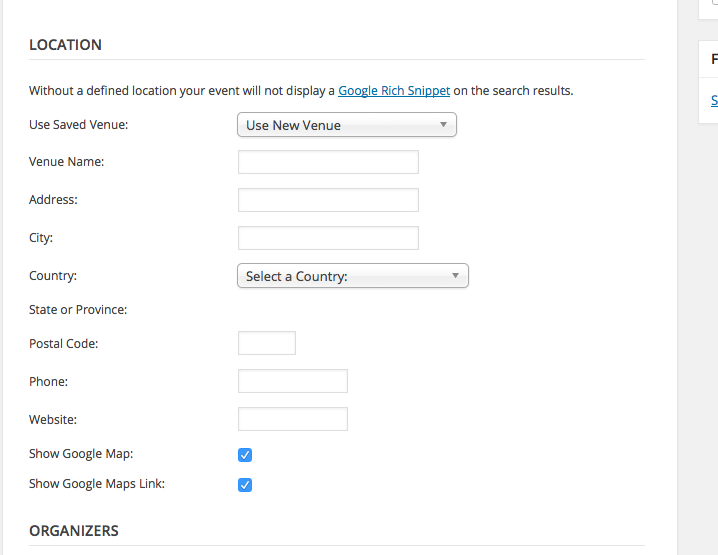
Just want to make sure I know what you’re talking about – I’m pretty darn certain this is what you mean but you never know 🙂
—
Assuming this is what you mean, then unfortunately the only way to go about doing this is with custom code. You can get started by first hiding all the extra fields for “new venue creation”, which you can do with this CSS:
#event_venue.eventtable tr {

    display: none;

}
#event_venue.eventtable tr:first-of-type,
#event_venue.eventtable tr:nth-child(2),
#event_venue.eventtable tr:nth-child(3) {
display: table-row !important;
}Here’s how that makes things look for me:
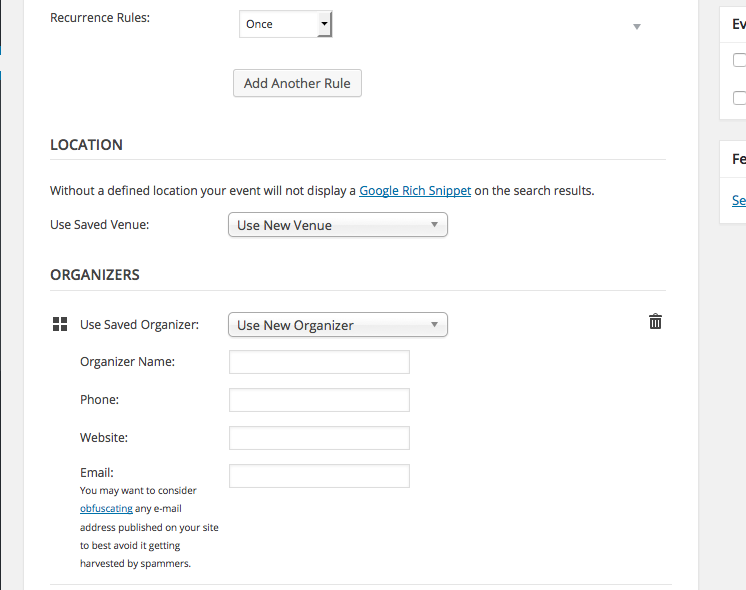
The dropdown still says “Use new venue”, obviously, but this is unfortunately not so easy to change 🙁 You’d have to customize the chosen.js javascript directly which is a bit outside the scope of the forums here.
I hope this is a good start though! If you’re not familiar with adding admin-facing CSS to your WordPress site, research this online – there are many ways to do it and you should choose the option that best suits your needs.
Cheers!
GeorgeParticipantHey Zach,
This forum is called “Pre-Sales Questions” – we cannot field technical support requests like this here.
With that being said, can you get started by clarifying exactly what you mean by this comment:
I have added your plugin to my theme
What do you mean? Have you implemented Calendar features into your theme via custom code or something?
Thank you!
George -
AuthorPosts