
Home › Forums › Calendar Products › Events Calendar PRO › Add none events to calendar?
- This topic has 10 replies, 2 voices, and was last updated 10 years, 11 months ago by
George.
-
AuthorPosts
-
November 4, 2015 at 1:51 am #1021590
Leanne
ParticipantHello,
Is it possible to add none events to JUST the calendar? Not the listings, just the calendar. My client would like users to be able to see what else is going on at their venue throughout the month, as well as the events.
November 4, 2015 at 8:52 am #1021748ParticipantThanks for reaching out.
I’m afraid I don’t quite know what you mean by “none events” – can you elaborate on all of this and clarify exactly what you mean? Include examples as well if possible.
You mention this in your post:
My client would like users to be able to see what else is going on at their venue throughout the month, as well as the events.
What else would be happening at venues other than events?
Apologies for my confusion here – thank you in advance for clarifying all of this, I just want to be 100% certain I know what you’re asking so I can best help out!
Thank you 🙂
GeorgeNovember 5, 2015 at 2:59 am #1022062ParticipantHi George,
Basically my client has regular disco nights that their customers know about. He wants to list these “Disco nights” in his calendar here: http://www.thecinnamonclub.net/events/month/
But he doesn’t want the “Disco nights” to display with all special events here: http://www.thecinnamonclub.net/events/
Is this possible?
Thanks – Leanne 🙂
November 5, 2015 at 8:56 am #1022215ParticipantHey Leanne,
Thank you for the elaboration here – it seems like you essentially just want the Disco Events to only display in Month View, but not any other calendar Views, is that correct?
If this is what you mean, there’s unfortunately no way to do this without writing custom code – are you interested in doing that? We do not technically offer any support for custom code, so while we can share some code as a code, we cannot help implement it on your site, and you would have to take the reins on maintaining the code and refining it if you want it to do more things than what it does by default.
Cheers!
GeorgeNovember 5, 2015 at 12:35 pm #1022304ParticipantHi George,
If you can point me in the right direction to how this can be achieved with custom code, that would be great. I can then get back to my client with a possible solution 🙂
Many thanks,
Leanne
November 6, 2015 at 10:02 am #1022614ParticipantOkay, cool @Leanne – I can help with some general advice, which should help get you started. You’ll have to take the reins from there to fully implement this and such, but the general idea is to use Event Categories to signify which events should not show up in the month view grid.
This category can be for “Internal use only”, you know? It doesn’t have to be displayed anywhere in public; just an admin tool for you and your client, et cetera, to say “this event should not show in month view”.
—
Get started by making a category for this feature. I’ll just use “Hidden Event”, as shown here:
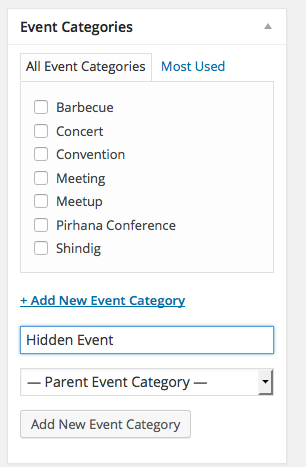
Now, this will unfortunately show up on the single-event views and such, which we do not want:
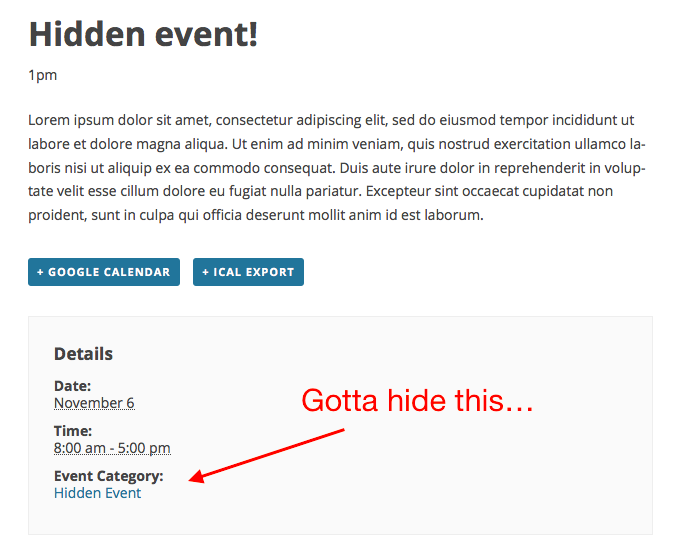
To make sure that other categories show up normally and stuff, but that the “Hidden Events” category name does not show up, add PHP like this to your theme’s functions.php file:
if ( function_exists( 'tribe_get_events' ) ) {
function tribe_support_1021590( $terms, $post_id, $taxonomy ) {
if ( ! tribe_is_event() || ! is_singular() )
return $terms;if ( ! is_array( $terms ) )
return $terms;foreach ( $terms as $key => $term ) {
// Change 13 to the term ID of your "Hidden Events" to the proper ID for your site.
if ( isset( $term->term_id ) && 13 == $term->term_id ) {
unset( $terms[ $key ] );
}
}return $terms;
}add_filter( 'get_the_terms', 'tribe_support_1021590', 10, 3 );
}
—
Now, to actually hide events that are in this category on the Month View ONLY, but preserve it on other views, you would CSS like the following to the bottom of your theme’s style.css file:
#tribe-events-content.tribe-events-month .tribe-events-category-hidden-event {

    display: none !important;

}
And there you go – this should events that are in that category on the month view, but not in other views.
Just put any events that you want to behave this way in that “Hidden Events” category, and add the code above, and it’ll work well. At least, I tested it locally and it works well for me 🙂
Cheers!
GeorgeNovember 6, 2015 at 10:07 am #1022616ParticipantP.S. One more thing!
—
I forgot to mention this, but in the PHP code I shared, you’ll notice a comment like this:
// Change 13 to the term ID of your "Hidden Events" to the proper ID for your site.To find the number you will need to use instead of 13, first just go to “Event Categories” in your admin:
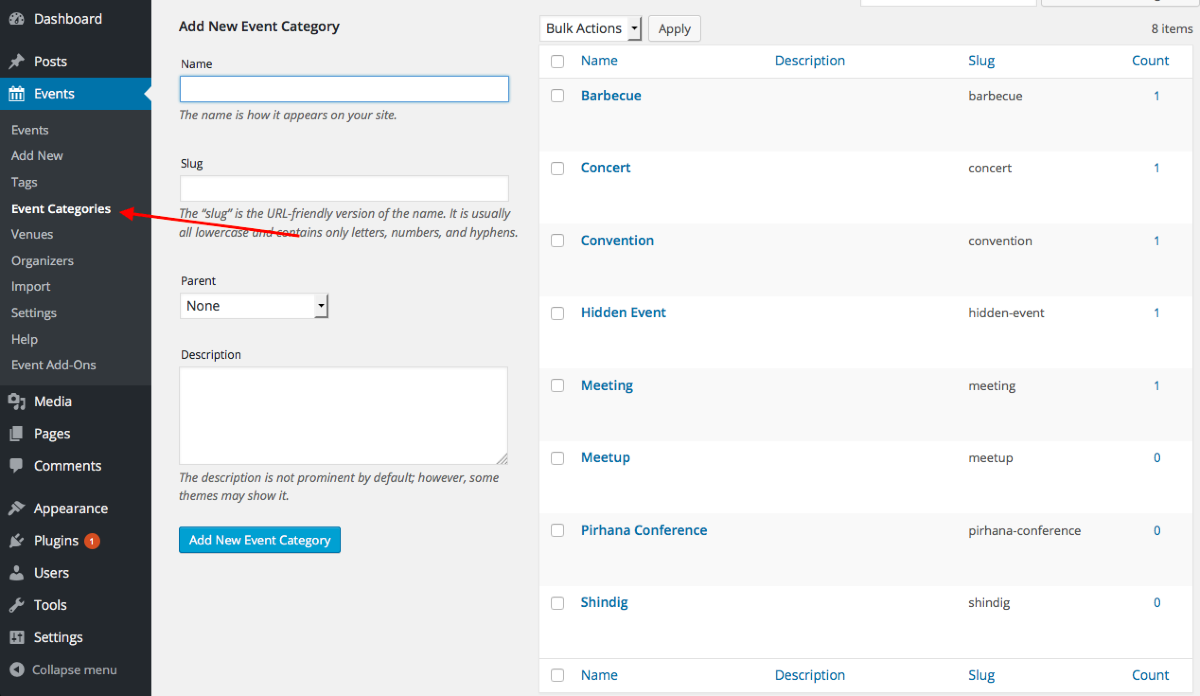
Then, click the specific “Hidden Event” category on your site.
It should bring to you a page that looks like this:
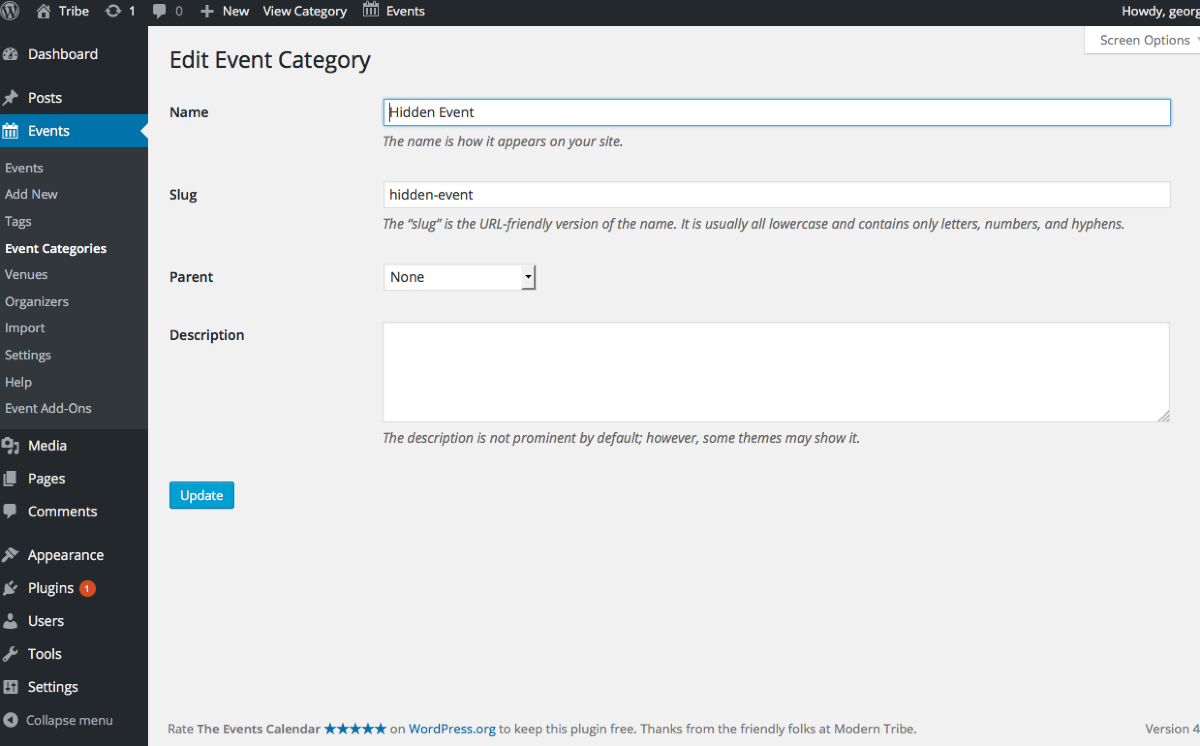
Look in the URL of this page!
It should be something like this:
/wp-admin/edit-tags.php?action=edit&taxonomy=tribe_events_cat&tag_ID=13&post_type=tribe_event
Notice the part that looks like this:
&tag_ID=13
For you, it might be something like tag_ID=88675, in which case you would replace the 13 in the code I shared above with 88675.
And that’s it!
November 10, 2015 at 8:05 am #1023754ParticipantGeorge that is fantastic thank you so much 🙂
November 10, 2015 at 10:42 am #1023849ParticipantAwesome! 😀
Make good backups of your code along the way and tinker around with some of my suggestions here, I hope you can put something together that serves you and/or your client well.
Cheers,
GeorgeNovember 11, 2015 at 8:49 am #1024236ParticipantThank you <3
November 11, 2015 at 11:41 am #1024303Participant😀
-
AuthorPosts
- The topic ‘Add none events to calendar?’ is closed to new replies.