
Home › Forums › Calendar Products › Events Calendar PRO › Time Settings Rigidly Stuck on World Clock
- This topic has 14 replies, 2 voices, and was last updated 10 years, 11 months ago by
George.
-
AuthorPosts
-
October 28, 2015 at 9:59 am #1019387
Sean
ParticipantWhy can’t I create and display events as 1-12 AM and 1-12 PM? We only display Portland, Oregon events, so this is something we absolutely need to resolve and I had assumed the pro version would immediately give me settings to resolve this. Go to http://www.thrumag.com/events.
Thanks.
-SO
October 28, 2015 at 11:48 am #1019468ParticipantHey @Sean,
Just to be 100% clear, instead of October 28 @ 19:00 you want it to say nothing more than 7pm?
— George
October 28, 2015 at 12:34 pm #1019490ParticipantThat’s right.
October 29, 2015 at 6:30 pm #1020130ParticipantThank you for verifying @Sean!
Adding the following code to your theme’s functions.php file will do this for you:
add_filter( 'tribe_events_event_schedule_details', 'custom_tribe_events_event_schedule_details' );function custom_tribe_events_event_schedule_details( $details ) {
$event = get_post( get_the_ID() );
$datetimes = array(
'start' => tribe_get_start_date( $event, false, 'Y-m-dTh:i' ),
'end' => tribe_get_end_date( $event, false, 'Y-m-dTh:i' )
);return date( 'ga', strtotime( $datetimes['start'] ) );
}
To tweak that display at all, you’ll need to play around with that date() function and the format it displays the date/time in – you can learn about that here: http://php.net/manual/en/function.date.php
Cheers!
GeorgeOctober 30, 2015 at 1:54 pm #1020405ParticipantThat presented additional problems. It is now blocking the date on the main page, all the times are incorrect, and it still shows in world clock on event posts. Any ideas?
-
This reply was modified 10 years, 12 months ago by
October 30, 2015 at 2:52 pm #1020416ParticipantI need to remove the CSS for now, because I do not know when you’ll be able to supply a fix.
November 2, 2015 at 4:58 pm #1021048ParticipantHey Sean,
I am sorry, this works very well for me as shown here:
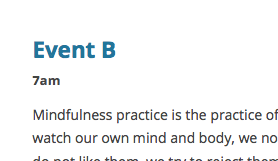
I do not know what’s going so wrong on your site – we cannot support custom code but I shared custom code anyways to at least get you started on implementing the customization you’d like, so unfortunately you’ll have to take the reins from here.
If you want to troubleshoot…
Despite what I wrote above about how we cannot support customizations, which is true, I hope to help a bit more here:
1. When you say “It is now blocking the date on the main page”, what exactly do you mean?
2. You say “all the times are incorrect” – if you go to Settings > General and adjust your site’s timezone setting there, does that resolve this problem?
3. Can you share your system information with us? Here’s how → https://theeventscalendar.com/knowledgebase/sharing-sys-info/
— George
November 2, 2015 at 5:38 pm #1021057ParticipantThanks for trying. Here is a picture of what happens with your code. I have to remove it again immediately however. http://www.thrumag.com/wp-content/uploads/2015/11/thru-calendar-time-date-problem.jpg
You can see that the date is gone and the times have shifted by 4 hours. My timezones are set correctly.
Here is a cut a paste from the box.
URL
http://www.thrumag.com
INSTALL KEYS
events-calendar-pro = d426dfff0e4f79126d4bad614b1bfc2075f0e4bb
WORDPRESS VERSION
4.3.1
PHP VERSION
5.6.10
PLUGINS
Wordpress Ad Widget version 2.8.3 by Broadstreet Ads(http://broadstreetads.com)
Akismet version 3.1.5 by Automattic(http://automattic.com/wordpress-plugins/)
Audio player version 2.0.4.6 by Martin Laine(http://www.1pixelout.net)
Configurable Tag Cloud version 5.2 by Keith Solomon(http://keithsolomon.net/)
Customify version 1.1.6 by PixelGrade(http://pixelgrade.com)
The Events Calendar PRO version 3.12.5 by Modern Tribe, Inc.(http://m.tri.be/20)
Google Analytics Dashboard for WP version 4.8.3 by Alin Marcu(https://deconf.com)
Jetpack by WordPress.com version 3.7.2 by Automattic(http://jetpack.me)
MediaElement.js – HTML5 Audio and Video version 2.10.3 by John Dyer(http://j.hn/)
Obfuscate E-mail version 3.4 by Scott Reilly(http://coffee2code.com/)
PixCodes version 2.3.3 by PixelGrade(https://pixelgrade.com)
PixLikes version 1.1.2 by pixelgrade(http://pixelgrade.com)
PixTypes version 1.3.2 by PixelGrade(http://pixelgrade.com)
Author Image version 4.9.3 by Denis de Bernardy & Mike Koepke(https://www.semiologic.com)
The Events Calendar version 3.12.3 by Modern Tribe, Inc.(http://m.tri.be/1x)
Visual Form Builder version 2.8.6 by Matthew Muro(http://matthewmuro.com)
WP Canvas – Gallery version 1.47 by Chris Baldelomar(http://webplantmedia.com/)
WordPress Importer version 0.6.1 by wordpressdotorg(http://wordpress.org/)
Yoast SEO version 2.3.5 by Team Yoast(https://yoast.com/)
WordPress Hashcash version 4.6 by Elliott Back(http://elliottback.com)
WP Super Cache version 1.4.6 by Automattic(http://automattic.com/)
Easy Forms for MailChimp by YIKES version 6.0.3 by YIKES(http://www.yikesinc.com/)
NETWORK PLUGINS
–
MU PLUGINS
–
THEME
Bucket
MULTISITE
–
SETTINGS
recurring_events_are_hidden = exposed
tribeEventsTemplate =
tribeEventsBeforeHTML =
tribeEventsAfterHTML =
previous_ecp_versions =
Array
(
[0] => 0
[1] => 3.9.1
[2] => 3.9.3
[3] => 3.10
[4] => 3.10.1
[5] => 3.11.2
[6] => 3.12
[7] => 3.12.1
[8] => 3.12.2
)
latest_ecp_version = 3.12.3
last-update-message = 3.12.3
earliest_date = 2015-02-11 07:30:00
latest_date = 2016-05-17 19:00:00
stylesheetOption = full
tribeEnableViews =
Array
(
[0] => list
[1] => month
[2] => week
[3] => day
[4] => map
[5] => photo
)
viewOption = map
tribeDisableTribeBar =
monthEventAmount = 4
dateWithYearFormat = F j, Y
dateWithoutYearFormat = F j
monthAndYearFormat = F Y
dateTimeSeparator = @
timeRangeSeparator = –
datepickerFormat = 2
donate-link =
postsPerPage = 14
liveFiltersUpdate = 1
showComments =
showEventsInMainLoop =
eventsSlug = events
singleEventSlug = event
multiDayCutoff = 00:00
defaultCurrencySymbol = $
reverseCurrencyPosition =
embedGoogleMaps = 1
embedGoogleMapsZoom = 16
debugEvents = 1
schema-version = 3.12.3
disable_metabox_custom_fields = show
pro-schema-version = 3.12.5
hideSubsequentRecurrencesDefault =
userToggleSubsequentRecurrences = 1
recurrenceMaxMonthsBefore = 13
recurrenceMaxMonthsAfter = 13
geoloc_default_geofence = 25
geoloc_default_unit = miles
hideLocationSearch =
hideRelatedEvents = 1
week_view_hide_weekends =
enable_month_view_cache =
weekDayFormat = D jS
tribe_events_timezone_mode = site
tribe_events_timezones_show_zone =
WORDPRESS TIMEZONE
America/Los_Angeles
SERVER TIMEZONE
UTCNovember 3, 2015 at 10:02 am #1021373ParticipantHey @Sean,
I’m a bit confused – you say that the display of times is problematic, but look at the times in your screenshot:

But you verified that that was the exact display you wanted:
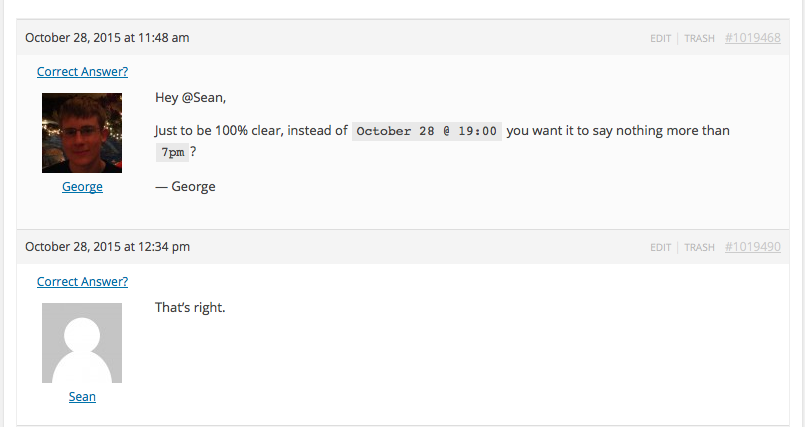
So it seems that the only problem is that it’s 4 hours ahead of where it should be – if you set your site timezone to something 4 hours behind its current setting (just for testing purposes!), is this resolved?
Thanks for your patience with this,
GeorgeNovember 16, 2015 at 12:42 pm #1026559ParticipantThis was my mistake in communication. I’m not sure why I put it to you that way. So I mean to say that I want the date to show plus the correct time — this is what the plugin does automatically. But as in the example above, it should read October 28 @ 9:00pm (and I believe that my choice in time format belongs in the settings). The CSS you provided shifts the time by 4 hours. My site parameters are all set to Los Angeles time (shared with Portland, OR), and there was no problem before the CSS, so I hope we can squeeze that problem out as well.
Thanks for your continued help and pardon me for the time lag here.
November 16, 2015 at 12:47 pm #1026564ParticipantI unfortunately do not have this time shift with my custom code on my own testing site, and there isn’t anything in my code snippet above that would cause a time shift 🙁
At this point I am unfortunately not sure of either of these two things:
1. What you are trying to do here if it is not what you said earlier.
2. What is causing the weird time shifting on your site with the presence of the PHP snippet I shared.Very odd indeed 🙁
November 16, 2015 at 1:00 pm #1026572ParticipantThe patch you provided turned “October 30th @ 21:00” into just “5pm”.
This is wrong on two levels. I’m sorry for any confusion, but lets make this clear.
The posts must look like this, “October 30th @ 5pm” or if it is 21:30 then it should read “October 30th @ 5:30pm”.
I believe this $89 per year calendar should let me decide how I want the time to read without writing me any custom CSS or spending time with support to get it.
And you’re telling me that the previous fix you gave me is causing this time problem? We need a solution or I must request a refund.
-
This reply was modified 10 years, 11 months ago by
November 16, 2015 at 1:07 pm #1026579ParticipantAnd you’re telling me that the previous fix you gave me is causing this time problem?
No, I explicitly said that the code I shared does not cause this problem, and that this problem is not one I can reproduce at all on my local testing site.
As for choosing how the time displays, you have total control over this. Please remove the snippet of code I shared with you, and then go to your site’s wp-admin. Go to Events > Settings > Display and use the “Date Format Settings” to format your date-times as needed.
—
Now, if you do not find that those settings achieve the specific format you want, please let me know what format you’re looking for. You said that the format you were looking for was just the display of time and then “am” or “pm”, but now it is allegedly not the right format.
Please remove my code snippet so that you’re not running any of my custom code.
Then, confirm these things definitively and clearly:
1. How does the time currently display on your site?
2. How do you want the time to display on your site instead?
Thanks,
GeorgeNovember 16, 2015 at 1:33 pm #1026600ParticipantI normally don’t have so much trouble communicating. But it looks like I’ve got this figured out. I needed to change my time in my site globally to the format of my choice. That is all.
Having said this, there never was a setting and is not one in my copy of Events Calendar. There was never a need for all the steps you took me through. I made it clear at the beginning that I needed the calendar to read in the clock that Americans read it, being that this is my viewership. I went to gather screenshots of all relevant settings and thats how I discovered my site’s global time setting conflict.
The problem is resolved however, so thank you for your diligence.
November 19, 2015 at 5:23 pm #1028325ParticipantHey Sean,
It’s easy in hindsight now to say that all of these steps were not necessary, but I unfortunately just did not understand what you were asking. Then you confirmed something and took it back and it was confusing, from my end of things.
I hope you can at least acknowledge that, because I’m genuinely sorry that all these steps happened too – it’s far from normal, and stems from a desire to help 🙂
Best of luck with your project,
George -
This reply was modified 10 years, 12 months ago by
-
AuthorPosts
- The topic ‘Time Settings Rigidly Stuck on World Clock’ is closed to new replies.