

Forum Replies Created
-
AuthorPosts
-
George
ParticipantHey @Steve,
These things are possible but are unfortunately not so without custom coding 🙁
We cannot help with custom coding but I have taken some to craft a free custom plugin for you to get you started on this – check out the code here: https://gist.github.com/ggwicz/cac1aa8265885b1440a3
If you add the code to your theme’s functions.php file, you should be able to achieve part 1 of your goals here; i.e., users who author events for review will get an email if their event has been approved and published 🙂
This works for me on my local testing site and I hope it works for you too!
I’m sorry that I don’t have the extra time to suss out your second request here; however, hopefully with the existing code I shared you can piece together similar code to achieve that. It should be rather simple, and you’d just need to use similar principles as the code I shared – but instead of dynamically generating the author email, you can just hard-code in the email address you’d like to be notified at 🙂 (you can use also use get_bloginfo( 'admin_email' )
—
To learn more about the functions involved in doing this, check out these codex pages:
• https://codex.wordpress.org/Function_Reference/wp_mail
• https://codex.wordpress.org/Function_Reference/get_bloginfo
• https://codex.wordpress.org/Post_Status_TransitionsCheers!
GeorgeParticipantHey Simon,
Thanks for reaching out!
About your question – would it work to have each possible activity be a separate event? Or do you really only want one day to be an event, and then activities are listed on the day and chosen from there, then purchased?
If the latter sounds like what you’re going for, then unfortunately The Events Calendar and The Events Calendar: WooCommerce Tickets wouldn’t really be the best solution; tickets can only be sold on an event, not an activity that is separate from an event.
However, it’s worth noting that you can sell many different tickets on the same day, and so perhaps you could just make a separate ticket for each activity and time?
Let me know this is helpful in any way – I’m sorry if not!
— George
ParticipantHi @Nikolay,
Building a whole separate page to do this would unfortunately require custom code. We cannot help with custom code, but I’m happy to share some general advice with you here about all of this.
—
Part One: Custom Page Template
First, you’d need to make a custom page template in your theme. Since this happens in your theme, you’ll need to contact your theme developer or search online for more information about this, but it’s fortunately covered in-depth in the WordPress Codex article here → https://developer.wordpress.org/themes/template-files-section/page-template-files/page-templates/
—
Part Two: Displaying All Events
To display all events on that custom page template, you can use the tribe_get_events() function. As long you set 'posts_per_page' => -1 in your arguments for it, all events should be retrieved.
Learn more about how to use tribe_get_events() here → https://theeventscalendar.com/knowledgebase/using-tribe_get_events/
—
Part Three: Adding Category Filters
Adding category filters is arguably the trickiest part here, and there are numerous ways you could achieve category filtering…you’ll have to take the reins on implementing this, or hire custom development help or something unfortunately. But regardless of method, you’ll need to get all of your Event Categories to begin with, and so to do that you’d need to use the core WordPress function wp_list_categories(). You can learn more about this function here – https://codex.wordpress.org/Function_Reference/wp_list_categories#Display_Terms_in_a_custom_taxonomy
Be sure to set the 'taxonomy' option to 'tribe_events_cat' so that your Events Categories are the items displayed, not your Post Categories!
—
I hope all of this information helps, @Nikolay. If you decide it’s best to hire someone to help, you might find this list of Customizers that we have helpful → http://m.tri.be/18k1
Cheers!
GeorgeParticipantAwesome! I admit to not doing much here, and not knowing what resolved things, but am glad it’s resolved regardless 🙂
Cheers,
GeorgeNovember 2, 2015 at 5:10 pm in reply to: Community Events – how to remove option for submitter to add event image? #1021051ParticipantWoo! Glad to help @DeAnne 😀
Best of luck with your site,
GeorgeNovember 2, 2015 at 5:08 pm in reply to: organizer page does not list events by that organizer #1021050ParticipantHey @Yasir,
I’m sorry, I unfortunately was not able to find anything in your system information that reveals the cause of this problem…I would recommend addressing two things:
1. Does this happen with every single organizer and venue on your site? Or only some venues and some organizers? If the latter, then is there any pattern to these venues and organizers that have the problem that you can think of?
2. Does anything change if you run through the complete set of troubleshooting steps here? → https://theeventscalendar.com/knowledgebase/testing-for-conflicts/
Cheers,
GeorgeParticipantHey Keith,
Thanks for that; it looks like the bars are indeed hidden, but the bar’s background color just needs to be set to transparent. Try this CSS to achieve that:
#tribe-bar-form {

    background: transparent !important;

}
I hope that helps!
Cheers,
GeorgeParticipantHey Sean,
I am sorry, this works very well for me as shown here:
I do not know what’s going so wrong on your site – we cannot support custom code but I shared custom code anyways to at least get you started on implementing the customization you’d like, so unfortunately you’ll have to take the reins from here.
If you want to troubleshoot…
Despite what I wrote above about how we cannot support customizations, which is true, I hope to help a bit more here:
1. When you say “It is now blocking the date on the main page”, what exactly do you mean?
2. You say “all the times are incorrect” – if you go to Settings > General and adjust your site’s timezone setting there, does that resolve this problem?
3. Can you share your system information with us? Here’s how → https://theeventscalendar.com/knowledgebase/sharing-sys-info/
— George
ParticipantNo problem Allan, sorry for the somewhat disappointing news 🙁
Cheers!
GeorgeNovember 2, 2015 at 4:45 pm in reply to: Woo Themes Halloween Sale Discount not showing up in shopping cart #1021040ParticipantHey @mattboggs,
That’s a coupon code on WooThemes.com; this here is http://theeventscalendar.com, which is unaffiliated with WooThemes. That coupon code therefore does not work here 🙁
We have no coupon codes at this time – sorry to disappoint!
Cheers,
GeorgeNovember 2, 2015 at 4:43 pm in reply to: Week View is Wonky – and yes, I did just activate the 3.12.5 #1021038ParticipantHey Carole Anne,
I appreciate your patience with things and the fact that your reply is kind and thoughtful despite being disappointed with things. There are several differences between Week View styling and Month View styling, but one of the main differences is that the Month View’s event displays are fit into a much simpler grid.
What I mean is, if you look at a month view grid, the events happening on a given day are just listed in the table cell for that day. Their position along the Y-axis is based on the time of day they occur, but there is not a ledger on the left side of the Month view that shows hour-by-hour breakdowns of event times. And so if events are happening at same or overlapping times, they just “Stack” one on top of the other.
The Week View, however, handles this differently – the hours of the day are listed along the left-hand side and so events are plotted along two axes for the Day and for the Time of Day that the event occurs.
An Example
Let’s say you have Events A, B, and C. They’re all happening on Friday at 2pm, 2:30pm, and 2:45pm, respectively.
Well, in month view the squares for these events will just stack straight up and down, like this:
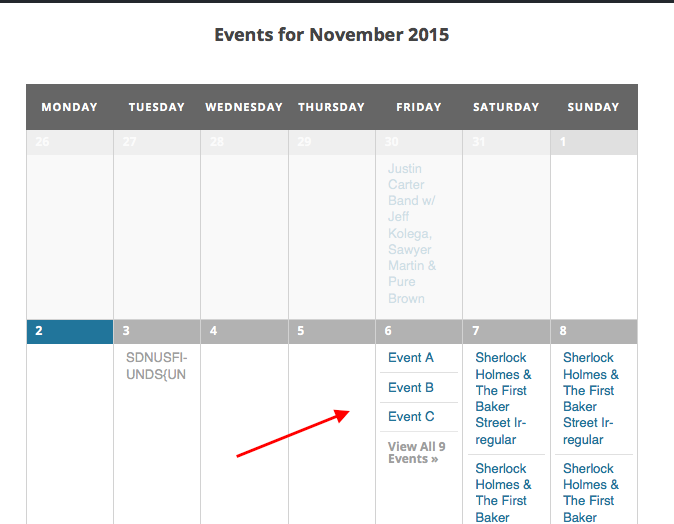
In week view, however, those events will be “squished” a bit and crammed along both the x-axis and y-axis to try and show the date and time accurately, like in this screenshot:
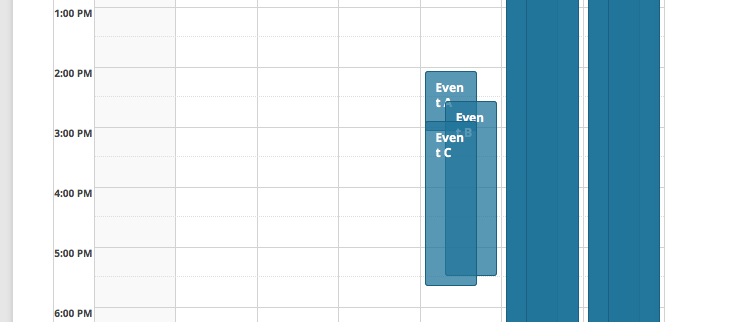
Same events, same theme, same exact information being shared with the user. But the different styles of layout have different implications for design and appearance, and so in a limited content width the Week View can look quite crammed 🙁
I hope this explanation clarifies things – please let us know what you think!
— George
November 2, 2015 at 4:27 pm in reply to: Where can I download older Events Calendar Pro (3.9.1 or 3.9.3 or both)? #1021037ParticipantHey @Marcus,
If The Events Calendar and Events Calendar Pro were deactivated, then that would have indeed caused the widgets to be deactivated. The migration of them to the “Inactive Widgets” area is the default handling of widgets like this in WordPress.
As for the folders, there should be separate folders for each plugin – what are all of the folders you see? It’s possible that your theme also has The Events Calendar’s plugin within it, which is a terrible coding practice but something that is unfortunately common in WordPress 🙁
— George
November 2, 2015 at 4:23 pm in reply to: Venue and Organizer templates in Event Calendar Pro #1021036ParticipantHey Annette,
I’m sorry to disappoint! I’m also sorry for the delayed reply over the weekend.
By default, 100 events are queried for both single-venue pages and single-organizer pages.
These “limits” are dictated by the functions tribe_venue_upcoming_events() and tribe_organizer_upcoming_events(), respectively.
To modify these limits, you’d need to add code like the following to your theme’s functions.php file:
if ( function_exists( 'tribe_get_events' ) ) {

    /**

     * Modify how many events are "allowed" on single-venue and single-organizer pages.

     * @link http://theeventscalendar.com/?p=1019251

     */

    function tribe_support_1019251( $limit ) {

        return 500;

    }
add_filter( 'tribe_events_single_venue_posts_per_page', 'tribe_support_1019251' );
add_filter( 'tribe_events_single_organizer_posts_per_page', 'tribe_support_1019251' );
}
This code increases the limit to 500 – change this to any integer you’d like and it should work well.
Let me know if this helps!
Thanks,
GeorgeParticipantIf all goes well you should not lose any recurring events; the slow process of updating version-by-version should help mitigate this risk especially.
ParticipantThanks for all of this Chris.
On your site, I noticed that the “Calendar” menu-item link goes to /event, but your options say that your Events Calendar slug is /events
I tried going to /events, but it redirected to /event…
What is this page at /event? Is it an actual page that you have created in your WordPress admin or something? If so, please make sure this page’s slug is NOT /event or /events – change it to /calendar or something similar.
—
Finally, for now: what are your site’s permalink settings? These can be found in the aptly named page in your wp-admin at Settings > Permalinks.
Thank you for your patience with this; cheers!
— George
-
AuthorPosts