

Forum Replies Created
-
AuthorPosts
-
George
ParticipantThanks for the update Karly – it could’ve been any number of things that led to the delayed success of the snippet, perhaps your server has some simple caching that made it take a while for the file to fully update across the network or something…regardless, I’m glad things work as intended now 🙂
Best of luck with your site!
– George
ParticipantHey James,
I’m sorry about the Google Maps issues since your last Avada theme update; I checked out the link you provided but couldn’t spot anything related to The Events Calendar specifically there. I’d recommend contacting the Avada support team about this, as there might be a CSS change on their end that has led to this or something.
If that’s not the case and they insist that The Events Calendar is at fault here, open up a new thread about that and include their responses. We’ll pick things up from there and help out!
Cheers,
GeorgeParticipantNo problem! 😀
ParticipantHey @Sylvie,
Is this for the same website in this other forum thread here? → http://theeventscalendar.com/support/forums/topic/sorry-this-product-cannot-be-purchased-3/
I’m sorry if it’s not! The descriptions of the issues sound the same, however, and both threads were posted at almost exactly the same time, so if they’re covering the same site then I will combine the threads for the sake of efficiency.
If not, I apologize for the assumptions there, and in which case can you start by sharing your site’s “System Information”? Here’s how to do that → https://theeventscalendar.com/knowledgebase/sharing-sys-info/
Thank you!
GeorgeParticipantHey @ben,
This is some odd behavior – I notice quite a few plugins in your System Information (thanks for sharing that!), and suspect a code conflict here of some kind.
With that in mind, then, I would recommend doing the plugin-related steps outlined in our Troubleshooting Steps here → https://theeventscalendar.com/knowledgebase/testing-for-conflicts/
Let us know what you find!
Thank you,
GeorgeNovember 2, 2015 at 2:10 pm in reply to: Does your event calendar PRO plugin work on a Weebly site? #1020974ParticipantHey Paul,
Thanks for your interest in our plugins! Unfortunately they will not work in a Weebly site 🙁 They only work on WordPress-powered websites.
I hope this is a clear answer that helps you move forward with your project!
Let me know if I can help with anything else.
— George
November 2, 2015 at 2:09 pm in reply to: How do I put an upcoming events list on my homepage in a text or code area? #1020973ParticipantHey @gardenclubcouncil,
You mention not being able to make that area a widget; but are you certain of this? You can register new widget areas in your theme relatively easily, as described in the WordPress Codex here: http://codex.wordpress.org/Widgetizing_Themes
If that’s not something you’re interested in, then unfortunately the only real alternative would be to use the tribe_get_events() function. You can learn about that and how to use it here → https://theeventscalendar.com/knowledgebase/using-tribe_get_events/
I hope that helps; we’re not able to help with custom code here, but let me know if you have any further questions, comments, concerns, etc.
Sincerely,
GeorgeParticipantHey Mike,
Sorry to hear about this; what was the organization you submitted for (or on behalf of, etc.)?
— George
ParticipantHey Kathryn!
We indeed have a “Non-Profit Partnership Program” which means free licenses for approved non-profits. You can learn more here → https://theeventscalendar.com/knowledgebase/do-you-offer-discounts-for-non-profit-organizations/
And you can apply directly here → https://theeventscalendar.com/apply-for-nppp/
If approved, we can give you a free license for Eventbrite Tickets, which is our Eventbrite plugin (learn more about it here).
That’s an add-on for The Events Calendar itself, but The Events Calendar is free for everyone and available for download here → https://wordpress.org/plugins/the-events-calendar/
There’s lots of links here, but I hope this all helps!
Cheers,
GeorgePS
Hello from Allston/Brighton 🙂 Sudbury Senior Center should have no problem getting approved for a non-profit license!ParticipantHey Cyndi,
Multiple calendars are unfortunately not supported at this time 🙁
As for non-profit pricing, we do indeed offer free non-profit licenses. You can learn more about our program and find the link to the application form for it here → https://theeventscalendar.com/knowledgebase/do-you-offer-discounts-for-non-profit-organizations/
I hope that helps!
Cheers,
GeorgeParticipantHey Tobias,
The tickets generated by our WooCommerce Tickets add-on do have security codes for check-ins and such, but we cannot promise “fraud-proof” 😉
To use WooCommerce Tickets, all you need are the following plugins:
• The Events Calendar [free]
• WooCommerce [free]
• The Events Calendar: WooCommerce Tickets [premium]We don’t have trial licensees, but we do have a no-questions-asked refund policy if you request a refund within 30 days from your date of purchase. So you can buy the license, try things out for a week or two, and if you don’t like the product, then as long as you request a refund within 30 days from the date of purchase we’ll issue a 100% refund immediately.
I hope this information helps – let me know!
George
ParticipantHey James,
I’m really sorry about the frustration here. We’re a bit frustrated with translations within WordPress at present, too, because things have changed recently and we’re working hard to accommodate the changes.
What are those changes? Well, specifically, WordPress.org is now hosting translations for plugins directly. So as you mentioned, the work done on our own translations site is now moved here → https://translate.wordpress.org/projects/wp-plugins/the-events-calendar/stable
You can read more about the new WordPress.org-official translation site here.
All of our premium add-ons are still hosted on http://translations.theeventscalendar.com, however. If any of this is confusing, please give these articles a read as they cover the changes and have been updated recently for the sake of doing so:
• Translating The Events Calendar: http://theeventscalendar.com/knowledgebase/translating-the-events-calendar/
• Translating our premium add-ons: https://theeventscalendar.com/knowledgebase/adding-or-updating-a-translation/
• Changing the language on your site: https://theeventscalendar.com/knowledgebase/changing-the-language-on-your-calendar/
—
In regards to your specific points about strings that haven’t been translated, unfortunately the names of Months, Days, etc. are not dictated by our plugin but by WordPress itself, using the date_i18n() function → https://codex.wordpress.org/Function_Reference/date_i18n
Next you mention that these strings weren’t translatable:
Next Events, Previous Events, Upcoming Events, Events from
What’s probably happening here is that the string replacement in use for these strings is not being found by your “String locator” or other methods. To clarify, “Next Events” does not exist in our code; instead you’ll find “Next %s”. “Events from:” would be “%s from:”, and so on.
This method of string replacement means that the oft-used words “Event” and “Events” don’t have to be translated over and over again; you translate them once, then WordPress replaces “%s” with the translated word. It also allows for the simple code changes described here: https://theeventscalendar.com/knowledgebase/changing-the-word-events-to-something-else/
As a final note, WPML is not 100% compatible with The Events Calendar 🙁 This has been a long-standing issue and we have begun to really dedicate time to improving compatibility in recent releases, but there are still many places where translations can end up incomplete or just not translated at all.
I hope this information clarifies some things – I’m sorry in advance if this is not the case. Please let me know what you think and what further questions you have on this matter!
Sincerely,
GeorgeParticipantHey @John!
Thanks for reaching out – the good news is that you can definitely cut out that “email 2”, but the bad news is that it unfortunately requires a bit of custom coding 🙁
To do this, you’d have to head to your theme’s functions.php file and then add code like what is mentioned in the WooCommerce documentation page here → https://docs.woothemes.com/document/unhookremove-woocommerce-emails/
Now, if the code in that page looks too complicated and you don’t want to mess with any other emails but these “Order Complete” emails, you can simplify the code in that article to just this:
add_action( 'woocommerce_email', 'unhook_those_pesky_emails' );function unhook_those_pesky_emails( $email_class ) {
// New order emails
remove_action( 'woocommerce_order_status_pending_to_processing_notification', array( $email_class->emails['WC_Email_New_Order'], 'trigger' ) );
remove_action( 'woocommerce_order_status_pending_to_completed_notification', array( $email_class->emails['WC_Email_New_Order'], 'trigger' ) );
remove_action( 'woocommerce_order_status_pending_to_on-hold_notification', array( $email_class->emails['WC_Email_New_Order'], 'trigger' ) );
remove_action( 'woocommerce_order_status_failed_to_processing_notification', array( $email_class->emails['WC_Email_New_Order'], 'trigger' ) );
remove_action( 'woocommerce_order_status_failed_to_completed_notification', array( $email_class->emails['WC_Email_New_Order'], 'trigger' ) );
remove_action( 'woocommerce_order_status_failed_to_on-hold_notification', array( $email_class->emails['WC_Email_New_Order'], 'trigger' ) );// Completed order emails
remove_action( 'woocommerce_order_status_completed_notification', array( $email_class->emails['WC_Email_Customer_Completed_Order'], 'trigger' ) );
}
That code might not look a whole lot simpler, but it will only affect “Order Completed”-style emails…
I hope this helps!
— George
ParticipantHey Chris,
I’m sorry to hear about these issues!
1. To get started, can you share the website where this is all happening?
2. Can you share your system information with us? Here’s how → https://theeventscalendar.com/knowledgebase/sharing-sys-info/
3. In regards to the issue of things being stuck on “Photo View”, can you head to Events > Settings > Display in your wp-admin, and tell us what you have configured for the “Enable Event Views” option and the “Default View” option? Here’s a screenshot of these options for reference:
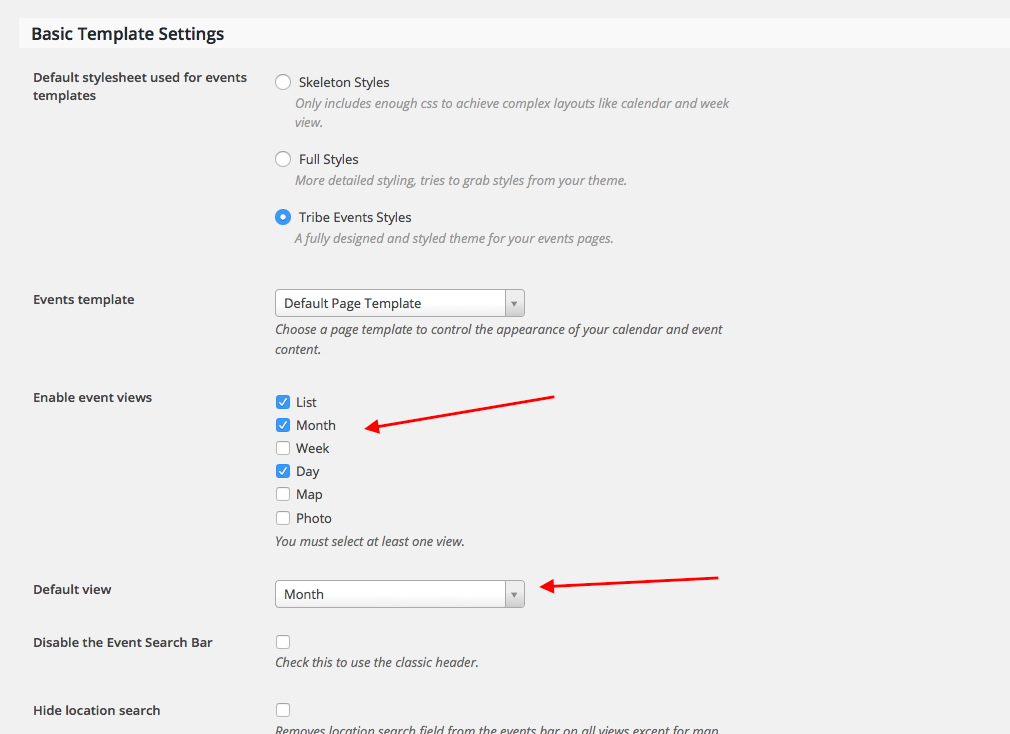
This will help us get started on things; we can address the issue of the first 6 events being left out once we get some of the basic information here. Please address each specific question I mentioned above, in list format even if possible.
We’ll get to the bottom of this; thank you in advance for sharing the information requested here that will help us troubleshoot further!
Cheers,
GeorgeParticipantHey @Cliffy,
You mention explicitly that you are not a programmer; why, then, do you assume all of your code-related arguments are good ones, and that our code-related arguments are illegitimate (“bloated”)?
I’m not being snarky here, I just want to highlight the contradiction in your post and clarify the fact that there are genuine, legitimate concerns about bloating the code and that regardless of what might seem like “common sense”, making the changes you suggest is quite complex.
An Example
Say we offer limiting things by time-frame as a UI option. Here are just a sample of further decisions that result from the original one:
1. where does this option go in the admin screen?
2. Is it per-event, or a global option?
3. Is it in the options panel? If so where?
4. Should it be a checkbox, a dropdown, a custom user input?
5. Should we set pre-defined time-frames to normalize the behavior? Or make it free-form?
6. How granular a limit should we allow/enable – time-frames of months? Weeks? Days? Years only? All of these?Now let’s say a time-frame of twelve months is chosen. For a given event, 10 results are found as “related”, but only 5 are within 12 months. These 5 are only sort-of related, but as it happens the 5 events beyond the 12 month time-frame are far, far more “related” to the current event.
7. What should happen here? Should the higher-relevancy events outside of the time-frame just be ignored altogether? Or should the time-frame be honored no matter how relevant the results within it?
And so on…
—
I just want to point out that beneath what might seem like a simple thing, i.e. “just add an option”, there are dozens and dozens of other decisions that all need to be made.
In closing, you mention this:
why not change the existing code and let others manually change it if they want something so far in the future
That’s a valuable bit of feedback, and the fact that now Jennifer and you are posting about this adds more weight to this idea. I want to be clear that this feedback is appreciated, and it’s something I take seriously, hence my long reply here! 😀
We will always admit that our plugin is not perfect and that there’s always room for improvement. But hopefully my reply here will illustrate how complicated a change it would be to make the changes you suggest – please let me know what your thoughts are on all of this.
—
For the time being and the foreseeable future, the only solution to this problem will be to use the code snippet that Brook shared in that forum thread. I’m sorry about that, but am happy to address any further questions you might have and to discuss more about this if you’re compelled to do so!
Sincerely,
George -
AuthorPosts