
Home › Forums › Calendar Products › Events Calendar PRO › Week View is Wonky – and yes, I did just activate the 3.12.5
- This topic has 6 replies, 3 voices, and was last updated 10 years, 7 months ago by
Support Droid.
-
AuthorPosts
-
October 28, 2015 at 3:44 pm #1019579
Carole
ParticipantHi.
This is the first time I’ve used your plug in. So, maybe I’m just being thick headed about some part of the set up, or did something I’m not aware of to cause things to change. I don’t know. BUT, the week view is a mess. And I activated the “legend super powers” which worked great initially, and then all of a sudden when I click on one of the activities in the legend, the calendar jumps back a month (from November to October) AND all categories disappear except for the one I clicked. Initially, the other categories just faded back.This is a difficult and demanding client, and I have a presentation in front of a committee of them on Friday.
If you can help me get this resolved before then, I would so appreciate it. 🙂
Thanks,
Carole AnneOctober 29, 2015 at 9:21 am #1019831George
ParticipantHey Carole,
Sorry you’re having trouble here! I have a series of questions and things to note here – since speed is of the essence here, can you address each of the specific points as follows? Thank you in advance for doing so! Here they are:
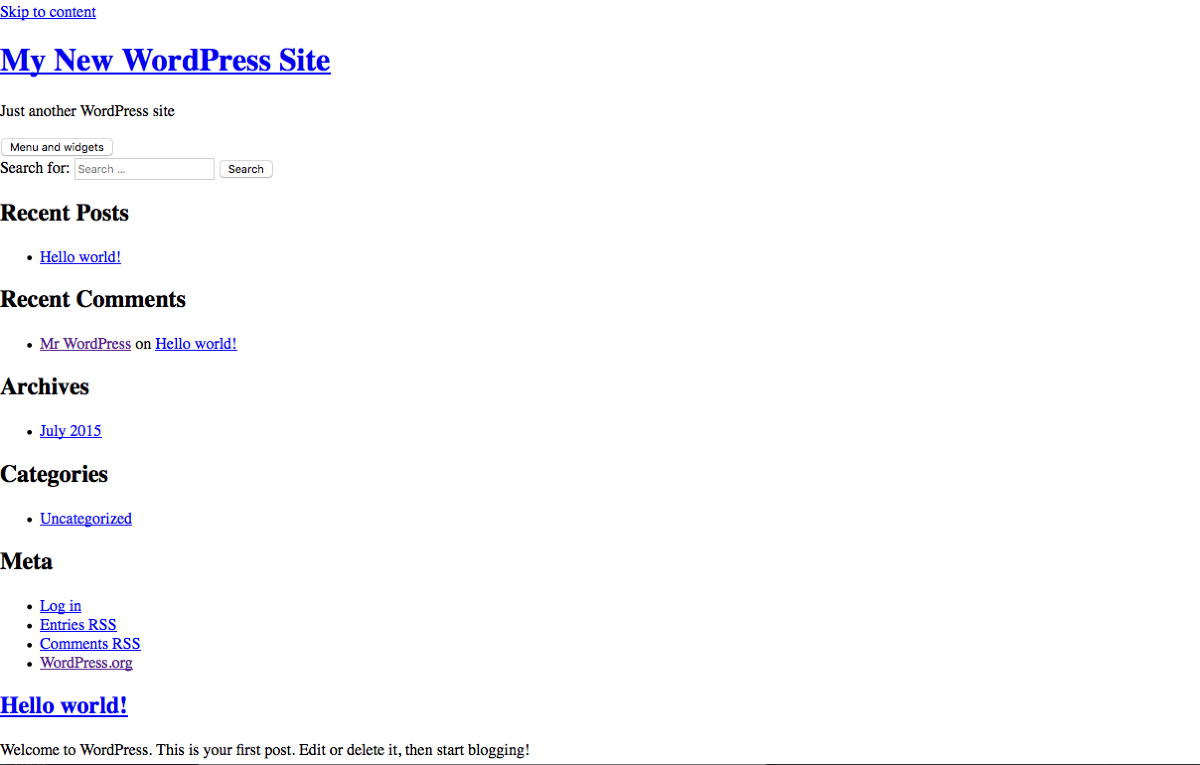
1. What is the specific site where this is happening? I checked out http://vvamigos.ipower.com/ but found a site that was broken on basic page load:
2. You say this: And I activated the “legend super powers” which worked great initially. What does this mean specifically? Please take a screenshot of what you are referring to – upload that image to Imgur.com and share the Imgur link in your reply, if possible.
3. Please share your site’s “system information”. Here’s how to do that: https://theeventscalendar.com/knowledgebase/sharing-sys-info/
4. As a closing note, I just want to make it clear that it is currently Thursday, 12:20pm Eastern Time. I understand your needs to get this done by tomorrow, but on some level we also cannot assume that responsibility and I cannot promise you a solution by that time. I totally related to having a demanding client and will help here as best as I can! 😀 I just want to keep expectations reasonable; our response times are within 24 hours and we have many, many other customers, so I just want be realistic that a total all-inclusive solution by tomorrow is not likely. 🙁
I will do my best @Carole! If you respond to each point here that will give us a good start on the troubleshooting process and we will try to get things working again here.
Thank you,
GeorgeOctober 29, 2015 at 11:47 am #1019958ParticipantHi George,
Thank you for your response – I am just not going to show the committee the week view at this time, so no worries about not addressing this by tomorrow. Thanks so much for your help.
Here is a link that should work: http://vvamigos.ipower.com/wordpress/events
2) Under the Events Category Settings > Category Colors – There is an option: “Check to add Legend Superpowers.
Legend Superpowers are an optional visual effect allowing visitors to focus only on those events that belong to categories of interest – without reloading the page and without eliminating other categories from view completely. Click on the category of interest in the Legend for the effect; click again to remove it.”
I checked the box and initially it worked exactly as described. Then, it suddenly stopped working – instead of fading back the unselected categories, they disappeared all together, AND the calendar went from a view of November to a view of October. BUT – IT CHANGED BACK AND IS NOW WORKING AGAIN. I have no idea what triggered either event.I have two other issues with the calendar that are not yet resolved:
1) The “WEEK VIEW” is distorted. Here is a link to a screen shot: http://imgur.com/bLqeOHV
2) The “exclude” option doesn’t seem to work – i.e. I have an event that is scheduled every week on Thursday. I tried to exclude Thanksgiving, using the Date function. It doesn’t work – the even still shows up in the calendar for that day.System information:
System InformationSometimes it’s hard to tell what’s going wrong without knowing more about your system steup. For your convenience, we’ve put together a little report on what’s cooking under the hood.
If you suspect that the problem you’re having is related to another plugin, or we’re just plain having trouble reproducing your bug report, please copy and send all of this to our support team.
URL
http://vvamigos.ipower.com
INSTALL KEYS
events-calendar-pro = bbc7d373dc4a273f4d66cc42f8bb9c07482935ef
WORDPRESS VERSION
4.3.1
PHP VERSION
5.5.22
PLUGINS
Disable Comments version 1.3.2 by Samir Shah(http://rayofsolaris.net/)
EIG-SSO version 1.0.2 by Endurance International Group(http://endurance.com/)
The Events Calendar PRO version 3.12.5 by Modern Tribe, Inc.(http://m.tri.be/20)
MOJO Marketplace version 0.5.8 by Mike Hansen(http://mikehansen.me?utm_campaign=plugin&utm_source=mojo_wp_plugin)
Simple Custom CSS version 3.2 by John Regan, Danny Van Kooten(http://johnregan3.me)
Simple Page Sidebars version 1.2.0 by Cedaro(http://www.cedaro.com/?utm_source=wordpress-plugin&utm_medium=link&utm_content=simple-page-sidebars-author-uri&utm_campaign=plugins)
The Events Calendar Category Colors version 4.3.5 by Andy Fragen, Barry Hughes(http://thefragens.com)October 30, 2015 at 9:01 am #1020289ParticipantHey @Carole,
Thanks for clarifying things! Your questions relate to The Events Calendar: Category Colors. This is NOT a plugin we make or offer any support for. It is not an official plugin made by us, it is a plugin here where you can post support to the plugin developer → https://wordpress.org/support/plugin/the-events-calendar-category-colors
—
As for the “distortion” of the Week View, I do not see distortion on your site 🙁 The “height” of the events is accurate, albeit tall because of the relative shortness of your week view grid which is because of your theme. But e.g. for the event that goes from 10am to 2:30pm, it fills up each hour block accurately and is as tall as it should be. If you don’t mean height, but do mean width, unfortunately this is dictated by your theme’s content area’s width and so you’d need to customize your theme or contact the theme developer for more assistance on changing that.
—
Finally, regarding the “exclude” option not working: this is a known bug and we have several fixes for “exclusions” coming in the next two releases.
I hope this all helps!
GeorgeOctober 30, 2015 at 10:48 am #1020343ParticipantHI George,
Thanks again for your reply.
The Category Colors issue is resolved.
I understand the “exclude” option is being worked on and look forward to resolution with future releases.As for the week view –
I’m kind of surprised at your response. When I look at the “month” view, it is divided into weeks, and the weeks display really nicely there. I don’t understand why the stand alone week view would stretch, and also have the width of the events get narrow. If this is due to my theme, why doesn’t it happen on the month view?
Anyway, I will simply have to take the week view out of the equation for now, which is disappointing.Carole Anne
November 2, 2015 at 4:43 pm #1021038ParticipantHey Carole Anne,
I appreciate your patience with things and the fact that your reply is kind and thoughtful despite being disappointed with things. There are several differences between Week View styling and Month View styling, but one of the main differences is that the Month View’s event displays are fit into a much simpler grid.
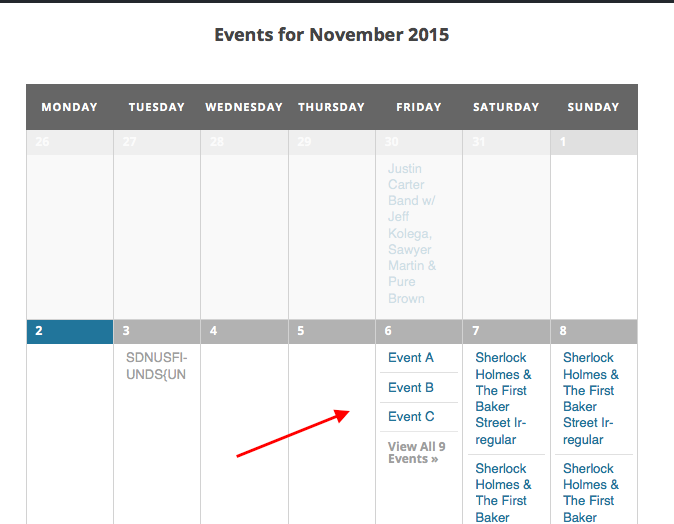
What I mean is, if you look at a month view grid, the events happening on a given day are just listed in the table cell for that day. Their position along the Y-axis is based on the time of day they occur, but there is not a ledger on the left side of the Month view that shows hour-by-hour breakdowns of event times. And so if events are happening at same or overlapping times, they just “Stack” one on top of the other.
The Week View, however, handles this differently – the hours of the day are listed along the left-hand side and so events are plotted along two axes for the Day and for the Time of Day that the event occurs.
An Example
Let’s say you have Events A, B, and C. They’re all happening on Friday at 2pm, 2:30pm, and 2:45pm, respectively.
Well, in month view the squares for these events will just stack straight up and down, like this:
In week view, however, those events will be “squished” a bit and crammed along both the x-axis and y-axis to try and show the date and time accurately, like in this screenshot:
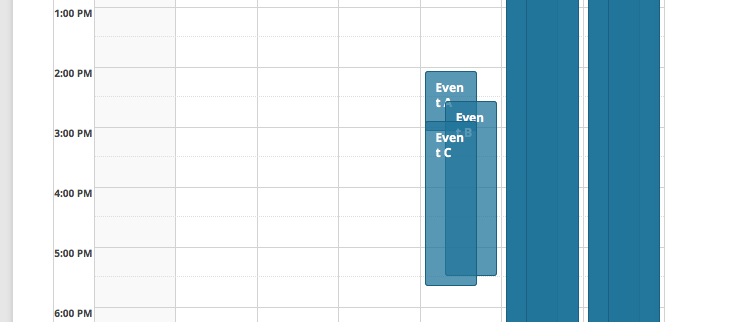
Same events, same theme, same exact information being shared with the user. But the different styles of layout have different implications for design and appearance, and so in a limited content width the Week View can look quite crammed 🙁
I hope this explanation clarifies things – please let us know what you think!
— George
February 18, 2016 at 8:30 am #1075337KeymasterThis topic has not been active for quite some time and will now be closed.
If you still need assistance please simply open a new topic (linking to this one if necessary)
and one of the team will be only too happy to help. -
AuthorPosts
- The topic ‘Week View is Wonky – and yes, I did just activate the 3.12.5’ is closed to new replies.