

Forum Replies Created
-
AuthorPosts
-
November 11, 2015 at 11:47 am in reply to: Where can I download older Events Calendar Pro (3.9.1 or 3.9.3 or both)? #1024306
George
ParticipantAwesome! Best of luck with your project 🙂
ParticipantSounds good Hans! I’m sorry that custom code is required at this time, but hope this code and information helps nonetheless 🙂
Cheers!
GeorgeParticipant😀
November 10, 2015 at 10:29 pm in reply to: Does the pro version allow embedding the full calendar with a shortcode? #1024082ParticipantHey Mendy,
This is unfortunately not possible at this time 🙁 there is no full-calendar shortcode.
Sorry to disappoint – let me know if I can help with anything else!
Sincerely,
GeorgeParticipantHey Tomáš,
Sorry to hear about this – unfortunately, this is currently the way the WooCommerce itself handles orders:
That means, when I pay for this order, I don’t receive any e-mail until I mark the order as completed.
You might be able to make order-completion happen automatically if you are a bit comfortable with editing code and have a good read of this tutorial → http://stackoverflow.com/questions/28218580/woocommerce-hook-for-after-payment-complete-actions
Otherwise this is unfortunately something we can’t really get around from inside our own plugin since our plugin just extends WooCommerce’s default functionality…
Let me know what you think of all of this!
Cheers,
GeorgeParticipantHey @John,
Thanks for reaching out – this is unfortunately a bit tricky since “Tickets” generated by our WooCommerce Tickets add-on are tied to a specific object type within WooCommerce called WC_Product.
Easy Digital Downloads uses a whole separate way of doing things and thus so does our EDD Tickets add-on for it, and so there is unfortunately not a simple way to export and import this auto-magically like with, for example, WordPress’ built-in import and export tools that export content as XML files….
It unfortunately seems like the only way to really pull this off would be to write a custom PHP script that takes data from the WC_Product items specifically and inserts it per EDD’s models into the database. There is no such script that I know of at this time 🙁
I”m really sorry about this @John!
—
With all that being said, I also wanted to address something you mentioned:
We are changing carts from EDD to WooCommerce to add physical products to the mix.
While your project and the decisions made about it are none of my business, I just wanted to clarify that WooCommerce supports physical products fully, out-of-the-box. An article online like this one is a good resource for learning more about this, just in case you were under the impression that physical products could not be sold with WooCommerce or something! → http://code.tutsplus.com/tutorials/woocommerce-adding-physical-products-to-your-store–cms-21516
—
Just wanted to address that 🙂
Thank you,
GeorgeParticipantHey Milad!
You can definitely add custom fields (and design elements based on them) to various event templates, like the “the event landing page”, but it would unfortunately require custom coding 🙁
While we cannot help with literally writing custom code here, we do have some very detailed documentation that walks you through the process of code-level customizations with our front-end templates → https://theeventscalendar.com/knowledgebase/themers-guide/
I’d recommend checking that out and tinkering around – if you need more professional-quality help with this, you’d unfortunately have to hire someone to write custom code for you.
Thank you,
GeorgeNovember 10, 2015 at 12:20 pm in reply to: Need CSS Code to resolve Event Calendar Highlight Color #1023894ParticipantHi! 😀
Can you explain what your question is here? Provide links to where your problems are happening and elaborate on what you’re trying to do, et cetera?
We are not able to write custom code, unfortunately, but if you describe your issues I’ll do my best to help!
Cheers,
GeorgeParticipantHey Matt!
I’m a huge fan of and contributor to both of those plugins, and they are awesome! 🙂 Unfortunately, while you can make this happen – in other words, it is technically indeed possible – you could only do so by custom-coding a solution for your site.
In other words there’s not, for example, a simple option you could check to make this automagically happen 🙁
Sorry to disappoint! Let me know if you have any other questions or if I can help with anything else.
Cheers!
GeorgeParticipantHey @Hans,
Thanks for elaborating on things and for sharing your information.
To get the “Find out more” link to appear on photo view, at this time you will unfortunately have first read our themer’s guide here → https://theeventscalendar.com/knowledgebase/themers-guide/
Using those principles, create a theme-specific version of this Events Calendar Pro plugin file:
src/views/pro/photo/single-event.php
You’ll want to duplicate that in your theme and then add a “Find out more” link manually to it right after the excerpt.
I made an example of this for you to refer to here, check out line 53 → https://goo.gl/41nEV4
—
As for shortening or otherwise changing the length of excerpts, you can do that by using the excerpt_length filter built into WordPress itself as described here → https://codex.wordpress.org/Plugin_API/Filter_Reference/excerpt_length
—
We can not help you implement any of this custom code, but hopefully all of these resources get you started in the right direction!
Best of luck with your customizations!
GeorgeParticipantThank you @Lamourah, I hope for such improvements as well and for now wish you the best of luck with your site!
Sincerely,
GeorgeNovember 10, 2015 at 12:06 pm in reply to: Need to clarify about syncing from ical importer #1023883ParticipantThanks for your update here and for your patience, @Jennifer!
It seems like the problems boil down to this:
• An event will be imported from your remote events feed into your WordPress site.
• That event will have some detail modified on its original remote listing.
• Upon the next scheduled import, this detail is not updated on the existing WordPress-imported event; rather, a new duplicate version of the event is imported altogether.Is that an accurate summary? I’m sorry about my questions, I just want to be 100% certain I know what you’re asking about so I can best be of help 🙂
Sincerely,
GeorgeParticipantThanks for elaborating on this, and for your patience – one thing I’m still a bit confused by is the nature of your problems in the mobile view. In mobile view for me, everything renders fine:
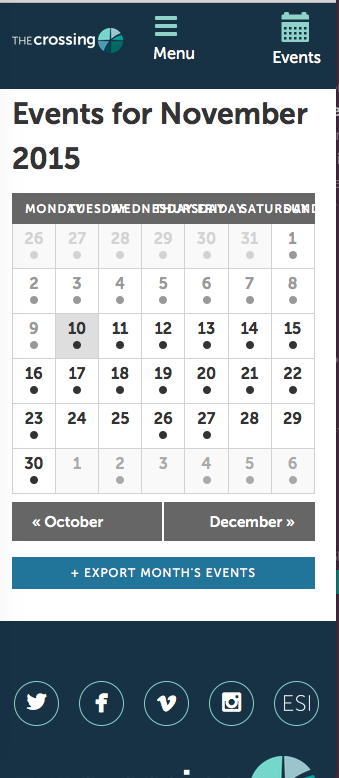
(The rest of the site footer renders and such, just not included in the screenshot).
Do you find this to not be the case? If so, can you scare a screenshot of your mobile problems specifically?
Thank you so much for your patience with this! Just trying to figure out exactly what you’re looking for so I can best be of help here! 😀
Sincerely,
GeorgeNovember 10, 2015 at 11:24 am in reply to: How can I have the event website open in a new tab? #1023873ParticipantWoot! Best of luck with your site going forward 🙂
Cheers,
GeorgeParticipantThank you so much @Mike! If you check your console for this after each step in our troubleshooting steps (https://theeventscalendar.com/knowledgebase/testing-for-conflicts/), does it go away at any time along the way after a specific plugin is deactivated, or after you change your theme to a default theme or something?
I’m sorry about that being the best step at this point – but I don’t have this JS error myself so it stands to reason that it could be the result of a code conflict.
Let us know what you find!
Sincerely,
George -
AuthorPosts