

Forum Replies Created
-
AuthorPosts
-
George
ParticipantYou’re right, Javier, and we are working on a better way to control this and set a limit.
There is no such feature for now, but we appreciate this feedback and agree with you that there should be more controls.
Thanks for reaching out!
GeorgeParticipantThat is indeed possible—check out this Knowledgebase guide to learn how to do so: https://theeventscalendar.com/knowledgebase/upgrading-a-license/
ParticipantHey @Nora,
Thanks for reaching out. What you describe is interesting but is unfortunately not possible with our plugins at this time. 🙁
I’m sorry to bear that news!
GeorgeApril 14, 2016 at 7:05 am in reply to: Event count down doesn't work anymore after WordPress update #1102416ParticipantSorry to hear this, Hans!
I just tested out the event countdown widget and it works well for me. We have no other reports of this breaking, to boot, so to help us investigate this issue a bit more closely would be able to share your site’s System Information with us?
Here’s how → https://theeventscalendar.com/knowledgebase/sharing-sys-info/
I’ll take a look through all of that and see if anything stands out as a possible culprit.
Thank you!
GeorgeParticipantHey @Arn!
Our RSVP features unfortunately do not have the access-control functions you describe, where users have to be logged-in to RSVP.
That would be possible with some custom coding, which I can try to cook up here, but can you confirm if you would even be interested in having to tinker with some custom code?
If not, no worries—sorry to disappoint!
GeorgeParticipantHey @Corey!
I was wondering how to configure the Call to Action button on each eventpage so that when clicked, it scrolls down the page to the eventbrite tickets widget? Right now, it actually scrolls up to the top of the page.
I’m not sure what call-to-action button you are referring to, but it is not something our plugins generate, so unfortunately you might have to contact the support folks behind the plugin that added the button (or, more likely, the theme) for further assistance.
A simple approach would be to put an EMPTY h3 header tag in your post content right before the bottom of the post content. Give this h3 header tag an id, like “eventbrite-form”.
Then you can make the call-to-action link have an href of #eventbrite-form, instead of a URL, and upon being clicked it will jump down the page to that element.
If anything I mentioned here doesn’t sound familiar, head over to the old Google dot com and search for clarification of those terms.
Also, does Modern Tribe plan to integrate the Eventbrite ticket option into Community Tickets?
There are unfortunately no plans for this at this time. 🙁
Also, is there anyway to list the attendees who purchased a ticket via Eventbrite on the event page (similar to if a user were to purchase through woocommerce)?
There is unfortunately no way to do this at this time. 🙁 It’s something that we would love to see down the road, but that is admittedly far down the road, on the orders of several months at the earliest.
Since I’m creating an event discovery platform, I want to use my recently downloaded Eventbrite Tickets add-on to upload Eventbrite events with the specific affiliate links so my site gets a commission — however, I noticed that back in October, you did not have this functionality (https://theeventscalendar.com/support/forums/topic/getting-credit-for-affiliate-sales-for-eventbrite-imported-events/).
Are there any plans to enable this feature?
This is a feature we want to support, but still unfortunately do not yet.
I do not have any specific ETA for when support for this will arrive, unfortunately, but it’s something we do indeed want to support.
Sorry to have to bear some bad/bummer news here!
Sincerely,
GeorgeParticipantHey Michael,
Thanks for reaching out!
This is an interesting question—our plugins themselves don’t quite provide anything along these lines, but you might be able to put together something where the retailers have a special discount code that they share with customers who buy stuff—they write the code on receipts or something—and then this discount code is a “discount code” in your site’s WooCommerce store.
Then, at checkout when they go to “buy” tickets, they can simply add this coupon code to get the discount per the giveaway….
It’s a tricky thing to pull off, and unfortunately our plugins on their own don’t have anything geared specifically towards this sort of stuff, but I hope my answer helps get some ideas going or something at least.
Let me know any further questions you might have—I will do my best to answer them and at least try to point you in the right direction.
Sincerely,
GeorgeParticipantHey Pau,
Thanks for reaching out.
You first ask if some customizations are possible—yes, basically any customization you could think of is possible. The tricky part is implementing the actual code to make it happen. We cannot help with any code customizations whatsoever, so if you yourself cannot code a customization you want, you would have to hire a professional.
• Read more about what support is provided for license-holders here → https://theeventscalendar.com/knowledgebase/what-support-is-provided-for-license-holders/
• Check out this list of great developers for hire here → http://m.tri.be/18k1 (we have no affiliation with any of these folks—they’re simply some well-respected names in the community that we’ve compiled to share).
Next, you ask about pricing.
If you want to use both plugins on two websites, then yes, you would have to spend $149 on each license. You’d be buying “Business” licenses, which are $149 apiece. We unfortunately do not have any active discount offers at this time, which news I’m sorry to bear here, but I hope the information in my reply here is clear and helps you proceed.
Last note—we have a no-questions-asked thirty-day refund policy that many folks use to facilitate a “trial period” with our software. You should consider doing the same here—the prices ARE, indeed, high, so if you check out our plugins and don’t feel that they’re right for the job, then within thirty days just follow the steps on this page to get a full refund immediately → https://theeventscalendar.com/knowledgebase/refund-policy/
— George
ParticipantHey Bob,
Thanks for reaching out.
We do not endorse any theme and it is actually a very bad practice for theme authors to include plugins inside their themes.
So, unfortunately you might be using an out-of-date version of The Events Calendar on your site.
I would recommend DELETING the version of The Events Calendar included by your theme. Then just install the real, free, actual version of the plugin which is found here → http://wordpress.org/plugins/the-events-calendar
If issues persist with the real, actual version of The Events Calendar, then contact your theme author about those issues because their theme should support the real version of The Events Calendar.
Neither of the issues you mention are ones that I can recreate myself or that we have other reports of at this time, so that’s why I assume that your version is out-of-date and/or being broken by the theme.
— George
ParticipantHi there,
I took look at the link you provided to your development server and unfortunately found lots of odd things there. Much of the HTML on the page is broken, as shown in this screenshot:
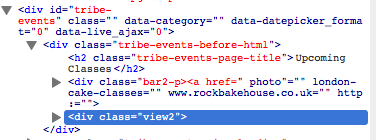
Our plugins do not cause that behavior and we unfortunately cannot help troubleshoot theme-related design issues, but it seems like there are some deep issues here with your chosen theme and possibly with whatever custom HTML you’ve created.
If you don’t find that your CSS is getting applied, then using the “css plugin” might be the problem—I would recommend trying to add CSS the proper way, at the bottom of your theme’s style.css file, just to see if that makes a difference so that you can tell that using the plugin to add CSS is the problem.
There is little insight we can offer on your issues, unfortunately. 🙁 We cannot help with front-end design projects, custom coding, etc. Please read this page to learn more about the support we can provide → https://theeventscalendar.com/knowledgebase/what-support-is-provided-for-license-holders/
I only mention this to set your expectations early here—apologies for any trouble.
If you find yourself with many remaining questions about custom coding and theme CSS and all of that, your best bet would be to hire a professional to help out. We have a list of great developers here → http://m.tri.be/18k1 (and have no affiliation with any of these folks—they’re simply some well-respected names in the community that we’ve compiled to share with folks).
Thank you,
GeorgeParticipantHi Louw,
Thanks for reaching out!
There is unfortunately no “delegate” feature within our plugins. So, you pose this question here:
How can i add a delegate to a course manually without going via woocommerce
Our plugins unfortunately do not provide that functionality so going through WooCommerce seems like the only possible method at this time.
If you are just trying to collect names of folks without having them go through a checkout process, then a “form” plugin like Gravity Forms or Ninja Forms might offer some useful features to this end.
Best of luck with your project!
GeorgeParticipantHey @edebex,
Unfortunately Events Calendar Pro will not work with WPML. It does not support WPML at all and they are not compatible together.
I’m sorry to bear this news. 🙁
— George
ParticipantThanks for chiming in here, @Joe!
@David, a solution like @Joe provided at this time is unfortunately the best sort of option here—our plugins on their own do not provide functionality for adding specific fees per-ticket.Sorry to disappoint on that front, but I hope that plugin Joe recommended is helpful!
Sincerely,
GeorgeApril 13, 2016 at 6:58 pm in reply to: https://theeventscalendar.com/support/forums/topic/something-odd-and-messed-up-i #1102259ParticipantHey Gregory,
Adding this CSS should do the trick—let me know if it does!
body.tribe_community_edit #dp-footer-wrap .owl-carousel {

    display: none !important;

}
Cheers,
GeorgeParticipantHi @Kelli,
I understand that answers like, “We unfortunately cannot do that” are frustrating. We are often bound by real limitations, however, like if a theme’s styling totally ruins a page then there is nothing we can do about that theme because we do not make any themes.
I only mention this because if emails are failing to arrive in your inbox, then this, too, is something happening outside the context of our plugins specifically.
Your server may be blocking the emails or just failing to deliver them properly. I would recommend setting up an SMTP plugin to alter the delivery system a bit, which usually works wonders.
A plugin like this one is what I am referring to → https://wordpress.org/plugins/easy-wp-smtp/
Install something like this plugin (though you can of course choose whichever specific plugin you like, not necessarily the one above)—set it up according to the instructions of that plugin—and see if anything improves with your email delivery.
Thank you!
George -
AuthorPosts