

Forum Replies Created
-
AuthorPosts
-
George
ParticipantHey Corby!
This is unfortunately not possible. 🙁 I’m sorry to bear that news, but I hope this clear answer helps you move forward with your project.
Sincerely,
GeorgeApril 14, 2016 at 12:49 pm in reply to: Using Visual Composer with Events Calender + Event Tickets Plus #1102699ParticipantHey Matthew,
Thanks for reaching out. There are indeed problems with Page Builders across the board, not just Visual Composer, so I would actually recommend no page builders.
Page builders often break fundamental aspects of how WordPress works, and they break many norms of theme development which can, in turn, then break plugins.
I would recommend well-coded, standards-compliant themes first and foremost. Themes made by the folks at http://arraythemes.com are excellent, for example, or http://woothemes.com, and so on.
Apologies if this isn’t the answer you were seeking! Let me know any other questions. To recap, though, essentially any page builder you choose will likely and almost certainly not work with The Events Calendar completely, and this could be true of many other plugins.
Sincerely,
GeorgeParticipantSure thing Richard! Follow the steps here and we’ll get you squared away with that refund → https://theeventscalendar.com/knowledgebase/refund-policy/
— George
ParticipantHey Andrea,
Sorry to disappoint, but at this time multiple calendars are not supported. 🙁
Cheers!
GeorgeParticipantHey Jeff,
Thanks for reaching out. The only demo site we have is the official demo site at http://wpshindig.com.
Can you clarify what registration process you are referring to specifically?
Thanks,
GeorgeParticipantHey Nora,
Thanks for reaching out!
Creating different forms and such as you describe is unfortunately not possible at this time. 🙁
Sorry to disappoint!
GeorgeParticipantHey George,
Sorry to see this! I don’t have the behavior—can you share your whole System Information to help us investigate?
Here’s how to do that → https://theeventscalendar.com/knowledgebase/sharing-sys-info/
I’ll look through it; I know you mention versions of things on your site, but the full un-edited version of the system information has lots of other important information that could be relevant here.
Cheers,
GeorgeParticipantHi Jean,
To ensure that styles take effect in that before-html section, try out things like the !important flag in your rules if they don’t seem to apply, or more selector specificity.
Check out this screenshot to see that things are working okay:
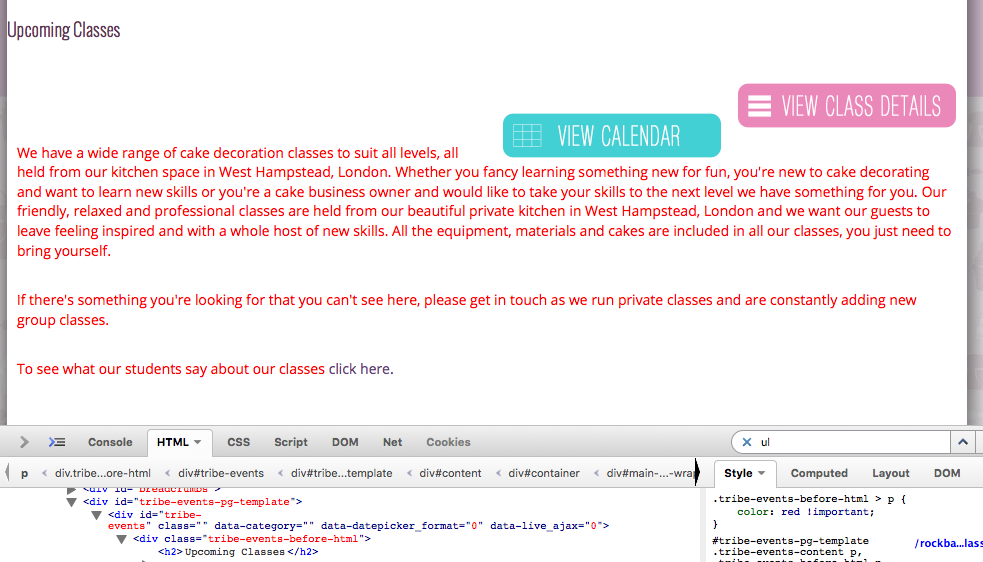
The CSS I tested was this:
.tribe-events-before-html > p {

    color: red !important;

}
Notice the caret figure? It specifies “only P tags that are direct children of .tribe-events-before-html.” Then the !important flag adds priority to this.
Try out these sorts of tricks—research online for more information about these methods if you’re not familiar with them—and ensure the code is in the bottom of the theme style.css file being loaded on your page.
Cheers!
GeorgeParticipantHey Vivianne,
Thanks for sharing all of this. It unfortunately is all related to your custom code:
I have code in my functions.php to add the booking form to the list and also code in the custom.js to place the colored button on the right, which opens the form. Within this file is also code to open a pop-up if you click on the spoon/knife icon and to show a message if no events are available in the chosen area/date.
It is indeed the case that the JavaScript needs another call after the AJAX call. That is correct. However, we are not able to dive into your custom code to make another JavaScript call after the AJAX call.
Sorry to disappoint! Check out this page to learn about the support available here: https://theeventscalendar.com/knowledgebase/what-support-is-provided-for-license-holders/
So to implement the fixes you describe, you would have to write that custom code or hire a professional developer to write the code for you. We have a list of great developers here → http://m.tri.be/18k1 (and have no affiliation with any of these folks—they’re simply some well-respected names in the community that we’ve compiled to share in situations like this one).
Sincerely,
GeorgeApril 14, 2016 at 12:25 pm in reply to: https://theeventscalendar.com/support/forums/topic/something-odd-and-messed-up-i #1102667Participant😀
ParticipantHey there,
I’ve responded over email and will keep the conversation going there.
I will close this thread—check out my most recent reply over email and we can continue the conversation.
Cheers,
GeorgeParticipantSo sorry to hear this @robert! We are pulling in developers left and right to try and get to the bottom of these sudden issues—it’s possible that Eventbrite’s API has changed, and we are investigating this closely.
Stay tuned.
George
ParticipantI’m really sorry about this bug, folks, and its persistence in our code base. We are working hard on isolating the cause of the issue and will fix this as soon as we can.
I’m curious—do you either of you notice a difference in behavior based on whether the event is using “Global stock” or not? In other words, do events with the Global Stock option checked have tickets that behave any differently here than events with the “Global Stock” option un-checked?
Thank you!
GeorgeParticipantHey Vivianne,
Thanks for reaching out. I’m unfortunately a bit stumped here because there are no templates inside our plugins that call functions.php or custom.js files at all.
Functions.php is loaded by your theme on its own—our plugins do not load or unload that file in any way, ever.
Custom.js sounds like a custom file you’ve added—our plugins do not load or unload that file in any way, ever.
So, it sounds like your own custom code is causing the odd behavior here, because our plugins do not load or unload those two files you mentioned on their own.
Can you elaborate a bit more on this, here? I will try to help—but just to make it clear, we unfortunately cannot help with any custom-code-related things. 🙁
Read this page to learn more before posting your reply → https://theeventscalendar.com/knowledgebase/what-support-is-provided-for-license-holders/
Thank you!
GeorgeParticipantSorry to hear about this, @Josh. There isn’t anything standing out as outright problematic in your System Information, so for starters, I’m wondering:
1. Can you clarify exactly what your site’s settings are in Settings → Permalinks?
Are they /%postname%/, for example?
2. Next, can you clarify when this issue started arising, to the best of your knowledge/memory?
3. Finally, for now, we have a handy guide for troubleshooting some of the common culprits behind 404 errors. That guide is here: https://theeventscalendar.com/knowledgebase/fixing-http-404-errors/. I would recommend going through that and seeing if progress is made anywhere along the way.
Let us know what you find!
Thank you,
George -
AuthorPosts