
Home › Forums › Calendar Products › Events Calendar PRO › Styling Before HTML content
- This topic has 6 replies, 3 voices, and was last updated 10 years, 6 months ago by
Support Droid.
-
AuthorPosts
-
April 14, 2016 at 1:07 am #1102330
Jean
ParticipantI’m trying to replicate a site (http://rockbakehouse.co.uk/london-cake-classes) on our development server http://176.32.230.46/rockbakehouse.co.uk/london-cake-classes/
I believe on the original site the template was modified – trouble is can’t find where that is (It’s not in the theme/tribe-events folder as described in your knowledgebase nor in the plugin files). However the client wants to be able to edit this content without havign to dig in to code every time.
I’ve put the content in the right place and tried styling it with custom css (using the simple custom css plugin) but it won’t apply any styles. What am I doing wrong?
April 14, 2016 at 6:23 am #1102391George
ParticipantHi there,
I took look at the link you provided to your development server and unfortunately found lots of odd things there. Much of the HTML on the page is broken, as shown in this screenshot:
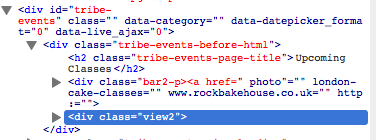
Our plugins do not cause that behavior and we unfortunately cannot help troubleshoot theme-related design issues, but it seems like there are some deep issues here with your chosen theme and possibly with whatever custom HTML you’ve created.
If you don’t find that your CSS is getting applied, then using the “css plugin” might be the problem—I would recommend trying to add CSS the proper way, at the bottom of your theme’s style.css file, just to see if that makes a difference so that you can tell that using the plugin to add CSS is the problem.
There is little insight we can offer on your issues, unfortunately. 🙁 We cannot help with front-end design projects, custom coding, etc. Please read this page to learn more about the support we can provide → https://theeventscalendar.com/knowledgebase/what-support-is-provided-for-license-holders/
I only mention this to set your expectations early here—apologies for any trouble.
If you find yourself with many remaining questions about custom coding and theme CSS and all of that, your best bet would be to hire a professional to help out. We have a list of great developers here → http://m.tri.be/18k1 (and have no affiliation with any of these folks—they’re simply some well-respected names in the community that we’ve compiled to share with folks).
Thank you,
GeorgeApril 14, 2016 at 7:48 am #1102454ParticipantHi George,
Thank you for your reply. I appreciate what you are saying.
I have removed the custom html and css so that you can see what the problem is. I have tried adding the custom css to the theme’s stylesheet as well (but now removed it) and that didn’t work.My question specifically then is how do I style that text in the ‘before html’ box? What css do I need?
Jean
April 14, 2016 at 12:36 pm #1102678ParticipantHi Jean,
To ensure that styles take effect in that before-html section, try out things like the !important flag in your rules if they don’t seem to apply, or more selector specificity.
Check out this screenshot to see that things are working okay:
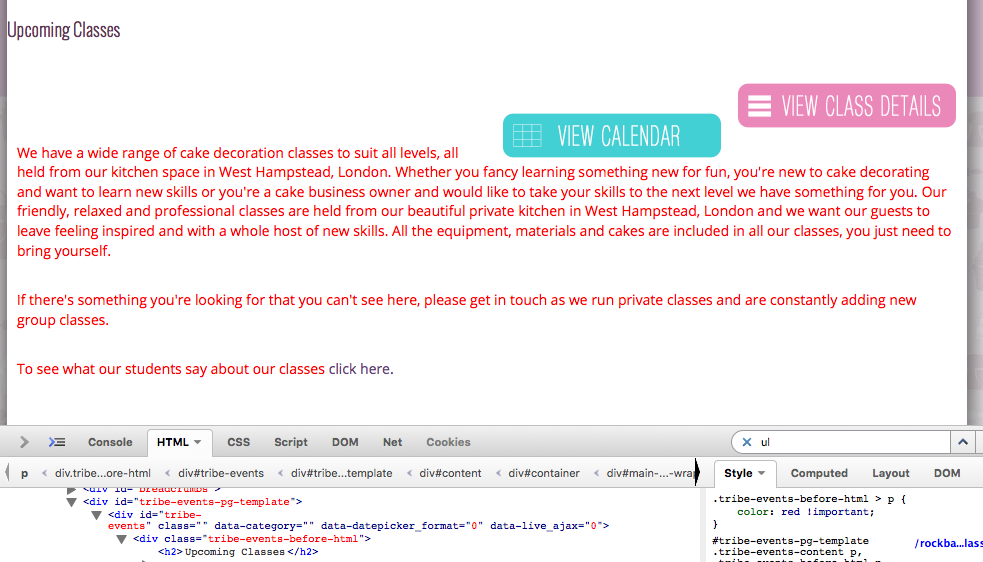
The CSS I tested was this:
.tribe-events-before-html > p {

    color: red !important;

}
Notice the caret figure? It specifies “only P tags that are direct children of .tribe-events-before-html.” Then the !important flag adds priority to this.
Try out these sorts of tricks—research online for more information about these methods if you’re not familiar with them—and ensure the code is in the bottom of the theme style.css file being loaded on your page.
Cheers!
GeorgeApril 15, 2016 at 8:53 am #1103039ParticipantYou are a star. Thank you. That was the missing piece of info that I needed.
April 15, 2016 at 11:05 am #1103156ParticipantCheers! Glad to hear about some progress.
There’s a wealth of knowledge along these lines at this website for free, so I would definitely recommend checking it out as you continue to tinker with your site → http://css-tricks.com
We don’t “officially endorse” that site or anything like that, it’s just an excellent resource.
I’ll close this thread for now, but if other issues arise open a new thread any time.
Cheers!
GeorgeApril 30, 2016 at 9:35 am #1109118KeymasterThis topic has not been active for quite some time and will now be closed.
If you still need assistance please simply open a new topic (linking to this one if necessary)
and one of the team will be only too happy to help. -
AuthorPosts
- The topic ‘Styling Before HTML content’ is closed to new replies.