

Forum Replies Created
-
AuthorPosts
-
George
ParticipantHey Christopher,
Thanks for reaching out!
Unfortunately, altering the order of the tickets would require you to dive into the plugin code on your site and modify the code directly. We cannot help with code modifications, so this is something you will have to take the reins on, or you can also hire a professional developer to help you. We have a list of great developers here → http://m.tri.be/18k1 (and have no affiliation with any of these folks–they’re simple some well-respected names in the community that we’ve compiled to share in situations like this one).
While we cannot help with the code modification here, I would like to at least throw out some information to help you get going in the right direction if this is a code modification you are willing to make on your own:
Head to this file within Event Tickets Plus:
event-tickets-plus/src/Tribe/WooCommerce/Main.phpThen, find the function called get_tickets_ids(). This function is what retrieves the tickets by IDs, and thus you should be able to manipulate it to alter the order.
How so? Well, again, this is something you will have to tinker with and experiment with. But check out the main query that gets the tickets:
        public function get_tickets_ids( $event_id ) {

		if ( is_object( $event_id ) ) {

			$event_id = $event_id->ID;

		}
$query = new WP_Query( array(
'post_type' => 'product',
'meta_key' => $this->event_key,
'meta_value' => $event_id,
'meta_compare' => '=',
'posts_per_page' => -1,
'fields' => 'ids',
'post_status' => 'publish',
) );return $query->posts;
}
This is just a WP_Query! So you can use any of the order and orderby parameters for WP_Query like normal here. Not familiar with such parameters? Well, they’re all documented pretty extensively in the official WordPress documentation here → https://codex.wordpress.org/Class_Reference/WP_Query
Check this all out and tinker around a bit—you should be able to tweak the ordering how you see fit.
Cheers!
GeorgeParticipantHey @Henry-James,
Thank you for reaching out.
Our plugins unfortunately do not offer any sort of “Event Gallery” link or feature, so what you are referring to might be something from another plugin or your theme, in which case you’ll have to pose support questions to the authors of those products.
To help clarify this, though, can you do the following things?
1. Post a screenshot of the link you are referring to, if possible.
2. I know you said you’re up-to-date with all versions, but just for a more complete look “under the hood” of your site, can you post your entire, un-edited System Information here? Here’s how to do that → https://theeventscalendar.com/knowledgebase/sharing-sys-info/
Thank you!
GeorgeParticipantHey Niclas,
Thanks for reaching out!
At this time, you can only have the calendar grid on the main events page. You cannot embed it to other pages or add it in other locations on your site.
Sorry to disappoint!
GeorgeParticipantHey @Adam,
Thanks for reaching out!
We unfortunately do not have this functionality at this time. 🙁 I’m sorry to disappoint.
Please let me know if there is anything else I can try to help with.
Sincerely,
GeorgeParticipantHey Patrick,
Thanks for reaching out. Our plugins unfortunately do not meet some of the requirements listed here. 🙁 I will elaborate as follows.
* booking different types of ressources (like rooms and equipment assigned for a specific meeting, ordering food for the meeeting, etc.)
☝️ While selling these other things is possible with WooCommerce itself, the closes thing our plugins could do is allow for the “ordering food for the meeting” option; e.g. if you have a defined list of meal options, you can use our ticketing plugins’ Additional Attendee Meta fields to require a meal selection when buying a ticket. But otherwise, what you list here is not supported.
* managing different statuses of users (the way WP does: registered user, contributor, writer…)
☝️ WordPress handles the user management entirely; our plugins work with that, of course, but do not offer any sort of additional layer of user management and role/access privilege management atop of that.
* notifications:
> for the booker (status of his/her reservation), the technicians (for the equipement to be installed), for the guests, for the ressources manager, for outsiders (via a mailing list?)☝️There is unfortunately no such notifications system with our plugins.
Most of the other things you listed are possible to varying degrees, but the above things I highlighted are not possible and so I wanted to point those out clearly in case these things are deal-breakers and make our plugins a no-go.
If you have further questions and curiosities about the plugins, check out the products pages for each of them on this site, ask me specific follow-ups, and do keep in mind that we have a no-questions-asked thirty-day refund policy which many folks use as a sort of “trial period” to test out the plugins firsthand. You may find this helpful—learn more about the refund policy here.
Thank you!
GeorgeParticipantThanks for this information!
It indeed shows that Events Calendar Pro is NOT activated/installed on your site.
I would recommend doing so before we can proceed here. You can grab the latest copy of Events Calendar Pro here → http://theeventscalendar.com/my-account/downloads
Cheers!
GeorgeMay 5, 2016 at 10:43 pm in reply to: calendar no more visible, every links direct towards empty page #1111309ParticipantThanks for testing that, @Christophe!
I’m sorry that deleting the page did not help. 🙁 Since this doesn’t change things, the next step from here is to do the full set of troubleshooting steps outlined here → https://theeventscalendar.com/knowledgebase/testing-for-conflicts/
After EACH STEP in that process, check on the issue: do you get the same behavior?
Let us know what you find!
Thanks,
GeorgeParticipantGlad to hear it, Dave!
ParticipantHi Tony,
What versions of The Events Calendar and Eventbrite Tickets are you running on your site? At this time, the current version of The Events Calendar is 4.1.3 and the current version of Eventbrite Tickets is 4.1.2
Ensure that you are up-to-date with both plugins and let me know if issues persist; we have published some fixes in these updates and they may resolve your issues.
If not, then please follow the steps here to process a refund → https://theeventscalendar.com/knowledgebase/refund-policy/
I’m sorry for the trouble regardless of the outcome here, and hope the newest versions of our plugins help.
Thank you,
GeorgeParticipant☝️ Thanks for posting this @Nico!
Let us know if we can help anything in the meantime, @Victor!
— George
Participant☝️ Thanks for posting this @Nico!
Let us know if we can help anything in the meantime, Juan!
— George
Participant☝️ Thanks for posting this @Nico!
Let us know if we can help anything in the meantime, @MacKenzie!
— George
May 5, 2016 at 10:18 pm in reply to: Imported categories are overriding the chosen category #1111301ParticipantThank you for this information, and for the iCal URL!
I tested importing that, but unfortunately was met with this error no matter what I tried, regardless of using the file itself or using the iCal URL:
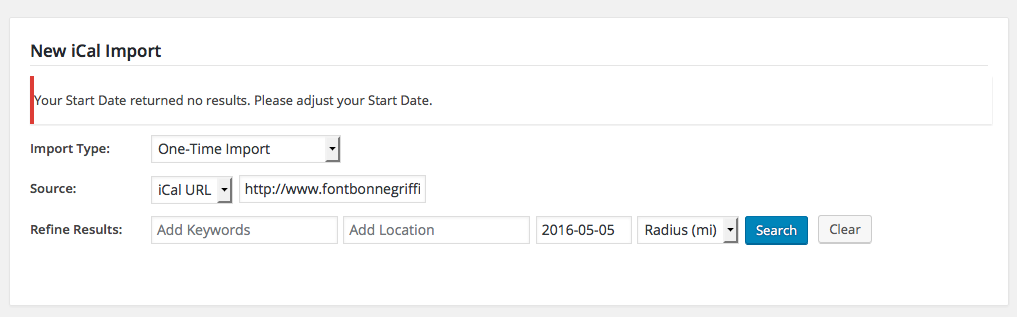
I will keep tinkering to see why this might be happening for me, but in the meantime, I noticed that your versions of The Events Calendar plugins are just a little bit behind—we’ve published some updates recently, so I would recommend updating to all of the most recent versions of The Events Calendar, Events Calendar Pro, and iCal Importer.
• Events Calendar Pro and iCal Importer are currently at version 4.1.2
• The Events Calendar itself is at version 4.1.3☝️ Update things on your site so that you have these version numbers, and let me know if the same issues persist!
Thank you,
GeorgeParticipantHey @Soula,
Thanks for reaching out!
I took a look at your sound and indeed found the 503 error. I cannot reproduce this on my own site, so to help investigate I would recommend sharing your site’s “System Information”, which you can see how to do here → https://theeventscalendar.com/knowledgebase/sharing-sys-info/
Next, I would recommend opening a support ticket with your web host, as they might be able to identify some errors on their server logs.
I’ll look at your system information and we can go from there!
Thank you,
GeorgeParticipantHey Nick!
Thanks for reaching out.
You unfortunately would only be able to pull off what you describe here by writing some extensive custom code.
We cannot help with custom code, so your best course of action would be to write code yourself or hire a professional to help you do so. We have a list of great developers here, if you need to do this → http://m.tri.be/18k1 (and have no affiliation with any of these folks–they’re simple some well-respected names in the community that we’ve compiled to share in situations like this one).
In the meantime, though, I took a look at your site and can recommend some CSS that will at least get you started with the two-column event layout you describe.
To try it out, try adding this CSS to the bottom of your theme’s style.css file:
#NewsandEvents .fusion-fullwidth .fusion-one-half:nth-child(1) {

    width: 100%;

}
#NewsandEvents .fusion-fullwidth .fusion-one-half:nth-child(2) {
display: none !important;
}#NewsandEvents .tribe-events-adv-list-widget .type-tribe_events {
float: left;
margin-right: 2%;
width: 48%;
}
This isn’t perfect—further refinement will almost certainly be needed. But I hope this helps!
Sincerely,
George -
AuthorPosts