

Forum Replies Created
-
AuthorPosts
-
May 5, 2016 at 9:23 pm in reply to: URLs: how to keep the English URLs and not having half of them in Italian..? #1111293
George
ParticipantHey Elena,
Thanks for reaching out!
How are you adding multilingual functionality to your site? Our plugins unfortunately do not fully support any multilingual plugins, including WPML, so the only way to keep events URLs in English would be to have multilingual functionality disabled altogether. 🙁
Your specific multilingual plugin may have the ability to ignore some URLs, though—so I would recommend reaching out to the plugin developer to see if their plugin can be configured to ignore any /events/ URLs.
Sorry to disappoint!
GeorgeParticipantHi Alex,
I’m sorry to hear about this. Our response times are one reply every 24 hours, but I will try to work with you here as quickly as possible to work towards a resolution! 😀
Can you please explain more about the problem?
⚠️ To help with a speedy support interaction here, please answer all of the following questions:
1. You say it’s crashing your site; how so? Are there errors displaying on your site? If so, please copy the FULL text of the errors and paste them here.
2. You say, “my site absolutely crapped itself at 8am this mornign”—what was the last change you made on your site before this happened?
3. You say, “Appears PRO is the problem”—how specifically did you determine this?
4. Finally for now, but perhaps most important: can you please post your “System Information”? Here is how to do that → https://theeventscalendar.com/knowledgebase/sharing-sys-info/
Cheers!
GeorgeParticipantHey Tobias!
This would be possible using our “Community Tickets” add-on.
Now, the Community Tickets add-on requires a lot of other plugins to work. Specifically:
• WooCommerce [free]
• The Events Calendar [free]
• Event Tickets [free]
• Community Events [premium]
• Event Tickets Plus [premium]
• Community Tickets [premium]☝️ This full line-up of plugins is required for Community Tickets to work.
You can learn more about Community Tickets itself here → https://theeventscalendar.com/product/community-tickets/
And if you’re interested, there’s also a “bundle” which includes the required premium items and an additional plugin, “Filter Bar”, which you can learn about here → https://theeventscalendar.com/bundles/bundle-community-manager/
Explore the links I’ve shared above, and keep in mind that we have a no-questions-asked thirty-day refund policy that many folks use as a sort of “trial period” to play with things firsthand. I would encourage this if possible.
Let me know if this information helps and if there are any specific follow-up questions I can try to help with.
Sincerely,
GeorgeParticipantSorry to see this, @Carly!
Can you post your site’s System Information so we can take a deeper look “under the hood”? Here’s how to post that information → https://theeventscalendar.com/knowledgebase/sharing-sys-info/
Thank you,
GeorgeParticipantHey Kathy,
Thanks for reaching out.
In your description of issues, you say, “when I import an iCal feed (recurring) that has it’s own category of ‘Women’s Tennis’….”
Can you clarify what you mean by saying the the feed itself has its own category? Are you saying that every event inside the feed has the same category, for example? If not, what do you mean?
Next, can you post your system information? Here’s how to do that → https://theeventscalendar.com/knowledgebase/sharing-sys-info/
Thank you!
GeorgeMay 5, 2016 at 9:46 am in reply to: calendar no more visible, every links direct towards empty page #1111108ParticipantThanks for all of this information!
I would recommend deleting the page titled “Events” on your site, because it is titled “Events” and is thus trying to use the slug /events.
But The Events Calendar is trying to use the slug /events too, to generate the generate calendar.
The Events Calendar is NOT an actual page—and so if you add an actual page with the same slug, it can cause the sort of issues you describe here.
Delete that page and let us know how things behave after that.
Thank you!
GeorgeMay 5, 2016 at 9:34 am in reply to: Facebook add-on not showing, insufficient permissions to access #1111059ParticipantHey @thisismarkc,
Thanks for reaching out. You mention your “old shortcut link”, so while that doesn’t work, can you clarify what happens if you go into your site’s wp-admin directly and then go to Events → Import?
You should be brought to this page which has a Facebook tab where you can perform your Facebook imports:
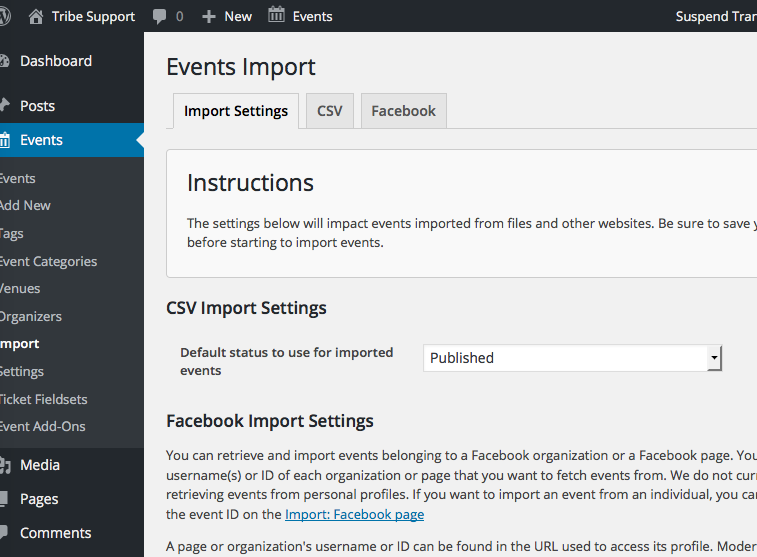
Do you find this tab?
Cheers,
GeorgeParticipantHey @Tyler,
Thanks for reaching out. It sounds like simply changing the word “Event” to “Reservation” (singular) and “Events” to “Registrations” (plural) would do the job here. Does that sound right?
If so, this is possible by following the steps outlined in this knowledgebase article → https://theeventscalendar.com/knowledgebase/changing-the-word-events-to-something-else/
Let me know if this helps!
GeorgeParticipantHey Lorri!
Thanks for reaching out.
1. When you say, “It” was working fine yesterday, what specifically are you referring to?
2. Can you share some links to events on your site whose images are not picked up correctly?
3. Can you post your site’s “System Information”? It will help us take a closer look at the issues. You can post that information by following the instructions here → https://theeventscalendar.com/knowledgebase/sharing-sys-info/
Thank you!
GeorgeParticipantHey @mnussbaum,
Thanks for reaching out!
When it comes to setting a default featured image, there is unfortunately no way to do this with our plugins. You could conceivably do it with some extensive custom coding, but that is outside the scope of support here and so it may not be a good option.
An alternative way around this would be to turn not to the plugins, but to your theme, and find where it displays featured images.
In these instances, you can check if the event has a featured image, and if not, supply a backup image. This too will take some custom coding, so reach out to a professional developer if you need help with writing custom code, but a general walk through of this sort of customization can be found here → http://www.wpbeginner.com/wp-themes/how-to-set-a-default-fallback-image-for-wordpress-post-thumbnails/
I hope this information helps!
GeorgeParticipantHi Jen,
Can you share a screenshot of where you get the “NaN” text, specifically?
Our plugins do not offer any image-resizing functions of their own, so I am just curious what you are referring to and a screenshot will help.
Thank you!
GeorgeParticipantThis thread is a duplicate of this thread over here → https://theeventscalendar.com/support/forums/topic/renewed-license-giving-error-as-invalid/
I am closing this thread; see you over in your original one!
ParticipantThis reply is private.
May 4, 2016 at 7:29 pm in reply to: Events Ticket Plus & Events Calendar/ The look of paintings in events calendar #1110799ParticipantSounds good—best of luck with your project!
George
ParticipantHey @Brendan!
There are a number of actions and filters in The Events Calendar’s admin. We are not able to help with code customizing and modifying and all of that, so you’ll have to mostly take the reins here and tinker around a bit, but here’s how to find hooks in our admin views:
1. Get a good code editor if you don’t already have one. There are free options, so just explore and find one good for you. I use and personally recommend Sublime Text. Just find one that has a “Find in Folder” feature.
2. Open up your plugin files for The Events Calendar.
3. Open your code editor’s “Find in Folder” feature so that you can perform a search on this folder:
wp-content/plugins/the-events-calendar/src/admin-views/4. In this folder, search for instances of do_action and apply_filters. These are the names of functions that run plugin actions or plugin filters, respectively.
I hope this helps! You mention the get_field function, but this function is one from Advanced Custom Fields; it is not from our plugins and so I unfortunately don’t have much insight on how well this would work in the admin and such (I’m sure it’d work fine).
For example, a hook that fires right above the events form in the wp-admin is tribe_events_eventform_top. And one at the bottom? tribe_events_details_bottom.
Use these methods, tinker around a bit, and let me know if you have any further questions. I’ll do my best to help within the limits of our customization/coding policy, and can help point you in the right direction for further development.
Cheers,
George -
AuthorPosts