

Forum Replies Created
-
AuthorPosts
-
George
ParticipantHey @Pau,
Two problems I see there are that you’re adding second and third parameters to functions that only have allow for one parameter.
So, for example:
<?php echo tribe_get_venue( $event_id, '<h3>', '</h3>' ); ?>☝️ You cannot add the <h3> or </h3> tags there. The function only allows for the first parameter, $event_id.
An alternative that might work better:
<h3><?php echo tribe_get_venue( $event_id ); ?></h3>

<h3><?php echo tribe_get_city( $event_id ); ?></h3>
You’ll have to take the reins from there—I hope this helps!
— George
ParticipantGlad to hear it!
Cheers,
GeorgeParticipantThis reply is private.
ParticipantHey Mike,
When I went to the Google Calendar link you posted, I was met with a fatal error right on the page itself:
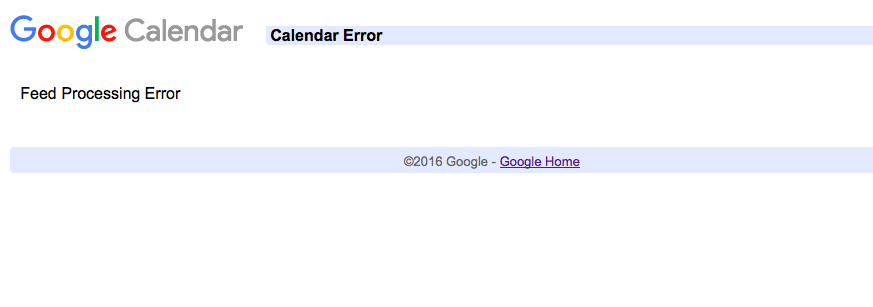
If the calendar URL cannot even be accessed in a browser, then our plugin will likely not work with it.
Based on your last question, it sounds like perhaps this is a Google Calendar that is completely private? Or has some restrictions in place that specifically prevent the outside world / the general public from accessing it?
Is that accurate? If so, then just for testing purposes, what happens if you recreate some of the events on a public calendar, and try importing from there?
Thank you,
GeorgeParticipantHey James,
Filtering the search results—or adding extra fields—is possible, but only by writing custom code. We unfortunately cannot help with custom coding here. Please read this page for more on that ? https://theeventscalendar.com/knowledgebase/what-support-is-provided-for-license-holders/
Next, in regards to the original issues you’re facing:
1. Can you share a link to your events page so that I can see the issue with the “Find Events” button not working firsthand?
2. Can you please post your complete, un-edited system information? Here’s how ? https://theeventscalendar.com/knowledgebase/sharing-sys-info/ I know you shared some details in your last reply, but the steps above generate a full, detailed profile of your site that is crucial for us to be able to provide further support here.
If you are concerned about having such information online, please take advantage of the “set as private reply” checkbox below the reply form before submitting your thread replies—this will keep the reply content private, and visible only to you and our support team.
Thank you,
GeorgeParticipantThis reply is private.
ParticipantThank you for testing this, @larafarwell.
This may seem trivial, but can you try making an event on your site itself; i.e., right in the wp-admin of your WordPress site, so that you have one event that is not imported from Facebook?
How does this event behave? Is there any duplication, etc.?
This will help confirm if the issues are just with the Facebook importing process, which will be quite helpful in narrowing down the issue.
Also, if possible, can you post some of the Facebook pages that you are importing from? No worries if this is private or sensitive, and you thus don’t want to post those pages. But if you can, I will test importing from those pages and leave the imports running, and will observe if I have a duplication problem on my own site as well.
Thank you for your patience with this!
GeorgeParticipantNo problem Randy!
I will close up this thread for now, but if other issues arise, or any questions, open a new thread any time.
Best of luck with your project,
GeorgeParticipantThis reply is private.
ParticipantHey Chris,
I am not the George on that page—if that’s a disappointment, my apologies. 😀
As for integration with Listable—we have no specific integrations with Listable, though as long as that theme is coded to WordPress coding standards, there should not be any issues.
In regards to the “listing” question, you ask, “can it be set so that if an event listed via this plugin – that it can appear on the listing on the listable created site?”
☝️ Our plugins do not have any special or specific integration to make this happen, so your best bet for finding this out is to pose the question to the makers of Listable directly for further insight about their theme capabilities.
I hope this helps!
GeorgeParticipantThank you for posting this!
Since your plugin versions seem all up-to-date, the best step from here would be to try activating a default theme like Twenty Twelve or Twenty Sixteen.
With this theme active, try saving some settings; does anything change?
If not, then proceed with the rest of the steps on this page ? https://theeventscalendar.com/knowledgebase/testing-for-conflicts/
After each step on that page, try saving the settings and see if anything improves.
Let us know what you find!
Thank you,
GeorgeParticipantHey Craig,
1. Can you please post your system information for omcar.com? Here’s how ? https://theeventscalendar.com/knowledgebase/sharing-sys-info/
2. Just to be clear, you wrote that you are using a shortcode as follows:
[tribe_mini_calendar tribe_events_list limit=”0″]☝️ This is not valid, and will not work. You cannot use two shortcodes as one shortcode. So, you could have this:
[tribe_mini_calendar limit=”0″]
Or this:
[tribe_events_list limit=”0″]But you could not try merging the two shortcodes.
Thank you!
GeorgeJune 13, 2016 at 2:47 pm in reply to: Internal Server Error when checking out using Ticket+ #1126337ParticipantSorry to hear this, @freddy!
I have no issues with the checkout process, so to help investigate, I would recommend activating fresh, un-modified copies of Event Tickets 4.2 and Event Tickets Plus 4.2 on your site.
Try going through the checkout process on a test event. Do you get the internal server error again?
If so, then leave these two plugins active, and proceed with the steps described on this page: https://theeventscalendar.com/knowledgebase/testing-for-conflicts/
After EACH STEP on that page, do a test purchase to completion. Does the error go away at all anywhere along the way?
Cheers,
GeorgeParticipantHey Jenna,
Thanks for reaching out!
While we could do something like this if necessary, it is actually not necessary.
Licenses do not affect plugin functionality in any way, shape, or form. You do NOT need the license key to install the plugins, use the plugins, etc. License keys only sign up a domain name for support, and for automatic updates.
So, if you are moving your site to a new server, simply go into the existing site location’s /wp-admin and to Events → Settings → Licenses. Remove the license key. Then go to http://theeventscalendar.com/license-keys and “disconnect” the license key from the old domain name.
Then, move your site.
On your new site location, add the license key in wp-admin, and you’re good to go! 😀
I hope this information helps.
— George
June 13, 2016 at 9:44 am in reply to: https://tiga.org/events/the-tiga-games-industry-awards-2016 #1126186ParticipantHey Richard,
Thanks for your patience and persistence with us here! If you have done those steps and still have issues, then there is a code conflict going on of some kind. So let’s do a few more things here to try and reveal the culprit.
Yes, we have looked at your links on the front end. This event, for example: http://tiga.org/events/how-to-grow-a-successful-games-business
We notice that when you select a ticket quantity, no options for adding ticket fields show up at all.
Can you confirm that you’ve added additional ticket fields to this event? To help confirm this, please do the following steps on that event I linked to above (http://tiga.org/events/how-to-grow-a-successful-games-business):
• Go into the “Edit” screen for that event (this one: http://tiga.org/events/how-to-grow-a-successful-games-business).
• Scroll down to the “tickets” metabox
• For the tickets you have, click the “edit” link that pops up upon hovering over the ticket. Here is a screenshot of what I mean for reference: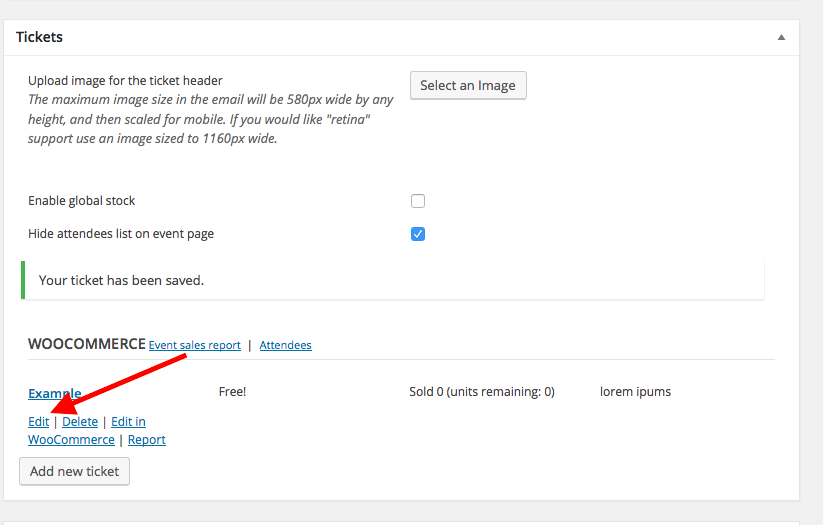
• Clicking that link will expand the ticket settings for the ticket. Here is a screenshot of that, for example:
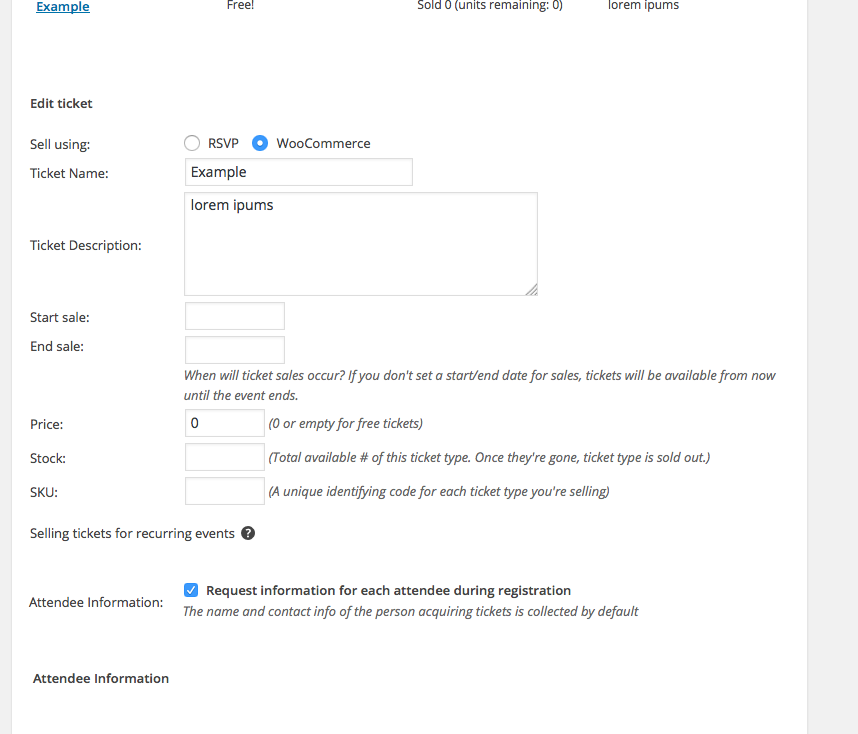
• ☝️ Please do these steps and share a screenshot of your ticket settings in the same way as the screenshot above. (You can do so by uploading the screenshots to this thread. If you have issues with that, you can upload to Imgur.com, Flickr.com, CloudUp.com, or any similar image-hosting site; then just share the links to those images here and I’ll take a look.)
We will take a closer look and go from there.
Thanks!
George -
AuthorPosts