Hey @Tom,
Sorry to hear this!
First, ensure that these plugins are not only installed, but activated:
• WooCommerce
• The Events Calendar
• Event Tickets
• Event Tickets Plus
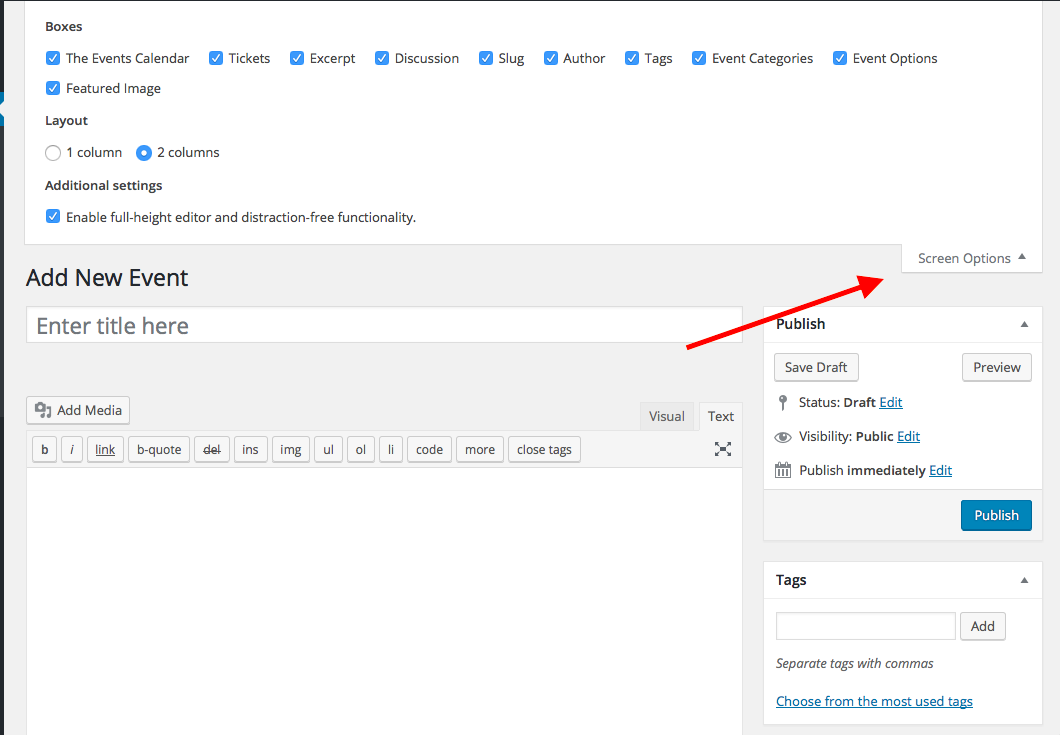
Next, make a new test event in your site’s wp-admin. While in the admin screen, look for the “Screen Options” tab in the top-right corner of the screen. Click this tab.
This should open a “drawer” of checkboxes:
1. Do you see a checkbox called “Tickets”?
2. Here is a screenshot of my drawer: https://cldup.com/9YMnv1jytj.png. Please take a screenshot of your open drawer and post that here, too (you can share a screenshot right on the thread uploader, or if that doesn’t work, you can do so by uploading the screenshot to Imgur.com, Flickr.com, CloudUp.com, or any similar image-hosting site; then just share the links to those images here and I’ll take a look.)
If you see the Tickets checkbox, make sure it is checked. Does this help at all?
Let me know what you find!
George
.