

Forum Replies Created
-
AuthorPosts
-
June 13, 2016 at 6:55 pm in reply to: error 500 for all event links after updating events calendar pro and events tick #1126486
George
ParticipantHey James,
That error is indeed related to older versions of WordPress. The is_embed() function was introduced in WordPress 4.4, and since your site’s version of WordPress is 4.2.8, the only way to resolve this at this time is to update your site’s version of WordPress.
☝️ Are you able to perform this update? If so, does it resolve that issue?
Thank you!
GeorgeParticipantHi Chris,
I am not quite sure what you’re referring to—it’s admittedly hard to know the precise things without a link to your events page.
I should note, however, that these forums here are our “Pre-sales Questions” forums, so we unfortunately cannot field technical support questions here.
It doesn’t currently appear that you have a premium license with us. If this is wrong, and you do have a premium license with us, then apologies for my misunderstanding! (However, in that case please log into the account on this site that has your premium license, and then post this question in a premium support forum.)
If you indeed do not have a premium license, then please post your question in our free support forums here → http://wordpress.org/plugins/the-events-calendar
Include a link to your events page, and we’ll take a look!
I only mention all of the above because I will be closing this thread for now. Please follow the courses of action recommended above based on whether you have a license or not….
But, in regards to your question here, try heading to Events → Settings → Display in your site’s wp-admin, and un-check all options but the “List View” in the option shown in this screenshot:
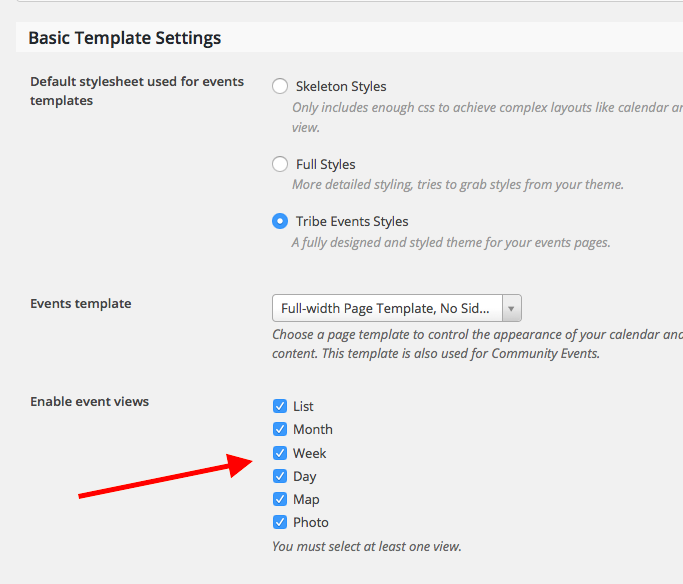
Thank you,
GeorgeParticipantHey @Graphic,
The changes do seem to take effect, when I look at your site. Here is your month view, for example—the screen reader text (formerly in the top-left corner) is no longer there:
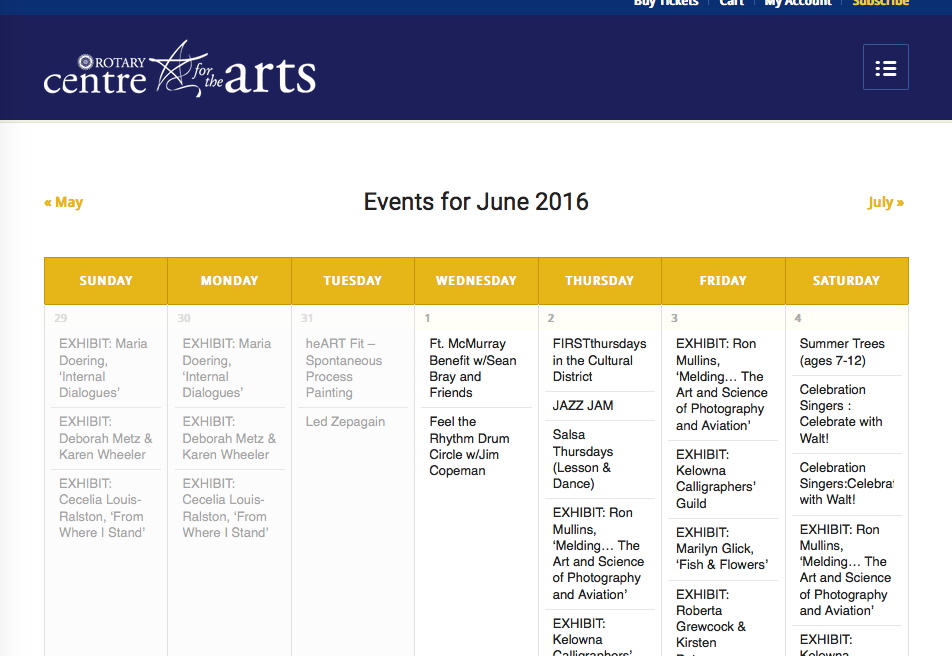
If there are other locations on your site where it’s not taking effect, can you share some more specific links to these locations?
Thank you!
GeorgeParticipantI appreciate your feedback, Noah, and am sorry to have to bear the news that the specific features you describe are not possible with our plugins at this time. 🙁
Please let me know if there’s anything else I can try to help with.
Sincerely,
GeorgeParticipantHey @Ali,
Can you please share a screenshot of the output of that shortcode on your site? I am referring to what you describe here:
When I add the shortcodes from the page you linked me to, it shows the Order number, status, date, and total, alongside a View button, and that’s it.
☝️ Can you share a screenshot of this on your site?
Next, can you post your complete, un-edited System Information? Here’s how to do that ? https://theeventscalendar.com/knowledgebase/sharing-sys-info/
This will help me investigate what is going on.
Thank you!
GeorgeParticipantHey @PAULUS,
I do not find what you find. Here is a short video (under 30 seconds-ish) of me adjusting the check-boxes and such, leaving the page and coming back to it, etc. It all works fine.
Please watch that here ? https://cloudup.com/cZWRVOFc5Vb
Furthermore, after this video I did more testing. When I checked the posts, venues, and organizers boxes, I checked some posts, some venues, and some organizers in the admin. They all had Tickets metaboxes on them as expected.
I then un-checked those types, and then checked out the Tickets metaboxes, and they no longer showed—as expected.
So we’re finding different things here, it seems…you posted some site information in your first post, but despite that, can you post your complete, un-edited System Information? Here’s how to do that ? https://theeventscalendar.com/knowledgebase/sharing-sys-info/
I will take a closer look and see if that reveals any useful information here.
Thank you!
GeorgeParticipantHey @Becky,
Thank you for your patience with my delayed reply over the weekend!
To be clear, my snippet does NOT change the settings; it just forces a different list of emails to be alerted upon submission. It is just meant to be a temporary help while we keep investigating this….
On that note, thank you for chiming in here, @Daniel. Would you mind posting your site’s System Information if possible? Here’s how ? https://theeventscalendar.com/knowledgebase/sharing-sys-info/
I am still unable to recreate the issues reported here. 🙁
@Becky, earlier you mentioned this:I finally had some time to test for conflicts.
Unfortunately, the issue has not been resolved.☝️ When you performed these tests, did you still find the error messages you report elsewhere in this thread? Or did issues persist, but this error was no longer visible, etc.? Any variation or details are worth sharing…just curious about what exactly you found.
Thank you for your patience with this issue.
Sincerely,
GeorgeParticipantThat is indeed odd, @John. Are the versions of The Events Calendar on those sites behind 4.2 by any chance? It could be a recent JavaScript change in The Events Calendar 4.2 that is breaking in the older jQuery versions.
The test I recommended above is still worth doing, in my recommendation. There is a more complete set of steps here if you are interested ? https://theeventscalendar.com/knowledgebase/testing-for-conflicts/
Thank you!
GeorgeParticipantInteresting, @eclair! That is not the behavior that should be arising.
Upon clicking the “use lat+long” checkbox on existing venues, the coordinates should be automatically populated. Check out this quick (4-second!) screencast to see what I see ? https://cloudup.com/cUrFYXtWBlP
If it’s an older venue or otherwise does not have the coordinates filled out on first click, then simply clicking “update” on the venue should then result in the generation of the coordinates. Here is another short video of that process ? https://cloudup.com/c-Cl804r0_A
☝️ How do your findings compare to those in these videos?
Thank you for your patience here!
GeorgeParticipantThank you for sharing this, @John!
I took a closer look at your site and found a JavaScript error, which may be related to an outdated version of jQuery on your site.
It seems like this outdated version may be coming from your theme.
To help test for this, can you activate a default theme like Twenty Twelve or Twenty Sixteen on your site, and then see how the “next events” and “previous events” links behave in that theme.
Thank you for your patience here; let us know what you find!
George
ParticipantThis reply is private.
ParticipantHey Ben,
I hate to make to be nit-picky here; apologies if this seems trivial! But I notice in your language that you refer to “installing” and “re-installing” the themes…
To be clear, I am not saying to uninstall, re-install, etc. any themes. The important thing is to “activate” the Twenty Twelve or Sixteen theme, and then test the settings again.
I am sure this is what you meant! And am really sorry if you did—but just wanted to be clear about this detail, because I am still unable to reproduce the problem so it still seems likely to me that it’s a theme or plugin code conflict issue.
Sincerely,
GeorgeParticipantGlad to hear it! (And thanks for clarifying.)
Stay tuned for further updates on that issue; we will be publishing a fix soon!
Cheers,
GeorgeParticipantGlad to hear it! 😀
Cheers,
GeorgeParticipantThis reply is private.
-
AuthorPosts