
Home › Forums › Calendar Products › Events Calendar PRO › Zip code search not returning correct events
- This topic has 8 replies, 3 voices, and was last updated 10 years, 4 months ago by
eclair.
-
AuthorPosts
-
June 10, 2016 at 5:49 pm #1125459
eclair
ParticipantHi, I have Events Calendar Pro + Filter Bar (4.2 on both).
When I enter a zip code in the location search, I’ll get a small list of events (I have 100+ different events), but the data is not necessarily correct. I know there are events that are close to the zip code I entered, but those events are not listed.
I can even type in the exact zip code of some of these events, and those events would not show up.
How is this zip code data generated, and what can we do to diagnose this issue?
Thank you!
June 12, 2016 at 7:42 pm #1125954George
ParticipantHey @eclair,
Thanks for reaching out. Your addresses may not be turning up in searches for a number of reasons, but one thing that might help is to ensure that you event Venues use latitude and longitude for map placement. This is possible by heading to individual Venues and checking the “Use latitude + longitude” option as shown in this screenshot:
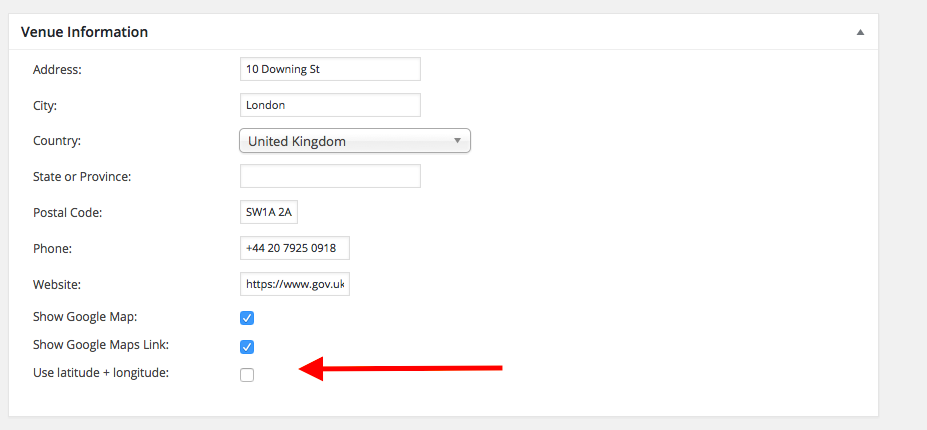
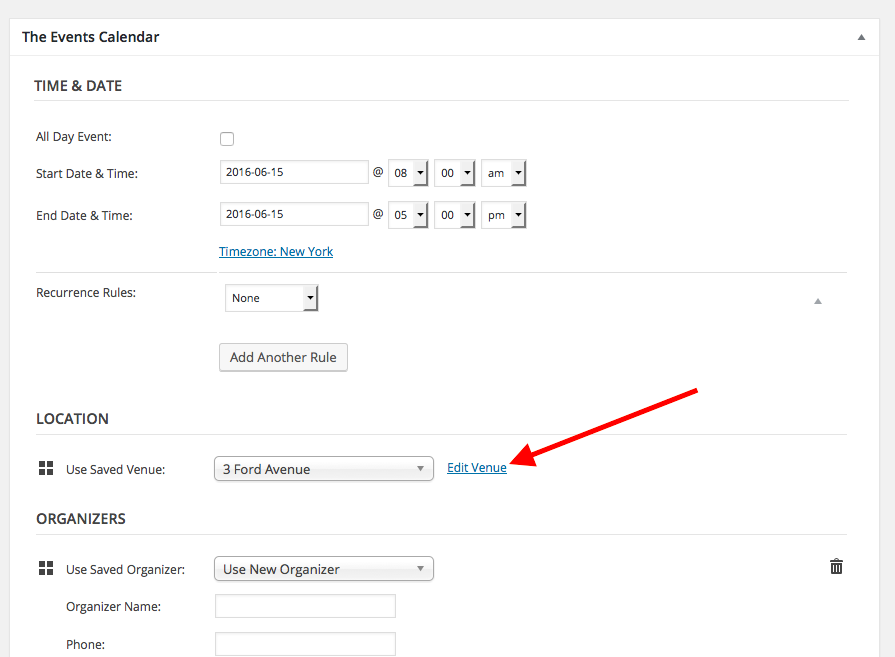
If you notice any particular events that fail to show up in zip code search results, try checking this option on the event’s venue and then click “Update” to ensure the venue is updated (you can find a venue’s edit page any time by going to the event itself, then clicking the “Edit Venue” link as shown in this screenshot → https://cldup.com/iafL0UbHnA.png).
Let me know if this helps!
GeorgeJune 13, 2016 at 3:53 pm #1126379ParticipantHi, thanks George. It seems when I click Use Lat/Lon, the page prompts me for the Lat/Lon of the venue, and if I try to save the page without entering the values for them, the setting to use Lat/Lon doesn’t stick.
Do I have to manually provide the coordinates for each venue?
June 13, 2016 at 5:42 pm #1126456ParticipantInteresting, @eclair! That is not the behavior that should be arising.
Upon clicking the “use lat+long” checkbox on existing venues, the coordinates should be automatically populated. Check out this quick (4-second!) screencast to see what I see ? https://cloudup.com/cUrFYXtWBlP
If it’s an older venue or otherwise does not have the coordinates filled out on first click, then simply clicking “update” on the venue should then result in the generation of the coordinates. Here is another short video of that process ? https://cloudup.com/c-Cl804r0_A
☝️ How do your findings compare to those in these videos?
Thank you for your patience here!
GeorgeJune 13, 2016 at 5:47 pm #1126460ParticipantExactly the same as your video, except at the end, when I click on Use Lat/Lon again, I don’t see the coordinates pre-populated.
June 13, 2016 at 7:58 pm #1126515ParticipantSorry to hear this, @eclair!
Does this change at all based on what venue what you try? What if you create a new venue, and make its address as follows:
700 Massachusetts Avenue

Boston, Massachusetts

02215

United States
☝️ This is just a random address that I can confirm works for me. What do you find if you use this?
June 14, 2016 at 1:50 pm #1126985ParticipantThanks! Trying to add a venue manually this way (I normally add venues through the Events page), I was able to see that there was an error about the API access has exceeded (because I’m on a shared server). Looking into the code, I found in /events-calendar-pro/src/Tribe/Geo_Loc.php the code that calls Google Maps API.
So I modified line 439 to this:
$url = 'https://maps.googleapis.com/maps/api/geocode/json?address=' . urlencode( $address ) . '&key=[API_KEY]';Where [API_KEY] is a server key generated with Google.
I also had to make the protocol from http to https.
Now I’m able to generate the proper lat/lon coordinates.
I would like to suggest adding this into your code for future updates (with the proper configuration option in the admin settings screen, of course!)
Now that that is working, I just basically modified your code to force it to look up all the lat/lon coordinates for every venue and save all the data again, and now it seems to be working much better!
June 15, 2016 at 10:43 am #1127451ParticipantThank you for digging into this and for sharing your solution, @eclair!
We are indeed keen on offering fallbacks for when server API limits are exceeded, so hopefully something like what you suggest here will be inherent in our plugins before long….
Best of luck with your project!
George -
AuthorPosts
- The topic ‘Zip code search not returning correct events’ is closed to new replies.