

Forum Replies Created
-
AuthorPosts
-
George
ParticipantHello!
1. Is there a reminder system where I can set a reminder for my clients who bought/RSVP’d tickets to be reminded a day or 2 before the event that the event is happening and that they have tickets?
This is unfortunately possible with our plugins at this time. 🙁
2. Can I have multiple locations for 1 event? For example, there is an open dag for a university and at various locations, students can go to the open day. It’s all the same time and same day, but at different locations?
This is also unfortunately possible with our plugins at this time. 🙁
3. Can I have 1 event but sell 2 different time slots. For example, the open day for the university is on 7 Jan 2017, but there is one session at 10:00-11:00 and another one from 12:00-1:00.
Yes! Just create two different tickets on the event: one ticket for the 10–11 slot, the other ticket for the 12–1 slot. If you’re looking for some method other than this, unfortunately there is no alternative method.
I hope this information helps!
— George
ParticipantHey Kaylan,
Thanks for reaching out. There unfortunately isn’t a way to do this without getting under-the-hood and tinkering with our plugin code directly, which is a level of customization we are not able to help with (read more here: https://theeventscalendar.com/knowledgebase/what-support-is-provided-for-license-holders/)
I’m sorry to disappoint! I would encourage consulting with the support team of that “product ordering plugin for WooCommerce” that you mentioned—perhaps they can shed some light on how, exactly, their plugin applies the custom ordering and if it is admin-only by design.
Sincerely,
GeorgeParticipantHi there,
Thank you for reaching out. These forums here are our “Pre-sales Questions” forums, so we unfortunately cannot field technical support questions here.
It doesn’t currently appear that you have a premium license with us. If this is wrong, and you do have a premium license with us, then apologies for my misunderstanding!
However, in that case please log into the account on this site that has your premium license, and then post this question in a premium support forum.
If you indeed do not have a premium license, then please post your question in our free support forums here → http://wordpress.org/plugins/the-events-calendar
We check those forums a bit more than once per week, so hopefully we will be able to get to your question there.
Thank you,
GeorgeParticipantHey Gray,
Thanks for reaching out. I’m really sorry to hear about these issues!
Neither plugin of ours that you mentioned adds “full width header images” onto web pages, so the full width header images you’re referring to sound like they’re coming from either your theme or from custom coding you’ve implemented.
With this in mind, I would encourage you to contact your theme support for further assistance with those images.
If you disagree and think that our plugins are explicitly the cause here, my apologies for misunderstanding! In this case though, please provide a link to a specific place on your site where “Full width header images” are appearing, and explain how our plugins are causing those to not work as you desire.
Thank you!
GeorgeParticipantHi Benjamin,
Thanks for reaching out. The features you are trying to implement are possible, but would unfortunately require many code customizations to implement. 🙁
We are not able to help with custom coding. Read more here: https://theeventscalendar.com/knowledgebase/what-support-is-provided-for-license-holders/
So to implement the features you describe, you would have to write that custom code or hire a professional developer to do it for you. We have a list of great developers here → http://m.tri.be/18k1 (and have no affiliation with any of these folks—they’re simply some well-respected names in the community that we’ve compiled to share in situations like this one).
Best of luck with your customizations!
GeorgeParticipantHi Michelle,
When you say, “since this is compatible with WooCommerce,” can you clarify what you mean by “this”? Are you referring to Event Tickets, for example?
If so, then there is not a place where users can see a list of all the events they’ve bought tickets to.
I hope this helps!
Thanks,
GeorgeDecember 12, 2016 at 10:52 am in reply to: Standardize actions on Community Event login forms #1204815ParticipantHi Frederick,
The login_form() method within Community Events itself calls the core WordPress function wp_login_form().
This function within WordPress core has its own set of filters.
Now, it’s true that the function has filters, not actions. But since you exit or die upon a call of wp_redirect() anyways, this shouldn’t matter.
So you can use one of WordPress core’s built-in filters here like as follows:
add_filter( 'login_form_top', 'tribe_ce_force_redirect_to_login_page' );function tribe_ce_force_redirect_to_login_page() {
wp_safe_redirect( wp_login_url() );
exit;
}☝️ Add that to your theme’s functions.php file, and any time someone arrives at the Community Events submission page while not being logged in, they will be redirected to wp-login.php
Cheers,
GeorgeParticipantHey Surabhi,
Thanks for reaching out. We would love to help here—can you submit a formal refund request via the form on this page? → https://theeventscalendar.com/knowledgebase/refund-policy/
Sorry to make you do another step here! But that will help us verify your records and issue a refund promptly.
Thanks!
GeorgeDecember 12, 2016 at 10:09 am in reply to: Conflict : All Links don't work outside of plugins #1204792ParticipantThanks for reaching out Stéphane.
You say this in your post:
You YES, i tested reverting the theme to one default and in this case it’s working, but what to do ?
☝️ Just to be clear, do you mean that if you do nothing else on your site except change to a default theme, all of the links start working again?
Thanks,
GeorgeParticipantThanks Neville! This is a known and we’re working hard on a fix.
Since these forums are our “Pre-sales Questions” forums, and cannot field technical support questions here, I will close this thread for now.
Stay tuned to plugin updates for news about when this is fixed!
Thank you,
GeorgeParticipantGlad to hear it @zeeheldennieuws!
Since the photo-import issue is resolved, I will close this thread. If you have other issues relating to Google Maps on your site, open a new thread here and include your site’s complete system information with it as instructed here → https://theeventscalendar.com/knowledgebase/sharing-sys-info/
Thanks!
GeorgeDecember 12, 2016 at 9:59 am in reply to: Still need help customizing Aggregator to schedule a CSV Import #1204782ParticipantHey Rodrigo,
Thanks for reaching out!
As Nico wrote in that thread, the custom code we provided is intended to be a starting point, not as a final solution.
We actually cannot provide any assistance with custom coding, as described here → https://theeventscalendar.com/knowledgebase/what-support-is-provided-for-license-holders/
As you can see from your last thread, we certainly try to get folks started on customization projects, but you’ll have to take the reins on all further aspects of this customization from here.
The code Nico provided does not add buttons to trigger the import manually, etc.—it’s just the basic code to process a CSV file in your Media Library.
If you want further assistance with any custom coding projects on your site, your best bet is to work with a professional developer to assist you. We have a list of great developers here → http://m.tri.be/18k1 (and have no affiliation with any of these folks—they’re simply some well-respected names in the community that we’ve compiled to share in situations like this one).
Sorry to disappoint, but I hope the initial code Nico shared with you did its job as giving you a good starting place that you can take from here and see to completion.
Cheers,
GeorgeParticipantHey Karl,
There’s unfortunately no way to do this at this time. 🙁
I’m sorry to disappoint! Please let me know if there are any other issues or questions I can try to help with.
— George
December 12, 2016 at 8:40 am in reply to: A way to quickly see if someone already checked in #1204742ParticipantHey Jack,
Thanks for reaching out. There are a few different things worth addressing here, so I will address your question in chunks as follows.
In my current event project people can order one ticket for an event, but for different time periods. So we created 5 tickets, one from 10.00 to 12.00 in the morning, one for 13.00 till 15.00 etc. People can only enter once!
Is there a way we can see if they come at the right time period? There is a limitation of space, so people that registered to come in the morning can’t come secretly in the afternoon. Also, because they get free vouchers that cost money, we don’t want people to take advantage of this and enter twice.
To be clear, with Event Tickets Plus, <span style=”text-decoration:underline”>1 ticket purchase = 1 check-in for that specific ticket type</span>. So if someone buys a ticket for a 10.00–12.00 class, they cannot check-in to a slot in the 13.00–15.00 class, and vice versa. Just wanted to clarify this detail!
I know it is possible to see if someone already entered by waiting until the page is fully loaded in the browser of the smartphone, but that takes much too long, especially when a few hundred people are waiting in a queue in front of you.
I totally hear you on this, and am genuinely sorry for some of the inherent limitations at play here: your site’s performance, the internet connection of the smartphone, the processing power of the smartphone, the performance of our own plugins and code, the performance of WordPress itself, etc…these factors all contribute the speed of check-ins!
Is there a way to this with Tickets Plus? How does Event Brite tickets compare to this? Or is this all a limitation of the scanning by QRcode with a smartphone. If so, how can we overcome this limitation?
As noted above, there indeed are some inherent limitations about the world itself that will always be present: No matter what solution we recommend, for example, if it requires internet access on your smartphone then there will always be a big factor there which is the quality and speed of the internet connection on the device….
However, there are indeed some options you can play around with. Our Event Tickets Plus check-in system works exactly as you describe: People can only check-in once for the specific ticket slot they’ve purchased, and if you’re using a QR Code scanner to scan their tickets, this requires a full page load in your smartphone’s web browser.
There are two main alternatives I can think of here:
1. You can manually check-in folks instead of using the QR Code-scanning method. What this means is that, instead of scanning QR codes for each ticket one at a time, you just pull up the Attendee Report for the event in your smartphone/tablet, then use the “live search” feature on that page to search for tickets by name, order number, ticket number, etc. Once you find the right ticket, you click “Check In” next to it, and it will be checked-in without needing a page load. Here’s a screenshot elaborating on this (click for a larger-sized image):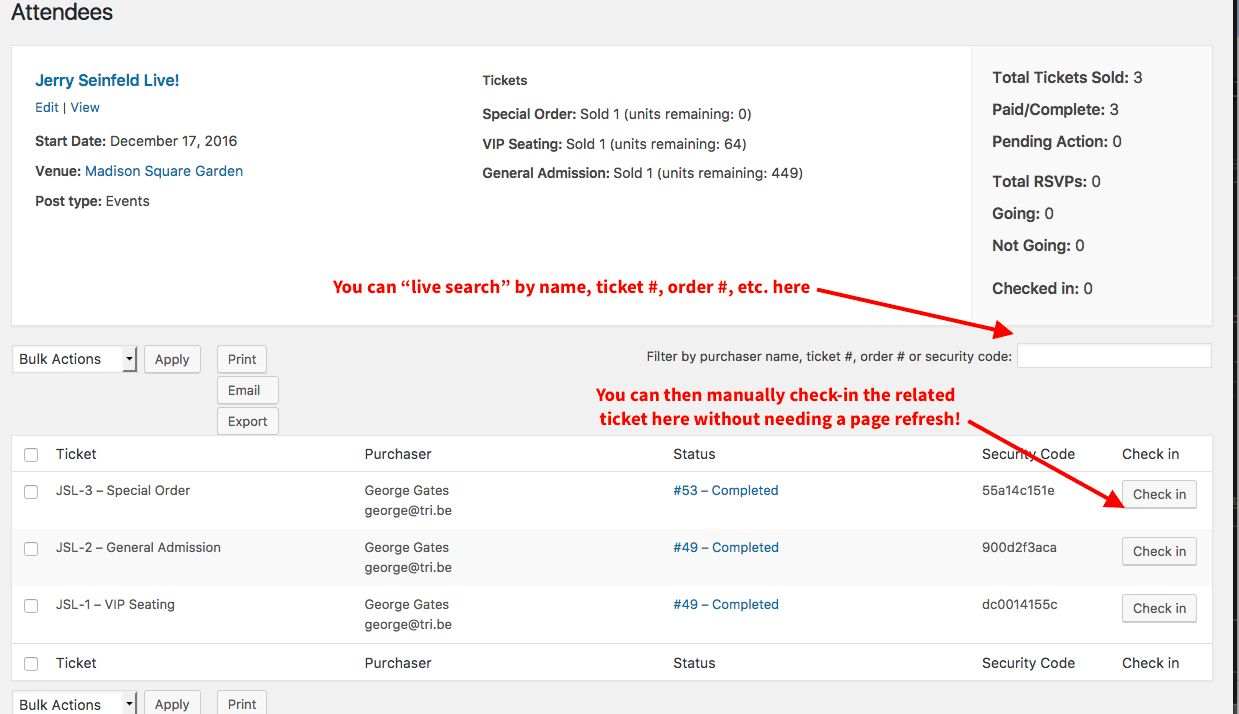
2. You can, instead, use Eventbrite Tickets like you mentioned. This would replace Event Tickets Plus—not work with it—and would mean you have to sell the tickets on Eventbrite.com. However, Eventbrite does provide some handy proprietary “attendee check-in” features which you can read more about here → https://www.eventbrite.com/support/articles/en_US/How_To/how-to-check-in-attendees-at-the-event-with-eventbrite-organizer?lg=en_US
I hope these two ideas help you move forward with your project!
Thanks,
GeorgeParticipantHey Troels,
Thanks for reaching out. This is unfortunately not possible with our plugins out-of-the-box, and would require many code customizations to implement 🙁
So to implement the features you describe, you would have to write that custom code or hire a professional developer to do it for you. We have a list of great developers here → http://m.tri.be/18k1 (and have no affiliation with any of these folks—they’re simply some well-respected names in the community that we’ve compiled to share in situations like this one).
Sorry to disappoint! Please let me know if there are any other issues or questions I can try to help with.
Sincerely,
George -
AuthorPosts