

Forum Replies Created
-
AuthorPosts
-
December 12, 2016 at 8:11 am in reply to: Customizing the Event View in The Events Calendar PRO #1204724
George
ParticipantHey Jason,
Thanks for reaching out. We unfortunately can’t provide help with customizations, as laid out in our Support Policy here → https://theeventscalendar.com/knowledgebase/what-support-is-provided-for-license-holders/ and our site Terms here → http://theeventscalendar.com/terms/
I’m sorry to bear this news! We try to help when possible, and by creating things like the Themer’s Guide itself to try and give folks a good resource to use.
But for any and all aspects of customizations, you’ll have to take the reins and we cannot provide assistance. If you’re hoping to find a professional who can help, we have a list of great developers here → http://m.tri.be/18k1 (and have no affiliation with any of these folks—they’re simply some well-respected names in the community that we’ve compiled to share in situations like this one).
Sorry to disappoint, Jason. Let me know if there’s anything else I can try to help with.
Sincerely,
GeorgeDecember 12, 2016 at 8:07 am in reply to: Problems with event eeoccurrence function in Events Calendar pro #1204723ParticipantHi there,
Thank you for reaching out. These forums here are our “Pre-sales Questions” forums, so we unfortunately cannot field technical support questions here.
It doesn’t currently appear that you have a premium license with us. If this is wrong, and you do have a premium license with us, then apologies for my misunderstanding!
However, in that case please log into the account on this site that has your premium license, and then post this question in a premium support forum.
Thank you,
GeorgeParticipantI’m sorry to hear this, Murray! This snippet has worked for a long time so I’m investigating why it’s no longer working according to your claims. I have reached out to other folks on our team for some assistance on this and will post an update here as soon as we’ve learned more.
Thanks for your patience!
GeorgeParticipantThis reply is private.
ParticipantHi Debra,
We do plan on incorporating support for this, but there is not a specific launch date for the arrival of that support yet at this time. It will hopefully come some time before summer of 2017 is upon us.
I’m sorry to disappoint! Please let me know if there are any other issues or questions I can try to help with.
— George
ParticipantHi David,
The Events Calendar’s search bar is located in this file within The Events Calendar:
the-events-calendar/src/views/modules/bar.phpIt’s being output in other calendar views by way of this specific function call:
tribe_get_template_part( 'modules/bar' )☝️ So if you want to see how and where this is being output onto a specific page, you can search inside your The Events Calendar files for instances of tribe_get_template_part( 'modules/bar' ) — where an instance of this exists, the Tribe Bar (which contains the search bar) is being output onto a page.
For further insight into this, check out our Themer’s Guide here → https://theeventscalendar.com/knowledgebase/themers-guide/
Cheers,
GeorgeParticipantSorry to hear this, @rufman. We cannot recreate that behavior and have no other reports of it — where the data doesn’t even show up anywhere — so it sounds like there is a problem unique to your site.
To help me figure out what could be the cause of this problem, can you please clarify the nature of your problems as follows?
1. The way attendee information works in terms of being viewable in the admin is that when you’re viewing an Attendees report, if an order has Attendee Information associated with it then you will see a “View Details” link when hovering over the order as shown in this screenshot (click for a larger-sized image):
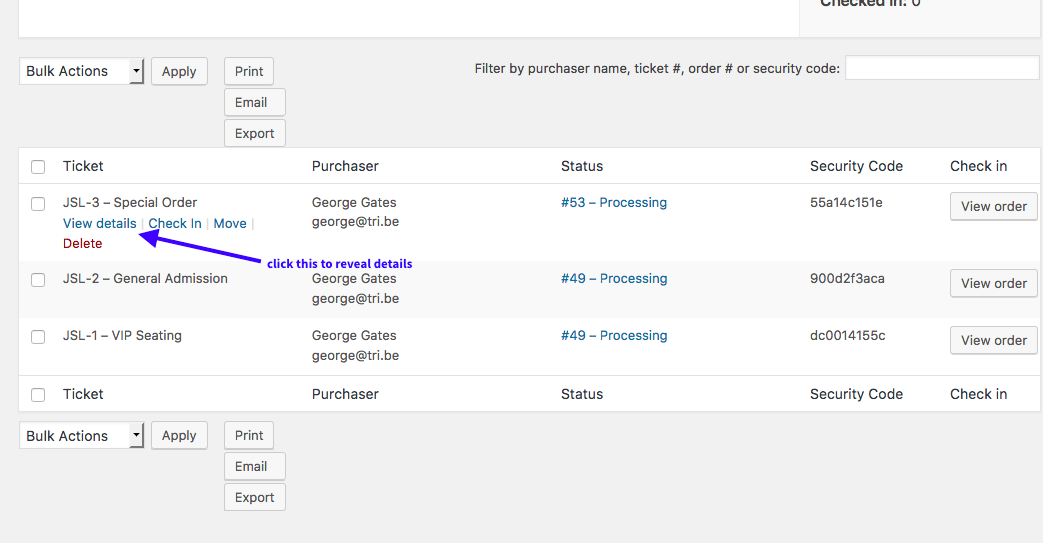
2. Upon clicking that “View Details” link, the attendee information for that ticket should show up like shown in this screenshot (click for a larger-sized image):
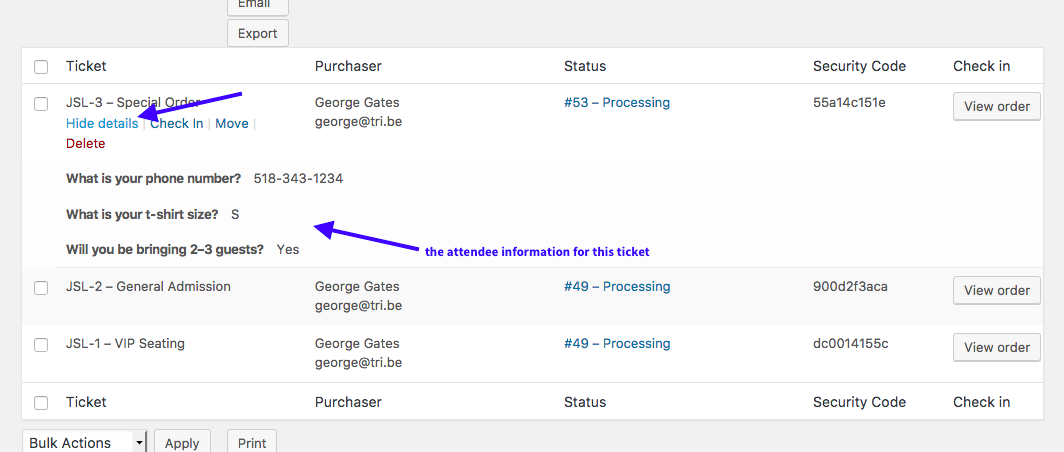
☝️ What is the specific failure for you here?
• Does the “View Details” link not even show up?
• Does it show up, but when you click it does nothing happen?
• Does it show up, but when you click it the information shows, but it is empty?Please specify exactly what is happening for you — this will help us help recommend the next steps from here.
Thanks for your patience!
GeorgeParticipantSorry to hear that Murray, you may have some better luck by removing the remove_action call from within init, so that the code is like this:
if ( class_exists( 'Tribe__Tickets_Plus__QR' ) ) { remove_action( 'tribe_tickets_ticket_email_ticket_bottom', array( 'Tribe__Tickets_Plus__QR', 'inject_qr' ) ); }ParticipantHey Cynthia,
Thanks for reaching out. The only volume-discount or “package” sort of thing we offer is the set of bundle offerings which can be found here → https://theeventscalendar.com/bundles/
There isn’t anything other than these official bundles. Please send us an email with a link back to this support thread if you have further questions about a discount here. The email address is support at theeventscalendar dot com
Cheers!
GeorgeParticipantHi Nate,
Sure thing, I’ve just refunded your Events Calendar Pro purchase—those funds should be back in your accounts in no more than a few business days.
Whenever you’re ready, you can proceed with buying a Community Events license as planned.
Cheers!
GeorgeParticipantHello!
I wanted to share the news that a fix has finally arrived for these issues—featured images should import without issue now.
Grab the 4.3.4 update from today to get this bug fix. Learn more about the 4.3.4 release here.
Thanks so much for your patience!
Cheers,
GeorgeParticipantHello!
I wanted to share the news that a fix has finally arrived for these issues—featured images should import without issue now.
Grab the 4.3.4 update from today to get this bug fix. Learn more about the 4.3.4 release here.
Thanks so much for your patience!
Cheers,
GeorgeParticipantHello!
I wanted to share the news that a fix has finally arrived for these issues—featured images should import without issue now.
Grab the 4.3.4 update from today to get this bug fix. Learn more about the 4.3.4 release here.
Thanks so much for your patience!
Cheers,
GeorgeParticipantHello!
I wanted to share the news that a fix has finally arrived for these issues—featured images should import without issue now.
Grab the 4.3.4 update from today to get this bug fix. Learn more about the 4.3.4 release here.
Thanks so much for your patience!
Cheers,
George -
AuthorPosts