

Forum Replies Created
-
AuthorPosts
-
George
Participant😀
ParticipantHi Barb,
Thanks for reaching out.
That “Move” link lets you move the specified ticket to another event—it does not let you move the ticket order on the same event.
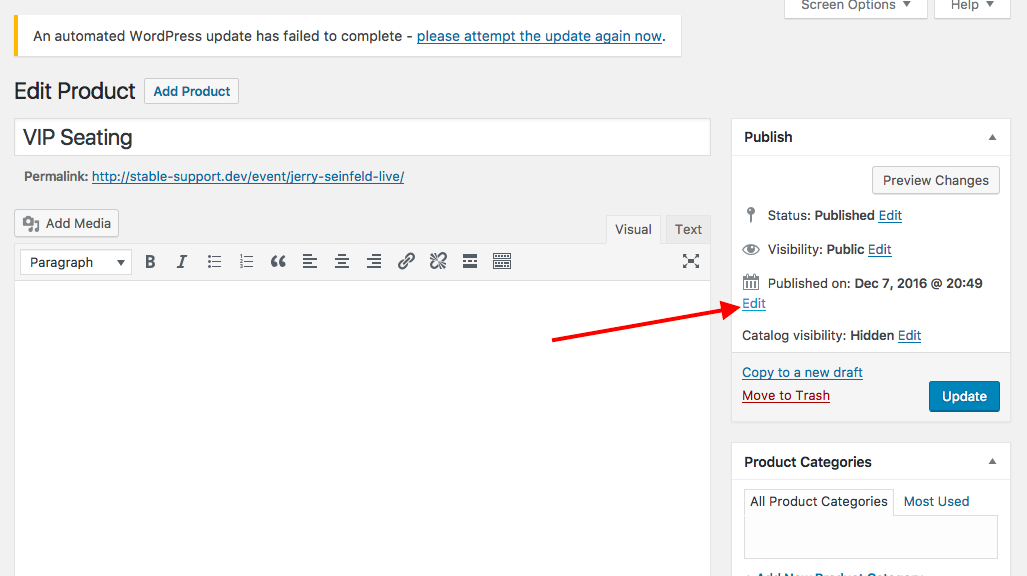
As for adjusting the publication date for tickets, this is not easily editable for RSVP ticket types, but is easily possible to edit for premium ticket types like WooCommerce or Easy Digital Downloads, for example. You would just click the “Edit in WooCommerce” link which would lead to you an edit screen like the one in the following screenshot—where you can click “edit” next to the publish date and it should be easily editable (click for a larger-sized image):
Cheers!
GeorgeParticipantHey there,
If you did a renewal purchase, then you won’t get a new key; your existing key will get RENEWED, meaning you should be able to use it now without an “expiration” notice like you probably saw before you renewed.
Do you find this to be the case? Or do you still get an expiration notice when you try to use the specific license key you just renewed?
Thanks!
GeorgeParticipantHey Chuck,
Thanks for reaching out.
The core of your question is what you wrote here: “Is there a way to publicly show the number of calendar events, venues, organizers etc.?”
The short answer is “no”, in the sense that our plugins themselves do not offer any way to do this. And so you’ll unfortunately have to use custom coding here to achieve this display of information.
I say “unfortunately” because we cannot help with custom coding, as elaborated upon here → https://theeventscalendar.com/knowledgebase/what-support-is-provided-for-license-holders/
As a quick tip though, WordPress Core itself (i.e., not our plugins, but WordPress itself) has its own function called <me>wp_count_posts() which does exactly what it sounds liked: it counts the number of posts exist for a specified post type.
So you could probably customize your theme to add this sort of information anywhere you want. Check out this page to learn more about the function and how to use it → https://codex.wordpress.org/Function_Reference/wp_count_posts
I hope this information helps!
GeorgeParticipantHey Michel,
Neither the [tribe_mini_calendar] shortcode nor the [tribe_events] shortcodes support having the Filter Bar atop of them, at this time. I’m sorry to disappoint!
Please let me know if there are any other issues or questions I can try to help with.
Sincerely,
GeorgeParticipantHey Knud,
Thanks for sharing these ideas. I have not either idea suggested before, so they may not be very popular, but I will take note of these ideas. If other folks mention wanting the similar sort of thing, then it’s something that could totally some day make it into our plugins.
To set your expectations honestly though, at this time these things would likely not make into our plugins any time soon—any time in the next 6 months, for example.
Just wanted to be honest about that, and about what you can expect—however, I am also being honest that if we start hearing more and more people request this, we will totally consider adding it to our products!
Cheers!
GeorgeDecember 12, 2016 at 12:50 pm in reply to: Pre sale question about the PRO calendar & Community plugin #1204879ParticipantHi Knud!
Events Calendar Pro can be found here → https://theeventscalendar.com/wordpress-events-calendar-pro
The prices for all of the available License types are listed there. These prices are not different if you have a license for a different product.
I hope this helps! 😀
GeorgeParticipantHey Debra,
Our plugins currently do prioritize some other types of events for primary sort order—for example, “sticky” events will display at the top of the day in Month View.
However, there is no way to otherwise modify this behavior so that the order for display is different. It’s possible, but would unfortunately require a good deal of code customizations to implement 🙁
We cannot help with custom coding as clarified here → https://theeventscalendar.com/knowledgebase/what-support-is-provided-for-license-holders/
So to implement the features you describe, you would have to write that custom code or hire a professional developer to do it for you. We have a list of great developers here → http://m.tri.be/18k1 (and have no affiliation with any of these folks—they’re simply some well-respected names in the community that we’ve compiled to share in situations like this one).
Sorry to disappoint! Please let me know if there are any other issues or questions I can try to help with.
— George
ParticipantHey @Clintaugust,
There is currently no shortcode for embedding the Community Events submission form at this time. 🙁
I’m sorry to disappoint!
George
ParticipantHey Mike,
Thanks for reaching out.
Our plugins should play nicely with W3 Total Cache and WP Super Cache as long as you ensure there is no compression or concatenation of JavaScript or CSS files on calendar pages.
There are different settings in the various caching plugins to control this, so consult with the documentation and/or support teams behind your caching plugin of choice to learn how to disable script compression or concatenation on events pages.
We also have a Knowledgebase article here that, while it doesn’t deliver many specific recommendations, may just generally be useful in learning more about how our plugins related to caching generally: https://theeventscalendar.com/knowledgebase/caching-basics/
Cheers,
GeorgeParticipantHi Mario,
Our plugins currently don’t support tickets themselves having categories—at least, not categories that can be entered from the front-end.
I’m sorry to disappoint!
You describe this as well:
We’d like to show availability (with number of still available seats) for both categories on the event, so once the given category is sold out, the availability turns to red color and “sold out” appears.
Our plugins do currently provide this for tickets generally—if you specify the stock for an RSVP ticket, for example, as 100, and 100 people make RSVPS, then it will say, “Sold Out” and folks won’t be able to buy make more RSVPs.
Please let me know if there are any other issues or questions I can try to help with.
Thanks,
GeorgeParticipantHi there,
Thank you for reaching out. These forums here are our “Pre-sales Questions” forums, so we unfortunately cannot field technical support questions here.
It doesn’t currently appear that you have a premium license with us. If this is wrong, and you do have a premium license with us, then apologies for my misunderstanding!
However, in that case please log into the account on this site that has your premium license, and then post this question in a premium support forum.
If you indeed do not have a premium license, then please post your question in our free support forums here → http://wordpress.org/plugins/the-events-calendar
We check those forums a bit more than once per week, so hopefully we will be able to get to your question there.
Thank you,
GeorgeParticipantThanks for reaching out!
I totally understand why you’re trying to alter the behavior here—unfortunately, there is no middle ground with our plugins at this time and there is no way to pull this off. 🙁 You can currently either have attendee information fields that show up for each attendee/ticket, or have no fields at all — our system simply is not “smart” enough to allow for other fields that only have to be entered once per order.
I’m sorry to bear this news!
Please let me know if there are any other issues or questions I can try to help with.
Thanks,
GeorgeParticipantHi Knud,
Thanks for reaching out. We unfortunately cannot help with customizations, as elaborated upon here → https://theeventscalendar.com/knowledgebase/what-support-is-provided-for-license-holders/
It look like writing some custom CSS will help you out. With this in mind, definitely check out a [free!] tool like Firebug if you use FireFox, or the Developer Tools for either Safari or Chrome. They have “Inspector” tools that let you zoom right over the element whose styles you can see—like the spacing between events—and thus more easily modify.
I am sorry that we’re not able to provide support for customizing, but I hope that helps!
Cheers,
GeorgeParticipantHey Nicolas,
Thanks for reaching out. While our plugins should work well with general caching plugins, they cannot function on a static page. Our plugins are built to work with WordPress, and so require a number of WordPress scripts, AJAX, and other core features that it sounds like the “SiteSucker” software may be stripping or removing.
I would recommend contacting the SiteSucker support team for further insights into what their software does, and would recommend asking them if there’s a way to prevent it from effecting Events Calendar Pro in some way.
Thank you,
George -
AuthorPosts