

Forum Replies Created
-
AuthorPosts
-
Geoff B.
MemberGood evening Edward and welcome to the Events Calendar Support forum!
Thank you for reaching out to us.
We are sorry to hear about the fact that you are struggling with updating the Events Calendar Pro.
I would love to help you with this topic.At this point, my recommendation would be to delete the Events Calendar Pro from your install completely and install our latest version 4.2.2.1 manually as explained here: https://theeventscalendar.com/knowledgebase/new-user-primer-the-events-calendar-and-events-calendar-pro/
Also, if you don’t mind could you please provide us with your complete system information in a private reply using the instructions found in the following link?
https://theeventscalendar.com/knowledgebase/sharing-sys-info/
Best regards,
Geoff B.
MemberGood evening Sheila and welcome back!
Thank you for reaching out to us.
We are sorry to hear about the fact that your stock seems to be inaccurate after purchasing tickets.
I would love to help you with this topic.As a first troubleshooting step, could you please provide us with your complete system information in a private reply using the instructions found in the following link?
https://theeventscalendar.com/knowledgebase/sharing-sys-info/
Secondly, would you mind:
- Telling me what payment gateway was used to perform that purchase (Paypal, Sandbox, Cheque ?)
- Sending me a screenshot of your settings for WooCommerce > Settings > Products > Inventory
Best regards,
Geoff B.
MemberGood evening Jonathan and welcome to the Events Calendar Support forum!
Thank you for reaching out to us.
I would love to help you with this topic.Just to set expectations, the scope of our support is mostly to get our customers started on the right track and to help them in case of issues.
We unfortunately do not provide complete support for customization.
With that in mind, would you mind sharing your custom piece of code so that I can take a look at it (in a private reply perhaps) ?
Could you also please provide us with your complete system information in a private reply using the instructions found in the following link?
https://theeventscalendar.com/knowledgebase/sharing-sys-info/
Best regards,
Geoff B.
MemberGood evening Ingrid and welcome back!
Thank you for reaching out to us.
We are sorry to hear about the issue you are experiencing between WPM and our plugins.
I would love to help you with this topic.As a first troubleshooting step, could you please provide us with your complete system information in a private reply using the instructions found in the following link?
https://theeventscalendar.com/knowledgebase/sharing-sys-info/
Best regards,
Geoff B.
MemberGood evening Gunnar and welcome back!
Thank you for reaching out to us.
I would love to help you with this topic.
I believe your best shot would be to use a plugin such as the following one: https://wordpress.org/plugins/intuitive-custom-post-order/
Let me know if that helps.
Have a great day!
Geoff B.
July 13, 2016 at 11:09 pm in reply to: How to prevent "Add to Cart" if no tickets were selected #1139500MemberGood evening Abby,
I’m stoked that you have been able to achieve what you are looking for with jQuery. Kudos on that!
You are welcome back on our support forums any time 🙂
For now, I am going to close this thread.
Have a great week!
Geoff B.
MemberHi again Chris,
I am stoked that you like the plugin I recommended.
I will pass your recommendation along.I can’t wait either for recurring event support for tickets!
Have a great day!
Geoff B.
MemberGood evening Chris,
Thanks for writing back.
You are welcome back on our support forums any time 🙂
For now, I am going to close this thread.
Have a great week!
Geoff B.
MemberGood evening Bruce,
Thank you for writing back.
I am sorry to hear that adding the code to your theme’s functions.php file caused the site to crash.
This was certainly unintended.The simplest solution would be if you could send me a copy of your WordPress theme / child theme in a .zip file link (via Dropbox or Google Drive) so that I can add the snippet in there for you and test it.
Especially since I have another snippet to add in there that I believe would prove helpful to your situation.
As an FYI, it is super important to not copy the opening <?php statement when using the snippet (since it should normally be in your theme’s functions.php
Best regards and hang in there while we fix this,
Geoff B.
MemberGood evening David,
Thank you for writing back and for providing me with the requested information.
On my end, I have not been able to reproduce the issue unfortunately (at least not yet).
With that in mind, the first thing I would recommend would be to update your iCal importer to the latest version (4.2.2).
We have fixed several bugs over the last little while and I believe this would help.Secondly, can you tell me if, when you initially set the import, you checked the “Overwrite Existing:” checkbox ?
Let me know how that goes.
Best regards,
Geoff B.MemberGood evening Stefaan,
Thank you for writing back and for providing your system information.
By the looks of it, there is unfortunately not much we can do about the rest of the setup (it’s pretty good).
But, could you also provide me with your WordPress memory settings (as found in either your wp-config.php or php.ini file) ?
The strange thing is … it used to work without all that much problems in the past I believe.
I totally understand were you are coming from.
This is unfortunately inherent to shared web hosting.Event with a good web host, what is happening is that there is a limited amount of server ressources available for everybody to share under such a plan. It’s a bit like sharing hot water for the shower when living with several roommates.
If one of your web server’s roommates uses a lot of ressources, if there is a growing number of roommates or even if there are peak usage time, the result is the same: less ressources for you to use. This will cause timeouts, slower sites, etc…
Furthermore (and I don’t claim that this is the case of your web host), I have personally seen several cases where web hosts oversell their shared hosting plans with results you can imagine.
Best regards,
Geoff B.
MemberGood evening Khanh,
Thank you for writing back.
Let me know things go with the PHP upgrade.
And if you get a chance, the system info would definitely help me help you out.
As per your second question, depending on how you are importing your events and which version of our plugins you are using, there is indeed a failsafe to prevent events that were deleted from being reimported.
You might want to add the following snippet to your theme’s functions.php to be able to remove the deleted events for good (and let you reimport them) https://git.io/vKBZh
Let me know how that goes.
Best regards,
Geoff B.MemberGood evening Tim,
Thank you for writing back.
I’m glad you found where to edit the email template.
Would it be possible to have a customised ticket for each event though?
The short answer is yes, it would probably be possible to code this as a template customization by adding conditionals in your code to tackle the different tickets you have.
With that in mind, just to set expectations, the scope of our support is mostly to get our customers started on the right track and to help them in case of issues. We unfortunately do not provide complete support for customization.
Additionally, you might want to look into casting your vote or comments on a very similar feature request found in our User Voice forum: https://tribe.uservoice.com/search?filter=ideas&query=custom%20ticket
Best regards,
Geoff B.
MemberDear Kam,
Thank you for writing back.
To move forward, I would really benefit from you sharing your complete system information in a private reply using the instructions found in the following link?
https://theeventscalendar.com/knowledgebase/sharing-sys-info/
To your point, with EDD, the way to change what page is used as a checkout page can be seen in the following screenshot
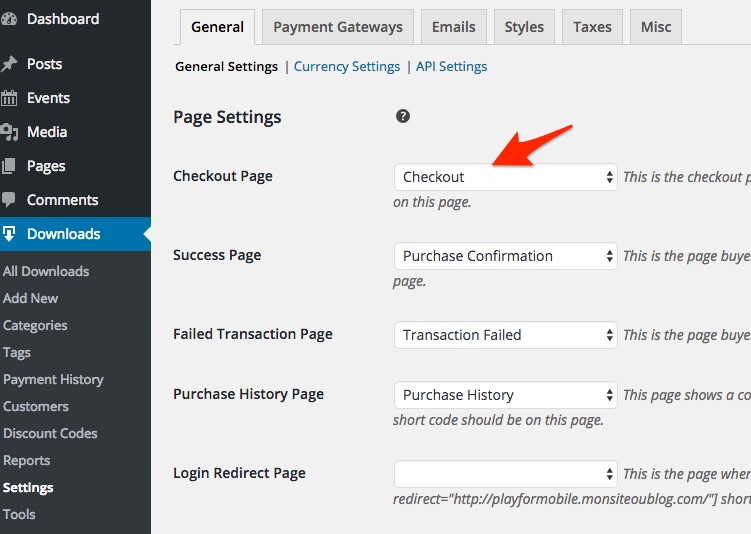
Let me know if that helps.
Have a great day!
Geoff B.
July 13, 2016 at 8:09 am in reply to: Display issue with Enfold theme and Event Tickets Plus #1139148MemberGood morning Bruce,
By the looks of it, it sounds like the callback function they are looking for would look something like:
add_action( 'some_theme_hook', array( Tribe__Events__Tickets__Woo__Main::get_instance(), 'front_end_tickets_form' ) );
Let me know how that goes.
Best regards,
Geoff B. -
AuthorPosts