

Forum Replies Created
-
AuthorPosts
-
Geoff B.
MemberGood evening Yohann,
Thank you for your interest in that feature.
At this point I unfortunately don’t have a release date to offer for the enhanced shortcodes as I literally do not have an ETA. But in one of the next upcoming Feature Releases (as opposed to maintenance releases) which are scheduled about every 2-3 months (we had our last one mid-june).
Stay tuned as we will be very vocal about such an awesome feature!
Best regards,
Geoff B.
MemberThis reply is private.
MemberGood evening Stefaan,
I totally understand where you are coming from.
For the record, there are a lot of options out there for pretty powerful web hosting plans around the $15 – $20 /month price range.I want to reiterate that it’s a shame that you are not able to tweak the timeout setting with that specific webhost (which otherwise looks great).
I did ask for a second opinion on this one to the other members on my team (in case I am missing something).
In the meantime, as requested previously, would you mind providing me with a couple of Facebook feeds that you are using so that I can run some tests (just to be extra sure that the cause is not elsewhere) ?
Best regards,
Geoff B.
MemberGood evening Bruce,
Thank you for writing back, for trying my suggestions and for the files.
Here is the updated file back (tested and all): functions
I hope this helps. As a side note, it might take a while to kick in because it uses CRON jobs in the background. So give it a couple of hours.
How will the additional code be carried forward if/when the theme is updated?
That’s a great question. The functions.php file would most likely get overwritten.
This is one of the top reasons why a lot of people choose to use child themes. If you don’t know about them, I would highly recommend it. There are even a bunch of plugins out there to ease the process.
Let me know how that goes.
Best regards,
Geoff B.MemberGood evening Sheila,
Thank you for writing back and for providing the requested information.
I tried reproducing the issue with the Avada theme on my end and the same versions of our plugins that you are using. Unfortunately, I was not able to reproduce the issue on my end.
Perhaps we are using a different version. Could you please send me a copy of your WordPress theme / child theme in a .zip file link (via Dropbox or Google Drive) so that I can run some tests on my end ?
With that in mind, I would like to ask a few additional questions about the test order you placed:
- You mentioned that you used Paypal to pay for the test order. Did you go through the complete process when placing that order (including payment) ? Do you remember what was the last screen you were on as part of that test purchase ? (return to site? Some page on the Paypal site?). Would you mind sharing a prinscreen of your Paypal settings (in a private reply) ?
- Can you tell me what the order status of these test orders are in WooCommerce ?
Best regards,
Geoff B.
MemberGood evening Ingrid,
Thank you for providing us with your system information.
I believe there are several things at play here. I would love to go through them one by one with the goal of helping you get the best possible working system.
- I notice that you are using PHP 7+ . Although it’s amazingly faster than previous versions, a lot of WordPress plugins do not all run smoothly with it yet (bugs). This is the case for many WooCommerce related plugins and is certainly the case with our plugins.
Short term, I would recommend downgrading PHP to any version after 5.4x and before 7. I realize this is not ideal, but it’s truly the best thing to do for a more stable website for now.
That being said, we are working at making everything fully PHP 7 compatible on our end, so stay tuned!
- I do not know if you were aware of this, but we currently Event Tickets Plus WPML support is not quite ready yet. The good news is that we are working very hard at that in the hopes of having some substantial compatibility increase by the end of the year if all goes well.
The good news is that I have tested the latest version of WPML in combination with our latest plugins and it should work.
The odds are pretty good that downgrading PHP will fix the issue.
Let me know how that goes.
Best regards,
Geoff B.MemberGood evening Kam,
You are absolutely right. For some strange reason, that page was changed to draft status (unbeknownst to me). My apologies.
It has now been reactivated.
Let me know if you need any help with this.
Best regards,
Geoff B.
MemberGood evening Kam,
Awesome! I’m glad that worked for you.
You are welcome back on our support forums any time 🙂
For now, I am going to close this thread.
Have a great week!
Geoff B.
MemberHello Nathaniel,
I’m sorry about the delay answering back.
I did reply to it yesterday, but somehow it did not go through. I apologize for that.
So here is my second attempt at that reply.Based on the information you have provided, there are a few things I am noticing:
- You are currently using Event Rocket. Although this is a great plugin, it’s update cycle has been abandonned by the author. Furthermore, it is known to break several normal behaviours of any the Events Calendar plugins for version 4.x +. I would recommend deactivating this plugin first (or if you want to continue using it, you will have to downgrade our plugins to versions prior to 4.x+)
- You are currently running PHP 5.3.x , if possible, I would highly recommend upgrading to at least PHP 5.4.x+. In fact WordPress recommends 5.6.x+, but 5.4 is fine. I have personally observed many strange behaviours with PHP 5.3.x . I am not sure that this is the cause of the issue, but it would not hurt to do the update anyway.
- There are several messages in the Google Developer tools console. Yesterday, there was a “Cross-Origin Resource Sharing policy” message for the admin-ajax.php file (which now seems to have been solved). But there is still one for some fonts (nothing dramatic).
Let me know how that goes.
Best regards,
Geoff B.MemberGood evening Abby and welcome back!
Thank you for reaching out to us.
I would love to help you with this topic.
What you need to do to view the attendee information is to go to your Events and hover over the event you want to check.
You should find an option labeled “Attendee”. You might want to read the following: https://theeventscalendar.com/knowledgebase/managing-your-orders-and-attendees/
Best regards,
Geoff B.
MemberGood evening Michael and welcome to the Events Calendar Support forum!
Thank you for reaching out to us.
I would love to help you with this topic.
That is a great question. The only way that this could be achieved for now is through a custom page template. You might want to read our Themer’s guide to get a sense of how that works.
You can also hire one of our recommended customizers to do the customization for you.
The good news is that we are working at expanding our shortcodes currently so that you will indeed be able to embed the full calendar in the page of your choice.
Alas, for now, it is not possible to have the full calendar (only other views).
Let me know if that helps.
Have a great day!
Geoff B.
MemberGood evening Julia and welcome to the Events Calendar Support forum!
Thank you for reaching out to us.
I would love to help you with this topic.The short answer is yes, but not completely out of the box.
What you would need to do to achieve that result would be to do a template customization on our list view.
You might want to read our Themer’s guide to get a sense of how that works.
As an alternative, you could hire one of our recommended customizers to do the customization for you.
Best regards,
Geoff B.
MemberHello Kam,
Yes, you can absolutely do that.
I recommend reading the following article on this topic: https://theeventscalendar.com/knowledgebase/moving-the-ticket-form/
Let me know if you need help with that.
Best regards,
Geoff B.
MemberGood evening Andreas and welcome back!
Thank you for reaching out to us.
We are sorry to hear about the message you have been receiving.
I would love to help you with this topic.I am not sure exactly why you are receiving this message, but it looks like somehow the system believes that the license key is still tied up to the old web host.
I would recommend reading the following article on that topic: https://theeventscalendar.com/knowledgebase/moving-your-license-keys/
Let me know if that helps.
Have a great day!
Geoff B.
MemberHello again Kam,
That is a great question.
Actually, the | should be sitting on the same line as the event time (see screenshot).
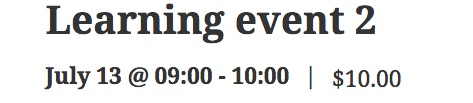
On your install, you could get that result by adding the following CSS rule to your WordPress theme or child theme.
.tribe-events-schedule h2 {

float: left;

}
Let me know if that helps.
Have a great day!
Geoff B.
-
AuthorPosts