
Home › Forums › Ticket Products › Event Tickets Plus › How do I view attendee additional information?
- This topic has 12 replies, 5 voices, and was last updated 10 years, 2 months ago by
keystoliteracy.
-
AuthorPosts
-
July 13, 2016 at 9:03 pm #1139470
keystoliteracy
ParticipantI’ve got my tickets set up to capture additional attendee information.
Where in the wordpress admin dashboard do I view this information for people who’ve purchased tickets?
July 13, 2016 at 11:59 pm #1139524Geoff B.
MemberGood evening Abby and welcome back!
Thank you for reaching out to us.
I would love to help you with this topic.
What you need to do to view the attendee information is to go to your Events and hover over the event you want to check.
You should find an option labeled “Attendee”. You might want to read the following: https://theeventscalendar.com/knowledgebase/managing-your-orders-and-attendees/
Best regards,
Geoff B.
July 14, 2016 at 12:10 pm #1139885ParticipantI’m looking at that screen (attaching screenshot) – where do I see the additional attendee information?
July 14, 2016 at 1:08 pm #1139911ParticipantAlso isn’t there a single place I can go to view all of the attendees who’ve registered for my events? It feels super confusing to find the information right now 🙁
July 14, 2016 at 10:29 pm #1140124MemberGood evening Abby,
Thank you for writing back.
Normally the attendee info can be seen by clicking on the link (see screenshot)
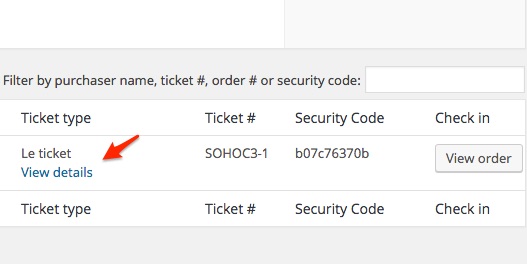
But based on your screenshot (and the fact that it looks very different), I am thinking that perhaps we are not using the same version of the plugins.
As a first troubleshooting step, could you please provide us with your complete system information in a private reply using the instructions found in the following link?
https://theeventscalendar.com/knowledgebase/sharing-sys-info/
Also isn’t there a single place I can go to view all of the attendees who’ve registered for my events? It feels super confusing to find the information right now ?
We are sorry to hear that this is confusing to you right now. Once I have the system information it will help me sort this out with you.
In the meantime, if I understand this correctly, you are looking for a place that displays ALL attendees for ALL events. Can you confirm ?
Are you looking for that list in the front-end or in the admin section of your website ?
Best regards,
Geoff B.
July 15, 2016 at 8:36 am #1140308Danilo
ParticipantHey Abby,
To view all attendee questions for your event, click on the EXPORT button (next to Bulk Actions). It will generate an Excel file for you.
Also, typically you’d have a View Details (see my attached image) link in the Ticket Type column. Maybe you need to upgrade your plug-in?
Have a great day!
DanJuly 15, 2016 at 1:28 pm #1140536MemberGood afternoon Dan,
Thank you for chiming in and for being engaged.
We always appreciate it.I suspect the plugin version might be the issue too.
Have a good week-end,
Geoff B.
July 15, 2016 at 9:46 pm #1140650ParticipantThis reply is private.
July 15, 2016 at 9:59 pm #1140653ParticipantOh! I found it. Phew! Was getting nervous.
Question – I know you’re not including this information right now in the emails that get sent out, but are there any code snippets I could take a look at to try to add it into the email that goes when someone places an order?
Thanks!!
Abbyps – Thanks, Dan! Super helpful to know about the export button too.
-
This reply was modified 10 years, 2 months ago by
July 15, 2016 at 10:21 pm #1140656ParticipantAlso – sorry, so many questions! When I look at the Order Details for a ticket someone has purchased and filled out the attendee information for, is it supposed to show up on the order page? I see it says
_tribe_wooticket_attendee_output:
But nothing shows up under it. (see screenshot)
(am trying to figure out the easiest way I can tell my customer how to find the attendee’s details when they register as she needs to do something with that info as soon as each registration comes in, and right now the best I can come up with is to click the “Order” link in the email, then on the order screen click the Product Name, but then that takes you into WooCommerce where you’ll have to click the name of the associated ticket, then scroll ALL the way down to the bottom, find the Attendees link, click in, then find the person who just registered in the list and click “View Details”)
-
This reply was modified 10 years, 2 months ago by
-
This reply was modified 10 years, 2 months ago by
July 18, 2016 at 10:46 pm #1141341MemberGood evening Abby,
Thank you for writing back, for running some additional tests and for your system information.
Kudos on finding the buttons!
Question – I know you’re not including this information right now in the emails that get sent out, but are there any code snippets I could take a look at to try to add it into the email that goes when someone places an order?
I would recommend reading the following thread where one of our customers was awesome enough to share his code to accomplish just that: https://theeventscalendar.com/support/forums/topic/have-the-additional-fields-appear-on-invoice/
When I look at the Order Details for a ticket someone has purchased and filled out the attendee information for, is it supposed to show up on the order page? I see it says
_tribe_wooticket_attendee_output:
That is a known glitch that should get addressed in our upcoming maintenance release.
The good news is that, aside from being odd, this has no real consequence. We will let you know as soon as the bug fix is out.
As for what you are trying to achieve, for now my top 2 recommendations are:
- Try out the snippet I have referred to
- Use the CSV export to get access to the attendee info in one clear and concise place
Let me know how that goes.
Best regards,
Geoff B.August 9, 2016 at 9:35 am #1149551Support Droid
KeymasterThis topic has not been active for quite some time and will now be closed.
If you still need assistance please simply open a new topic (linking to this one if necessary)
and one of the team will be only too happy to help. -
This reply was modified 10 years, 2 months ago by
-
AuthorPosts
- The topic ‘How do I view attendee additional information?’ is closed to new replies.