

Forum Replies Created
-
AuthorPosts
-
Geoff B.
MemberHey again Kam,
Great! This should be pretty straightforward after reading the documentation of these plugin.
Hit us up if there is anything.
I am going to close this thread 🙂
Cheers,
Geoff B.
MemberGood afternoon Kam,
Awesome!
For now, I am going to close this thread.
Have a great weekend!
Geoff B.
MemberGood evening Vincent and welcome back!
Thank you for reaching out to us.
I would love to help you with this topic.
After creating an event ticket, the qty interval is from 1 – 10, default is 1. How to set the default to 0?
The default Quantity should be zero by default.
Since that does not seem to be the case on your site, then I’m thinking that this means that there is some customization at hand (either through a plugin or through your theme).
As a first troubleshooting step, could you please provide us with your complete system information in a private reply using the instructions found in the following link?
https://theeventscalendar.com/knowledgebase/sharing-sys-info/
Could you please send me a copy of your WordPress theme / child theme in a .zip file link (via Dropbox or Google Drive) so that I can run some tests on my end ?
Best regards,
Geoff B.
MemberGood evening and welcome to the Events Calendar forum!
Thank you for your interest in our products.
We’ll be glad to answer your questions.Can users subscribe to events to get notified of updates etc?
That is a very good question.
We have a couple of options available:
- There is an event RSS feed built-in to our plug-in
- Under each view (including the main calendar) there is an iCal / Google Calendar compatible button that can also be used as a calendar to subscribe to
Can users comment etc to event?
Built-in we have not included the comment template in single events. But since Events are really just a custom post type, it would be easy to add that back using some simple template customization.
You might want to read our Themer’s guide to get a sense of how that works.
Let me know if that helps.
Have a great day!
Geoff B.
MemberGood evening Kam,
The answer is yes, you can do that.
However, this will need to be handled by a WooCommerce third party plug-in such as:
- https://wordpress.org/plugins/woocommerce-bulk-discount/
- https://woocommerce.com/products/dynamic-pricing/
Let me know if that helps.
Have a great day!
Geoff B.
MemberGood evening Peter and welcome to the Events Calendar Support forum!
Thank you for reaching out to us and for running this test.
Is there anything specific that I can help you with on this topic ? 🙂
Have an awesome day!
Geoff B.
MemberGood evening Isaac,
Thank you for writing back.
The short answer is that there is no automatic way to do that. But when the time comes, please reach to us over email quoting this thread and I am pretty sure we will be able to offer something very similar to what you are looking for 🙂
Best of luck with this project.
Have a great day!
Geoff B.
MemberGood evening Joshua and welcome back!
Thank you for reaching out to us.
I would love to help you with this topic.
The CSS code to tweak is the following:
.single-tribe_events .tribe-events-event-meta {

background: #e4e2e6;

}
You could replace it by something like
.single-tribe_events .tribe-events-event-meta {

background: #fff;

}
As for the Monday tooltip still being transparent, I would suggest the following CSS rule
#tribe-events-content.tribe-events-month .tribe-events-tooltip {

background-color: #fff;

}
Let me know if that helps.
Have a great day!
Geoff B.
MemberGood evening Jeff and welcome to the Events Calendar Support forum!
Thank you for reaching out to us.
We are sorry to hear about the column width not looking great on your website.
I would love to help you with this topic.The simplest approach to solving things would be through CSS.
For example, updating the following rule would at least make things look better (especially the ticket number filed).tribe-events-tickets tr .tribe-ticket, .tribe-events-tickets tr .tickets_name, .tribe-events-tickets tr .tickets_description {
width: auto;
}The different cells that can be styled here are:
- #tribe-events .tribe-events-tickets .woocommerce
- .tribe-events-tickets tr .tickets_name
- .tribe-events-tickets .tickets_price
- .tribe-events-tickets .tickets_price
Let me know if that helps.
Have a great day!
Geoff B.
MemberGood evening Kevin and welcome to the Events Calendar Support forum!
Thank you for reaching out to us.
We are sorry to hear about the maps displaying
I would love to help you with this topic.With that in mind, I tried going on your website, but even with info you gave me, I get hit by a “This content is for registered and logged in members only.” message.
Ideally, I would need to get a better look (maybe some screenshots) of how you set up your API with Google.
It is worth noting that they substantially changed their API authorization policies as of June 22nd.They are now way stricter, especially with wildcard domains APIs. In any case, if you haven’t already done so, I would recommend reading the following article on that topic: https://theeventscalendar.com/knowledgebase/setting-up-your-google-maps-api-key/
Let me know if that helps.
Have a great day!
Geoff B.
MemberGood evening Abby,
Thank you for writing back.
Normally the attendee info can be seen by clicking on the link (see screenshot)
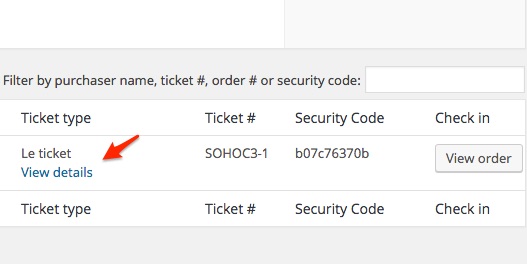
But based on your screenshot (and the fact that it looks very different), I am thinking that perhaps we are not using the same version of the plugins.
As a first troubleshooting step, could you please provide us with your complete system information in a private reply using the instructions found in the following link?
https://theeventscalendar.com/knowledgebase/sharing-sys-info/
Also isn’t there a single place I can go to view all of the attendees who’ve registered for my events? It feels super confusing to find the information right now ?
We are sorry to hear that this is confusing to you right now. Once I have the system information it will help me sort this out with you.
In the meantime, if I understand this correctly, you are looking for a place that displays ALL attendees for ALL events. Can you confirm ?
Are you looking for that list in the front-end or in the admin section of your website ?
Best regards,
Geoff B.
MemberGood evening Sun and welcome back!
Thank you for reaching out to us.
I would love to help you with this topic.
The short answer is no. It should not pose a problem.
That being said, I would recommend reading the following to make sure everything goes smoothly: https://theeventscalendar.com/knowledgebase/moving-your-license-keys/Let me know if that helps.
Have a great day!
Geoff B.
MemberGood evening Thomas and welcome to the Events Calendar Support forum!
Thank you for reaching out to us.
We are sorry to hear about your struggles getting tickets to display properly.
I would love to help you with this topic.As a first troubleshooting step, could you please provide us with your complete system information in a private reply using the instructions found in the following link?
https://theeventscalendar.com/knowledgebase/sharing-sys-info/
Secondly, could you tell me if you went through the following procedure as you migrated from WooTickets to Event Tickets Plus : https://theeventscalendar.com/knowledgebase/moving-to-event-tickets-plus/ ?
Finally, is it possible that there is a ticket start sale date on your tickets ?
If so, then the tickets actually will not display until that start date is reached. You can test that by removing the start sale date and seeing if the tickets show up.
Let me know how that goes.
Best regards,
Geoff B.MemberGood evening Julia,
Thank you for writing back.
One more question how to show old at the bottom of page
Great question. In order to have a descending order, you will need to do a template customization.
My colleague Geoff explains it very well here: https://theeventscalendar.com/support/forums/topic/ordering-past-events-in-descending-order/#post-873990Also please let me know how to call organiser image
Organizer images can be obtained through the tribe_organizer post type in wp_posts. The image reference is stored in wp_postmeta in the _thumbnail_id row for the tribe_organizer post_id.
Let me know if that helps.
Have a great day!
Geoff B.
MemberGood evening David,
Thank you for writing back. I am sorry to hear that updating the plugin did not help.
On my end, I have let the iCal recurring import run with the feed you have provided me with, and I still have not been able to reproduce the issue.
I totally understand the seriousness of the situation and in fact I absolutely share your goal: resolve this as quickly as possible.
Based on what we know, it looks like for some reason the recurring iCal import is unable to properly match past events and as such creates duplicates every time it runs.
We also know that a recurring import for that exact iCal feed created with the latest version of the plugin AND the overwrite checkbox selected works great.
At this stage, we have a couple of options on the table to achieve that:
- Try to see if there is not a conflict at play (theme or plugin based). This can be accomplished by going through our testing for conflicts procedure (preferably in a staging/dev environment or local install of your WordPress website) and let us know what you find out.Basically the goal here is to revert back to a bare WordPress installation to see if the problem persists. It also allows us to pinpoint what the cause of the issue is.
- Completely stop and delete the recurring import, clean the past events manually and recreate the import with the latest version of the plugins.
I would personally recommend option 2 (even though it’s time consuming). The reason for that is that it looks like your current recurring import is “corrupted” at some level. So starting relatively clean, would be my preferred solution.
Let me know which path you would like to pursue.
Thank you for sticking with us on this complex issue.
Best regards,
Geoff B.
-
AuthorPosts