
Home › Forums › Ticket Products › Event Tickets Plus › How to set ticket qty to 0
- This topic has 10 replies, 4 voices, and was last updated 10 years, 1 month ago by
Vincent.
-
AuthorPosts
-
July 14, 2016 at 10:56 pm #1140151
Vincent
ParticipantI have Event Ticket Plus and wooCommerce. After creating an event ticket, the qty interval is from 1 – 10, default is 1. How to set the default to 0?
July 14, 2016 at 11:24 pm #1140166Geoff B.
MemberGood evening Vincent and welcome back!
Thank you for reaching out to us.
I would love to help you with this topic.
After creating an event ticket, the qty interval is from 1 – 10, default is 1. How to set the default to 0?
The default Quantity should be zero by default.
Since that does not seem to be the case on your site, then I’m thinking that this means that there is some customization at hand (either through a plugin or through your theme).
As a first troubleshooting step, could you please provide us with your complete system information in a private reply using the instructions found in the following link?
https://theeventscalendar.com/knowledgebase/sharing-sys-info/
Could you please send me a copy of your WordPress theme / child theme in a .zip file link (via Dropbox or Google Drive) so that I can run some tests on my end ?
Best regards,
Geoff B.
July 15, 2016 at 12:04 pm #1140503ParticipantThis reply is private.
July 15, 2016 at 12:08 pm #1140504ParticipantThank you Geoff. Could you tell me how to make a copy of WordPress theme / child theme?
July 15, 2016 at 2:52 pm #1140584MemberGood afternoon Vincent,
Thank you for writing back and sharing your system information.
It looks like you are using Twenty-fourteen (I’m just not sure if it was modified or not).
So there is no need to send your theme over 🙂Based on that, I would recommend trying to add one of the following snippets in your theme’s functions.php:
- https://docs.woothemes.com/document/adjust-the-quantity-input-values/
- https://wordpress.org/support/topic/set-default-product-quantity-from-1-to-0
Let me know if that helps.
Have a great day!
Geoff B.
July 15, 2016 at 10:33 pm #1140659ParticipantI’ve tried both but wouldn’t help…
July 18, 2016 at 11:03 pm #1141348MemberGood evening Vincent,
I am sorry that these 2 snippet suggestions did not work.
With that in mind, I decided to push the investigation a bit further and, as a result, there is something that is bothering me about the add to cart screenshot you have sent me.
The default Twenty Fourteen Add to cart button should look like the following screenshot (not like a dropdown) in yours.
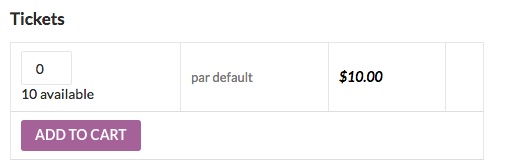
That means that something on your install is creating this custom add to cart menu.
The 2 most likely culprits are:
- A template customization found in your version of twenty-fourteen.
- Perhaps this is a result of you Paypal by Braintree plugin
A quick test would be to temporarily (perhaps while using a maintenance page) switch to twenty-fifteen and deactivating that plugin to see if the issue persists.
The other thing that would be worth a shot is providing me with a copy of your theme.
To answer your earlier question, the simplest way to get me a copy of your theme would be through the following plugin: https://wordpress.org/plugins/wp-downloader/Once you have that folder in your Computer, simply compress it and send me the link to a Dropbox or Google Drive copy of that file.
Hang in there as we figure this out!
Best regards,
Geoff B.
July 25, 2016 at 9:16 pm #1143994ParticipantGeoff,
I switched to twenty-fifteen and deactivated Paypal by Braintree plugin works!
So this means the problem caused by that plugin? Any solution?
Thanks,
VincentJuly 26, 2016 at 5:32 pm #1144441MemberHey Vincent,
Thank you for writing back and running those tests.
It does look like there is something in the plugin that’s altering the shopping cart.
The best solution would be to be able to tweak that behaviour.There are many approaches to this:
- Adding a filter in your themes functions.php to set the quantity to zero for the functions used by braintree to create the “Add to cart” box.
- Contacting the plugin’s author to see how to go about doing this.
- Could you please send me a copy of that plugin in a .zip file link (via Dropbox or Google Drive) so that I can run some tests on my end ? I can’t promise anything, but I’ll gladly take a look
Best regards,
Geoff B.
August 17, 2016 at 9:35 am #1152662Support Droid
KeymasterThis topic has not been active for quite some time and will now be closed.
If you still need assistance please simply open a new topic (linking to this one if necessary)
and one of the team will be only too happy to help. -
AuthorPosts
- The topic ‘How to set ticket qty to 0’ is closed to new replies.