Forum Replies Created
-
AuthorPosts
-
Geoff B.
MemberHello again Mike,
I must say I am a bit confused.
Built-in, there are + and – buttons for Event Tickets Plus.I am not sure why you would want to use a customization for adding something that should already be there. But perhaps I am missing something ?
As you might know, the scope of our support is mostly to get our customers started on the right track and to help them in case of issues.
We unfortunately do not provide complete support for customization.
That being said, I will gladly ask for an expert pair of eye once I can understand what you are trying to accomplish that is outside of the built-in functionality.
Best regards,
Geoff B.
November 16, 2016 at 11:42 pm in reply to: Font Color for Days, Changing Start Day of the Week, Changing Header of Calendar #1193714MemberGood evening Allison and welcome to the Events Calendar forum!
Thank you for your interest in our products.
We’ll be glad to answer your questions.1. How do I change the font color on Monday, Tuesday, Wednesday, etc. in the month view? Currently, mine is black and I want it to be white.
There a couple of ways to do this. You could:
- Experiment with the customizer in Appearance > Customize > the Events Calendar
- Experiment with the first setting found on the Events -> Settings -> Display page
- Add some custom CSS rules to your theme’s style.css or custom CSS section
.tribe-events-calendar th {color: #fff !important}
2. In the month view, how do I start the week with Sunday instead of Monday?
You need to change that at the WordPress level. Head over to Settings > General
3. How do I change the header so instead of saying “Events for November 2016” it says “Yoga Classes in November”
This will require a bit of customization. You can:
- Use the following snippet: https://theeventscalendar.com/knowledgebase/change-the-wording-of-any-bit-of-text-or-string/
- Create custom templates for your views and harcode that title: You might want to read our Themer’s guide to get a sense of how that works.
Let me know if that helps.
Have a great day!
Geoff B.
November 16, 2016 at 11:32 pm in reply to: Attendee info (name, email, etc) not saving when customer adds it to tickets #1193713MemberHey Paul,
Thank you for writing back. Thank you Mike for pitching in.
The initial issue (with transients) should be a thing of the past.
Normally, the initial workaround should not longer be necessary.Could you provide me with an example URL for this ?
I believe you might want to check on Mike’s suggestion.
Best regards,
Geoff B.
November 16, 2016 at 11:19 pm in reply to: I bought the wrong plugin..i got the aggregator, but I meant to get pro. #1193707MemberGood evening Cory and welcome to the Events Calendar Support forum!
Thank you for reaching out to us.
We are sorry to hear that you did not purchase the proper product.
I would love to help you with this topic.I simply went ahead and replaced your Events Aggregator license by one for the Events Calendar Pro.
Let me know if that helps.
Have a great day!
Geoff B.
November 16, 2016 at 11:13 pm in reply to: How can I show the attendee information in the woocommerce checkout page? #1193705MemberGood evening Mike and welcome back!
Thank you for reaching out to us.
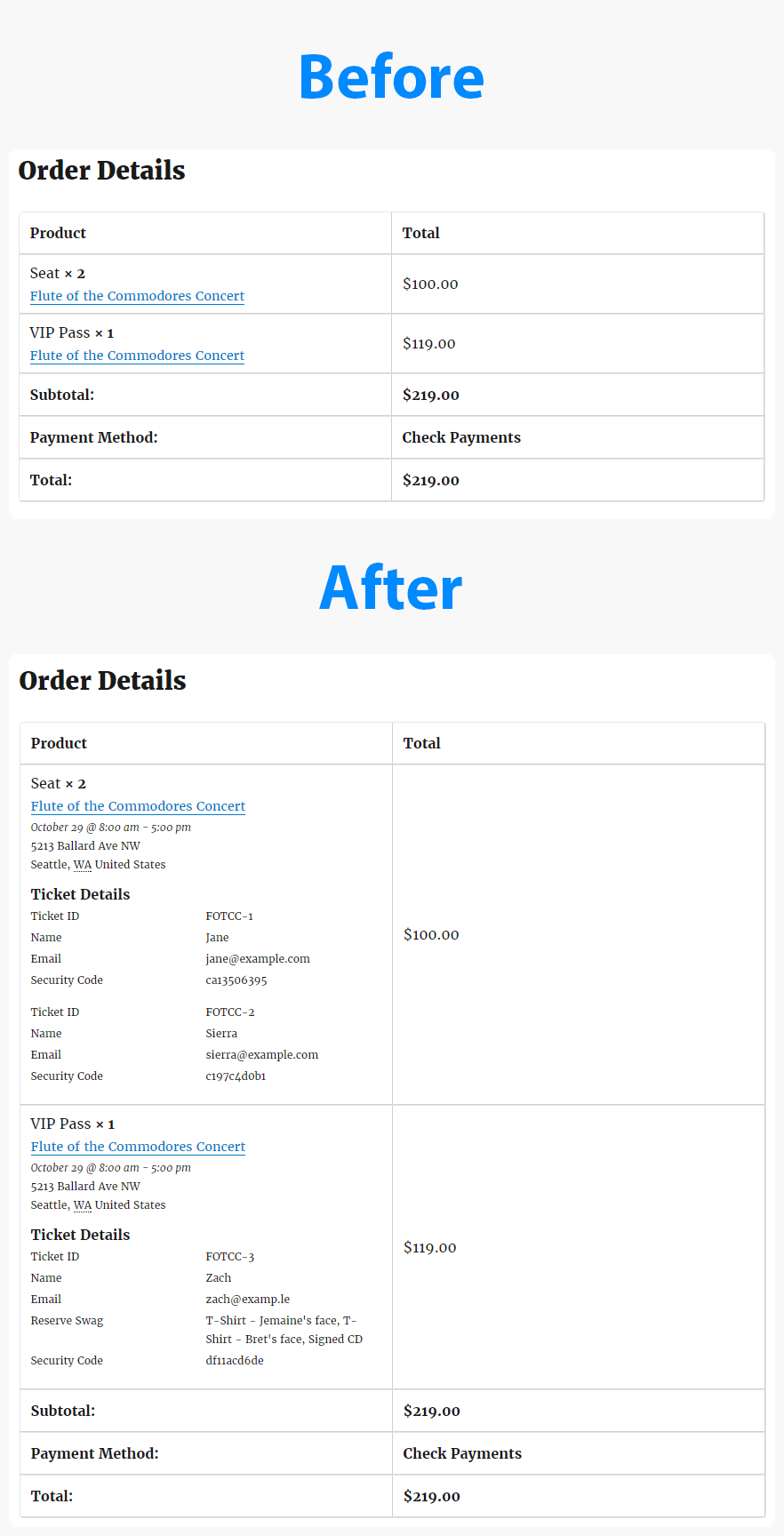
I would love to help you with this topic.We now have the Event Tickets Extension: Additional Email Options.
Namely it includes attendee meta and event info in the WooCommerce order emails and details pages. Example: https://theeventscalendar.com/content/uploads/2016/10/before-after-tickets-email-options.png
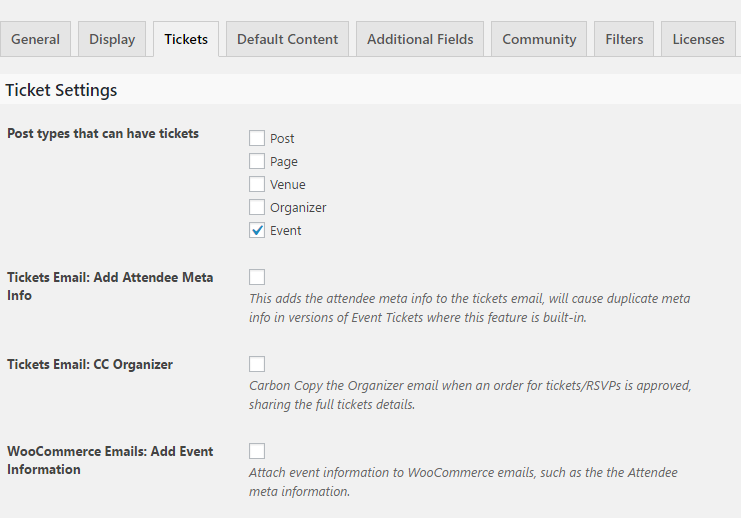
So the extension now has three different options that it adds WP-Admin > Events > Settings > Tickets:
https://theeventscalendar.com/content/uploads/2016/10/email-options-ss.pngYou can download it here: https://theeventscalendar.com/content/uploads/2016/10/tribe-ext-tickets-email-options-0-3-0.zip
Let me know if that helps.
Have a great day!
Geoff B.
November 16, 2016 at 11:09 pm in reply to: Recurring events – start and end date not set after save #1193704MemberGood evening Bobby and welcome back!
This is quite an interesting question.
Just to set expectations, the scope of our premium support is mostly to get our customers started on the right track and to help them in case of issues.
We unfortunately do not provide complete support for customization.
With that in mind, I would like to run your question by our WPML Dev expert to see if he could shed some light on this.
Hang in there as I do this for you.
Best regards,
Geoff B.
MemberThis reply is private.
MemberHey Erik,
This is awesome news! I am stoked that you got things fixed on your end.
You are welcome back in our support forums any time 🙂
For now, I am going to close this thread.
Have a great week!
Geoff B.
November 16, 2016 at 10:56 pm in reply to: Tickets Disappear From Website a few hours before event begins #1193695MemberHi again Doug,
Thank you for these screenshots.
I would also like to compare this against 2 other things:
- Can you tell me if changing your timezone setting in Events -> Settings -> General has any impact ?
- Would it be possible for you to get your PHP server time (from your webhost) ?
The goal here would be to ensure that every part is synchronized properly.
Have a great day!
Geoff B.
MemberDear Joan,
I am terribly sorry about this.
I totally understand that you can’t get to your wp-admin page for now.
My solution will still work, in spite of that.
Step 1: Force deactivation of the plugin
To do this you need to use an FTP Client or the File manager from your CPanel.
You can ask your web host about this.We can force deactivation of the plugin ( the Events Calendar) by editing the plugin folder name :
- Change the folder found at /wp-content/plugins/the-events-calendar/ to /wp-content/plugins/z_the-events-calendar
That will deactivate your the Events Calendar plugin and give you access to your site once again.
Step 2: Delete the plugin
- Delete the wp-content/plugins/z_the-events-calendar completely OR from the plugins menu in WordPress.
- Reinstall the Events Calendar plugin by using the Add plugin interface.
Everything should then be back to normal.
Let me know how that goes.
Best regards,
Geoff B.MemberGood evening Malcolm and welcome to the Events Calendar forum!
Thank you for your interest in our products.
We’ll be glad to answer your questions.We would need to be able to import all events,
We offer a built-in CSV importer with the Events Calendar free version.
If you have more advanced needs (Google Calendar/iCal or Facebook importers, meetup), you will want to take a look at our event aggregator service: https://theeventscalendar.com/product/event-aggregator/
We even have a dedicated plugin to deal with Eventbrite events and tickets importing: https://theeventscalendar.com/product/wordpress-eventbrite-tickets/
and also have the ability for site visitors to submit events from a submission form.
This can be achieved by our Community Events Plugin: https://theeventscalendar.com/product/wordpress-community-events/
Will I need to purchase the importer & community events add ons separately from the Pro Bundle?
That is a great question. At this point I am not sure if you need or are interested in the feature of the Events Calendar Pro as well: https://theeventscalendar.com/product/wordpress-events-calendar-pro/
If you are, than perhaps the cheapest solution would be to get the importer bundle and Community events separately: https://theeventscalendar.com/bundles/
Best of all, you can try these risk-free.
This is because you are entitled to a refund as long as you are within 30 days of your purchase.
To obtain the refund, you just need to follow the procedure described here.Let me know if that helps.
Have a great day!
Geoff B.
November 16, 2016 at 10:30 pm in reply to: Push State Error when clicking on next/previous day or next/previous month. #1193687MemberGood evening Russell and welcome to the Events Calendar Support forum!
Thank you for reaching out to us.
We are sorry to hear about the messages you are getting while navigating between months after the last update. I would love to help you with this topic.
From what I can see, I have a couple of recommendations.
First of all, I would recommend tackling the Google maps API message from the Console in Google Chrome’s developer tools.
More specifically, you might be interested in:
- https://theeventscalendar.com/knowledgebase/setting-up-your-google-maps-api-key/
- Perhaps disabling your other Google Maps API plugin, at least for the Events Calendar pages and archives
Secondly, I am noticing that you are using an older version of PHP.
I would highly recommend (after a backup), upgrading to PHP 5.4+ (in fact WordPress recommends 5.6+).Let me know how that goes.
Best regards,
Geoff B.MemberGood evening Joe and welcome to the Events Calendar forum!
Thank you for your interest in our products.
We’ll be glad to answer your questions.How can I display a monthly view calendar on my page or any of the other free views available? Are there any shortcodes somewhere which I did not see?
Shortcodes come with the Events Calendar Pro: https://theeventscalendar.com/product/wordpress-events-calendar-pro/
You can see them in action here:
- https://theeventscalendar.com/knowledgebase/pro-widget-shortcodes/
- https://theeventscalendar.com/knowledgebase/embedding-calendar-views-tribe_events-shortcode/
Best of all, you can try Pro risk-free.
You can get a refund if you want one as long as you are within 30 days of your purchase.
To obtain the refund, you just need to follow the procedure described here.Let me know if that helps.
Have a great day!
Geoff B.
MemberGood evening Moe and welcome to the Events Calendar forum!
Thank you for your interest in our products.
We’ll be glad to answer your questions.I have a question about if this plugin support to sell normal entry tickets without an event or dates.
Is it support that ?Yes, absolutely. You can use Event Tickets and Event Tickets Plus standalone (without the Events Calendar).
You will then be able to sell tickets via pages, posts and custom post types.
Let me know if that helps.
Have a great day!
Geoff B.
MemberGood evening Boris and welcome to the Events Calendar forum!
Thank you for your interest in our products.
We’ll be glad to answer your questions.Imagine an event with 20 occurrences. People leave fantastic reviews after the first instance, but then 1 week on (the next occurrence) there will presumably be no reviews because the second instance will be treated by the system as a separate event?
I totally understand what you mean.
Since I am not sure how the plugin you are using operates, I can’t say for sure.
But I suspect that you are right about this, by default all of these reviews will most likely be separate for each event.If so, will it be possible to add an event with recurring dates, but still be treated as one single event? This will allow reviews to accumulate.
I absolutely believe this is possible since there are already a couple of things that recurring events share among each other.
In fact, currently, tickets assigned to recurring events are shared between all events.
In any case, this will require some customization. You might want to read our Themer’s guide to get a sense of how that works.
If programming is not really your thing, you can hire one of our recommended customizers to do the customization for you..
I wish I had a better answer for you, but for now it’s the best one I have.
Best regards,
Geoff B.
-
AuthorPosts