

Forum Replies Created
-
AuthorPosts
-
Geoff B.
MemberGood evening Werner and welcome to the Events Calendar forum!
Thank you for your interest in our products.
We’ll be glad to answer your question.I translated all the locations of my events from German to Italian, but they will not show up translated on the page.
How can I translate them correctly?My first recommendation would be to confirm you have setup the Events Calendar with WPML exactly as follows: https://theeventscalendar.com/knowledgebase/setting-up-the-events-calendar-with-wpml/
Secondly, can you confirm that you are using the following procedure to translate Events and Venues ? https://theeventscalendar.com/knowledgebase/creating-translations-for-events-using-wpml/
Finally, if none of this works, would it be possible to get an example URL ?
Best regards,
Geoff B.
November 17, 2016 at 8:02 pm in reply to: Attendee info (name, email, etc) not saving when customer adds it to tickets #1194302MemberHey Paul,
Thank you for writing back. I am sorry to hear the snippet did not help.
First off, you can find my colleague Cliff’s most recent version of the snippet: https://gist.github.com/cliffordp/66bf05df61ee269c60ff20d6f39e2cab
Can you confirm that the version you are using is up to date ?
You can also try this other snippet (still by Cliff): https://gist.github.com/cliffordp/f148a9cacd726e5a86ffeda2d2e204c1
Please pay attention to the notes
* WooCommerce: redirect Cart to Checkout to disable users being able to edit cart after adding Tickets
* Useful if only using WooCommerce for Event Tickets Plus, not selling other ProductsJust to clarify, this last snippet does not prevent you from modifying the cart, but rather skips the cart altogether and sends you to the checkout page.
The idea behind this is that we are not able to capture the additional attendee info in the cart page (at least for now).
The good news is that there is a priority one ticket to actually prevent changing the quantity in the cart for tickets.
Unfortunately, I cannot commit to a release date at this point. But stay tuned, you will be contacted when the fix is released.
If the updated snippet does not cut it, could you please send a copy of the latest version of your WordPress theme / child theme via a link to a .zip file link (stored Dropbox or Google Drive) so that I can run some tests on my end ? I recommend a private reply for that purpose.
Please ensure you are using the latest files as found on your actual website.
This way I will get access to any updates or customizations you might have made.Hang in there!
Best regards,
Geoff B.
MemberGood evening Earle,
I am super stoked that this worked for you.
You are welcome back in our support forums any time 🙂
For now, I am going to close this thread.
Have a great week!
Geoff B.
November 17, 2016 at 7:37 pm in reply to: Font Color for Days, Changing Start Day of the Week, Changing Header of Calendar #1194295MemberHey Allison,
Thank you for writing back.
I am sorry to hear that you are still struggling with the colour of the names of the days of the week.
To answer your question, this is not caused by the version of the Events Calendar you have. How the calendar looks is a combination of:
- Your WordPress theme and its CSS rules
- Your settings under Events -> Settings -> Display
- Your settings in the Customizer.
When all that fails, you can always resort to CSS rules. If you are not too comfortable with these, I suggest installing the following plugin: https://wordpress.org/plugins/simple-custom-css/
Once that is done, simply paste the following CSS rule and the days should display properly
.tribe-events-calendar th {color: #fff !important}Let me know how that goes.
Best regards,
Geoff B.MemberHey Lynn,
I forgot to suggest to reference this thread in the email, but I still was able to retrieve your email.
The simplest solution short term is to add the following CSS rule to your theme’s style.css or Custom CSS section
#tribe-events-content {

background-color: #fff;

}
Let me know how that goes.
Best regards,
Geoff B.MemberHey Malcolm,
Thank you for writing back.
I can accomplish #1 using this? https://theeventscalendar.com/product/ical-importer/
Actually the ical importer plugin has been replaced by the Events Aggregator service. It is much more robust and constantly updated.
Furthermore, we are currently phasing out the iCal importer, so I would not recommend purchasing it at this point.
I can accomplish #2 using this? https://theeventscalendar.com/product/wordpress-community-events/
Absolutely.
I can accomplish #3 using this? https://theeventscalendar.com/product/wordpress-events-calendar-pro/
You are right once again.
How can I accomplish #4?
This can be accomplished using the Events Calendar Pro: https://theeventscalendar.com/knowledgebase/embedding-calendar-views-tribe_events-shortcode/
So in short, your best bet is to get the Importer Bundle and Community Events.
Let me know if that helps.
Have a great day!
Geoff B.
MemberHey Nora,
Thank you for writing back.
I am sorry this crashed you site.It certainly was not my intention. Yikes!
Actually, there are 3 main things to be aware of for this code to work properly:
- Do not paste the opening <? ph p tag (since there is already one in your functions.php file).
- The code to use is actually found at the very bottom of that page (where it says “View Code snippet”. Everything else leading up to it is just for the explanation.
- You will need to tweak the code to your needs. In your case, that will most likely mean changing
$custom_text = array(

'Venue' => 'Location',

'Related %s' => 'Similar %s',

);
to
$custom_text = array(

'events' => 'training opportunities',

'Events' => 'Training opportunities',

);
Let me know if that helps.
Have a great day!
Geoff B.
November 17, 2016 at 6:53 pm in reply to: Mini calendar widget displaying HTML code for events #1194282MemberHey DeAnne,
I am super stoked that you managed to find the issue. Kudos!
You are welcome back in our support forums any time 🙂
For now, I am going to close this thread.
Have a great week!
Geoff B.
November 17, 2016 at 6:51 pm in reply to: Tooltips Not Displaying with [tribe_events] shortcode on page #1194280MemberHey Shay,
I’m super stoked that this now works for you.
You are welcome back in our support forums any time 🙂
For now, I am going to close this thread.
Have a great week!
Geoff B.
MemberThis reply is private.
MemberHey Moe,
You make a great point about our testing website.
The tickets are not sent because the order needs to be marked as “complete” for the tickets to be sent. I will open a ticket for this.Unfortunately, I cannot commit to a release date at this point. But stay tuned, you will be contacted when the fix is released.
In the meantime, here is a sample of what the ticket looks like.
Remember that you can tweak this with our Themer’s guide. You can also add an header image should you want to.
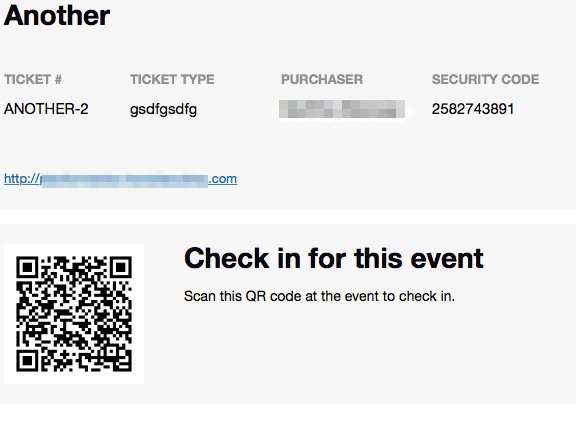
The other question is we are going to sell the ticket with other physical products. What about if the client want to buy the ticket is there any automatic shipping fee like the other products ?
By default, the tickets are virtual products (you could change that both at a by default level and at a per ticket level). So by default, there is no shipping fee applicable.
And what about if the client want to buy the ticket with other products? What will happen in this case?
Well tickets are just another WooCommerce products, so after adding them to the cart, they could continue shopping if they want to. This also means that you can control the behaviour of what happens after clicking on “Purchase” (redirect to cart, stay on that page, go to the shop, etc…)
Let me know if that helps.
Have a great day!
Geoff B.
MemberHey KS,
Thank you for the link.
Unfortunately I am on nightshift duty today, so I will only be able to look into this tonight.
Hang in there,
Geoff B.
MemberHey Tien,
Here are some more answers
One other thing that is important to the community is the notification to send out to our members whenever new events are created. Will this feature be available in Community Tickets and Events?
The short answer is no. This is not in our product.
However you could totally do so using the WordPress better notifications plugin.
As a side note, about your previous point 2, here is the snippet that allows logged-in WordPress users to have their login info pre-populate the RSVP section: https://gist.github.com/niconerd/b31d7d436a35e15a1f0c151f9a0bc7bb
Also, whenever a member RSVP to an event, it should send a notification to the event organizer. I would have to checkout the Snippet to see what’s available.
Let me know if you need the second snippet I offered that sends a CC of every possible RSVP ticket to the WordPress admin.
To answer your question about having the names of attendees to show on the event page. As of right now, when a member RSVP on the event page, it only shows their profile image and not their name. It should only shows the attendee and # of guests.
You can totally tweak that with the help of our Themer’s guide.
Will the Community Tickets have front-end to create event with added RSVP feature?
Yes, if you have all 5 plugins installed, Community Tickets offer the RSVP feature in the front-end.
I see that I missed out on the Community Event Bundles, would you be able to provide discount for the Community Tickets? Recurrent event is a nice feature to have in a community but I don’t know if I want to purchase another license just for that feature.
I am pretty sure we can arrange something. Please send us that request here: https://theeventscalendar.com/contact/
Finally, in the future, to avoid other users from getting notified every time you have a follow-up question (in this case Kevin), I would ask you to please open a separate thread so that we can take care of your needs in a personalized manner.
Best regards,
Geoff B.
November 17, 2016 at 9:02 am in reply to: Remove end time, details section, single event page #1193971MemberHey Sally,
I am super stoked that we managed to fix everything to your liking.
You are welcome back in our support forums any time 🙂
For now, I am going to close this thread.
Have a great week!
Geoff B.
MemberHello again Mike,
Let me answer your questions.
If I add updated CSS to my style.css file in my theme, will it replace the default CSS TEC comes loaded with?
Yes, it will. That being said, it also depends on the first setting found in Events -> Settings -> Display. The “Tribe events styles” might prove harder to override.
I believe all of your answers can be found here: https://theeventscalendar.com/knowledgebase/themers-guide/#customizing-styles
Let me know if that helps.
Have a great day!
Geoff B.
-
AuthorPosts