

Forum Replies Created
-
AuthorPosts
-
Geoff B.
MemberHey Mike,
I am super stoked that my answers helped out.
You are welcome back in our support forums any time 🙂
For now, I am going to close this thread.
Have a great week!
Geoff B.
MemberGood afternoon Johan,
Thank you for writing back and for the screenshots.
This allowed me to find out that you are using Event Tickets standalone.
This is very unfortunate for our customers that do not use the Events Calendar.I will reopen the bug ticket I had originally opened and will ask if it is possible to get a snippet as a temporary workaround.
Hang in there as I follow up on this for you.
Best regards,
Geoff B.
MemberHey Johan,
No worries. I will forward your translations to the team member in charge of translations this week.
It might take a bit of time, but we’ll try to add your translations in there.
Because of the nature of Glotpress and the fact that translations for our free plugins is actually not approved by us, we can only do this manually.Cheers,
Geoff B.MemberGood afternoon and welcome back!
Thank you for reaching out to us.
I would love to help you with this topic.I think the simplest way to go about this would be to password protect the WooCommerce product.
I have not tested this, but I believe a third-party plugin such as https://codecanyon.net/item/product-password-protector-woocommerce/7481489 should do the trick.
Also, as a side note, I am noticing that you are a couple of versions behind on our plugins.
After a database backup, I would recommend updating so that you can take advantage of our newest features.Best regards,
Geoff B.
December 5, 2016 at 11:31 am in reply to: Negative Ticket Number (e.g. Ticket Number Prefix is Blank) #1201679MemberGood afternoon James and welcome to the Events Calendar Support forum!
Thank you for reaching out to us.
We are sorry to hear about the stock count being negative on your site. Yikes!
I would love to help you with this topic.As a first troubleshooting step, could you please provide us with your complete system information in a private reply using the instructions found in the following link?
https://theeventscalendar.com/knowledgebase/sharing-sys-info/
With that in mind, I went ahead and tried purchasing a ticket while the event is in Draft status.
Unfortunately, I was not able to reproduce the issue.By the sound of it, it looks like there is some type of conflict at play.
This is usually because of:- A conflict with another plugin
- A conflict with your WordPress theme
- A template customization for the Events Calendar that requires updating
A first quick test is to simply temporarily revert back to a default WordPress theme such as twenty-sixteen to see if the issue persists.
The next step would be to go through our testing for conflicts procedure (preferably in a staging/dev environment or local install of your WordPress website) and let us know what you find out.
Basically the goal here is to revert back to a bare WordPress installation to see if the problem persists. It also allows us to pinpoint what the cause of the issue is.
But, before you do that, there are 2 things I would advise:
- Make a backup of your database
- Consider activating a “Maintenance Page” plugin if you are doing this on your live site (to minimize impact on your visitors)
Let me know how that goes.
Best regards,
Geoff B.MemberGood afternoon Michael and welcome back!
Thank you for reaching out to us.
We are sorry to hear about the display issue you are dealing with.
I would love to help you with this topic.With that in mind, I went on your website and I unfortunately was not able to see that gap.
Would you mind sending me a screenshot of what you are seeing ?
Best regards,
Geoff B.
December 5, 2016 at 11:17 am in reply to: You have included the Google Maps API multiple times on this page. #1201671MemberGood afternoon Thomas and welcome back!
Thank you for reaching out to us.
I am super stoked that you single-handedly figured out the solution to this issue.
Kudos!You are welcome back in our support forums any time 🙂
For now, I am going to close this thread.
Have a great week!
Geoff B.
MemberThis reply is private.
MemberHey Mark,
As promised, I did go ahead and requested a second pair of eyes on this.
As it turns out, both our experience is 100% right. There is a major bug with EDD tickets currently.We apologize for the inconvenience this is creating
We are actively working on a fix for this.Unfortunately, I cannot commit to a release date for a fix at this point. But you will be contacted as soon as there is one.
Thank you for your patience as we see this through.
In the meantime, your option are to :
- Downgrade our plugins suite
- Try WooCommerce (as you just did)
As for your question regarding WooCommerce, this is a CSS issue.
The number in the box is there, but it is hidden by the arrows.Try adding the following CSS rule to your style.css file or in your Custom CSS metabox:
.woocommerce .quantity .qty {

width: 4.631em !important;

}
Best regards,
Geoff B.
MemberGood afternoon Shaun,
I am sorry that the CSS code did not cut it for you.
So let’s dig a bit deeper.
As a first troubleshooting step, could you please provide us with your complete system information in a private reply using the instructions found in the following link?
https://theeventscalendar.com/knowledgebase/sharing-sys-info/
Could you also please send me a copy of the latest version of your WordPress theme / child theme via a link to a .zip file link (stored Dropbox or Google Drive) so that I can run some tests on my end ? I recommend a private reply for that purpose.
Please ensure you are using the latest files as found on your actual website.
This way I will get access to any updates or customizations you might have made.Hang in there as we try to pinpoint where the issue is coming from.
Best regards,
Geoff B.
MemberHey guys,
As promised, I did reach out to the extension author. Here’s his answer:
One of the extension’s two primary options is that it will CC the event organizer on tickets emails (if you check the box). In order for that to work it requires the The Events Calendar. Also it even the attendee meta info includes the event title in the emails, so that too would require The Events Calendar.
With that in mind, because of the extension’s popularity, he said he will work at adapting it so that it also works for standalone Event Tickets users.
As a side note, we are also working on an extension library to add such features to our plugins.
Unfortunately, I cannot commit to a release date at this point. But stay tuned!
I wish I had a better answer for you, but for now it’s the best one I have.
Have a great day!
Geoff B.
December 5, 2016 at 9:52 am in reply to: Is your software solutions the one we need to purchase? #1201627MemberGood afternoon Knud and thank you for writing back,
Regarding the screenshot you sent, here is what is happening:
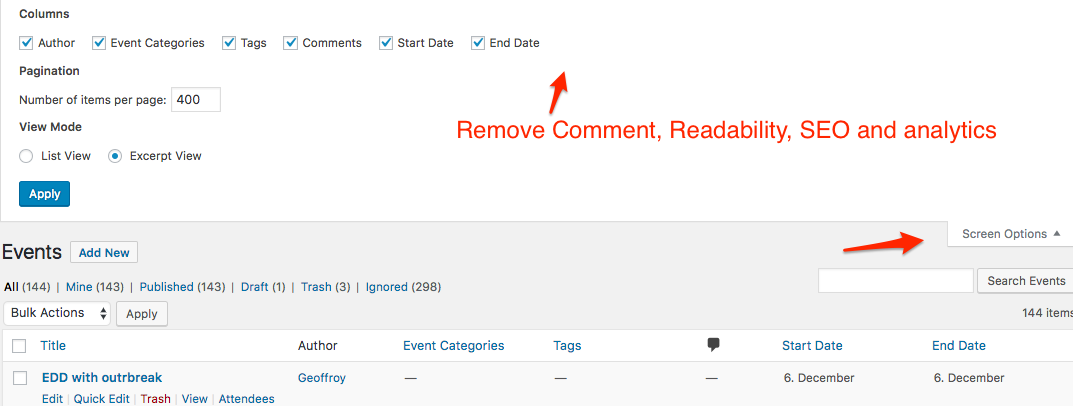
- On each WordPress menu, you can choose how many columns are displayed
- On your screen, it looks like there are too many of these columns for your screen width
- This is due to the fact that Events have many more columns than a normal post.
To fix this, please look at the following screenshot
When I created this annonemous event, WordPress or something else, decided to pick a user account and add it to the event. I could manually change it … but … not so good.
I am not exactly sure what you mean by that. Could you send me a screenshot or give me a specific example ?
When I click the event, either WordPress or … wont let me just get in and edit and see the event … I have to mark it, and click edit from the menu to be allowed to edit the item.
Again, I am not 100% sure what you mean by that. A screenshot or examples would help me understand a bit better.
By the way, now that you are a premium customer, you have access to the premium support forums which also include the ability to have private replies.
If you would like to take advantage of that immediately, we can continue this thread over there.
Have a great day!
Geoff B.
MemberGood afternoon Steve,
I am stoked that it finally kicked in.
I believe you are probably right about the caching.You are welcome back in our support forums any time 🙂
For now, I am going to close this thread.
Have a great week!
Geoff B.
December 5, 2016 at 9:22 am in reply to: mix translation – how do i get a 100% translated nav link #1201608MemberHey Eric,
Actually, french is my first language :-p
Awesome. I am super stoked that this helped you to fix things.
You are welcome back in our support forums any time 🙂
For now, I am going to close this thread.
Have a great week!
Geoff B.
MemberGood evening Melanie,
I see what you mean.
Let me talk to the plugin author and see what he has to say about this.
Hang in there and have a great weekend!
Geoff B.
-
AuthorPosts