

Forum Replies Created
-
AuthorPosts
-
Geoff B.
MemberGood evening Doug,
I am sorry things did not go very smoothly while attempting to send those files.
What would have been awesome is if the current thread had been opened under the ” the Events Calendar Pro” forum (https://theeventscalendar.com/support/forums/forum/events/events-calendar-pro/)
This would have given you access to private replies (which is good to know for future use).
In the meantime, exceptionally I can take a look (but not touch) with your permission.
Since posting credentials on a public forum is definitely not recommended, I would suggest you use our contact form and that you reference both this thread’s URL and my name in the contact form: https://theeventscalendar.com/contact/Hang in there as we try to get your calendar back.
Have a great day!
Geoff B.
MemberGood evening Mark and welcome back!
Thank you for reaching out to us.
I would love to help you with this topic.Just to set expectations, the scope of our support is mostly to get our customers started on the right track and to help them in case of issues.
We unfortunately do not provide complete support for customization.
With that in mind, I have requested that some of our code wizards take a look at your code in order to point you in the right direction towards a code that works for you 🙂
Hang in there as I follow-up on this for you.
Best regards,
Geoff B.
MemberGood evening Arnau,
Thank you for writing back, for the information and doing those changes.
Since there are traces of French both in Catalan and Spanish, this point to some incomplete string translations.
What I am unsure about is if these strings are from our plugin or from your theme.
After a database backup, please head over to WPML > Support > Troubleshooting page.
Once you are there, you are going to click on the 7 buttons under the cleanup section (one after the other) and see if that helps.If possible, I would re-scan both our plugins and your theme for strings.
Once that is done, head over to the string translation interface and try to find the untranslated strings.
Could you also please send me a copy of the latest version of your WordPress theme / child theme via a link to a .zip file link (stored Dropbox or Google Drive) so that I can run some tests on my end ? I recommend a private reply for that purpose.
Please ensure you are using the latest files as found on your actual website.
This way I will get access to any updates or customizations you might have made.Hang in there as we investigate this further.
Best regards,
Geoff B.
MemberHey Darren,
I am not sure I understand your web host’s reply.
Do they mean that they do not offer the possibility of having your own separate Google Map API key configured or that they do not have a Google Map API key set up for their servers ?Just to clarify, we are not accusing them of substituting our API key.
What I am saying is that some of our Google Maps call are made using whatever key is found on the server (even if there is none).What is happening is that since last June, Google has really increased limitations on access to Google Maps to force users to use a Google Map API key. One of the things they did to enforce that is limit the number of requests allowed per ip address.
Since it sounds like you are on a shared hosting plan, what is probably going on (wether or not a key is in place on the server) is that all the sites hosted on that shared plan are using the same server ip address. As a result the limit gets reached pretty fast.
You can read more on that topic here: https://developers.google.com/maps/documentation/geocoding/usage-limits
Once again I want to reiterate that we are terribly sorry for that.
Although it is not much of a solution, getting at least a VPS level hosting would instantly fix this issue.Best regards,
Geoff B.
December 7, 2016 at 2:46 pm in reply to: Translation only picked up partially in edit-event.php #1202912MemberGood evening Kristian,
I totally understand where you are coming from.
You are right, if you do not have proper translation in place, the page is, for all intends and purposes, useless.
As you can imagine, this is not our goal.
In fact, we want nothing more than for our Swedish customers to have things display nicely in their language.We absolutely want to constantly improve the way we handle translations for all languages including those that use concatenated words.
Full disclosure, it is no small task to accomplish just that and we do try to model the way do things as close as possible to the WordPress translation guidelines.
But realistically, this might take a while.
With that in mind, I was under the impression that your clever use of dashes (-) could be used as a workaround and that we only had one issue left (which could be solved by the update of your language file OR by applying your customizations to an updated version of the po file).
But perhaps I misunderstood.
In any case, although I truly understand your refund request, it is not possible to do so via Paypal after the 30 days mark for technical reasons.
As a result, I would like to escalate this to our support team leader.
Best regards,
Geoff B.
December 7, 2016 at 2:16 pm in reply to: Do we HAVE to use Woo or another ecommerce plugin? #1202896MemberGood evening Emma and welcome to the Events Calendar Support forum!
Thank you for reaching out to us.
I would love to help you with this topic.Do we HAVE to use an ecommerce plugin in order to Tickets Plus to work?
The short answer is it depends on what you are looking to do.
If you simply want to add Event Tickets Plus’ features to RSVP tickets (additional attendee info for example), then the answer is no, you do not need an e-commerce plugin.
If you are looking for transactional use, then yes, you need to have an e-commerce plugin to installed.
WooCommerce, Easy Digital Downloads, WP eCommerce, and Shopp are currently supported.
Unfortunately, Ecwid is not supported at this time.
If I DO have to install Woo…do I have to install or buy any other add-ons with them…or is it just the free Woo installation that I need?
Just the basic free version of Woo (like you installed) will be fine.
That being said, there are quite a few awesome free plugins that you could extend your WooCommerce with should you want to.
If you haven’t already, you might want to follow this guide: https://theeventscalendar.com/knowledgebase/new-user-primer-event-tickets/
Let me know how that goes.
Best regards,
Geoff B.MemberGood evening Martin and welcome back!
Thank you for reaching out to us.
We are sorry to hear about
I would love to help you with this topic.Try adding the following CSS rule to your style.css file or in your Custom CSS metabox:
@media only screen and (max-width: 640px) {

table.tribe-events-tickets tr .woocommerce, table.tribe-events-tickets tr .tickets_description, table.tribe-events-tickets tr .tickets_name,

table.tribe-events-tickets tr .tickets_price {

width: 100% !important;

}

}
Let me know if that helps.
Have a great day!
Geoff B.
MemberGood evening Gustavo and welcome to the Events Calendar Support forum!
Thank you for reaching out to us.
We are sorry to hear about the Facebook event images not importing properly.
I would love to help you with this topic.As it turns out, we are very close to releasing a fix for this issue.
We apologize for the inconvenience this has created.But, the good news is that there is a manual workaround that you can apply today.
The issue is actually not related to PRO itself but to previously imported images.1. Have TEC and/or PRO active.
2. Delete media uploads (Media > Bulk select > Delete Selected) for the Facebook events related images.
3. Import an event from Facebook using EA.
4. View imported event (featured image should have been imported).Let me know if that helps.
Have a great day!
Geoff B.
December 7, 2016 at 11:41 am in reply to: Recurring rules button not showing with crazy JavaScript error #1202827MemberGood afternoon Ron,
Thank you for writing back and for providing more details.
I totally understand the importance of this and I would love to help you fix it as soon as possible.What I am referring to is the following:
Home URL
http://webstage.necc.mass.edu
Site URL
https://webstage.necc.mass.eduAs you can see, the issue is that the Home URL is not https.
Normally, in spite of your multisite install, you should be able to tweak that here
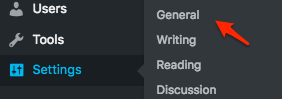
You could also change this at the Database level (although a DB backup is always good practice, just in case).
Let me know if that helps.
Have a great day!
Geoff B.
December 7, 2016 at 11:34 am in reply to: Can't update past version 4.2.7 without getting an INTERNAL SERVER ERROR #1202825MemberGood afternoon Rob,
Thank you for writing back and providing some more explanations.
I see what you mean, this is a pretty big upgrade. Hopefully, once we settle this issue, your experience with the plugins will be much smoother moving forward.
Where would I find the system information to send you privately? Let me know and I’ll forward it along.
In version 4.1.4, the help tab was found under Events -> Settings -> Help
Please let me know what I need to do in order to get this properly updated.
That’s a good question. As a rule of thumb, you absolutely need to upgrade the free plugin first.
Here is my recommended action plan:
- Please make a database backup
- Deactivate and delete both the Events Calendar and the Events Calendar Pro
- Download the latest version of both plugins https://theeventscalendar.com/my-account/downloads/
- Install them manually via WordPress’ built-in Add plugin interface (upload zip file)
- Activate the free plugin and then the Pro plugin.
You should be all set.
Let me know how that goes.
Best regards,
Geoff B.MemberGood afternoon John and welcome back!
Thank you for reaching out to us.
We are sorry to hear about the text not displaying to your liking when the Events Calendar Pro is activated. I would love to help you with this topic.
What is going on is that the Eventica or Eventica child theme has a customization that displays all the recurrence rules for an event in the Meta section of the event (/wp-content/themes/eventica-wp/tribe-events/modules/meta/details.php).
If you click on “Edit Event”, and go to the recurrence rules, you will notice that the text there is exactly the same as on the front-end.
We can handle this 2 ways:
- Could you please send me a copy of the latest version of your WordPress theme / child theme via a link to a .zip file link (stored Dropbox or Google Drive) so that I can run some tests on my end ? I recommend a private reply for that purpose.
Please ensure you are using the latest files as found on your actual website.
This way I will get access to any updates or customizations you might have made. - You could edit those files and remove the unwanted section yourself.
Best regards,
Geoff B.
MemberGood afternoon Jack,
Thank you for writing back.
You are right. To be able to manage settings does require the WordPress user role to be able to manage options. We simply followed WordPress best practices guidelines on this one.
One possible workaround would be to use Members in combination with something else such as the Adminimize plugin: https://wordpress.org/plugins/adminimize/
I think this would offer the level of control you are looking for.
Let me know how that goes.
Best regards,
Geoff B.MemberGood afternoon Mark,
I totally understand where you are coming from.
The current bug with EDD is a pretty major one.I can appreciate how downgrading might not be an acceptable solution to you for now.
Again, we do apologize for the inconvenience this has caused so far.The good news is you are fully entitled to a refund if you want one since you are within 30 days of your purchase. To obtain the refund, you just need to follow the procedure described here.
Best regards,
Geoff B.
December 7, 2016 at 11:07 am in reply to: I have query regarding the licence, where do I ask? #1202809MemberGood afternoon Jose and welcome to the Events Calendar Support forum!
Thank you for reaching out to us.
You are correct, your non profit license means that you are not entitled to premium support.The best way to inquire about things is through our Contact form https://theeventscalendar.com/contact/
Another option for more technical questions is to use our free support forum.
https://wordpress.org/support/plugin/the-events-calendar ?
With that in mind, in case that is related, here is a good knowledge article regarding licenses: https://theeventscalendar.com/knowledgebase/moving-your-license-keys/
Best regards,
Geoff B.
MemberGood afternoon Christophe and welcome back!
Thank you for reaching out to us.
We are sorry to hear about the lack of uniformity between the styles of the sidebar on your installation. I would love to help you with this topic.
First, just to clarify, could you tell me which of these 2 styles is the correct one for you:
My guess is number 2, but I might be wrong.
In any case, what is going on is that you have a special set of CSS rules that impact single events only. Here is an example:
body.has-sidebar.single-tribe_events #main .sidebar {

width: 20%;

}
As you can see, the .single-tribe_events means it will only apply to single events.
Depending on your answer to my question, you might want to:- Remove these special rules (if the answer is #1)
- Replace all these specific CSS rules from body.has-sidebar.single-tribe_events to body.tribe-events-style-full or better yet with just body.has-sidebar (if the answer is #2)
Let me know if that helps.
Have a great day!
Geoff B.
-
AuthorPosts