

Forum Replies Created
-
AuthorPosts
-
Geoff B.
MemberGood afternoon Pim,
Thank you for your understanding and I am glad my reply was helpful.
You are welcome back in our support forums any time 🙂
For now, I am going to close this thread.
Have a great week!
Geoff B.
MemberGood afternoon Jordan,
I am super stoked that all is now working for you!
You are welcome back in our support forums any time 🙂
For now, I am going to close this thread.
Have a great week!
Geoff B.
MemberGood afternoon Stuart,
I am glad this was useful to you.
You are welcome back in our support forums any time 🙂
For now, I am going to close this thread.
Have a great week!
Geoff B.
MemberThis reply is private.
February 21, 2017 at 12:11 am in reply to: Event cost filed after installing event ticket – now remove the mention "FREE" #1242783MemberThis reply is private.
February 20, 2017 at 11:55 pm in reply to: I think my problem relates to the Community Events plugin #1242779MemberThis reply is private.
February 20, 2017 at 11:42 pm in reply to: Need to change font size in Event List widget and Calendar list view. Possible? #1242775MemberGood evening Donato,
I must say I am truly sorry about this.
Normally, CSS tweaks work much faster than this!Just to be sure we are talking about the same thing, here is a screenshot.
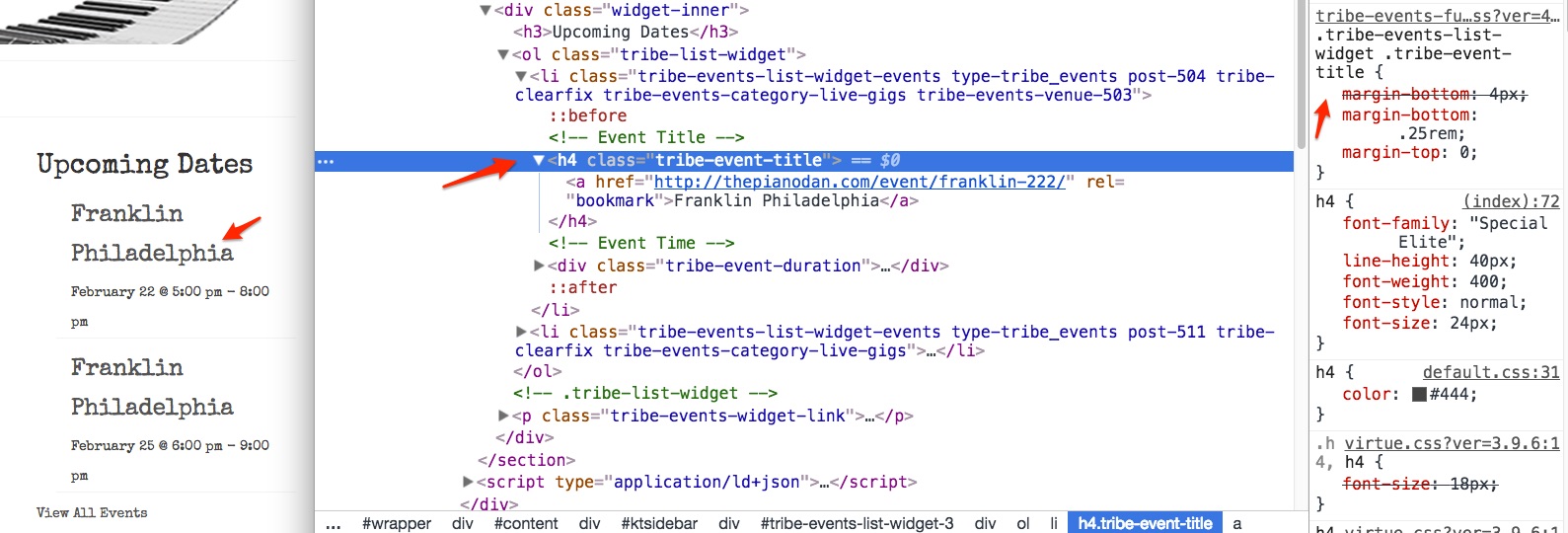
What I am curious about is that the suggested CSS rule is not showing in the inspector. Is it possible you removed it ? If so, could you put it back.
If you did not remove it, would you mind trying to add the CSS rules through the following plugin’s interface https://wordpress.org/plugins/simple-css/ ?
If none of that works, I would like to offer to login to take a look (not to touch).
For that purpose, I would need temporary credentials (in a private reply).Best regards,
Geoff B.
MemberGood evening Stuart,
Thank you for writing back and for running these tests.
It is unfortunate that these were not met with better success.I also conducted a few tests on my end with your theme.
What I did is that I disabled your theme overrides by temporarily renaming your /tribe-events/ folder to /z_tribe-events/.The result is that the view works properly.
This leads me to believe that you might have to review and update your template customizations.It is a bit cumbersome, but I would compare your files to the latest ones (from 4.4.2) to see where the updates are required.
Let me know how that goes.
Best regards,
Geoff B.MemberGood evening Samuel,
I am super stoked that this helped you out!
.home .type-tribe_events.tribe-events-photo-event .tribe-events-photo-event-wrap {

background: transparent !important;

text-align: center;

color: white;

}
.home .tribe-events-list #tribe-events-photo-events .tribe-events-event-details h2 a {
color: white;
}Let me know if that helps.
Have a great day!
Geoff B.
MemberGood evening Lindy,
Thank you for writing back.
That must be a very strange and frustrating issue!I would advise temporarily changing default view, saving the settings and then returning to the desired settings (saving them as well).
If that does not work, could you try it out with a default WordPress theme ?
Let me know how that goes.
Best regards,
Geoff B.MemberGood evening Thomas,
I am sorry to hear that my suggestion did not help.
Here a few alternative rules (remove the previous one and use all of the following):
.tribe-events-style-full .tribe-events-tickets .woocommerce {

    width: 15%;

}
.woocommerce .quantity, .woocommerce-page .quantity {
padding-right: 0px !important;
}.tribe-events-style-full .woocommerce .quantity input {
height: 30px !important;
position: relative !important;
width: 30px !important;
float: left !important;
}Let me know how that goes.
Best regards,
Geoff B.MemberGood evening Steph,
That is great to hear!
I would recommend trying out the changes on a testing site if you can when the fixes come out.
Even though extensive QA is conducted on each of our release, I usually recommend that approach for any upgrade in WordPress (other plugins, WordPress, our plugins).
This way, there is no impact on your live website 🙂
I will mark this thread “pending fix”.
Have a great day!
Geoff B.
MemberGood evening Lowell and welcome to the Events Calendar forum!
Thank you for your interest in our products.
We’ll be glad to answer your questions.This type of issue can have 2 causes:
- Your WordPress theme is forcing this title because of the fact that the Events Calendar uses archives to function.
You could try different settings for Events Template under Events -> Settings -> Display to see if that helps.
- If you are using Yoast SEO, I would recommend reading the following: https://theeventscalendar.com/knowledgebase/titles-in-yoast-seo/
Best regards,
Geoff B.
MemberGood evening Rockport and welcome to the Events Calendar Support forum!
Thank you for reaching out to us.
We apologize for the delay answering.We are currently experiencing a high-level of customer inquiries.
Thank you for your patience as we go through these as fast as we can.We are sorry to hear about the issues you have encountered with your licenses. Yikes!
I would love to help you with this topic.If you have not already, I would highly recommend reading the following: https://theeventscalendar.com/knowledgebase/new-user-primer-event-aggregator/
As you can see, there is no need to download an extra plugin. The code you need is already located in the Events Calendar plugin itself.
Everything unlocks once you enter Aggregator’s license key.
If that still does not work after reading the article above, as a first troubleshooting step, could you please provide us with your complete system information in a private reply using the instructions found in the following link?
https://theeventscalendar.com/knowledgebase/sharing-sys-info/
And, with your permission, I would like to offer to login to look (not touch).
Hang in there!
Best regards,
Geoff B.
MemberGood evening Suzanne and welcome to the Events Calendar Support forum!
Thank you for reaching out to us.
We are sorry to hear about the calendar not displaying properly on your site.
I would love to help you with this topic.With some themes, you might have to try different settings for “Events Template” under Events -> Settings -> Display.
Let me know if that helps.
Have a great day!
Geoff B.
- Your WordPress theme is forcing this title because of the fact that the Events Calendar uses archives to function.
-
AuthorPosts