

Forum Replies Created
-
AuthorPosts
-
Geoff B.
MemberGood morning Bradley and welcome to the Events Calendar forum!
Thank you for your interest in our products.
We’ll be glad to answer your question.I’m still curious to know if it’s possible to add a calendar under the whole thing
I am not sure exactly how you went about creating the page above in question.
But, I can tell you that the Events Calendar Pro offers the ability to embed full calendar views (such as the month view) on any page using a shortcode: https://theeventscalendar.com/knowledgebase/embedding-calendar-views-tribe_events-shortcode/You would probably need to hide the “next month / previous month” links with CSS, but I believe that should do the trick.
Let me know if that helps.
Have a great day!
Geoff B.
May 4, 2017 at 6:46 am in reply to: How should we handle long URLs bleeding over in the Event Description? #1278512MemberGood morning Ryan and welcome back!
Thank you for reaching out to us.
I would love to help you with this topic.Try adding the following CSS rule to your style.css file or in your Custom CSS metabox:
.single-tribe_events #tribe-events-content .tribe-events-event-meta dd.tribe-events-event-url {

    word-wrap: break-word;

    width: 200px !important;

}
You might have to tweak it a tad, but that should work.If not, could you please set up a live example (perhaps somewhere far in the future) on your website and give me the link to that event so that I can take a look ?
Let me know how that goes.
Best regards,
Geoff B.MemberGood morning Amaury and welcome to the Events Calendar Support forum!
Thank you for reaching out to us.
I would love to help you with this topic.For starters, if you have not already done so, I would recommend reading the following:
- https://theeventscalendar.com/knowledgebase/incomplete-translations/
- https://theeventscalendar.com/knowledgebase/adding-or-updating-a-translation/
- https://theeventscalendar.com/knowledgebase/how-to-override-plugin-language-files/
With that in mind, most of these tasks will probably be handled directly in Loco Translate in your case.
The plugin is mostly translated but there are several items i must translate completely.
The first thing to check is if what is the source used by Loco Translate for language files.
The second thing to check is if your language files are actually up to date.
This can be done by taking a look at the latest version of your language’s files here: http://translations.theeventscalendar.com/projects and comparing them with what Loco Translate displays.
Sometimes, the translation exists, but your language file is not up to date.
- All : Can you point me to which version of “All” you are referring to ?
- You have 9 Tickets for this Evento: This is the “You have %s for this %s.” string
- View your Entradas: This is the “View your %s” string
Let me know how that goes.
Best regards,
Geoff B.MemberGood morning Chris and welcome back!
Thank you for reaching out to us.
I would love to help you with this topic.Normally, this would be handled via the customizer.
You can see it under Appearance > Customize > The Events CalendarIf that is not working to your liking, this can also be tackled via CSS.
I could help you with that if you can point me to a specific example of what elements you would like to change (a screenshot usually works great).Let me know how that goes.
Best regards,
Geoff B.MemberGood morning Richard and welcome to the Events Calendar forum!
Thank you for your interest in our products.
We’ll be glad to answer your questions.1. Do we need to do anything with the Events Calendar plugin already installed or do we just install Pro,
Pro extends the Events Calendar plugin, it does not replace it.
This means that you simply leave the existing plugin in place and add Pro on top of it.
2. Is there a trial period?
All of our products offer a 30 day refund policy. So I guess the answer is yes 🙂
Speaking of which, please reach out to us if you have any questions during the setup phase.
3. Is the a simple Duplicate option?
There are quite a few plugins that handle post duplication out there.
For that reason, we did not include that feature built-in.Basically any plugin that supports custom post types (events are a custom post type) will work.
There is event one out there made specifically for events: https://wordpress.org/plugins/duplicate-tec-event/4. Finally what is the price in £’s?
That will most likely depend on the exchange rate on the day of your purchase.
All of our products are available in USD only at the moment of writing.
Let me know if that helps.
Have a great day!
Geoff B.
MemberGood morning Mel,
I am super stoked that this worked for you!
You are welcome back in our support forums any time 🙂
For now, I am going to close this thread.
Have a great week!
Geoff B.
MemberGood evening Catherine and welcome to the Events Calendar Support forum!
Thank you for reaching out to us.
We are sorry to hear about the struggles you have experienced while simply attempting to purchase Event Tickets Plus. Yikes!
I would love to help you with this topic.
Our apologies for that, it does seem like something went wrong in the process.
The good news is that I just fixed the license for you.Normally, you should be able to find what you are looking for here.
Let me know how that goes.
Best regards,
Geoff B.May 3, 2017 at 11:17 pm in reply to: Recurring Events (See all) link shows events all out of order. #1278402MemberThis reply is private.
MemberGood evening,
That is excellent news. Who knew ?
Thank you for sharing this.The only bug is that it displays this tine “codesnippet” as spesified above…
What is probably going on is that WP Globus has a filter that strips away those language tags.
The best thing would be to look up their documentation or simply ask them what that filter is so that you can apply it to tribe-events post types.So if any of you know how to “hide” this snippet with css – it will be perfect.
Alas, CSS will not cut it here.
You would need some kind of filter (code snippet) in your theme’s functions.php file.
Something not unlike what you can find at the bottom of this page: https://theeventscalendar.com/knowledgebase/change-the-wording-of-any-bit-of-text-or-string/I also have an issue with the listing of events in your plugin – the “Title” colum is somehow comressed to a single ter file which makes an overwiew and editing evemnts difficult.
This is caused by a plugin (probably Yoast SEO) adding columns in wp-admin.
You can adjust this by using the “Screen options” menu at the top right corner of your screen while in the events list page in wp-admin.Let me know how that goes.
Best regards,
Geoff B.MemberGood evening Paul,
Thank you for that additional piece of information.
I have escalated the question about the Roots Bedrock Framework to our code Ninjas since this is slightly above my pay grade.Hang tight as I follow up on this for you.
Have a great day!
Geoff B.
MemberGood evening Joseph,
Thank you for writing back and for your awesome words.
They are truly appreciated.I believe the following third-party plugin is what you are looking for: https://wordpress.org/plugins/the-events-calendar-category-colors/
Let me know if that does the trick for you.
Have a great day!
Geoff B.
MemberGood evening Sarah,
Thank you for writing back.
I would love to help you make those final steps in achieving a setup that works for you.Just to make sure we are on the same page, would you mind sending me a screenshot of your “Edit Ticket” section so that I can make sure I reproduce it precisely ?
The closest one to what you are looking for is https://gist.github.com/niconerd/d2ea62be5375ae3dc088dd29b7350608
As per the instruction you need to Override this template in your own theme by creating a file at:[your-theme]/tribe-events/attendees-list.php
In plain english:
- Download the zip file here https://gist.github.com/niconerd/d2ea62be5375ae3dc088dd29b7350608/archive/3fd3cb81df47f71f2ac86b12788282b089c4da30.zip
- Unzip it
- Drag and drop the file it contains to [your-theme]/tribe-events/
The only downside is that it does not seem to return the value for each attendee, only the first one.
I will let the snippet author know and get back to you.
Hang in there!
Geoff B.
MemberGood evening Adam,
I would love to help you get to the bottom of these syntax issues.
You are correct. When it comes to these types of translation, they are using a variable (%s).
To fix the syntax, you simply need to alter the sequence of the strings for Polish (see screenshot)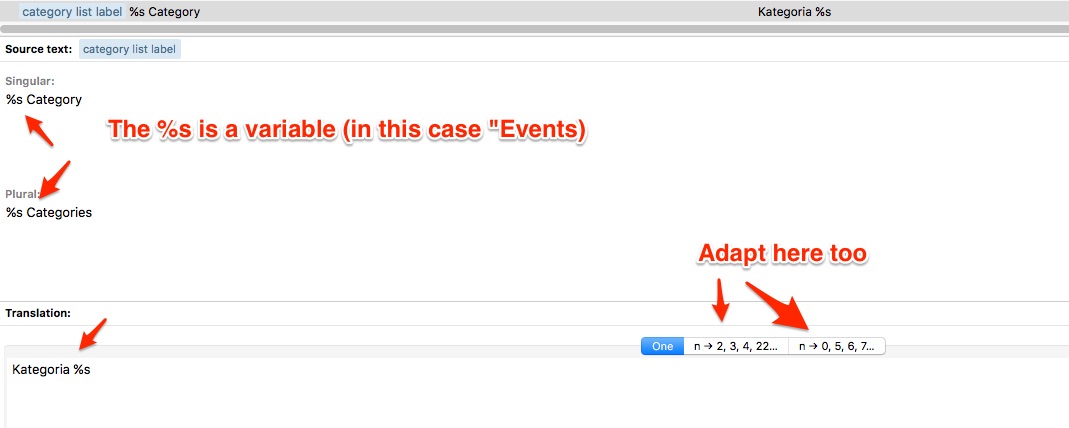
In your case that can be controlled via Loco translate (which also lets you decide what source to use). You should be able to update it there.
In case you are interested here is a version of the Polish language files with that idea adapted: Polishv2
Let me know how that goes.
Best regards,
Geoff B.May 3, 2017 at 9:17 pm in reply to: Ticket not sent if ordered in other than the default language #1278378MemberGood evening Tibor,
Thank you for your answer.
I totally understand and respect your decision.I am mostly glad you could find a solution that works for you.
I just processed the refund as per your request.Best of luck with your projects!
Have a great day!
Geoff B.
MemberGood evening Doron,
Thank you for writing back and for the system information.
1. Where can I see if the translation files are up to date?
That is a great question.
Basically it will depend on your setup.In your specific case, I believe Loco translate is the “master”.
It should enable you to:- Decide what the source of the translation file (because the file can live either in the plugin’s /lang/ folder or in the /wp-content/languages/ or /wp-content/languages/plugins/ folder.
- Update the file from there
So in short, if you could establish what source you are using and send me a copy of that file (via link to a .zip file on a Dropbox or Google Drive folder), I could check that out for you.
Additionally, all of our latest files are viewable and available for download here: http://translations.theeventscalendar.com/projects
I do see an mo and po file in /wp-content/plugins/the-events-calendar/lang/ – but I’m not sure thos are the file being used in translation
You might be right. This will depend on your LocoTranslate settings.
If you have not already done so, I highly recommend reading the following:
- https://theeventscalendar.com/knowledgebase/incomplete-translations/
- https://theeventscalendar.com/knowledgebase/how-to-override-plugin-language-files/
- https://theeventscalendar.com/knowledgebase/translating-the-events-calendar/
Let me know if that helps.
Have a great day!
Geoff B.
-
AuthorPosts