

Forum Replies Created
-
AuthorPosts
-
Geoff B.
MemberGood afternoon Johan,
I am sorry to hear that these 2 ideas did not yield better results.
I totally get what the issue is and I understand the specificity of Swedish currency.
Interestingly enough other currencies behave very differently.In any case, the decimal version of the price is established by your WooCommerce settings.
You might have to review that there.As for the other cost, there are a couple more options available.
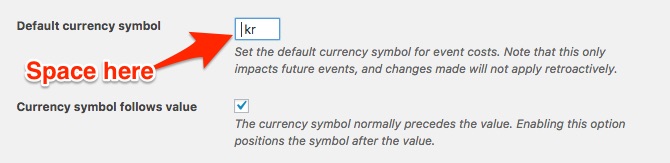
- Under Events -> Settings -> General add the space before the currency
- Try the following snippet: https://gist.github.com/GeoffEW/ef196ef3154a747a851c771ae45fdecd
- Using the following snippet: https://gist.github.com/ggwicz/ec04f88224651a777c88#file-return-unfiltered-cost-php you can expand on suggestion 1 and input something like “,00 kr” in the currency symbol field
Let me know if that helps.
Have a great day!
Geoff B.
MemberGood afternoon Lisa,
I am super stoked that this worked for you.
Speaking of chicken dinner, the one offered on the front page of your website looks amazing.
You are welcome back in our support forums any time 🙂
For now, I am going to close this thread.
Have a great weekend!
Geoff B.
MemberGood afternoon Emanuele,
Kudos on fixing the issue!
As you know, you are welcome back in our support forums any time 🙂
For now, I am going to close this thread.
Have a great weekend!
Geoff B.
MemberGood afternoon Gretel,
I am super stoked that this worked for you.
You are welcome back in our support forums any time 🙂
For now, I am going to close this thread.
Have a great weekend!
Geoff B.
MemberGood evening Dan,
Thank you for writing back.
I am glad that the snippet worked.
But since you would like to have the exact same email as the admin, it sounds like you will need to add a bit of customization to the snippet.Just to set expectations, them in case of issues.
We unfortunately do not provide complete support for customization.With that in mind, I would recommend exploring the second idea I submitted or perhaps consider adapting https://gist.github.com/cliffordp/4f06f95dbff364242cf54a3b5271b182#file-functions-php to include the logic from the snippet I previously shared.
If coding is not really your cup of tea, you could always hire one of our recommended customizers to do the customization for you.
Let me know how that goes.
Best regards,
Geoff B.May 11, 2017 at 7:04 pm in reply to: Event Tickets with Woocommerce products on Divi theme not working #1282704MemberGood evening Paula,
I am super stoked that this was helpful to you.
As far as our refund policy is concerned, we will pretty much refund for any reason as long as it stays within the 30 days period.
Normally, answers to our nonprofit take far less time than that.
You are welcome back in our support forums any time 🙂
For now, I am going to close this thread.
Have a great week!
Geoff B.
MemberGood evening Gretel,
Sorry for the confusion.
Simply place the following file in your child theme (and while you are it, you can take a look at what I meant): header
Let me know how that goes.
Best regards,
Geoff B.MemberGood evening Stephen,
Thank you for writing back.
Try adding the following CSS rule to your style.css file or in your Custom CSS metabox:
@media screen and (min-width: 800px) { #tribe-mobile-container .type-tribe_events {

padding: 20px 10px 16px !important;

background: rgba(252,252,252,0.83);

}

}
And still, when I click on an Upcoming Event from the Home page, not the Event page, it takes me to a page within WordPress, not to facebook. I want it to take the user directly to facebook. It worked before I updated everything, so I feel like it could work again.
Actually, it does not fully work on the Events page either.
If you switch to list or day view, you will notice that the image still links to the event page (and not FB).Would you mind letting me know which method you have used to redirect event to FB ?
Perhaps you could send me a copy of the latest version of your WordPress theme / child theme via a link to a .zip file link (stored Dropbox or Google Drive) so that I can run some tests on my end ? I recommend a private reply for that purpose.
Please ensure you are using the latest files as found on your actual website.
This way I will get access to any updates or customizations you might have made.Hang in there!
Geoff B.
MemberGood evening Dan and welcome back!
Thank you for reaching out to us.
I would love to help you with this topic.You are right, the default behaviour of Event Tickets Plus does not display the “Continue Shopping” button by default.
This was programmed this way because the majority of our customers do not have their tickets visible in the Shop.
With that in mind, there is nothing stopping you from doing a template override of /wp-content/plugins/event-tickets-plus/src/views/wootickets/tickets.php
You might want to read our Themer’s guide to get a sense of how that works.
You could loosely borrow from WooCommerce “normal” add to cart template.
We also have a couple of cart related snippets available. None of them actually do what you are looking for, but they could serve as inspiration/starting point for creating your own snippet (instead of going with a template override):
- https://gist.github.com/elimn/30c533fad7ee5ce4c3cb8a0f727c7190#file-tribe_prevent_add_cart_empty-php
- https://gist.github.com/cliffordp/f148a9cacd726e5a86ffeda2d2e204c1#file-functions-php
The second one tackles specifically what happens after hitting the “add to cart” button.
Let me know if that helps.
Have a great day!
Geoff B.
May 11, 2017 at 5:37 pm in reply to: How to prevent community event users to see events of other users in Backend? #1282668MemberGood evening Paul,
Thank you for writing back.
That is awesome to hear. Keep us posted on the results when you have a minute.
Best regards,
Geoff B.
MemberThis reply is private.
MemberGood evening Mike,
Thank you for writing back.
I am not sure I will buy the pro version unless I know that I can add the feature image into a custom for loop.
I totally understand where you are coming from.
Perhaps I miscommunicated what I meant.You can include the event’s feature image in a custom loop without the need for the Pro version
echo tribe_event_featured_image( null, 'medium' )However, what I am saying is that we are limited in the amount of support we can offer for customizations. At best, we can get you started (like I just did).
My second comment regarding the Events Calendar Pro is that it looks like your need (the custom loop) could probably be addressed via one of the many shortcodes the Events Calendar Pro offers:
- https://theeventscalendar.com/knowledgebase/pro-widget-shortcodes/
- https://theeventscalendar.com/knowledgebase/embedding-calendar-views-tribe_events-shortcode/
I would assume that the bit of code that I need would look similar to: $event->post_title. Am I right to assume that there is something?
Yes, most probably. But alas, as just stated, fixing your custom code is beyond the scope of what we can help with.
The link you sent it to short codes but short codes to not work in a php loop. Do they?
Actually, they could completely replace the need for PHP if you just use them in combination with a page’s content.
If your need are more involved, for the record you can totally trigger a shortcode in a PHP context (look up the do_shortcode function).
Let me know if that helps,
Geoff B.
MemberGood evening Stefano and welcome to the Events Calendar Support forum!
Thank you for reaching out to us.
I would love to help you with this topic.I would like that the series of generated events have the same number of days as their father, but the series events last only one day.
This used to be a glitch with the Events Calendar Pro a few versions back, but the good news is that it is gone from the most recent version of our plugins.
As a first troubleshooting step, could you please provide us with your complete system information in a private reply using the instructions found in the following link?
https://theeventscalendar.com/knowledgebase/sharing-sys-info/
The second possibility is that there could be some view customizations in place in your WordPress theme that require updating.
A quick test would be to try temporarily reverting back to a default WordPress theme such as twenty-sixteen and see if that helps.
Let me know how that goes.
Best regards,
Geoff B.MemberGood evening Clare and welcome back!
Thank you for reaching out to us.
I would love to help you with this topic.how can I make it so that the Google Map shows up under the event description and not right at the top?
Actually the Google Map at the top is not standard display behaviour of our plugins.
The fact that it is there means that there is some the Events Calendar view customization in place in your theme files.The good news is that it means you can easily tweak that.
You might want to read our Themer’s guide to get a sense of how that works.So in short, here is what you need to do (after reading the article):
- Create a child theme (either manually or with a plugin)
- Create a /tribe-events/ folder inside that Child theme
- Find and download the appropriate single-event.php file from your theme’s /tribe-events/
- Open it in a text editor and look for cmsms_single_event_map
- Take that section and paste it at the desired position.
- Save your file
- Upload it to /tribe-events/ folder of your Child theme
Let me know how that goes.
Best regards,
Geoff B.MemberGood evening Gustav and welcome to the Events Calendar Support forum!
Thank you for reaching out to us.
I would love to help you with this topic.An exhibition can last maybe three months, and if you buy a ticket you should be able to use it on any day (but only once) during the exhibition period.
That is totally feasible.
For statistical reasons we need to know how many ticket holders access the exhibition each day.
Currently, we do not capture the date and time of the check-in.
That being said, it is probably possible to customize the plugin to add that information.
I will ask our code ninjas to see if there is not a simple way to do this ?In the meantime, the manual workaround would be to ensure you make export the attendee report every day.
This would allow you to do a file compare and establish that statistic.
I realize this is not great, but it should work.If so, is it possible to automate these reports to be compiled and e-mailed at the end of each day?
Although there is no built-in feature to automatically generate such reports, you could most likely achieve this via some sort of WP Cron job (automated scheduled task).
There are even plugins out there to help you out: https://wordpress.org/plugins/cronjob-scheduler/
Let me get back to you about the date and time of QR check-ins.
Best regards,
Geoff B.
- Under Events -> Settings -> General add the space before the currency
-
AuthorPosts