
Home › Forums › Ticket Products › Event Tickets Plus › Inconsistent currency format
- This topic has 6 replies, 2 voices, and was last updated 9 years, 4 months ago by
Tom Stone.
-
AuthorPosts
-
May 8, 2017 at 11:22 pm #1280663
Tom Stone
ParticipantHello!
I’m using Event Ticket Plus, together with Events Calendar. And how currency is displayed is a bit inconsistent.Like here:
http://mystique.nu/eventet/birthday-party/In the Event Tickets Plus section, the Swedish currency is shown properly as: 10,00 kr (Correct; Decimal comma, and a space between the number and the currency “kr”).
But above, in the Events Calendar details, the price is given as: 10kr (wrong format; no space between the price and the currency “kr”. The price is given without the decimal comma and the decimals, which would be ok, if it wasn’t inconsistent with how Event Tickets Plus shows it).
Provided this isn’t controlled with a setting I haven’t found yet, can it be amended?
May 10, 2017 at 9:52 pm #1282162Geoff B.
MemberGood evening Johan and welcome back!
Thank you for reaching out to us.
We are sorry to hear about the inconsistency in format on your site. Yikes!
I would love to help you with this topic.The good news is that this is totally possible to tweak.
I would like to recommend giving the 2 following ideas a shot:- You could simply force the use of the cost field (from the event): https://gist.github.com/GeoffEW/69f8a033fb614c78b3de45a197431135
- You could try returning the unfiltered cost: https://gist.github.com/barryhughes/21c4e2fc52aec514cc9c
You could apply the snippets above in the functions.php file of your theme (without the PHP tag at the top).
Let me know how that goes.
Best regards,
Geoff B.May 11, 2017 at 9:28 am #1282352ParticipantHaha, yes “yikes” indeed! 😀
I get your point – as far as bugs go, this is quite benign.
Still… if a value is entered at one place, and the formatting is set in one place, it seems odd that other versions will appear on the same page.I tried the two code snippets, each on their own, and then together. No luck!
As seen in the screen capture, the formatting is the same on two places and different on the third.
In Swedish currency, we have always a space between the value and the unit. Decimals are optional.
So these are ok:
10 kr and 10,00 kr.
These are not ok:
10kr and 10,00kr.
And whatever format is used, it should be consistent on the page.May 12, 2017 at 10:05 am #1283164MemberGood afternoon Johan,
I am sorry to hear that these 2 ideas did not yield better results.
I totally get what the issue is and I understand the specificity of Swedish currency.
Interestingly enough other currencies behave very differently.In any case, the decimal version of the price is established by your WooCommerce settings.
You might have to review that there.As for the other cost, there are a couple more options available.
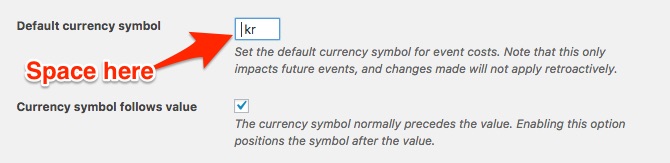
- Under Events -> Settings -> General add the space before the currency
- Try the following snippet: https://gist.github.com/GeoffEW/ef196ef3154a747a851c771ae45fdecd
- Using the following snippet: https://gist.github.com/ggwicz/ec04f88224651a777c88#file-return-unfiltered-cost-php you can expand on suggestion 1 and input something like “,00 kr” in the currency symbol field
Let me know if that helps.
Have a great day!
Geoff B.
May 14, 2017 at 4:50 pm #1283709ParticipantGreat!
I added a space before “kr” as suggested, then went into WooCommerce and removed the decimals.
Not ideal to set the formatting of the price in several places to get it consistent, but as far as it works, then…Thank you! 🙂
May 15, 2017 at 9:15 pm #1284186MemberGood evening Johan,
I am super stoked that this did the trick for you!
You are welcome back in our support forums any time 🙂
For now, I am going to close this thread.
Have a great week!
Geoff B.
-
AuthorPosts
- The topic ‘Inconsistent currency format’ is closed to new replies.