

Forum Replies Created
-
AuthorPosts
-
Geoff
MemberHey Bill,
Thanks for the link!
Try adding this to either your style.css file or the Appearance > Customize > Additional CSS screen:
.fusion-events-shortcode .fusion-full-one .tribe-events-event-image {
display: none;
}
That seems to do the trick when I test it out on your site and here’s a screenshot for one of the places I tested. Hopefully this does the trick for you while you work with the theme author for a more permanent solution. 🙂
Cheers!
GeoffMemberMy absolute pleasure, sir.
And, of course, feel free to hit us up with a new thread if any other questions come up — we’d be happy to help.
Cheers to you and have an excellent weekend. 🙂
Geoff
MemberHi @crharrison,
Geez, it’s been a busy day for you!
Let’s see if we can figure this out together. I may even need to pull in another colleague from my team as we get some more information to work with.
For starters, I see that the host noted the increase in activity started at 6am CST. Do you happen to know if something was happening right around then? For example, was there a rather large recurring event posted, a WordPress update, theme update, or anything else? Any clues you are able to offer would be a huge help.
Next, I see you noted the following in the system information box:
sites are down; unable to access
As of last week we were running latest versions of events cal & proAre you still unable to access the Events > Help screen where the system information can be shared? If so, would it be possible to get a copy of your database for testing? Either way will also help a ton.
Thirdly, and again if you are able, would you be willing to install the Query Monitor plugin? While the queries that the hosting company do not jump out at me as anything concerning right out of the gate, the Query Monitor plugin can give a report of slow queries that are dragging down performance, and help us associate them with functions from our plugins so we can isolate the issue. Once you have that up and running (if you are able to) then sharing a report of the slow queries with us here would be great.
Let’s start with these three things and go from there. Like I said, I will likely need to get some other eyes on this, but getting these bits of information will get us off to a good start.
Thanks so much!
GeoffMemberHey Kerry and happy Friday!
Oh yeah, I see exactly what you mean.
Try pasting this snippet to your theme’s style.css file or on the Appearance > Customize > Additional CSS screen:
#main-wrapper .tribe-events-list .type-tribe_events {
padding: 0 !important;
}
Here’s a screenshot of how that looks when I tested it out on your site. Hopefully it does the trick for you as well!
Cheers,
GeoffMemberHey Krystyna,
Nice to see you again — happy Friday!
I personally would suggest allowing your Venue and Organizer pages to be indexed and optimized. Those pages also display events and–since all the content is relevant and properly linked–it can only do good for increasing the visibility of your events.
I’m not exactly an expert on using the Yoast SEO plugin, but I can say that, as you use the configuration wizard, you cab allow Events. Venues and Organizers to all be visible in that process:
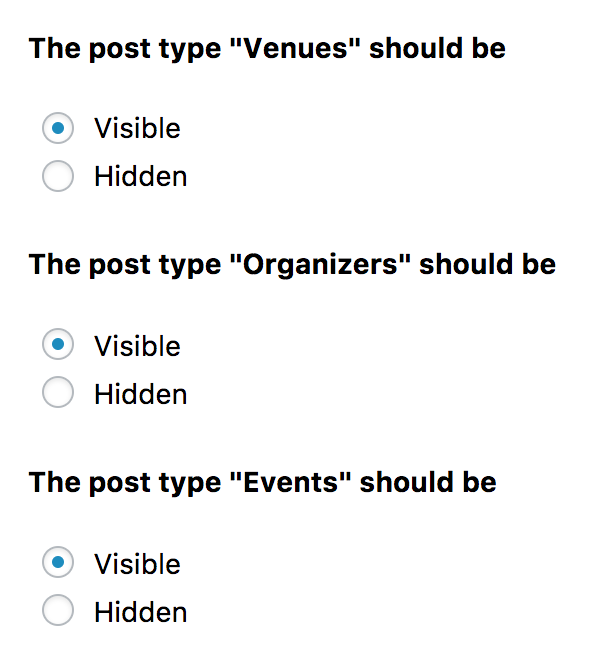
Each one is a custom post type and making them “Visible” will instruct Yoast SEO to make those indexable by search crawlers.
Does this help answer your question? Please let me know. 🙂
Cheers!
GeoffMemberHi @ejimford,
Ack, so sorry for the trouble!
This is indeed something I see that has been logged in our system as a bug and it was reported yesterday. While I do not have a specific timeframe for when this will be fixed, I have added this thread to the ticket and will set the thread to Pending Fix so we can keep you posted as we make progress.
In the meantime, I would suggest rolling back to the last version to get the layout back in working order the way it was before updating.
Thanks for reporting this and for your patience while we work on it!
Geoff
MemberHi @crharrison,
Thanks for getting in touch!
I do think this would be possible, if the customization was done on the network level.
For example, if all the sites are running on the same theme, then I would suggest writing a snippet and adding it to the functions.php file of that theme so that it applies to all the sites using it.
While we’re unable to provide direct support for custom development, I did write up a quick, untested snippet you can try using and, at the very least, use it to work off of for adding the start time and venue to the event title:
// Appends start time and venue to event titles
function tribe_events_title_include_time_venue ($title, $id) {
$separator = ' » '; // Separator between categories and title
if (tribe_is_event($id) && !is_single()) {
$title = $title . $separator . tribe_get_start_time() . $separator . tribe_get_venue();
}
return $title;
}
add_filter('the_title', 'tribe_events_title_include_time_venue', 100, 2);
Does this help answer your question? Please let me know. 🙂
Cheers!
GeoffMemberHi Kathleen,
Thanks for getting in touch!
I’m afraid that our plugins are only compatible with WordPress sites and do not offer integrations with other content management systems like Squarespace.
I see you have already purchased a license for Events Calendar PRO. Do you have a WordPress site where you are using the plugin, or did you purchase it hoping to install and use the plugin on Squarespace? If it happens to be the latter, I’d be happy to initiate a refund for you if you would prefer. Just let me know!
Thanks,
GeoffMemberHey @surferjohn,
Oh no! We do not see that come up very often but, when it does, it’s certainly troubling. Let’s dig into this together and get things back on track.
You had mentioned being unable to do anything via the admin, but I’m really hoping there’s a chance you can install this extension to your site, perhaps even manually by uploading it directly to the plugins directory on your server:
https://theeventscalendar.com/extensions/recurring-event-cleanup-tool/
That extension, when activated, will allow you to view a list of your recurring events and delete all of the recurring instances for a specific one. Please give that a try and let’s hope that does the trick right off the bat.
Thanks,
GeoffMemberHmm, sounds like some more troubleshooting is needed to pin that down.
Do you happen to have a support license with us? If so, will you please sign into your account and post this to our Events Calendar PRO support forum? The forum we’re chatting in now is open to the community to help answer questions about purchasing our premium plugins.
Or, if you do not have a support license with us, it would be awesome if you could post your question to our WordPress.org support forum.
In the meantime, I would also suggest following the steps outlined in this guide as a starting point because it often helps explain where an issue is and will help move the troubleshooting process along a lot faster.
Thanks so much!
GeoffMemberThis reply is private.
MemberHey Jason,
Thanks for reaching out! Glad to hear you’re looking into our plugins. 🙂
Yes, I do believe that The Events Calendar will do exactly what you’re looking for here. Even in the free version, you are able to create as many venues as you would like and associate those venues with any number of events. The plugin performs very well in and of itself, though, I would say that if you are publishing a huge number of events (in the thousands), then you may want to look into a dedicated server option for hosting. I would make that recommendation for any WordPress site, even with default Posts.
If you would like to have Venue and Organizer pages and other features, like recurring events and additional calendar views, then that where I would suggest looking into our Events Calendar PRO add-on, which extends The Events Calendar with those and more features.
Does this help answer your question? Please let me know. 🙂
Cheers!
GeoffMemberHi Tammy,
Thanks for getting in touch!
I just checked your account and you do indeed have a license for Events Calendar PRO.
One thing I see happen often is the license for Events Calendar PRO accidentally being entered in the Event Aggregator field on the Events > Settings > Licenses screen.
Will you please check that screen and make sure that the license is entered in the field for Events Calendar PRO? If it is already there, will you please take a screenshot and share it with me here as a private reply?
Thanks so much!
GeoffMemberHi Bob,
Sorry for the confusion here!
Event Aggregator is a service and is actually already built into The Events Calendar. In other words, there’s no need to install anything new. Simple purchase the license, enter the license key on the Events > Settings > Licenses screen, and that will unlock the importing features under Events > Import.
Does this help answer your question? Please let me know. 🙂
Cheers!
GeoffMemberHey Bob,
It looks like your thread was posted twice by accident. I’m going to close this one and respond to you in the other one here shortly:
Cheers!
Geoff -
AuthorPosts