

Forum Replies Created
-
AuthorPosts
-
Geoff
MemberHi Dan,
While The Events Calendar PRO does offer the ability to add custom fields to an event, those fields cannot be added to the ticket purchasing process. In other words, neither PRO nor Event Tickets Plus support collecting additional information during a ticket transaction, though it is something we have started working on for a future release.
Sorry for the bad news, but does this help answer your question? Please let me know.
Thanks,
GeoffMemberAwesome! I’m glad to hear that everything appears to be working as expected. Cheers and please feel free to hit us with a new thread if any other questions pop up–we’d be happy to help. 🙂
Geoff
MemberThis is such a great question!
I wish I could say The Events Calendar is ideal for both events and appointments, but I don’t think it is at the moment.
We’re really interested in the idea of being able to split events within events–effectively allowing you to create sub-events that could act as appointments within a parent event. Until then, however, the best suggestion I can offer is to create individual events for each appointment time slot within a given day and sell tickets directly for those posts.
I know that’s not ideal since it could possibly clutter a day on the calendar visually, but does this at least help answer your question? Please let me know.
Thanks,
GeoffMemberHi Pascal,
That’s a really interesting question! i’m afraid there is no way to do this out of the box. What I would suggest considering is importing events and setting them to Draft status instead of Published. That would allow you a chance to edit those events before they display on the site.
Sorry, I wish I had a better solution for you here, but does this at least help answer your question? Please let me know.
Thanks,
GeoffMemberHey there!
Our documentation is a good place to get started with custom integrations. In this case, I think tribe_get_events_title() is what you’re looking for.
Also, just a heads up that we use the Pre-Sales forum for questions about the features of our premium plugins. If you have a technical support question and a premium license, please do feel free to open a thread in the forums here on our site. Otherwise, we do provide support for questions like these on our open-source forum.
Let me know if you have any pre-sales questions and I’d be happy to help. 🙂
Cheers!
GeoffMemberHello Alex,
How strange! I tried the snippet and it seemed to do the trick. Do you know if it works when switching to the default WordPress Twenty Sixteen theme? It’s possible there is a theme conflict and I want to check for that.
Thanks!
GeoffMemberHi Aindreas,
It sounds like there is a file permissions issue on the site. You can add The Events Calendar back to your list of plugins by manually installing the latest version. Here’s an article with step-by-step instructions.
Please give that a go and let me know if it helps to the trick.
Thanks!
GeoffMemberHowdy Brett, I see my last answer was marked as the correct answer–thanks for following up! I’ll go ahead and close this thread but please feel free to hit us with a new one if any other questions pop up. We’d be happy to help. 🙂
Cheers!
GeoffMemberHowdy Robert, I see my last answer was marked as the correct answer–thanks for following up! I’ll go ahead and close this thread but please feel free to hit us with a new one if any other questions pop up. We’d be happy to help. 🙂
Cheers!
GeoffMemberHey @CDC, thanks for following up!
Yeah, select2 is an integral part of the the calendar and unfortunately cannot be dequeued on it’s own. You could dequeue the script that calls it using a snippet like this:
https://gist.github.com/geoffgraham/22eaf88a8fc1e35f8cdd
I have to warn, however, that it will likely have an effect across the entire plugin as this will deactivate the AJAX feature when filtering events.
If that does not seem to do the trick, then I would suggest trying to dequeue the select2 script on the theme side of things so that it does not interfere with the calendar.
Thanks!
GeoffDecember 28, 2015 at 8:06 am in reply to: Calendar is invisible when WooCommerce plugin activated #1047440MemberHello Karen,
Thanks SO much for the theme and plugin files–this helps a ton as far as troubleshooting goes.
I’m still curious what will happen once we play with the database but–so far–I’m still unable to recreate the issue. I have the Rise theme and both plugins active and the calendar is showing up at /events even with WooCommerce is activated.
However, note the screenshot of my calendar:
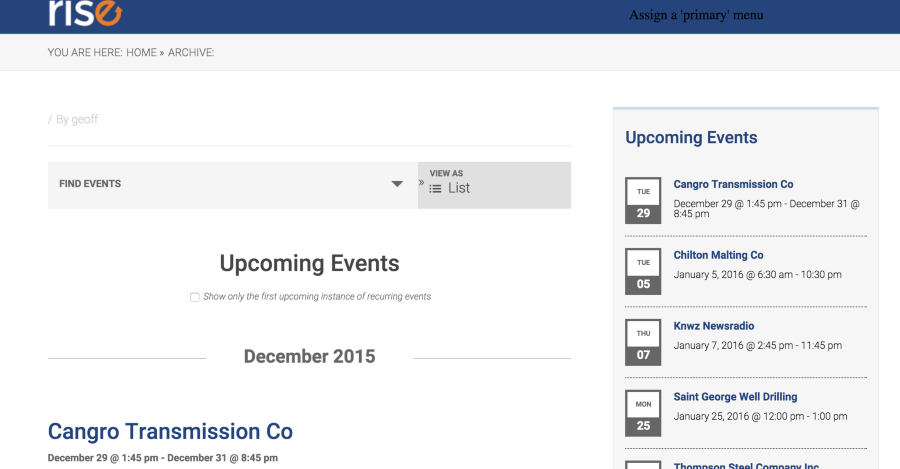
Specifically, see how the breadcrumb below the header reads:
You Are Here: Home > ArchiveThat’s different than what it says on your site:
<i>You Are Here: Home > Events</i>That’s significant because the calendar itself is an archive, yet your site is recognizing it as a page. In other words, the site is looking for a page that actually doesn’t exist.
Are you sure there are no other pages on the site that use the /events slug? That would certainly explain the issue. I would suggest even checked the Trash to ensure it is completely gone, then flushing permalinks one more time after.
Thanks!
GeoffMemberHey Tommy, thanks for the info–much appreciated!
What happens when creating a new event with tickets? Are the inventories correct before and after sale, or is the same issue popping up?
I’m curious because the patch ought to have reset inventories for existing events to their correct amounts but–according to your screencast–they have not. Now I’m wondering if the issue shows up at all with new events.
And, just to be on the safe side, you are seeing this when a default WordPress theme and all other plugins are deactivated, right? If so, and the issue is affecting new events as well as existing events, I’ll want to try some deeper troubleshooting.
Thanks,
GeoffDecember 28, 2015 at 7:31 am in reply to: Activation of Event Ticket Plus returns white page #1047433MemberHi Alain and sorry for the continues trouble here!
By chance, have you added any snippets for the calendar to your theme’s functions.php file or do you have any custom calendar templates in your theme? You can check for the custom templates by opening your theme folder and looking for a sub-folder called tribe-events.
Thanks!
GeoffMemberHello Peter, I see my last answer was marked as the correct answer–thanks for following up! I’ll go ahead and close this thread but please feel free to hit us with a new one if any other questions pop up. We’d be happy to help. 🙂
Cheers!
GeoffMemberHowdy Franco, I see my last answer was marked as the correct answer–thanks for following up! I’ll go ahead and close this thread but please feel free to hit us with a new one if any other questions pop up. We’d be happy to help. 🙂
Cheers!
Ge0ff -
AuthorPosts